
Internet Explorer 10 Provides Safer Browsing

Brink

Administrator
Staff member
Last month NSS Labs, an independent security research and testing organization, released its Browser Security Comparative Analysis that shows Internet Explorer 10 blocks more socially-engineered malware than any other browser on Windows with its SmartScreen and Application Reputation technologies. But SmartScreen and Application Reputation are only one piece of how Internet Explorer 10 protects Windows customers. Internet Explorer 10 includes significant advancements in security to help keep you safer as you browse the Internet. Backed by third-party evidence, Internet Explorer 10 not only blocks over 99% of malware, but also has fewer software vulnerabilities than other browsers on Windows.

To get this level of protection, IE10 follows multiple security strategies to better protect people on the Web, including:
Protection from socially-engineered attacks

By imitating or compromising trusted web sites, malware authors try to trick users into sharing personal information or downloading and executing malicious software. To help protect users from these socially-engineered attacks, Microsoft uses a combination of URL filtering and application reputation. SmartScreen URL filtering and Application Reputation provide the best protection available against malware attacks.

Protection from attacks on web sites

Even “good” web sites can sometimes have security vulnerabilities that can allow malicious sites to steal your data or perform actions as if they were you. Internet Explorer helps protect you with the XSS Filter, which automatically prevents certain types of attacks and makes it easier for Web sites to secure themselves with Declarative Security features, like IE10’s support for the HTML5 Sandbox.

Protection against attacks on the browser or operating system

Automatic updating ensures that you have the latest updates installed. This protects you against security issues that have already been fixed. Internet Explorer 9 added significant memory protection features to make it harder to exploit certain types of vulnerabilities, which were enhanced in IE10. We also added a new layer of protection in IE10 called Enhanced Protected Mode.
How secure is Internet Explorer 10? There are various ways of measuring this, but one widely-accepted way is to assess how well browsers perform against real-world attacks. We can also look at the number of software vulnerabilities, as a measure of engineering quality. Let’s look at each briefly.
Real-World Attacks


Last month’s report on socially-engineered malware by NSS Labs used over 96,000 test cases involving live malware across a 28-day period. It showed that Internet Explorer blocks more real-world attacks than other browsers. This is not surprising, as Microsoft originally released SmartScreen five years ago and continues to evolve protections like Application Reputation.


Malware Block Rate by Browser, according to NSS Labs (May 2013)


This chart shows that Chrome, Firefox, and Safari all use Google’s Safe Browsing API to block malicious URLs at about a 10% success rate. Most of Chrome’s protection comes after users have downloaded malicious software, in the form of a warning. By comparison, Internet Explorer 10’s SmartScreen URL filtering alone blocks as much as Chrome—and when Application Reputation is added, IE10 blocked over 99% of malware. For a user, this is very important. It’s safer to block malware before it’s downloaded versus warning someone after the fact.

Put differently, only four pieces of malware out of a thousand bypassed Internet Explorer’s protections. For Chrome, about two out of ten attacks would have relied on other protection like antivirus software. For Firefox and Safari, nine out of a ten attacks would need to be stopped elsewhere. This is a great example of why the security principle of "defense in depth" is important. Every system has multiple layers of security—but how much do you trust the other layers to catch what your browser might miss?


Quality of Engineering

The Microsoft Secure Development Lifecycle (SDL) is a software development process that helps developers build more secure software and address security compliance requirements, while reducing development cost. Internet Explorer—like other Microsoft products—is developed using SDL best practices to decrease security vulnerabilities. How does Internet Explorer fare, when looking at the quality of security engineering? Analyst reports like the Secunia Vulnerability Review 2013 and Symantec’s 2013 Internet Security Threat Report show that Internet Explorer has far fewer security vulnerabilities than the competition.


Software Vulnerabilities, according to the Secunia Vulnerability Review 2013

These results agree with the US NIST National Vulnerability Database, which tracks all software vulnerabilities. Of course not all these vulnerabilities may be prone to attack, but this is a good proof point for the success of the Secure Development Lifecycle process and the high quality of Internet Explorer engineering in protecting people from vulnerabilities.


Safer Browsing

Your browser is the first line of defense in keeping you safe on the Web. Internet Explorer 10 was designed with security in mind, and third-party reports like those from NSS Labs and Secunia show that IE10 provides industry-leading security for Windows customers. If you’re looking for a web experience that is fast, fluid and safer, try Internet Explorer 10 for Windows.

--Fred Pullen
Senior Product Marketing Manager, Internet Explorer
aggbug.aspx

More...
 

My Computer

Computer type
PC/Desktop
Computer Manufacturer/Model Number
Self built custom
OS
64-bit Windows 11 Pro for Workstations
CPU
Intel i7-8700K OC'd to 5 GHz
Motherboard
ASUS ROG Maximus XI Formula Z390
Memory
64 GB (4x16GB) G.SKILL TridentZ RGB DDR4 3600 MHz
Graphics Card(s)
ASUS ROG-STRIX-GTX1080TI-O11G-GAMING
Sound Card
Integrated
Monitor(s) Displays
2 x Samsung Odyssey G7 27"
Screen Resolution
2560x1440
Hard Drives
1TB Samsung 990 PRO M.2,
4TB Samsung 990 PRO PRO M.2,
TerraMaster F8 SSD Plus NAS
PSU
Seasonic Prime Titanium 850W
Case
Thermaltake Core P3
Cooling
Corsair Hydro H115i
Keyboard
Logitech wireless K800
Mouse
Logitech MX Master 4
Internet Speed
2 Gb/s Download and 100 Mb/s Upload
Antivirus
Malwarebyte Anti-Malware Premium
Browser
Google Chrome
Other Info
Logitech Z625 speaker system,
Logitech BRIO 4K Pro webcam,
HP Color LaserJet Pro MFP M477fdn,
APC SMART-UPS RT 1000 XL - SURT1000XLI,
Galaxy S23 Plus phone
IE has gone a long way. I used to use Firefox but after trying IE9, it made me switch over to IE. IE10 in my computer has the fastest startup time and uses the least amount of RAM compared to memory hogging Chrome and Firefox. In addition, IE10 is the smoothest in scrolling, animation (especially in HTML5 websites) and has the best hardware acceleration in my computer. HTML5 in Chrome is laggy, and Firefox is slower and less stable than IE10 at least on my computer.
 

My Computer

Computer type
Laptop
Computer Manufacturer/Model Number
Dell Optiplex SX270, Lenovo Z470
OS
Windows 7 Professional x64 SP1
CPU
Intel® Pentium® 4 @ 2.26 GHz, Intel Core i7-2670QM @ 2.20 GH
Motherboard
Dell, Lenovo
Memory
512MB Dual channel DDR SDRAM @ 400MHz 2.5-3-3-7, 8 GB DDR3
Graphics Card(s)
Intel 82865G, Nvidia GeForce 520M Graphics
Sound Card
SoundMax Integrated Audio, Integrated HD Audio
Monitor(s) Displays
LG W1952
Screen Resolution
1440x900, 1366 x 768
Hard Drives
40 GB 2.5" IDE 4200 RPM HDD, 500 GB 5400 RPM Sata 1.5 + 32 GB SSD
PSU
Dell 145 Watt, Lenovo 120 Watt Power Adapter
Case
Optiplex SX270 Small Form Factor, Laptop
Cooling
Dell Proprietary Air Cooling, Stock laptop cooling
Keyboard
Dell SK-8125 USB Keyboard
Mouse
Dell PS/2 2 button ball mouse with wheel scroll
Internet Speed
300 Mbit down / 20 Mbps up Time Warner Cable
Antivirus
MSE, Malwarebytes Scanner
Browser
Internet (Aizawa) Explorer 11
Other Info
Running Windows Server 2012 Datacenter on a virtual machine to run Metro Apps.
Well good to know but will probably stick to chrome because ie10 lacks add ons and plugins. At least the ones I use.
 

My Computer

Computer type
PC/Desktop
Computer Manufacturer/Model Number
custom build
OS
Windows 10 64bit
CPU
AMD Phenom II X4 925 (Deneb)(2.8GHz) OC 3.4GHz
Motherboard
M5A78L-MLX Plus
Memory
Corsair Vengeance DDR3 4GBX2 (8192MB)
Graphics Card(s)
XFX HD 6870 1GB (OC)- 940MHz core, mem 1150MHz
Monitor(s) Displays
Vizio 26' 1920x1080 / Acer 1336x768
Screen Resolution
1920x1080 60Hz /1336x768
Hard Drives
Kingston Digital 60GB SSDNow V300/500gb HDD Western Digital 7200rpm (/WD 160GB HDD 7200rpm
PSU
CORSAIR CX600 600w
Case
AZZA Orion 202 EVO
Cooling
cooler master hyper TX3 cpu cooler
Keyboard
Razer DeathStalker
Mouse
Logitech Optical Gaming Mouse G400
Antivirus
Defualt on win 10
Browser
Firefox
Other Info
cpu is overclocked in bios
Is the IE that comes with W8, IE10?
 

My Computer

Computer type
PC/Desktop
Computer Manufacturer/Model Number
HP
OS
Windows 8
CPU
AMD A8-4500M APU with Radeon(tm) HD Graphics
Motherboard
Hewlett-Packard 184B
Memory
4.00 GB
Graphics Card(s)
AMD Radeon HD 7640G
Sound Card
(1) AMD High Definition Audio Device (2) IDT High Definiti
Keyboard
Logitech K120
Mouse
Kensington
I live on the edge, and use Opera ;)

A Guy
 

My Computer

Computer type
PC/Desktop
OS
Windows 10 Home x64
CPU
INTEL Core i5-750 Quad-Core 3.37GHz
Motherboard
ASUS P7P55D
Memory
HyperX Fury Black Series 8GB (2 x 4GB) 1866Mhz
Graphics Card(s)
EVGA GeForce GTX 750 Superclocked 1GB 128-Bit GDDR5
Monitor(s) Displays
LG 32MA68HY 32" IPS
Screen Resolution
1920 x 1080
Hard Drives
Samsung 840 Evo 120GB, SEAGATE 500GB Barracuda® 7200.12, SATA 3 Gb/s, 7200 RPM, 16MB cache
PSU
ANTEC TruePower New TP-550, 80 PLUS, 550W
Case
ANTEC Three Hundred Illusion
Cooling
COOLER MASTER Hyper 212 Plus, 4 x 120mm 1 x 140mm Noctua's
Internet Speed
85 + Mbps
Antivirus
Avast
Browser
Vivaldi
ie10 is interesting compared to ie9 as far as superantispyware scanning is concerned,
It just doesn't find any cookies possibly this is the html5 sandbox ?
 

My Computer

Computer type
PC/Desktop
Computer Manufacturer/Model Number
Custom assembled by me :}
OS
Win-7-Pro64bit 7-H-Prem-64bit
CPU
i7-5930K 2nd i9-9940x both water blocked VRM's too
Motherboard
ASUS SABERTOOTH X99 2nd ASUS x299 Apex
Memory
Trident-z 3200C14 2nd Trident-z 3600C16
Graphics Card(s)
EVGA 1080ti ftw3 2nd Titan Xp both water blocked
Sound Card
Built-in Realtek
Monitor(s) Displays
1-AOC G2460PG 24"G-Sync 144Hz/ 2nd 1-ASUS VG248QE 24" 144Hz
Screen Resolution
1920 x 1080 144Hz
Hard Drives
2-Samsung M.2 Evo & Evo Plus
2-Samsung 850 EVO 500GB SSD's/ 3-2.5 W.D. Black 1tb-&3-1tb/3-3.5 WD Black 1tb hdd's
PSU
EVGA SuperNOVA 1000-P2 2nd 1200-P2
Case
2-Corsair Obsidian Series 450D Black ATX Mid Tower
Cooling
Custom water loops
Keyboard
Logitech G710+/ 2nd Logitech G910
Mouse
2-RedDragon M901 Perdition 16400 dpi Gaming mouse = wired
Internet Speed
Comcast Ping 19ms 89.31mbps download speed 6.12mbps upload
Antivirus
Malwarebytes Pro/ Superantispyware Pro
Browser
FireFox & Pale moon
Other Info
2nd ASUS X299 Apex/Intel i9-9940x with Custom water loop/7H-Prem-x64/Corsair 450D case/Ram Trident-z 3600C16 4x8gb / Samsung970Evo plus 500gb SSD/Dual ssd EZ swap evo/PSU EVGA SuperNova 1200w-P2 80+Platinum/GPU Titan Xp /8-ML-140 on push-pull on 2-280GTX rads
Brink, Thanks for posting the info on IE10.

As one that recently installed IE10 from 9, it's a lot faster on my PC than IE9. I've only seen one minor issue with IE10 which Brink is helping me resolve in another thread.

I've stayed with the IE browsers since the beginning of my home 'net use. I considered going to Firefox some years ago, due to some intrusions that my AV wasn't blocking, but I like the IE key mapping, since I'm a keyBd shortcut geek :D. Firefox duplicated some of IE's shortcuts but not some of the ones that I use daily.
When I was using IE9, I had one intrusion that I couldn't clean up, but it wasn't a problem. I plugged in my cloned HDD and was back up in minutes.
 

My Computer

Computer type
PC/Desktop
Computer Manufacturer/Model Number
Built at Micro Center Richardson, TX
OS
Windows 7 Home Premium 64 bit
CPU
Intel i5 650 Dual Core 3.20 GHz Cache 4MB Threads: 4
Motherboard
ASUS PRO P7P55D-E
Memory
Corsair 16GB DDR3 1600MHz 9-9-9-24 P/N: CMZ8GX3M2A1600C
Graphics Card(s)
ZOTAC GeFORCE 9500 ZT-95TEK2M-FSL 1GB GDDR2
Sound Card
Mother Bd
Monitor(s) Displays
ASUS V228H 21.5” Diag
Screen Resolution
1440 x 900
Hard Drives
SEAGATE BARRACUDA (2ea) 3.5” INTERNAL 1Tb 16 MB SATA ST1000DM003-9YN162 7200RPM, 64MB, SATA 6Gb/s ** 2 Sata Hot-Swap Racks installed in Tower
PSU
Thermaltake Model TR2 RX 750W
Cooling
2 Tower Fans
Keyboard
Dell Quietkey PS/2 Windows 104 P/N 0463CD
Mouse
Kensington Mechanical Trackball USB Model 64217
Internet Speed
35/35
Antivirus
Norton 360 & MBAM Pro
Browser
IE10
Other Info
Printer: HP DeskJet 3520 USB 2.0 **
Speakers: ALTEC Model VS4621 2.1 28 W/Channel w/Sub-woofer **
IOGEAR HDMI Monitor Switcher Swx3 MODEL GHDSW3 ** Addonics ZDRWESU3 eSata/USB 3.0 external DVD Read/Write DVD Drive** SEAGATE GoFlex USB 2.0 Portable HD 500GB 5400 RPM P/N: 9ZF2A2-570
This is soooo confusing for a dummy

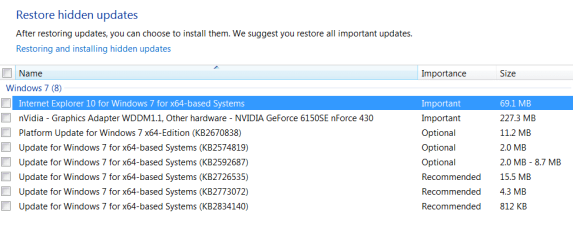
I've wanted to install IE10 due to the safety part of it & have also read some posts that say it's faster but then again have read many posts about lots of issues with it,like BSOD's, etc. & where I'm PC illiterate, it scares the heck out of me. Have also read here in forum about issues between IE10 & KB2670838. I currently have both of them hidden.

Can anyone give me some advice please?
 

Attachments

  • 2013-06-21_111543 _my Hidden updates_838 and 140 go together.png
    2013-06-21_111543 _my Hidden updates_838 and 140 go together.png
    26.6 KB · Views: 7

My Computer

Computer type
PC/Desktop
Computer Manufacturer/Model Number
emachines
OS
Microsoft Windows 7 Home Premium 64-bit 7601 Multiprocessor Free Service Pack 1
CPU
AMD Athlon(tm) II X2 220 Processor
Motherboard
eMachines EL1358G
Memory
3.00 GB
Graphics Card(s)
NVIDIA GeForce 6150SE nForce 430
Sound Card
Realtek High Definition Audio
Screen Resolution
1280 x 1024 x 32 bits (4294967296 colors) @ 60 Hz
Hard Drives
(1) WDC WD10 EADX-22TDHB0 SCSI Disk Device (2) Generic- Multi-Card USB Device
Keyboard
came with PC
Mouse
came with PC
Antivirus
Avast
Browser
IE 9
Other Info
don't know how to get info for the other 5 areas
I've never seen IE10 cause a BSOD, people most likely are blaming IE10 since that was the last process which was running at the time.
 

My Computer

Computer type
Laptop
While IE10/11 security is good, it requires EPM to be enabled for the full protection. Unfortunately,doing so disables DNTM and/or Ghostery plugins on 64bit systems. This is not an issue with IE, more of an issue with the plugins. In my system, the EPM had been substituted by EMET 4.0 and running DNTM.

I just wish that there was a "NoScript" plugin for IE10/11...
 

My Computer

Computer type
PC/Desktop
Computer Manufacturer/Model Number
Custom built at Home
OS
Windows 7 64-bit, Windows 8.1 64-bit, OSX El Capitan, Windows 10 (VMware)
CPU
Intel i5-3350P 3.1 GHz
Motherboard
Gigabyte GA-Z77X-UP5 TH
Memory
16 GBs GSkill Sniper
Graphics Card(s)
Radeon HD 7850
Sound Card
VIA HD Audio
Monitor(s) Displays
Dell U2410 24"
Screen Resolution
1920x1200
Hard Drives
1 x Intel 520 240 GBs
1 x Seagate 1TBs SATA 2.0,
1 x Seagate 1TBs eSATA 2.0
PSU
Thermaltake 850W
Case
Antec P183
Cooling
Noctua NH-D14 Heatsink 2 x 120mm fans, 4 x 120mm case fans
Keyboard
Dell Multimedia keyboard
Mouse
Logitech Trackball
Internet Speed
28.5 Mb/s
IE 10 is not my cup of tea, still using IE9 a better deal. I use Google Chrome more! Opera and Firefox occasionally.
 

My Computer

Computer type
Laptop
Computer Manufacturer/Model Number
Acer Aspire 4736G
OS
Windows 7 Home Premium 64bit
CPU
Intel Core 2 Duo T6600 2.2 GHz 800MHz
Motherboard
Intel PM65
Memory
4GB
Graphics Card(s)
Nvidia Geforce G105M
Hard Drives
Toshiba MK5055GSX 99FKS993S LBAS 976773167
Antivirus
AVG Free AV 2015
Browser
IE & Chrome
Back
Top