Internet Explorer 11 fails to open PDF link

Deny3

New member
Local time
10:14 PM
Messages
9
I recently updated to Explorer 11, works fine but for one problem, when I try to open a site which is a pdf link it fails to open, I get the message there is a problem with this page. I had the same prob. With Explorer 10, but Explorer 9 works just fine.
I have Windows 7, 64 bit. Would like to keep now version if I can solve this. :confused:
 

My Computer My Computer

At a glance

Windows 7 64 bit
OS
Windows 7 64 bit

My Computer My Computer

At a glance

W7 Pro SP1 64biti78GBIntel HD Graphics
Computer type
Laptop
Computer Manufacturer/Model Number
Employer provided Dell Latitude
OS
W7 Pro SP1 64bit
CPU
i7
Memory
8GB
Graphics Card(s)
Intel HD Graphics
Hard Drives
crappy SSD
Antivirus
Employer mandated Symantec Endpoint Protection
Browser
Pale Moon 64bit, IE11 64bit & Chrome 64bit
I am using PDF Complete Corporate Edition 4.1.45

Followed your instructions but the problem still persists...

I had no problems like this in IE 9, but the same problem occurred in IE 10
 

My Computer My Computer

At a glance

Windows 7 64 bit
OS
Windows 7 64 bit
Sorry that I was not clear. I was only asking if you had EPM enabled. I was not asking you to enable it. (That said, you are safer with it enabled. You might as well leave it enabled.)

Is there a setting within PDF Compete to display the PDF in its own window (as opposed to displaying it inside the browser)?
 

My Computer My Computer

At a glance

W7 Pro SP1 64biti78GBIntel HD Graphics
Computer type
Laptop
Computer Manufacturer/Model Number
Employer provided Dell Latitude
OS
W7 Pro SP1 64bit
CPU
i7
Memory
8GB
Graphics Card(s)
Intel HD Graphics
Hard Drives
crappy SSD
Antivirus
Employer mandated Symantec Endpoint Protection
Browser
Pale Moon 64bit, IE11 64bit & Chrome 64bit
Last edited:

My Computer My Computer

At a glance

Windows 7 UltimateAMD Sempron LE-1150 2.0 GhzATi Radeon HD 3650
OS
Windows 7 Ultimate
CPU
AMD Sempron LE-1150 2.0 Ghz
Motherboard
Gigabyte GA-M61PME-S2
Graphics Card(s)
ATi Radeon HD 3650
Sound Card
Realtek HD Onboard Audio
Monitor(s) Displays
HP 1702
Screen Resolution
1280x1024
Keyboard
Logitech Wireless
Mouse
Logitech Wireless
Internet Speed
7 MB DSL
Thanks for the link. I'll have to study on this some more.

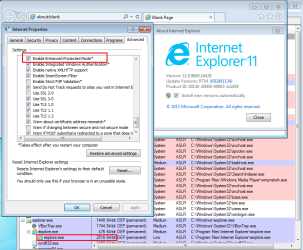
IE11 does offer an option with that name.
It is off by default - which creates 32 bit children from the parent process.

Turning that option on and then restarting the computer will cause the parent process to spawn 64bit children. Which enables ALSR to sprinkle the process in a larger area of RAM for greater security. Perhaps there is a lot more to EPM and that is why the article linked to states that IE11 does not have this feature.

In the context of this thread - spawning 64bit children can create issues with apps that do not have 64bit plug-ins. I'm not sure what PDF Complete has - hence my question about the status of that option.

IE11-EPM.png
 

My Computer My Computer

At a glance

W7 Pro SP1 64biti78GBIntel HD Graphics
Computer type
Laptop
Computer Manufacturer/Model Number
Employer provided Dell Latitude
OS
W7 Pro SP1 64bit
CPU
i7
Memory
8GB
Graphics Card(s)
Intel HD Graphics
Hard Drives
crappy SSD
Antivirus
Employer mandated Symantec Endpoint Protection
Browser
Pale Moon 64bit, IE11 64bit & Chrome 64bit
Thanks for the link. I'll have to study on this some more.

IE11 does offer an option with that name.
It is off by default - which creates 32 bit children from the parent process.

Turning that option on and then restarting the computer will cause the parent process to spawn 64bit children. Which enables ALSR to sprinkle the process in a larger area of RAM for greater security. Perhaps there is a lot more to EPM and that is why the article linked to states that IE11 does not have this feature.

In the context of this thread - spawning 64bit children can create issues with apps that do not have 64bit plug-ins. I'm not sure what PDF Complete has - hence my question about the status of that option.

View attachment 294562

That's interesting, because I've looked in my IE11, and don't see that option. And every article I've looked at says that EPM is not in the Windows 7 version of IE11.
 

My Computer My Computer

At a glance

Windows 7 UltimateAMD Sempron LE-1150 2.0 GhzATi Radeon HD 3650
OS
Windows 7 Ultimate
CPU
AMD Sempron LE-1150 2.0 Ghz
Motherboard
Gigabyte GA-M61PME-S2
Graphics Card(s)
ATi Radeon HD 3650
Sound Card
Realtek HD Onboard Audio
Monitor(s) Displays
HP 1702
Screen Resolution
1280x1024
Keyboard
Logitech Wireless
Mouse
Logitech Wireless
Internet Speed
7 MB DSL
32 bit machines do not have EPM at all,
So this is a 64 bit feature, ie10 is no different,
But what is universal in ie9-10-11 is that GPU rendering is enabled and usually interrupts utilities like reader xi or any other reader of pdf's,
Switch to Software rendering,
http://www.sevenforums.com/tutorials/149063-internet-explorer-gpu-hardware-acceleration-turn-off.html
If you need to switch to software rendering you'll most likely have a bad experience with ie11 because it's heavy on gpu usage,
You'll be better off rolling back to ie10,
Cheers.
 
Last edited:

My Computer My Computer

At a glance

Win-7-Pro64bit 7-H-Prem-64biti7-5930K 2nd i9-9940x both water blocked VRM'...Trident-z 3200C14 2nd Trident-z 3600C16EVGA 1080ti ftw3 2nd Titan Xp both water blocked
Computer type
PC/Desktop
Computer Manufacturer/Model Number
Custom assembled by me :}
OS
Win-7-Pro64bit 7-H-Prem-64bit
CPU
i7-5930K 2nd i9-9940x both water blocked VRM's too
Motherboard
ASUS SABERTOOTH X99 2nd ASUS x299 Apex
Memory
Trident-z 3200C14 2nd Trident-z 3600C16
Graphics Card(s)
EVGA 1080ti ftw3 2nd Titan Xp both water blocked
Sound Card
Built-in Realtek
Monitor(s) Displays
1-AOC G2460PG 24"G-Sync 144Hz/ 2nd 1-ASUS VG248QE 24" 144Hz
Screen Resolution
1920 x 1080 144Hz
Hard Drives
2-Samsung M.2 Evo & Evo Plus
2-Samsung 850 EVO 500GB SSD's/ 3-2.5 W.D. Black 1tb-&3-1tb/3-3.5 WD Black 1tb hdd's
PSU
EVGA SuperNOVA 1000-P2 2nd 1200-P2
Case
2-Corsair Obsidian Series 450D Black ATX Mid Tower
Cooling
Custom water loops
Keyboard
Logitech G710+/ 2nd Logitech G910
Mouse
2-RedDragon M901 Perdition 16400 dpi Gaming mouse = wired
Internet Speed
Comcast Ping 19ms 89.31mbps download speed 6.12mbps upload
Antivirus
Malwarebytes Pro/ Superantispyware Pro
Browser
FireFox & Pale moon
Other Info
2nd ASUS X299 Apex/Intel i9-9940x with Custom water loop/7H-Prem-x64/Corsair 450D case/Ram Trident-z 3600C16 4x8gb / Samsung970Evo plus 500gb SSD/Dual ssd EZ swap evo/PSU EVGA SuperNova 1200w-P2 80+Platinum/GPU Titan Xp /8-ML-140 on push-pull on 2-280GTX rads
32 bit machines do not have EPM at all,
So this is a 64 bit feature, ie10 is no different,
But what is universal in ie9-10-11 is that GPU rendering is enabled and usually interrupts utilities like reader xi or any other reader of pdf's,
Switch to Software rendering,
http://www.sevenforums.com/tutorials/149063-internet-explorer-gpu-hardware-acceleration-turn-off.html
If you need to switch to software rendering you'll most likely have a bad experience with ie11 because it's heavy on gpu usage,
You'll be better off rolling back to ie10,
Cheers.

Interesting, ThrashZone. :)
 

My Computer My Computer

At a glance

Windows 7 UltimateAMD Sempron LE-1150 2.0 GhzATi Radeon HD 3650
OS
Windows 7 Ultimate
CPU
AMD Sempron LE-1150 2.0 Ghz
Motherboard
Gigabyte GA-M61PME-S2
Graphics Card(s)
ATi Radeon HD 3650
Sound Card
Realtek HD Onboard Audio
Monitor(s) Displays
HP 1702
Screen Resolution
1280x1024
Keyboard
Logitech Wireless
Mouse
Logitech Wireless
Internet Speed
7 MB DSL
Thanks,
A possible solution to the software rendering switch is to check for video card driver updates,
Intel has had a pretty good record for offering these updated drivers but as anything they loose interest in older hardware because as everyone knows there isn't much money in supporting old equipment,
Cheers.
 

My Computer My Computer

At a glance

Win-7-Pro64bit 7-H-Prem-64biti7-5930K 2nd i9-9940x both water blocked VRM'...Trident-z 3200C14 2nd Trident-z 3600C16EVGA 1080ti ftw3 2nd Titan Xp both water blocked
Computer type
PC/Desktop
Computer Manufacturer/Model Number
Custom assembled by me :}
OS
Win-7-Pro64bit 7-H-Prem-64bit
CPU
i7-5930K 2nd i9-9940x both water blocked VRM's too
Motherboard
ASUS SABERTOOTH X99 2nd ASUS x299 Apex
Memory
Trident-z 3200C14 2nd Trident-z 3600C16
Graphics Card(s)
EVGA 1080ti ftw3 2nd Titan Xp both water blocked
Sound Card
Built-in Realtek
Monitor(s) Displays
1-AOC G2460PG 24"G-Sync 144Hz/ 2nd 1-ASUS VG248QE 24" 144Hz
Screen Resolution
1920 x 1080 144Hz
Hard Drives
2-Samsung M.2 Evo & Evo Plus
2-Samsung 850 EVO 500GB SSD's/ 3-2.5 W.D. Black 1tb-&3-1tb/3-3.5 WD Black 1tb hdd's
PSU
EVGA SuperNOVA 1000-P2 2nd 1200-P2
Case
2-Corsair Obsidian Series 450D Black ATX Mid Tower
Cooling
Custom water loops
Keyboard
Logitech G710+/ 2nd Logitech G910
Mouse
2-RedDragon M901 Perdition 16400 dpi Gaming mouse = wired
Internet Speed
Comcast Ping 19ms 89.31mbps download speed 6.12mbps upload
Antivirus
Malwarebytes Pro/ Superantispyware Pro
Browser
FireFox & Pale moon
Other Info
2nd ASUS X299 Apex/Intel i9-9940x with Custom water loop/7H-Prem-x64/Corsair 450D case/Ram Trident-z 3600C16 4x8gb / Samsung970Evo plus 500gb SSD/Dual ssd EZ swap evo/PSU EVGA SuperNova 1200w-P2 80+Platinum/GPU Titan Xp /8-ML-140 on push-pull on 2-280GTX rads
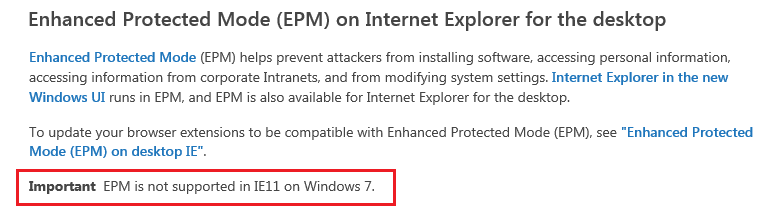
It seems that MS cannot make up their minds.

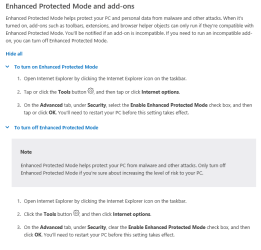
This link states that W7 and IE11 do not mix:
Privacy and security (Windows)
IE11-EPM0.png


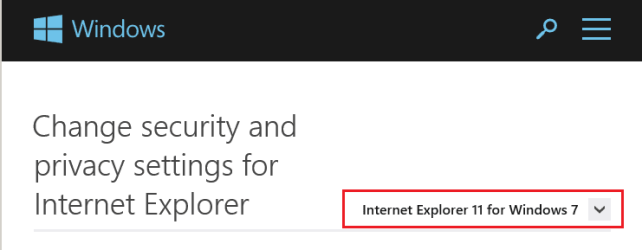
This link states that IE11 is a feature on W7:
Change security and privacy settings in Internet Explorer - Microsoft Windows Help
IE11-EPM1.png
~~~
IE11-EPM2.png


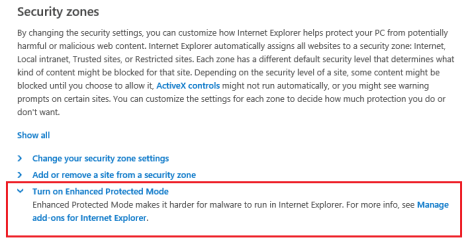
This link states that IE11 is a feature on W7:
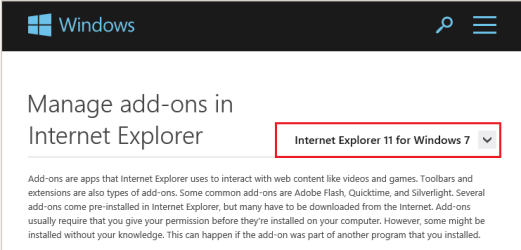
Manage add-ons for Internet Explorer - Microsoft Windows Help
IE11-EPM3.png
~~~
IE11-EPM4.png


This site lists unsupported features on Windows 7:
IE11 on Windows 7 (Windows)
EPM is not listed.

It might be that the developer copy of IE for W7 did not support EPM - but I think that it did. Does anyone have a copy if that version? If so, they would need to install it (in a VM) while disconnected from the internet - or it may download/install the latest version.


edit: @robertwnielsen,
You might want to point Ankit Gupta to this discussion.
http://news.thewindowsclub.com/micr...ed-protected-mode-internet-explorer-11-66389/
 

My Computer My Computer

At a glance

W7 Pro SP1 64biti78GBIntel HD Graphics
Computer type
Laptop
Computer Manufacturer/Model Number
Employer provided Dell Latitude
OS
W7 Pro SP1 64bit
CPU
i7
Memory
8GB
Graphics Card(s)
Intel HD Graphics
Hard Drives
crappy SSD
Antivirus
Employer mandated Symantec Endpoint Protection
Browser
Pale Moon 64bit, IE11 64bit & Chrome 64bit
It seems that MS cannot make up their minds.

This link states that W7 and IE11 do not mix:
Privacy and security (Windows)
View attachment 294622


This link states that IE11 is a feature on W7:
Change security and privacy settings in Internet Explorer - Microsoft Windows Help
View attachment 294618
~~~
View attachment 294619


This link states that IE11 is a feature on W7:
Manage add-ons for Internet Explorer - Microsoft Windows Help
View attachment 294620
~~~
View attachment 294621


This site lists unsupported features on Windows 7:
IE11 on Windows 7 (Windows)
EPM is not listed.

It might be that the developer copy of IE for W7 did not support EPM - but I think that it did. Does anyone have a copy if that version? If so, they would need to install it (in a VM) while disconnected from the internet - or it may download/install the latest version.


edit: @robertwnielsen,
You might want to point Ankit Gupta to this discussion.
Microsoft disables Enhanced Protected Mode in Internet Explorer 11

My point was to say that EPM isn't a feature of IE11 on Windows 7, that it was one of many features that MS dropped when IE11 came to W7 from 8.1.
 

My Computer My Computer

At a glance

Windows 7 UltimateAMD Sempron LE-1150 2.0 GhzATi Radeon HD 3650
OS
Windows 7 Ultimate
CPU
AMD Sempron LE-1150 2.0 Ghz
Motherboard
Gigabyte GA-M61PME-S2
Graphics Card(s)
ATi Radeon HD 3650
Sound Card
Realtek HD Onboard Audio
Monitor(s) Displays
HP 1702
Screen Resolution
1280x1024
Keyboard
Logitech Wireless
Mouse
Logitech Wireless
Internet Speed
7 MB DSL
Back
Top