
Internet Explorer 9 - Favorites

Muirfield

New member
Local time
12:35 AM
Messages
21
Location
South Africa
I have successfully downloaded and installed Internet Explorer 9 and it appears to be working well. However I do have a small, but annoying problem. When trying to organize 'gfavorites' I get 'error 55'. See attached. I have tried to reinstall IE 9 but I get the message: ' .. a more recent version is installed'.
This is in itself is not important but may indicate more serious problems.
Any help will be most appreciated.

I am running Windows 7 Pro on an HP.Compaq 500B MT
Regards
Tony
 

Attachments
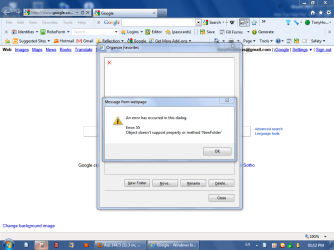
  • IE 9 Favorites.PNG
    IE 9 Favorites.PNG
    56.3 KB · Views: 99
Last edited:

My Computer My Computer

At a glance

Windows 7
Computer Manufacturer/Model Number
HP Compaq 500B MT
OS
Windows 7

My Computer My Computer

At a glance

Windows 7 X64 ProfessionalIntel® Pentium D Dual Core 3.6GHZ4GB DDR2 PC2-5300GeForce GT 440 (Fermi) 2GB 128-bit DDR3 PCI E...
Computer Manufacturer/Model Number
Dell XPS 400
OS
Windows 7 X64 Professional
CPU
Intel® Pentium D Dual Core 3.6GHZ
Motherboard
DELL Dimension 9150 MotherBoard DXP051 XPS400 FJ030
Memory
4GB DDR2 PC2-5300
Graphics Card(s)
GeForce GT 440 (Fermi) 2GB 128-bit DDR3 PCI Express 2.0 x16
Sound Card
ASUS XONAR DG 5.1 Channels PCI Interface Xonar DG
Monitor(s) Displays
2 X 23" Apple Cinema Display
Screen Resolution
1920 X 1200p
Hard Drives
250GB Intel® 510 Series SSD SATA 6G (w/TRIM) [500MB/s Reads]
1.0TB Western Digital Caviar Black SATA 6G 7200rpm 64MB Cache
PSU
375 Watt Dell
Case
Dell XPS 400 BTX Case
Cooling
Dell XPS 400 Air Cooling
Keyboard
Logitech Illuminated Keyboard
Mouse
Logitech M705 Marathon
Internet Speed
+/- 9929 Kbps
Other Info
This machine was given to me when my dad bought a new computer. I keep throwing upgrades at it and it keeps on ticking. Think I've done everything to it that can be done outside a PSU upgrade so I can run an even BETTER GPU.
Thanks for the quick response. I tried as you suggested. Unfortunately it made no difference.
 

My Computer My Computer

At a glance

Windows 7
Computer Manufacturer/Model Number
HP Compaq 500B MT
OS
Windows 7
Last edited by a moderator:

My Computer My Computer

At a glance

Windows 8 Pro w/MC 32-bitIntel Atom 1.86 GHz2 GBIntel GMA 500
Computer type
PC/Desktop
Computer Manufacturer/Model Number
OQO 2+
OS
Windows 8 Pro w/MC 32-bit
CPU
Intel Atom 1.86 GHz
Motherboard
OQO 2+
Memory
2 GB
Graphics Card(s)
Intel GMA 500
Sound Card
IDT
Monitor(s) Displays
LCD
Screen Resolution
800 x 480 (portable) 1280 x 1024 (docked)
Hard Drives
64 GB SSD
PSU
9 Ah Battery (portable) or OQO Brick (docked)
Case
Shirt Pocket Sized
Cooling
Tiny Fan
Keyboard
Slide out (portable) DiNovo Edge (docked)
Mouse
Eraser head (portable) Logitech Bluetooth (docked)
Internet Speed
WWAN or 802.11G (portable) T1 (docked)
Browser
IE 10
Other Info
DVD-RW OQO Docking Station
Many Thanks. I tried, but it doesn't seem to make any difference. I will keep on trying
 

My Computer My Computer

At a glance

Windows 7
Computer Manufacturer/Model Number
HP Compaq 500B MT
OS
Windows 7
1. Uninstall IE9. (Your machine will automatically revert back to IE8.)

How do I install or uninstall Internet Explorer 9?

2. Clean up all those extra toolbars, run a full scan for malware using your product of choice. I'd suggest a final scan with the FREE Malwarebytes or Hitman Pro 3.5 just as a precaution in case your own antimalware product missed something.

3. Reinstall IE9 using Microsoft instructions in Step 1 above.
 

My Computer My Computer

At a glance

Win 7 Pro 64-bitIntel i5 2.4 Ghz8GB DDR3Intel HD 3000
Computer type
Laptop
Computer Manufacturer/Model Number
Sony Vaio VPCEB47GM Laptop
OS
Win 7 Pro 64-bit
CPU
Intel i5 2.4 Ghz
Memory
8GB DDR3
Graphics Card(s)
Intel HD 3000
Sound Card
IDT High Definition
Monitor(s) Displays
15.6 WGXA Anti-Glare LED
Screen Resolution
1280x800
Hard Drives
640Gb 7200rpm
Antivirus
MSE
Browser
Opera (primary) with IE9 backup
Thanks for all the suggestions. I have tried them all except for reinstalling IE9. I have but few favorites and I can easily do without the organizing feature. I don't fancy going through all the trouble of uninstalling and then reinstalling IE 9.

Regards
Tony
 

My Computer My Computer

At a glance

Windows 7
Computer Manufacturer/Model Number
HP Compaq 500B MT
OS
Windows 7
You could try some system maintenance tasks:
1) c:\ (properties) Disk Clean-up and Tools/Error Checking
2) sfc /scannow in a command prompt window
 

My Computer My Computer

At a glance

Windows 8 Pro w/MC 32-bitIntel Atom 1.86 GHz2 GBIntel GMA 500
Computer type
PC/Desktop
Computer Manufacturer/Model Number
OQO 2+
OS
Windows 8 Pro w/MC 32-bit
CPU
Intel Atom 1.86 GHz
Motherboard
OQO 2+
Memory
2 GB
Graphics Card(s)
Intel GMA 500
Sound Card
IDT
Monitor(s) Displays
LCD
Screen Resolution
800 x 480 (portable) 1280 x 1024 (docked)
Hard Drives
64 GB SSD
PSU
9 Ah Battery (portable) or OQO Brick (docked)
Case
Shirt Pocket Sized
Cooling
Tiny Fan
Keyboard
Slide out (portable) DiNovo Edge (docked)
Mouse
Eraser head (portable) Logitech Bluetooth (docked)
Internet Speed
WWAN or 802.11G (portable) T1 (docked)
Browser
IE 10
Other Info
DVD-RW OQO Docking Station
Back
Top