
You are using an out of date browser. It may not display this or other websites correctly.
You should upgrade or use an alternative browser.
You should upgrade or use an alternative browser.
Internet Explorer deleted...
- Thread starter Imacer
- Start date
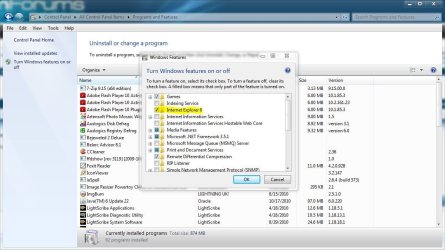
Can Internet Explorer be deleted from Windows 7 100%?
This is as close as you can get,
http://www.sevenforums.com/tutorials/5023-windows-features-turn-off.html
Attachments
My Computer
- Computer type
- PC/Desktop
- Computer Manufacturer/Model Number
- Self Built
- OS
- Win 10 Pro x64
- CPU
- Intel I5-2500K @3.3GHz
- Motherboard
- Asrock P67 Extreme4
- Memory
- 16GB G.Skill Ripjaws X (4x4GB)
- Graphics Card(s)
- EVGA GeForce 750 Ti SC 2GB
- Sound Card
- ASUS Xonar DG 5.1 Channels 24-bit 96KHz PCI Interface Sound
- Monitor(s) Displays
- auria eq2367
- Screen Resolution
- 1920 x 1080
- Hard Drives
- 250GB Samsung 850 EVO SSD
1TB WD Blue
1TB Hitachi
- PSU
- SeaSonic X 650W 80 Plus Gold
- Case
- Corsair Obsidian 750D
- Cooling
- Corsair H60, Three 140mm case fans
- Keyboard
- Logitech Wireless Keyboard K520
- Mouse
- Logitech Wireless Mouse M310
- Internet Speed
- Wave Broadband ~ 100 dn 5 up
- Antivirus
- Windows Defender, Malwarebytes Premium
- Browser
- Edge, IE11, Chrome
- Other Info
- Laptop specs: HP g7-1365dx /
CPU: AMD A6-3420M APU with Radeon(tm) HD Graphics /
RAM: Crucial 8Gb (2x4Gb) /
SSD: Crucial M4-CT128M4SSD2 ATA Device/ FW 000F /
GFX: AMD Radeon HD 6520G /
OS: Windows 10 Pro x64
Why can't IE be deleted 100% and other web browsers can.
I would guess because it's shipped with the OS, and the others are not.
Isn't that fix working for you?
My Computer
- Computer type
- PC/Desktop
- Computer Manufacturer/Model Number
- Self Built
- OS
- Win 10 Pro x64
- CPU
- Intel I5-2500K @3.3GHz
- Motherboard
- Asrock P67 Extreme4
- Memory
- 16GB G.Skill Ripjaws X (4x4GB)
- Graphics Card(s)
- EVGA GeForce 750 Ti SC 2GB
- Sound Card
- ASUS Xonar DG 5.1 Channels 24-bit 96KHz PCI Interface Sound
- Monitor(s) Displays
- auria eq2367
- Screen Resolution
- 1920 x 1080
- Hard Drives
- 250GB Samsung 850 EVO SSD
1TB WD Blue
1TB Hitachi
- PSU
- SeaSonic X 650W 80 Plus Gold
- Case
- Corsair Obsidian 750D
- Cooling
- Corsair H60, Three 140mm case fans
- Keyboard
- Logitech Wireless Keyboard K520
- Mouse
- Logitech Wireless Mouse M310
- Internet Speed
- Wave Broadband ~ 100 dn 5 up
- Antivirus
- Windows Defender, Malwarebytes Premium
- Browser
- Edge, IE11, Chrome
- Other Info
- Laptop specs: HP g7-1365dx /
CPU: AMD A6-3420M APU with Radeon(tm) HD Graphics /
RAM: Crucial 8Gb (2x4Gb) /
SSD: Crucial M4-CT128M4SSD2 ATA Device/ FW 000F /
GFX: AMD Radeon HD 6520G /
OS: Windows 10 Pro x64

IE is made up of multiple componens. Many of which are used in the OS itself to display help and information in several dialog boxes. (Note that FF/Mozilla are now designed this way as well).
So you can get rid of the IE UI but not the MSHTML rendering engine which is in use "privately" but the OS as well as MANY third parties.
So you can get rid of the IE UI but not the MSHTML rendering engine which is in use "privately" but the OS as well as MANY third parties.
My Computer
- Computer Manufacturer/Model Number
- Scratch built
- OS
- Windows 7 x64 Ultimate
- CPU
- i7 960
- Motherboard
- Asus P6X58D
- Memory
- 12 Gig Corsair Dominator
- Graphics Card(s)
- Nvidia 480
- Sound Card
- Maudio Delta 44 + breakout box
- Monitor(s) Displays
- Dell UltraSharp U2410 24in and Samsung 21 dual monitors
- Screen Resolution
- 1920x1200 and 1280x1024
- Hard Drives
- Primary: Intel X-25M G2 160G SSD
Secondary: Segate baracuda 1.0 TB
HDs in AHCI mode.
- PSU
- Corasair TX850
- Case
- Cooler Master HAF
- Cooling
- Corsair H50
- Keyboard
- Logitech G15 + N52 game pad
- Mouse
- Logitech MX518
- Internet Speed
- 15kbs down 4.5kbps up
- Other Info
- WEI 7.6
CPU & RAM 7.6
Graphics 7.9
Hard disk 7.7
IE is more than just a browser. Many applications like Word, Outlook, etc (those that depend on HTML rendering) need IE in order to function. As Derek said, best you can do is disable it. And if Windows Update comes out with any IE updates, best to install it just in case it fixes something relating to the HTML function or a security issue.
Darn it... fseal beat me to it!!
Darn it... fseal beat me to it!!
My Computer
- Computer type
- Laptop
- Computer Manufacturer/Model Number
- Sony Vaio VPCEB47GM Laptop
- OS
- Win 7 Pro 64-bit
- CPU
- Intel i5 2.4 Ghz
- Memory
- 8GB DDR3
- Graphics Card(s)
- Intel HD 3000
- Sound Card
- IDT High Definition
- Monitor(s) Displays
- 15.6 WGXA Anti-Glare LED
- Screen Resolution
- 1280x800
- Hard Drives
- 640Gb 7200rpm
- Antivirus
- MSE
- Browser
- Opera (primary) with IE9 backup

- Local time
- 11:43 PM
- Messages
- 7,146
keep internet explorer - you won't regret it, and you don't have to use it as a day-to-day browser.
as others have said, many other windows and third-party software rely on the ie trident engine, such as steam and winamp, amongst many many others. it saves those programs from having to write their own browser to show webpages.
(@marsmimar outlook and word use their own html rendering engine which is flawed and buggy - if only they would use ie!)
as others have said, many other windows and third-party software rely on the ie trident engine, such as steam and winamp, amongst many many others. it saves those programs from having to write their own browser to show webpages.
(@marsmimar outlook and word use their own html rendering engine which is flawed and buggy - if only they would use ie!)
My Computer
- Computer Manufacturer/Model Number
- mickey megabyte 1234
- OS
- ultimate 64 sp1
- CPU
- i5 2500K [email protected]
- Motherboard
- MSI P67A-GD53
- Memory
- 8 gigs GSkill Ripjaws 1600
- Graphics Card(s)
- amd hd6950
- Sound Card
- creative x-fi gamer
- Monitor(s) Displays
- samsung 24"
- Screen Resolution
- 1920x1080
- Hard Drives
- ocz vertex 2e 60 gig, samsung f3 1tb, buffalo 2tb ext
- PSU
- antec 550
- Case
- antec three hundred
- Cooling
- i'm a cooling fan
- Keyboard
- saitek eclipse ii
- Mouse
- logitech g3
- Internet Speed
- about 4 Mbps
- Other Info
- i love win7

Even if you could completely delete it (which is not possible - see above), what would be your gain other than a few bytes saved on the disk. Where is the point? - or am I missing something?
My Computer
- Computer Manufacturer/Model Number
- HP, Dell, Gateway, Toshiba - 4 laptops and 2 desktops
- OS
- Vista, Windows7, Mint Mate, Zorin, Windows 8
- CPU
- from 1.6GHz Duo to i7
- Monitor(s) Displays
- 2x HP w2207
- Hard Drives
- 5x HDD, 7x SSD, 12x Externals
- Keyboard
- with trackball - no mices
- Mouse
- Trackball mice
- Internet Speed
- DSL 6000
(@marsmimar outlook and word use their own html rendering engine which is flawed and buggy - if only they would use ie!)
Appreciate the slap on the head!
I was thinking back to earlier versions of Outlook where an email with extensive CSS that was not readable in Outlook could be opened with IE. (Open the message in Outlook > Other Actions in the Office ribbon > View In Browser.) You'd get a security warning about opening suspect HTML in IE. Then you'd click OK to launch IE. Outlook would save the message to the \Temporary Internet Files\content.outlook\ folder as MIME HTML with an .mht extension, and then launch IE pointing to the saved .mht file.My Computer
- Computer type
- Laptop
- Computer Manufacturer/Model Number
- Sony Vaio VPCEB47GM Laptop
- OS
- Win 7 Pro 64-bit
- CPU
- Intel i5 2.4 Ghz
- Memory
- 8GB DDR3
- Graphics Card(s)
- Intel HD 3000
- Sound Card
- IDT High Definition
- Monitor(s) Displays
- 15.6 WGXA Anti-Glare LED
- Screen Resolution
- 1280x800
- Hard Drives
- 640Gb 7200rpm
- Antivirus
- MSE
- Browser
- Opera (primary) with IE9 backup
Similar threads
- Replies
- 5
- Views
- 2K


- Replies
- 0
- Views
- 285


