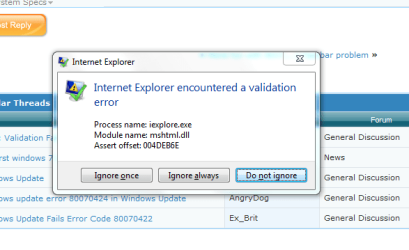
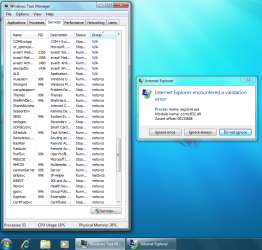
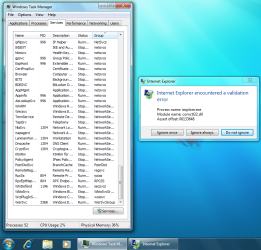
Internet Explorer has encountered a validation error

adricha

New member
Local time
5:45 AM
Messages
10
I have just installed Win 7 RC onto my Fujitsu Lifebook and am receiving the above error repeatedly when trying to use Internet Explorer (also get similar error for Windows Explorer). When the error appears it lists the "process name" (iexplore.exe or explorer.exe), "Module name" (eg mshtml.dll - this varies) and "assert offset" (eg 004DEB6E - also varies) along with 3 buttons "Ignore Once", "Ignore Always" and "Do not ignore". If I select "do not ignore" the windows error reporting process kicks in but does not find a solution and will ocassionally restart IE or kick me out completely. Selecting "Ignore Once" will often lead to a number of similar popups with either different module or assert offsets.

I have gone through device manager to ensure all my drivers are properly updated and have also tried to reinstall to no avail.

Not sure if it is connected but Windows Update does not appear to find any updates either even if I try and install Office 2007 and look for updates to that (I know it should find SP2 at least).

Any help much appreciated as this is driving me nuts.
 

My Computer

OS
Windows 7 RC
CPU
Intel Core 2 Duo E7400 @2.8GHz
Motherboard
Asus P5N7A-VM
Memory
Crucial 2 x 2GB DDR2 - 800 CL4 Ballistix
Graphics Card(s)
NVIDIA GeForce 9300 / nForce 730i
Other Info
AVG-Free anti virus
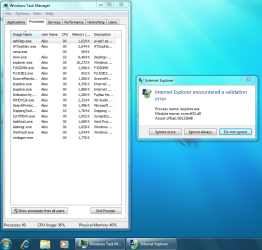
What software have you recently installed (if any)? There could be an incompatible process in task manager which is causing this issue. When you get the issue again try and post a screenshot of task manager, this might help point you in the right direction.
 

My Computer

Computer Manufacturer/Model Number
Compaq Desktop
OS
Windows 7 Ultimate x64
CPU
AMD Sempron Dual Core
Memory
3GB
Graphics Card(s)
NVIDIA GeForce 6150SE nForce 430
Screen Resolution
1024x768
Hard Drives
150GB Sata
Thanks for the response. I get this immediately after installation, before I have installed any other software and it continues to appear when I do add stuff. I'm on a different machine at the moment but will try and get a screen grab of task manager later tonight.
 

My Computer

OS
Windows 7 RC
CPU
Intel Core 2 Duo E7400 @2.8GHz
Motherboard
Asus P5N7A-VM
Memory
Crucial 2 x 2GB DDR2 - 800 CL4 Ballistix
Graphics Card(s)
NVIDIA GeForce 9300 / nForce 730i
Other Info
AVG-Free anti virus
Screen grab of error message:

Validation Error.PNG
 

My Computer

OS
Windows 7 RC
CPU
Intel Core 2 Duo E7400 @2.8GHz
Motherboard
Asus P5N7A-VM
Memory
Crucial 2 x 2GB DDR2 - 800 CL4 Ballistix
Graphics Card(s)
NVIDIA GeForce 9300 / nForce 730i
Other Info
AVG-Free anti virus
My first question is
Where did you get the copy of 7100?
I have just installed Win 7 RC onto my Fujitsu Lifebook and am receiving the above error repeatedly when trying to use Internet Explorer (also get similar error for Windows Explorer).
 
using the "checked build" from MSDN..... In the process or redownloading in case there was a corruption or sthg...
 

My Computer

OS
Windows 7 RC
CPU
Intel Core 2 Duo E7400 @2.8GHz
Motherboard
Asus P5N7A-VM
Memory
Crucial 2 x 2GB DDR2 - 800 CL4 Ballistix
Graphics Card(s)
NVIDIA GeForce 9300 / nForce 730i
Other Info
AVG-Free anti virus
btw - x86 version.
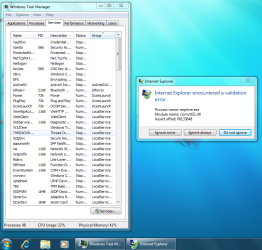
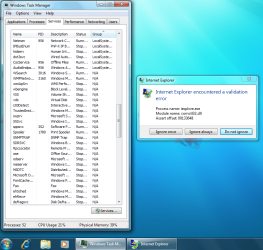
Screen shots of task manager attached to this post.
Processes.PNG

Services pg 2.PNG

Services pg 1.PNG

Services pg 3.PNG

Services pg 4.PNG

Services pg 5.PNG
 

My Computer

OS
Windows 7 RC
CPU
Intel Core 2 Duo E7400 @2.8GHz
Motherboard
Asus P5N7A-VM
Memory
Crucial 2 x 2GB DDR2 - 800 CL4 Ballistix
Graphics Card(s)
NVIDIA GeForce 9300 / nForce 730i
Other Info
AVG-Free anti virus
Getting the same error on 2 x64 RC installs

Been hunting all over with no success, base installs with nothing else installed.!
 

My Computer

OS
windows 7
Try a new set of memory modules and see if it repros
 

My Computer

OS
Windows 7
I am so very sorry that i first missed on reading your task manager shots.
plz look you have 2 iexplore.exe there should only be 1.
1st is legit the 2nd is a bad VIRUS... you can google "how to remove iexplorer.exe virus." then you will not have the error.
My BAD :mad: - Sorry I did catch this the first time.
 
I am so very sorry that i first missed on reading your task manager shots.
plz look you have 2 iexplore.exe there should only be 1.
1st is legit the 2nd is a bad VIRUS... you can google "how to remove iexplorer.exe virus." then you will not have the error.
My BAD :mad: - Sorry I did catch this the first time.

Wrong.

If you have multiple tabs open you see multiple instances of IE in Task Manager - this is not a new thing, it has been doing this since the Beta v8 has been released to the public.

View attachment 10271

using the "checked build" from MSDN..... In the process or redownloading in case there was a corruption or sthg...

Are you a developer?

UMass MSDN Academic Alliance - FAQ
 

My Computers

System One System Two

  • Computer type
    PC/Desktop
    Computer Manufacturer/Model Number
    The Beast Model A (homebrew)
    OS
    Windows 11 21H2 Current build
    CPU
    AMD Ryzen 9 3950X
    Motherboard
    MSI MEG X570 GODLIKE
    Memory
    4 * 32 GB - Corsair Vengeance 3600 MHz
    Graphics Card(s)
    EVGA GeForce RTX 3080 Ti XC3 ULTRA GAMING (12G-P5-3955-KR)
    Sound Card
    Realtek® ALC1220 Codec
    Monitor(s) Displays
    2x Eve Spectrum ES07D03 4K Gaming Monitor (Matte) | Eve Spec
    Screen Resolution
    3x 3840 x 2160
    Hard Drives
    3x Samsung 980 Pro NVMe PCIe 4 M.2 2 TB SSD (MZ-V8P2T0B/AM) } 3x Sabrent Rocket NVMe 4.0 1 TB SSD
    PSU
    PC Power & Cooling’s Silencer Series 1050 Watt, 80 Plus Plat
    Case
    Fractal Design Define 7 XL Dark ATX Full Tower Case
    Cooling
    SteelSeries Apex Pro Wired Gaming Keyboard
    Keyboard
    SteelSeries Apex Pro
    Mouse
    Logitech MX Master 3S | MX Master 3 for business
    Internet Speed
    AT&T LightSpeed Gigabit Duplex Ftth
    Antivirus
    Windows Defender + MB 3
    Browser
    Nightly (default) + Firefox (stable),Chrome, Edge
  • Computer type
    PC/Desktop
    System Manufacturer/Model Number
    Dell Latitude E5470
    OS
    ChromeOS Flex Dev Channel (current)
    CPU
    Intel(R) Core(TM) i5-6300U CPU @ 2.40GHz, 2501 Mhz, 2 Core(s), 4 Logical Processor(s)
    Motherboard
    Dell
    Memory
    16 GB
    Graphics Card(s)
    Intel(R) HD Graphics 520
    Sound Card
    Intel(R) HD Graphics 520 + RealTek Audio
    Monitor(s) Displays
    Dell laptop display 15"
    Screen Resolution
    1920 * 1080
    Hard Drives
    Toshiba 128GB M.2 22300 drive
    INTEL Cherryville 520 Series SSDSC2CW180A 180 GB SATA III SSD
    PSU
    Dell
    Case
    Dell
    Cooling
    Dell
    Keyboard
    Dell
    Mouse
    Logitech MX Master 3S (shared w. Sys 1) | Dell TouchPad
    Internet Speed
    AT&T LightSpeed Gigabit Duplex Ftth
I'm thinking there must be a problem with the image I was using as reformatting the drive and reinstalling still caused the same error. First time I booted into Win 7 after the reinstall, everything seemed ok until I enable the wireless connection then bam, same error. However, I have tried to install the x64 version which I have working on a desktop machine and it works with no problems (except for a few missing drivers which I need to track down).

Most confused..
 

My Computer

OS
Windows 7 RC
CPU
Intel Core 2 Duo E7400 @2.8GHz
Motherboard
Asus P5N7A-VM
Memory
Crucial 2 x 2GB DDR2 - 800 CL4 Ballistix
Graphics Card(s)
NVIDIA GeForce 9300 / nForce 730i
Other Info
AVG-Free anti virus
Found that the "Windows 7 RC Checked Build (x64) - DVD (English)" dated 5/5/2009 seems to have issues, i downloaded it 4 times and burned it every which way i can and installed it and got that same "validation" error.

but downloaded and burned the "Windows 7 Ultimate RC (x64) - DVD (English)" dated 4/30/2009 and all is well.

BTW this was on 3 diffrent machines.
 

My Computer

OS
windows 7
Yup - looks like it is the image - absolutely fine if I use the non-'checked' image...

Thanks for the help folks
 

My Computer

OS
Windows 7 RC
CPU
Intel Core 2 Duo E7400 @2.8GHz
Motherboard
Asus P5N7A-VM
Memory
Crucial 2 x 2GB DDR2 - 800 CL4 Ballistix
Graphics Card(s)
NVIDIA GeForce 9300 / nForce 730i
Other Info
AVG-Free anti virus
Hi guys,

I'm having exact same issues ... I'm downloading Windows 7 dated 4/30/2009 (per dadale73 post above) .. I'll let you know soon once installed. Thanks
 

My Computer

Computer Manufacturer/Model Number
Lenovo T400
OS
Windows 7
CPU
Intel Core 2 Duo 2.53 GHz
Memory
3 GB
Graphics Card(s)
ATI
Back
Top