"Internet Explorer has stopped working" Acrobat

wsplawn

New member
Local time
12:40 PM
Messages
74
This does not happen in all cases but in a number of circumstances when I try to open a .PDF file while in Explorer 8 I get an error message of "Internet Explorer has stopped working"

As I said, I have gone to numerous sites where there is a .PDF to be downloaded and experienced no problem, however, the problem does occur at random times and sites and it is troublesome. I am using the latest version of Adobe Acrobat Reader, Version 9.2.0.

Anyone know what the problem is and more importantly, what the solution is?
 

My Computer

OS
Windows XP
This does not happen in all cases but in a number of circumstances when I try to open a .PDF file while in Explorer 8 I get an error message of "Internet Explorer has stopped working"

As I said, I have gone to numerous sites where there is a .PDF to be downloaded and experienced no problem, however, the problem does occur at random times and sites and it is troublesome. I am using the latest version of Adobe Acrobat Reader, Version 9.2.0.

Anyone know what the problem is and more importantly, what the solution is?
If you click on the help tab in Acrobat (icon usually found on desktop), you can chose repair. See if it works. If not, try uninstalling and then installing again. If that does not work, use system restore, go back to the point prior to installation of acrobat and then try to install again. This just sounds like a corrupt Acrobat installation.
 

My Computer

Computer type
PC/Desktop
Computer Manufacturer/Model Number
Dell XPS 420
OS
Windows 10, Home Clean Install
CPU
Intel Core2 processsor Q8200(2.33Ghz 1333FSB) Quad Core Tech
Motherboard
Dell
Memory
6 gb
Graphics Card(s)
ATI Radeon 256MB HD3650
Sound Card
Intergrated 7.1 Channel Audio
Monitor(s) Displays
Dell SP2009W 20"
Hard Drives
640 GB Serial ATA Hard drive
Cooling
Fan
Keyboard
Dell USB Keyboard
Mouse
Dell Premium Optical USB
Internet Speed
DSL 2.85
This does not happen in all cases but in a number of circumstances when I try to open a .PDF file while in Explorer 8 I get an error message of "Internet Explorer has stopped working"

As I said, I have gone to numerous sites where there is a .PDF to be downloaded and experienced no problem, however, the problem does occur at random times and sites and it is troublesome. I am using the latest version of Adobe Acrobat Reader, Version 9.2.0.

Anyone know what the problem is and more importantly, what the solution is?

Hi wsplawn and welcome

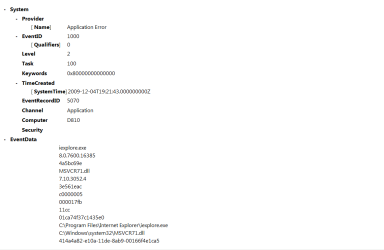
Next time IE stops responding type eventvwr in search, go to the windows logs>application tab. Look for errors (they have red in the left hand column) that have app hang, app crash, or anything IE realted. when you find them (there is a lot of data) use the snipping tool (guilt into win 7) to make a screen shot. Upload it to us using the attachment icon (shaped like a paperclip) in the reply form

See pics.

Let us know if you need help


Kenn J++
 
Last edited:

My Computer

Computer Manufacturer/Model Number
HP Pavillion dv-7 1005 Tx
OS
Win 8 Release candidate 8400
CPU
[email protected]
Memory
4 gigs
Graphics Card(s)
Nvidia 9600M
Sound Card
HD built-in
Monitor(s) Displays
17" Wxga
Screen Resolution
1440x900
Cooling
none
Internet Speed
45Mb down 5Mb up
I don't know if you create PDF files or simply need to view them periodically. If all you need is a viewer, there are products other than Adobe that work fine. I try to avoid Adobe stuff other than Photoshop as much as possible as they tend to be large and have a way of insinuating themselves into a system--much like Quicktime, Realtime, etc.

I formally gave up on Adobe for PDF purposes recently and now use Foxit as a PDF reader. No issues so far.
 

My Computer

Computer type
PC/Desktop
Computer Manufacturer/Model Number
Ignatz Special; 4 speed manual gearbox; factory air conditioning; one of one
OS
Windows 7 Home Premium SP1, 64-bit
CPU
Intel Skylake i5-6600K, not overclocked
Motherboard
AsRock Z170M Extreme 4, micro ATX
Memory
8 GB HyperX DDR4-2666 (2 x 4 GB)
Graphics Card(s)
none; graphics are integrated on CPU
Sound Card
onboard: Realtek ALC1150; external: USB Behringer UF0-202
Monitor(s) Displays
Dell S2340M 23 inch IPS
Screen Resolution
1600 x 900
Hard Drives
System: Crucial MX100 series SSD, 128 GB;
Data: Samsung Spinpoint 103SJ, 1 TB;
Backup: WD Caviar Green WD30EZRX-00D8PB0, 3 TB
PSU
Rosewill SilentNight 500 watt fanless, semi-modular
Case
Antec Solo II
Cooling
Noctua NH-U12S; Noctua F12 intake, Noctua S12A exhaust
Keyboard
Microsoft 200 6JH-00001 USB
Mouse
Dell or Microsoft optical wired; USB
Antivirus
Microsoft Security Essentials and Malwarebytes Premium
Browser
Pale Moon
Other Info
All fans PWM; speeds at idle: CPU circa 500 rpm; intake circa 600 rpm; exhaust circa 600 rpm; CPU temps 27 idle and 47 C load in a warm room (27 C/81 F) when running Intel Extreme Tuning Utility stress test.
This does not happen in all cases but in a number of circumstances when I try to open a .PDF file while in Explorer 8 I get an error message of "Internet Explorer has stopped working"

A few days ago there was a newsflash about a newly discovered vulnerability in all versions of Internet Explorer in relation to the way the browser handles or prints PDF's within a browsing session.

Exploits were predictably going to occur, and Microsoft are supposedly busy constructing patches for this latest bungle.
 

My Computer

Computer Manufacturer/Model Number
Custom built machine
OS
W7 x64
CPU
Intel Q9300 2.5Ghz Quad LGA775 (Would like Q9650)
Motherboard
Gigabyte GA-EP45T-UD3R (F6 Bios)
Memory
4Gb OCZ Gold 1,333Mhz
Graphics Card(s)
Palit HD4850 O/C Sonic 512Mb DDR3, Dual DViD's
Sound Card
Azalia to twin Samson 50w Studio Monitors
Monitor(s) Displays
Twin Dell (E-IPS) U2311H 23.6" Screens
Screen Resolution
1920 x 1080 @ 60Hz
Hard Drives
Crucial M4 SSD, archives on twin Western Digital Caviar Black WD2002FAEX, 2TB, 7200rpm HDD's, Samsung Ritemaster CD/DVD Burner...
PSU
OCZ 600w
Case
Lian-Li PC8 acoustifoamed' aluminium tower
Cooling
Scythe 140mm Zipang
Keyboard
Cherry PS/2 custom model
Mouse
Lenovo USB laser "Thinkpad" Mouse
Internet Speed
ADSL2+ @14Mbps downstream & Cat6 Gigabit Ethernet
Antivirus
NOD32
Browser
Opera
Other Info
Silicon Dust HD Homerun Dual FTA (Ethernet) TV Tuners, Dray Tek Vigor 2850Vn router and 8x HP Gigabit Switch. Lian-Li CR26 Card Reader, Canon MF4430 iSensys laser printer/scanner.
ZigZag:

I'm sorry to be so long in responding but other pressing matters came up and I could'nt get back till now. I have done as you've asked. Attached is a .png file with the information you requested.

Thank you for your attention.
 

Attachments

  • 2009-12-04_113135.png
    2009-12-04_113135.png
    11.9 KB · Views: 361

My Computer

OS
Windows XP
Problem Solved:

I took the advice of RichC46, unintalled Acrobat and reinstalled and things are working correctly now. Don't know why but this is my experience.

Thank you to any who tried to help.
 

My Computer

OS
Windows XP
I have been having problems with internet explorer and adobe flash player. ie stops working and the solution to the problem is uninstall flash and reinstall, but the problem keeps coming back.
 

My Computer

Computer Manufacturer/Model Number
DELL =XPS 730x
OS
Windows 7 Professional x64
CPU
Intel i7 965
Memory
4GB
Graphics Card(s)
Dual ATI HD4850 2GB
Sound Card
SoundBlaster xFi
Monitor(s) Displays
Dual Dell 2709
Cooling
H2C
this is the problem I am having
System
-Provider[ Name] Application Error
-EventID1000[ Qualifiers] 0
Level2Task100Keywords0x80000000000000-TimeCreated[ SystemTime] 2009-11-21T20:34:59.000000000Z
EventRecordID2628ChannelApplicationComputerDell-XPS730x-EventDataiexplore.exe8.0.7600.163854a5bc69eFlash10c.ocx10.0.32.184a613d79c0000005001579a217e001ca6acb38569da8C:\Program Files (x86)\Internet Explorer\iexplore.exeC:\Windows\SysWow64\Macromed\Flash\Flash10c.ocx55bca093-d6dd-11de-8fa4-001e4ccd749f
Security
 

My Computer

Computer Manufacturer/Model Number
DELL =XPS 730x
OS
Windows 7 Professional x64
CPU
Intel i7 965
Memory
4GB
Graphics Card(s)
Dual ATI HD4850 2GB
Sound Card
SoundBlaster xFi
Monitor(s) Displays
Dual Dell 2709
Cooling
H2C

reputation_green.gif


Join Date: Dec 2009

Windows 7
1 posts


user_online.gif


icon1.gif
Internet Explorer not working
In anticipation of Windows 7 for travel I bought a HP 13.3 laptop with Windows Vista and a free upgrade to Windows 7 when available.

Later I bought a HP 14.1 laptop with Windows 7 loaded for home use. To compare Vista to 7 I did not upgrade the travel comuter.

Both computers have had consistent problems:

"Internet explorer not respoding"

"Internet explorer not working:

Sometimes the system would reset, other times the system would hang up, and other times the system would continue after closing the pop-up notification window about solving the problem.

After searching the internet for a solution, today I download Firevox. Faster and after much testing, no problem.

Why does Microsoft let a free sofrware provider outperform them?
 

My Computer

Computer Manufacturer/Model Number
MicrosoftWindows 7
OS
Windows 7
CPU
Intel(R) Coree(TM)2 Duo CPU T6500 @2.10 GHz
Memory
4 GB
I had the same problem of opening pdf file in ie 9. The acrobat installed on my computer is Acrobat Pro XI on Win 7. I did many of the things suggested here as well as on other websites. I even upgraded to ie 10 but with no result. Then I noticed that there is one addon in ie called "wxdownloader class". I uninstalled it through add/remove on control panel and immediately I was able to open pdf pages. Good Luck to you also!
 

My Computer

Computer Manufacturer/Model Number
HP Compaq 6710b
OS
Windows 7
Back
Top