“Internet explorer” message in windows server 2012,

Jamal NUMAN

New member
Member
VIP
Local time
4:45 AM
Messages
144
“Internet explorer” message in windows server 2012,

“Internet explorer” message in windows server 2012,

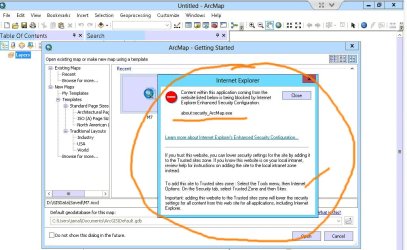
I’m wondering why the attached messages appear each time any software is launched in windows server 2012.


How to stop having these messages?

Thank you

Best

Jamal
 

Attachments
  • Clip_209.jpg
    Clip_209.jpg
    96.8 KB · Views: 6
  • Clip_210.jpg
    Clip_210.jpg
    82 KB · Views: 3

My Computer

OS
Windows 7 Ultimate x64
Which other programs do these messages appear in,
Obviously this particular program relies on an Internet connection and accessing a database on the site which not many programs I know of do this ?
Your screen shots exclude your taskbar,
You might try holding down the Ctrl key when you click to open this program and see what effect it has,
Or right click it and click on Run as administrator when you open it.

Also see the links above my signature picture/ Fill in your system spec's sheet, add which security suite you use.
 
Last edited:

My Computer

Computer type
PC/Desktop
Computer Manufacturer/Model Number
Custom assembled by me :}
OS
Win-7-Pro64bit 7-H-Prem-64bit
CPU
i7-5930K 2nd i9-9940x both water blocked VRM's too
Motherboard
ASUS SABERTOOTH X99 2nd ASUS x299 Apex
Memory
Trident-z 3200C14 2nd Trident-z 3600C16
Graphics Card(s)
EVGA 1080ti ftw3 2nd Titan Xp both water blocked
Sound Card
Built-in Realtek
Monitor(s) Displays
1-AOC G2460PG 24"G-Sync 144Hz/ 2nd 1-ASUS VG248QE 24" 144Hz
Screen Resolution
1920 x 1080 144Hz
Hard Drives
2-Samsung M.2 Evo & Evo Plus
2-Samsung 850 EVO 500GB SSD's/ 3-2.5 W.D. Black 1tb-&3-1tb/3-3.5 WD Black 1tb hdd's
PSU
EVGA SuperNOVA 1000-P2 2nd 1200-P2
Case
2-Corsair Obsidian Series 450D Black ATX Mid Tower
Cooling
Custom water loops
Keyboard
Logitech G710+/ 2nd Logitech G910
Mouse
2-RedDragon M901 Perdition 16400 dpi Gaming mouse = wired
Internet Speed
Comcast Ping 19ms 89.31mbps download speed 6.12mbps upload
Antivirus
Malwarebytes Pro/ Superantispyware Pro
Browser
FireFox & Pale moon
Other Info
2nd ASUS X299 Apex/Intel i9-9940x with Custom water loop/7H-Prem-x64/Corsair 450D case/Ram Trident-z 3600C16 4x8gb / Samsung970Evo plus 500gb SSD/Dual ssd EZ swap evo/PSU EVGA SuperNova 1200w-P2 80+Platinum/GPU Titan Xp /8-ML-140 on push-pull on 2-280GTX rads
Which other programs do these messages appear in,
Obviously this particular program relies on an Internet connection and accessing a database on the site which not many programs I know of do this ?
Your screen shots exclude your taskbar,
You might try holding down the Ctrl key when you click to open this program and see what effect it has,
Or right click it and click on Run as administrator when you open it.

Also see the links above my signature picture/ Fill in your system spec's sheet, add which security suite you use.


Thank you very much ThrashZone for the help,


This issue sounds to be related to windows server (2008 or even 2012) but not to the software being launch.

Sure, I get this message if I launch any software when the environment windows server. The screenshots of the software I attached is just an example. The same happens with all software when they are lunched in windows server.

All what I need to do here is to stop having this message!

Best

Jamal
 

My Computer

OS
Windows 7 Ultimate x64
Which other programs do these messages appear in,
Obviously this particular program relies on an Internet connection and accessing a database on the site which not many programs I know of do this ?
Your screen shots exclude your taskbar,
You might try holding down the Ctrl key when you click to open this program and see what effect it has,
Or right click it and click on Run as administrator when you open it.

Also see the links above my signature picture/ Fill in your system spec's sheet, add which security suite you use.


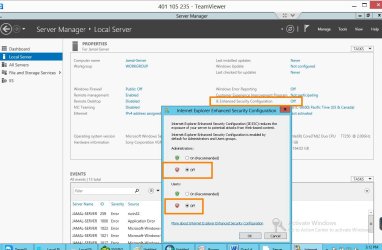
I got the answer from an expert. See the attached image

Best

Jamal
 

Attachments

  • Clip_217.jpg
    Clip_217.jpg
    100.8 KB · Views: 3

My Computer

OS
Windows 7 Ultimate x64
Hmmm, seems like a work around rather then a fix. Disabling security completely would seem a rather heavy handed method. A Guy
 

My Computer

Computer type
PC/Desktop
OS
Windows 10 Home x64
CPU
INTEL Core i5-750 Quad-Core 3.37GHz
Motherboard
ASUS P7P55D
Memory
HyperX Fury Black Series 8GB (2 x 4GB) 1866Mhz
Graphics Card(s)
EVGA GeForce GTX 750 Superclocked 1GB 128-Bit GDDR5
Monitor(s) Displays
LG 32MA68HY 32" IPS
Screen Resolution
1920 x 1080
Hard Drives
Samsung 840 Evo 120GB, SEAGATE 500GB Barracuda® 7200.12, SATA 3 Gb/s, 7200 RPM, 16MB cache
PSU
ANTEC TruePower New TP-550, 80 PLUS, 550W
Case
ANTEC Three Hundred Illusion
Cooling
COOLER MASTER Hyper 212 Plus, 4 x 120mm 1 x 140mm Noctua's
Internet Speed
85 + Mbps
Antivirus
Avast
Browser
Vivaldi
Hmmm, seems like a work around rather then a fix. Disabling security completely would seem a rather heavy handed method. A Guy


Thanks “A Guy”

For the time being, it works for me

Best

Jamal
 

My Computer

OS
Windows 7 Ultimate x64

My Computer

Computer type
Laptop
Computer Manufacturer/Model Number
Dell Optiplex SX270, Lenovo Z470
OS
Windows 7 Professional x64 SP1
CPU
Intel® Pentium® 4 @ 2.26 GHz, Intel Core i7-2670QM @ 2.20 GH
Motherboard
Dell, Lenovo
Memory
512MB Dual channel DDR SDRAM @ 400MHz 2.5-3-3-7, 8 GB DDR3
Graphics Card(s)
Intel 82865G, Nvidia GeForce 520M Graphics
Sound Card
SoundMax Integrated Audio, Integrated HD Audio
Monitor(s) Displays
LG W1952
Screen Resolution
1440x900, 1366 x 768
Hard Drives
40 GB 2.5" IDE 4200 RPM HDD, 500 GB 5400 RPM Sata 1.5 + 32 GB SSD
PSU
Dell 145 Watt, Lenovo 120 Watt Power Adapter
Case
Optiplex SX270 Small Form Factor, Laptop
Cooling
Dell Proprietary Air Cooling, Stock laptop cooling
Keyboard
Dell SK-8125 USB Keyboard
Mouse
Dell PS/2 2 button ball mouse with wheel scroll
Internet Speed
300 Mbit down / 20 Mbps up Time Warner Cable
Antivirus
MSE, Malwarebytes Scanner
Browser
Internet (Aizawa) Explorer 11
Other Info
Running Windows Server 2012 Datacenter on a virtual machine to run Metro Apps.
Back
Top