
Internet Explorer SmartScreen Filter - Report Unsafe Website

How to Report an Unsafe Website with SmartScreen Filter in Internet Explorer

   Information
This will show you how to either report a website as unsafe or report a website flagged as unsafe as safe with SmartScreen Filter in IE8, IE9, or IE10.


OPTION ONE

To Report Unsafe Website with SmartScreen Filter


1. In IE8, IE9, IE10, open the website in a tab that you want to report as being unsafe, and do step 2 or 3 below.
NOTE: In Windows 8, this would only apply to the IE10 desktop version, and not the IE10 Metro (Windows UI) version.

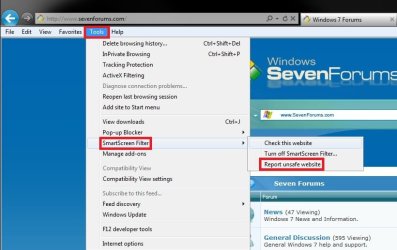
2. Click/tap on Tools on the Menu bar, SmartScreen Filter, and Report unsafe website, then go to step 4 below. (see screenshot below)
Report-1A.jpg
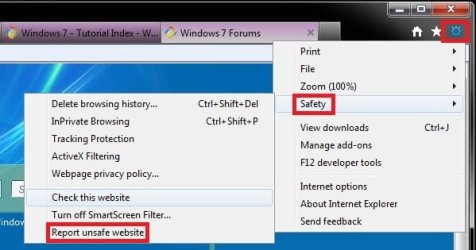
3. Click/tap on the gear icon at the top right, click/tap on Safety, and Check this website, then go to step 4 below. (see screenshot below)
Report-1B.jpg
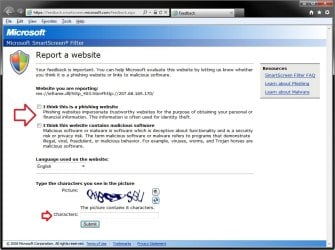
4. A new Internet Explorer window will open to a Microsoft webpage for you to fill out to report the website as unsafe. When finished, click/tap on the Submit button. (see screenshot below)
Report-2.jpg


OPTION TWO

To Report a Website Flagged as Unsafe by SmartScreen Filter as Safe


NOTE: This option is if you get a SmartScreen Filter warning page that website that you know is safe has been flagged as unsafe, and you would like to report that the website is actually safe.
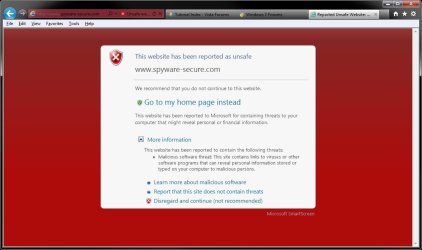
1. In the warning page, click/tap on More information to expand it. (see screenshot below)
unsafe_website.jpg
2. Click/tap on the Report that this site does not contain threats link. (see screenshot above)

3. A new Internet Explorer window will open to a Microsoft webpage for you to fill out to report the website as safe. When finished, click/tap on the Submit button. (see screenshot below)
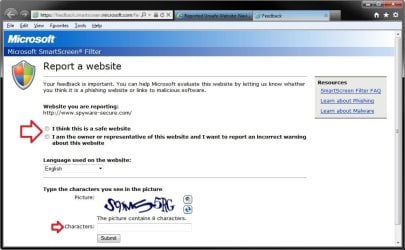
Report_Safe.jpg
That's it,
Shawn


Last edited:
Another fine piece of work Shawn :)
 

My Computer My Computer

Computer Manufacturer/Model Number
Compaq Desktop
OS
Windows 7 Ultimate x64
CPU
AMD Sempron Dual Core
Memory
3GB
Graphics Card(s)
NVIDIA GeForce 6150SE nForce 430
Screen Resolution
1024x768
Hard Drives
150GB Sata
Thank you Jeff. :)
 

My Computer My Computer

Computer type
PC/Desktop
Computer Manufacturer/Model Number
Self built custom
OS
64-bit Windows 11 Pro for Workstations
CPU
Intel i7-8700K OC'd to 5 GHz
Motherboard
ASUS ROG Maximus XI Formula Z390
Memory
64 GB (4x16GB) G.SKILL TridentZ RGB DDR4 3600 MHz
Graphics Card(s)
ASUS ROG-STRIX-GTX1080TI-O11G-GAMING
Sound Card
Integrated
Monitor(s) Displays
2 x Samsung Odyssey G7 27"
Screen Resolution
2560x1440
Hard Drives
1TB Samsung 990 PRO M.2,
4TB Samsung 990 PRO PRO M.2,
TerraMaster F8 SSD Plus NAS
PSU
Seasonic Prime Titanium 850W
Case
Thermaltake Core P3
Cooling
Corsair Hydro H115i
Keyboard
Logitech wireless K800
Mouse
Logitech MX Master 4
Internet Speed
2 Gb/s Download and 100 Mb/s Upload
Antivirus
Malwarebyte Anti-Malware Premium
Browser
Google Chrome
Other Info
Logitech Z625 speaker system,
Logitech BRIO 4K Pro webcam,
HP Color LaserJet Pro MFP M477fdn,
APC SMART-UPS RT 1000 XL - SURT1000XLI,
Galaxy S23 Plus phone
Very timely Brink, nice one.
 

My Computer My Computer

Computer type
PC/Desktop
Computer Manufacturer/Model Number
Golden Mk. I.4
OS
Windows 10 Pro x64 ; Xubuntu x64
CPU
Intel i7 860 @ 2.80 GHz O/C'ed to 4.0GHz
Motherboard
Gigabyte P55A-UD3R Rev.1. Award BIOS F13
Memory
16GB Corsair Vengance DDR3 @ 661 MHz Dual Channel (9-9-9-24)
Graphics Card(s)
EVGA NVidia GTX 560 1024MB
Sound Card
Realtek Integrated
Monitor(s) Displays
Dual Samsung SyncMaster 2494HS
Screen Resolution
1920*1080 and 1920*1080
Hard Drives
1*Samsung 840 EVO 120GB SSD;
1*OCZ Vertex 2 60GB SSD;
2*Samsung F3 SpinPoint 1TB in RAID0;
1*Samsung F1 SpinPoint 1TB;
2*Western Digital 1TB External USB 3.0
1*Western Digital 500GB External USB 3.0
1*Seagate 500GB External USB 2.0
PSU
Thermaltake ToughPower QFan 750W
Case
Thermaltake Element S VK60001W2Z
Cooling
Corsair H60 Water Cooling, 2*230mm and 2*80mm case fans
Keyboard
Logitech G110
Mouse
Logitech MX518
Thank you Golden. :)
 

My Computer My Computer

Computer type
PC/Desktop
Computer Manufacturer/Model Number
Self built custom
OS
64-bit Windows 11 Pro for Workstations
CPU
Intel i7-8700K OC'd to 5 GHz
Motherboard
ASUS ROG Maximus XI Formula Z390
Memory
64 GB (4x16GB) G.SKILL TridentZ RGB DDR4 3600 MHz
Graphics Card(s)
ASUS ROG-STRIX-GTX1080TI-O11G-GAMING
Sound Card
Integrated
Monitor(s) Displays
2 x Samsung Odyssey G7 27"
Screen Resolution
2560x1440
Hard Drives
1TB Samsung 990 PRO M.2,
4TB Samsung 990 PRO PRO M.2,
TerraMaster F8 SSD Plus NAS
PSU
Seasonic Prime Titanium 850W
Case
Thermaltake Core P3
Cooling
Corsair Hydro H115i
Keyboard
Logitech wireless K800
Mouse
Logitech MX Master 4
Internet Speed
2 Gb/s Download and 100 Mb/s Upload
Antivirus
Malwarebyte Anti-Malware Premium
Browser
Google Chrome
Other Info
Logitech Z625 speaker system,
Logitech BRIO 4K Pro webcam,
HP Color LaserJet Pro MFP M477fdn,
APC SMART-UPS RT 1000 XL - SURT1000XLI,
Galaxy S23 Plus phone
How do you report a safe site?

I've read how you can report a site as safe via a SmartScreen filter error.

But how does a website owner with a safe site do so when he does not himself get the error but has been told by others that they get the error?

How does he do this without having to rely on asking a customer to do it for him?

I cannot find a link anywhere on the web that allows a web owner with download software to do this.

Any help?
 

My Computer My Computer

Computer type
PC/Desktop
Computer Manufacturer/Model Number
VirtualBox
OS
Windows 7
CPU
Processor AMD Ryzen 7 3700X 8-Core Processor, 3593 Mhz, 8 Co
Motherboard
X570 AORUS ULTRA
Memory
64g
Graphics Card(s)
GeForce GTX 1050 Ti
Hard Drives
500gb, 500gb, 1T SSD's
PSU
800w
Back
Top