Internet Explorer - Turn Menu Bar Always On or Off

How to Force Internet Explorer to Always Have the Menu Bar Turned On or Off by Default

   Information
This will show you how to enable or disable having the Menu bar to always be turned on or off by default in Internet Explorer for all users in Windows 7 and Vista. For example, if you force it always on, then it cannot be turned off using the normal method (Option Two at link). Same if you force it always off, then it cannot be turned on using the normal method (Option Two at link).

You will need to be logged in as an administrator to be able to do this tutorial.

   Note
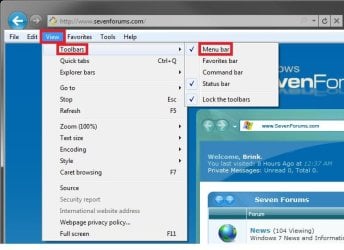
If you just wanted to turn the Menu bar on or off in IE8 or IE9, then see the tutorial link below instead.

How to Turn the Menu Bar On or Off in Windows 7


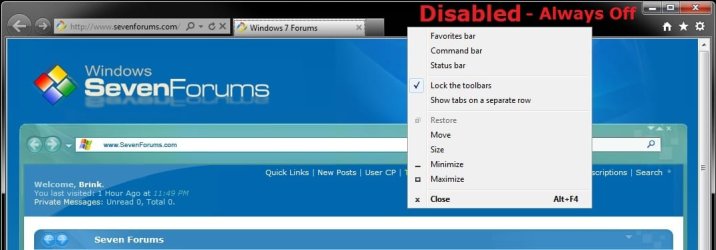
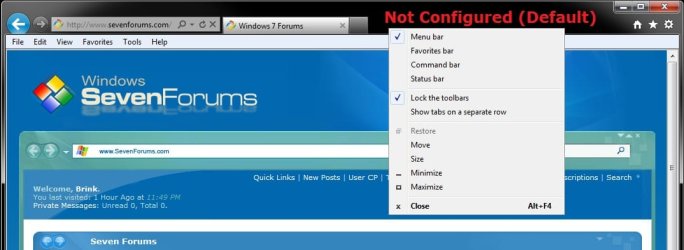
EXAMPLE: Internet Explorer Menu Bar Always On or Off, and Default
NOTE: Notice that the Menu bar option is no longer available in the IE toolbar menu when you have it set to always be on or off.
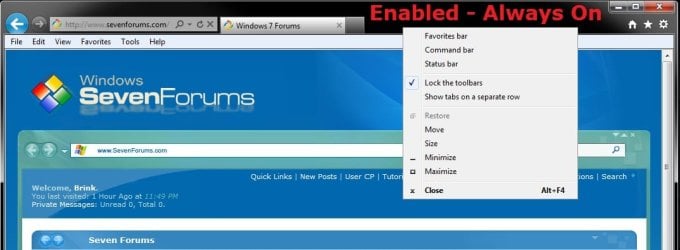
Enabled.jpg
Disabled.jpg

Not_Configured.jpg


OPTION ONE

Using a REG File Download


1. To Force Internet Explorer Menu Bar to be Always On
A) Click on the Download button below to download the file below.
Force_IE_Menu_Bar_Always_On.reg

Download


B) Go to step 4.
2. To Force Internet Explorer Menu Bar to be Always Off
A) Click on the Download button below to download the file below.
Force_IE_Menu_Bar_Always_Off.reg


Download


B) Go to step 4.
3. To Allow Internet Explorer Menu Bar to be Turned On or Off by Users
NOTE: This is the default setting.
A) Click on the Download button below to download the file below.
Allow_IE_Menu_Bar_to_be_Turned_On_or_Off.reg


Download


4. Click on Save, and save the .reg file to the desktop.

5. Right click on the downloaded .reg file and click on Merge.

6. Click on Run, Continue (UAC-Vista) or Yes (UAC-Windows 7), Yes, and OK when prompted.

7. Log off and log on, or restart the computer to apply.

8. When done, you can delete the downloaded .reg file if you like.


OPTION TWO

Through the Local Group Policy Editor


1. Open the all users, specific users or groups, or all users except administrators Local Group Policy Editor for how you want this policy applied.

2. In the left pane, click on to expand User Configuration, Administrative Templates, Windows Components, and Internet Explorer. (see screenshot below)
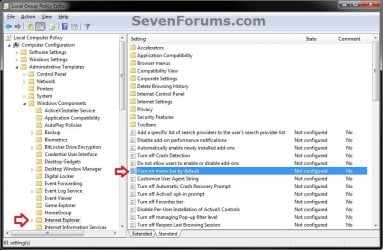
GPEDIT-1.jpg
3. In the right pane, right click on Turn on menu bar by default and click on Edit. (see screenshot above)

4. To Force Internet Explorer Menu Bar to be Always On
A) Select (dot) either Not Configured or Disabled. (see screenshot below step 7)

B) Go to step 7.
5. To Force Internet Explorer Menu Bar to be Always Off
A) Select (dot) Disabled. (see screenshot below step 7)

B) Go to step 7.
6. To Allow Internet Explorer Menu Bar to be Turned On or Off by Users
NOTE: This is the default setting.
A) Select (dot) Not Configured. (see screenshot below step 7)
7. Click on OK. (see screenshot below)
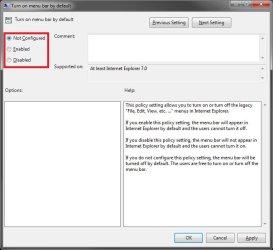
GPEDIT-2.jpg
8. Close the Local Group Policy Editor window.

9. If open, close and reopen Internet Explorer to apply.
That's it,
Shawn


Attachments

Last edited:
If nobody has mentioned it yet in this thread, the RTM IE9 now installs with the menu bar fully visible. So there's no need for this action to be taken now. It was a quick fix for the beta version of IE9. It was very useful though. Thanks Shawn...you da' man! ;)

Hello David,

I suppose that depends on if you want to force the IE Menu bar to always be on or off for all users on the computer or not. :p
 

My Computer My Computer

At a glance

64-bit Windows 11 Pro for WorkstationsIntel i7-8700K OC'd to 5 GHz64 GB (4x16GB) G.SKILL TridentZ RGB DDR4 3600...ASUS ROG-STRIX-GTX1080TI-O11G-GAMING
Computer type
PC/Desktop
Computer Manufacturer/Model Number
Self built custom
OS
64-bit Windows 11 Pro for Workstations
CPU
Intel i7-8700K OC'd to 5 GHz
Motherboard
ASUS ROG Maximus XI Formula Z390
Memory
64 GB (4x16GB) G.SKILL TridentZ RGB DDR4 3600 MHz
Graphics Card(s)
ASUS ROG-STRIX-GTX1080TI-O11G-GAMING
Sound Card
Integrated
Monitor(s) Displays
2 x Samsung Odyssey G7 27"
Screen Resolution
2560x1440
Hard Drives
1TB Samsung 990 PRO M.2,
4TB Samsung 990 PRO PRO M.2,
TerraMaster F8 SSD Plus NAS
PSU
Seasonic Prime Titanium 850W
Case
Thermaltake Core P3
Cooling
Corsair Hydro H115i
Keyboard
Logitech wireless K800
Mouse
Logitech MX Master 4
Internet Speed
2 Gb/s Download and 100 Mb/s Upload
Antivirus
Malwarebyte Anti-Malware Premium
Browser
Google Chrome
Other Info
Logitech Z625 speaker system,
Logitech BRIO 4K Pro webcam,
HP Color LaserJet Pro MFP M477fdn,
APC SMART-UPS RT 1000 XL - SURT1000XLI,
Galaxy S23 Plus phone
I suppose that depends on if you want to force the IE Menu bar to always be on or off for all users on the computer or not. :p
I didn't know you did stand up comedy too. What DON'T you do? LMAO
 

My Computer My Computer

At a glance

Windows 7 Ultimate SP1 x64 RTMAMD Athlon 64x2 3800+ Dual CoreOCZ Platinum Dual Channel 4x1GBPNY NVIDIA GeForce 9800 GT 1024MB DDR3 256 Bit
Computer Manufacturer/Model Number
NVIDIA
OS
Windows 7 Ultimate SP1 x64 RTM
CPU
AMD Athlon 64x2 3800+ Dual Core
Motherboard
NVIDIA GeForce 6100-M9
Memory
OCZ Platinum Dual Channel 4x1GB
Graphics Card(s)
PNY NVIDIA GeForce 9800 GT 1024MB DDR3 256 Bit
Sound Card
Creative Sound Blaster Audigy 24Bit
Monitor(s) Displays
Compaq 7500
Screen Resolution
1024x768
Hard Drives
C: 250GB Seagate Barracuda 7200.12 SATA-300
D: 500GB Seagate Barracuda 7200.12 SATA-300
PSU
OCZ 650Watt Dual 12-Volt Rails
Case
Thermaltake
Cooling
Fans, fans, and more fans
Keyboard
Logitech
Mouse
Logitech PS2
Internet Speed
300MBps
Other Info
LG CD-RW [IDE]
Pioneer DVD-RW [SATA-II]
LOL. ;)
 

My Computer My Computer

At a glance

64-bit Windows 11 Pro for WorkstationsIntel i7-8700K OC'd to 5 GHz64 GB (4x16GB) G.SKILL TridentZ RGB DDR4 3600...ASUS ROG-STRIX-GTX1080TI-O11G-GAMING
Computer type
PC/Desktop
Computer Manufacturer/Model Number
Self built custom
OS
64-bit Windows 11 Pro for Workstations
CPU
Intel i7-8700K OC'd to 5 GHz
Motherboard
ASUS ROG Maximus XI Formula Z390
Memory
64 GB (4x16GB) G.SKILL TridentZ RGB DDR4 3600 MHz
Graphics Card(s)
ASUS ROG-STRIX-GTX1080TI-O11G-GAMING
Sound Card
Integrated
Monitor(s) Displays
2 x Samsung Odyssey G7 27"
Screen Resolution
2560x1440
Hard Drives
1TB Samsung 990 PRO M.2,
4TB Samsung 990 PRO PRO M.2,
TerraMaster F8 SSD Plus NAS
PSU
Seasonic Prime Titanium 850W
Case
Thermaltake Core P3
Cooling
Corsair Hydro H115i
Keyboard
Logitech wireless K800
Mouse
Logitech MX Master 4
Internet Speed
2 Gb/s Download and 100 Mb/s Upload
Antivirus
Malwarebyte Anti-Malware Premium
Browser
Google Chrome
Other Info
Logitech Z625 speaker system,
Logitech BRIO 4K Pro webcam,
HP Color LaserJet Pro MFP M477fdn,
APC SMART-UPS RT 1000 XL - SURT1000XLI,
Galaxy S23 Plus phone
I just installed IE9 RTM and hitting the ALT button brings up the Menu bar and then under View/Toolbars you can select the Menu Bar to keep it turned on.

Jim :geek:
 

My Computer My Computer

At a glance

Windows 8.1 Pro w/Media Center 64bit, Windows...Phenom II X6 1100TCrucial Balistic 8gb DDR3-1866 CL9MSI R6850 Cyclone IGD5 PE
Computer type
PC/Desktop
Computer Manufacturer/Model Number
Home Built
OS
Windows 8.1 Pro w/Media Center 64bit, Windows 7 HP 64bit
CPU
Phenom II X6 1100T
Motherboard
ASUS M5A99X EVO
Memory
Crucial Balistic 8gb DDR3-1866 CL9
Graphics Card(s)
MSI R6850 Cyclone IGD5 PE
Sound Card
On Board
Monitor(s) Displays
ASUS VE258Q 25" LED with DVI-HDMI-DisplayPort
Screen Resolution
1920 x 1080
Hard Drives
Two WD Cavier Black 2TB Sata III, WD My Book Essential 2TB USB 3.0
PSU
Seasonic X650 80 Plus GOLD Modular
Case
Corsair 400R
Cooling
Antec Kuhler H2O 620, Two 120mm and four 140mm
Keyboard
Logitech K120
Mouse
Logitech Marble Mouse USB, Logitech Precision Game Pad
Internet Speed
15MB
Antivirus
Norton IS 2013, Malwarebytes Pro Beta 2
Browser
IE-11, FF-27
Other Info
APC UPS ES 750, Netgear WNR3500L Gigabit & Wireless N Router with SamKnows Test Program, Motorola SB6120 Gigabit Cable Modem. Brother HL-2170W Laser Printer, Epson V300 Scanner
Hello Jim,

Yes, that is one of the normal ways for users to just turn the Menu bar on or off in their IE9.

The tutorial on the first page is a different method to force the Menu bar to either be always be on or off for all users instead. For example, if you force it always on, then it cannot be turned off using the normal method above. Same if you force it always off, then it cannot be turned on using the normal method above. :)
 

My Computer My Computer

At a glance

64-bit Windows 11 Pro for WorkstationsIntel i7-8700K OC'd to 5 GHz64 GB (4x16GB) G.SKILL TridentZ RGB DDR4 3600...ASUS ROG-STRIX-GTX1080TI-O11G-GAMING
Computer type
PC/Desktop
Computer Manufacturer/Model Number
Self built custom
OS
64-bit Windows 11 Pro for Workstations
CPU
Intel i7-8700K OC'd to 5 GHz
Motherboard
ASUS ROG Maximus XI Formula Z390
Memory
64 GB (4x16GB) G.SKILL TridentZ RGB DDR4 3600 MHz
Graphics Card(s)
ASUS ROG-STRIX-GTX1080TI-O11G-GAMING
Sound Card
Integrated
Monitor(s) Displays
2 x Samsung Odyssey G7 27"
Screen Resolution
2560x1440
Hard Drives
1TB Samsung 990 PRO M.2,
4TB Samsung 990 PRO PRO M.2,
TerraMaster F8 SSD Plus NAS
PSU
Seasonic Prime Titanium 850W
Case
Thermaltake Core P3
Cooling
Corsair Hydro H115i
Keyboard
Logitech wireless K800
Mouse
Logitech MX Master 4
Internet Speed
2 Gb/s Download and 100 Mb/s Upload
Antivirus
Malwarebyte Anti-Malware Premium
Browser
Google Chrome
Other Info
Logitech Z625 speaker system,
Logitech BRIO 4K Pro webcam,
HP Color LaserJet Pro MFP M477fdn,
APC SMART-UPS RT 1000 XL - SURT1000XLI,
Galaxy S23 Plus phone
Hello Jim,

Yes, that is one of the normal ways for users to just turn the Menu bar on or off in their IE9.

The tutorial on the first page is a different method to force the Menu bar to either be always be on or off for all users instead. For example, if you force it always on, then it cannot be turned off using the normal method above. Same if you force it always off, then it cannot be turned on using the normal method above. :)

Thanks for the calification. I normally use FF but have been giving IE9 a shot and just trying to learn all the options. I have got just about everything tweaked and it is very nice. Only problem I have is the Organize Favorites wont populate the box. Need to do more digging on that problem.

Jim :geek:
 

My Computer My Computer

At a glance

Windows 8.1 Pro w/Media Center 64bit, Windows...Phenom II X6 1100TCrucial Balistic 8gb DDR3-1866 CL9MSI R6850 Cyclone IGD5 PE
Computer type
PC/Desktop
Computer Manufacturer/Model Number
Home Built
OS
Windows 8.1 Pro w/Media Center 64bit, Windows 7 HP 64bit
CPU
Phenom II X6 1100T
Motherboard
ASUS M5A99X EVO
Memory
Crucial Balistic 8gb DDR3-1866 CL9
Graphics Card(s)
MSI R6850 Cyclone IGD5 PE
Sound Card
On Board
Monitor(s) Displays
ASUS VE258Q 25" LED with DVI-HDMI-DisplayPort
Screen Resolution
1920 x 1080
Hard Drives
Two WD Cavier Black 2TB Sata III, WD My Book Essential 2TB USB 3.0
PSU
Seasonic X650 80 Plus GOLD Modular
Case
Corsair 400R
Cooling
Antec Kuhler H2O 620, Two 120mm and four 140mm
Keyboard
Logitech K120
Mouse
Logitech Marble Mouse USB, Logitech Precision Game Pad
Internet Speed
15MB
Antivirus
Norton IS 2013, Malwarebytes Pro Beta 2
Browser
IE-11, FF-27
Other Info
APC UPS ES 750, Netgear WNR3500L Gigabit & Wireless N Router with SamKnows Test Program, Motorola SB6120 Gigabit Cable Modem. Brother HL-2170W Laser Printer, Epson V300 Scanner
Eh, it's no problem at all Jim.

In the IE9 Beta, we had to use the option in this tutorial to even be able to keep the Menu bar turned on. Thank goodness it was fixed in the RC and RTM versions to be able to use the normal method to turn on the Menu bar again. :)

I usually do may Favorites origanizing directly from the C:\Users\(user-name)\Favorites folder instead. It just seems easier to do from this location for me.
 

My Computer My Computer

At a glance

64-bit Windows 11 Pro for WorkstationsIntel i7-8700K OC'd to 5 GHz64 GB (4x16GB) G.SKILL TridentZ RGB DDR4 3600...ASUS ROG-STRIX-GTX1080TI-O11G-GAMING
Computer type
PC/Desktop
Computer Manufacturer/Model Number
Self built custom
OS
64-bit Windows 11 Pro for Workstations
CPU
Intel i7-8700K OC'd to 5 GHz
Motherboard
ASUS ROG Maximus XI Formula Z390
Memory
64 GB (4x16GB) G.SKILL TridentZ RGB DDR4 3600 MHz
Graphics Card(s)
ASUS ROG-STRIX-GTX1080TI-O11G-GAMING
Sound Card
Integrated
Monitor(s) Displays
2 x Samsung Odyssey G7 27"
Screen Resolution
2560x1440
Hard Drives
1TB Samsung 990 PRO M.2,
4TB Samsung 990 PRO PRO M.2,
TerraMaster F8 SSD Plus NAS
PSU
Seasonic Prime Titanium 850W
Case
Thermaltake Core P3
Cooling
Corsair Hydro H115i
Keyboard
Logitech wireless K800
Mouse
Logitech MX Master 4
Internet Speed
2 Gb/s Download and 100 Mb/s Upload
Antivirus
Malwarebyte Anti-Malware Premium
Browser
Google Chrome
Other Info
Logitech Z625 speaker system,
Logitech BRIO 4K Pro webcam,
HP Color LaserJet Pro MFP M477fdn,
APC SMART-UPS RT 1000 XL - SURT1000XLI,
Galaxy S23 Plus phone
Eh, it's no problem at all Jim.

In the IE9 Beta, we had to use the option in this tutorial to even be able to keep the Menu bar turned on. Thank goodness it was fixed in the RC and RTM versions to be able to use the normal method to turn on the Menu bar again. :)

I usually do may Favorites origanizing directly from the C:\Users\(user-name)\Favorites folder instead. It just seems easier to do from this location for me.

I never tried the Beta so I just stared using it. Thanks for the tip on organizing the favorites. It is a lot eaiser. Still need to find the problem in IE9 as things like that bug me.

Jim :geek:
 

My Computer My Computer

At a glance

Windows 8.1 Pro w/Media Center 64bit, Windows...Phenom II X6 1100TCrucial Balistic 8gb DDR3-1866 CL9MSI R6850 Cyclone IGD5 PE
Computer type
PC/Desktop
Computer Manufacturer/Model Number
Home Built
OS
Windows 8.1 Pro w/Media Center 64bit, Windows 7 HP 64bit
CPU
Phenom II X6 1100T
Motherboard
ASUS M5A99X EVO
Memory
Crucial Balistic 8gb DDR3-1866 CL9
Graphics Card(s)
MSI R6850 Cyclone IGD5 PE
Sound Card
On Board
Monitor(s) Displays
ASUS VE258Q 25" LED with DVI-HDMI-DisplayPort
Screen Resolution
1920 x 1080
Hard Drives
Two WD Cavier Black 2TB Sata III, WD My Book Essential 2TB USB 3.0
PSU
Seasonic X650 80 Plus GOLD Modular
Case
Corsair 400R
Cooling
Antec Kuhler H2O 620, Two 120mm and four 140mm
Keyboard
Logitech K120
Mouse
Logitech Marble Mouse USB, Logitech Precision Game Pad
Internet Speed
15MB
Antivirus
Norton IS 2013, Malwarebytes Pro Beta 2
Browser
IE-11, FF-27
Other Info
APC UPS ES 750, Netgear WNR3500L Gigabit & Wireless N Router with SamKnows Test Program, Motorola SB6120 Gigabit Cable Modem. Brother HL-2170W Laser Printer, Epson V300 Scanner
Back
Top