Internet Explorer won't load graphic

Kenard

New member
Local time
2:50 AM
Messages
39
Hello everyone.

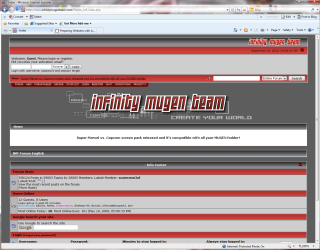
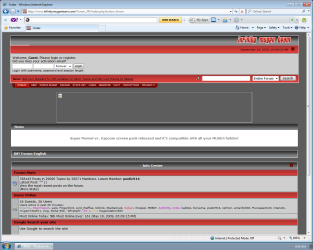
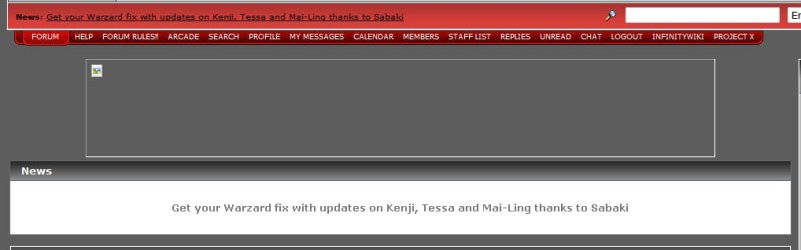
Well, I've been trying to figure out how to get a certain graphic to load in IE8. The first pic is Internet Explorer 8 and the second is Firefox.

I was wondering if anyone knew of something that could be edited in the registry to get the graphic to show up in IE8. Thank you.
 

Attachments
  • 1.jpg
    1.jpg
    29.2 KB · Views: 9
  • 2.jpg
    2.jpg
    44.9 KB · Views: 9

My Computer

Computer Manufacturer/Model Number
Gigabyte GA-EP43T-UD3L
OS
Windows 7 Home Premium 32-bit SP1
CPU
Intel Core 2 Duo E8500 @ 3.80 GHz
Motherboard
GIGABYTE Intel Chipset
Memory
4GB of Kingston HyperX 1333 MHz DDR3 Dual Channel RAM
Graphics Card(s)
nVIDIA GTX 460 768 MB GDDR5
Sound Card
Realtek ALC888 HD audio
Monitor(s) Displays
BENQ FP731
Screen Resolution
1280 x 1024
Hard Drives
640 GB Western Digital Caviar Black SATA 7200 rpm
260 GB Western Digital SATA 7200 rpm
PSU
750W Ultra X Pro
Case
Cooler Master G Lite
Cooling
Zalman CNPS9500
Keyboard
Logitech Deluxe
Mouse
Logitech HD
Internet Speed
30 Mbps
Hi

Welcome to Seven Forums :)
If you are on a network, there's not much that can be done unless you have a chat with your network admin.
Otherwise, have a look at the following:

1. From Internet Explorer 7, click the "Tools" button.

2. Select "Internet Options".

3. When the "Internet Options" multi-tabbed dialog box appears, click the "Advanced" tab.

4. Scroll down to "Multimedia" and check or uncheck "Show pictures" as desired. Refer to the below screenshot.

ie7_show_pictures.jpg


5. Click "OK" to close the dialog box.

NOTE that this option only disables picture viewing when pictures are referenced normally in the source webpage. Images loaded from scripts, Flash animations, Java applets, etc., may not be affected by this configuration option.

Source

Hope this helps

Regards
 

My Computer

Computer Manufacturer/Model Number
Custom
OS
Win7 HP (x64)/Win7 Ultimate (x64)
CPU
Core i7 920
Motherboard
Intel X58
Memory
6 x 2GB Corsair XMS3
Graphics Card(s)
CF HD4890
Sound Card
Asus Xonar
Monitor(s) Displays
Dell 2408WFP
Screen Resolution
1920 x 1200
Hard Drives
2 x 150GB WDC Velociraptors (Raid 0)
1 x 1TB Seagate
1 x 1.5TB Seagate
PSU
Corsair HX1000W
Case
Antec 1200
Keyboard
Razer Lycosa/N52te
Mouse
Razer Lachesis
Thanks a lot.

Well, I disabled that then enabled it again, but it didn't seem to work. I was wondering if you could go to that site on your IE just to see if it loads up for you, 'cause even on XP it wouldn't load the graphic.

- Index
 

My Computer

Computer Manufacturer/Model Number
Gigabyte GA-EP43T-UD3L
OS
Windows 7 Home Premium 32-bit SP1
CPU
Intel Core 2 Duo E8500 @ 3.80 GHz
Motherboard
GIGABYTE Intel Chipset
Memory
4GB of Kingston HyperX 1333 MHz DDR3 Dual Channel RAM
Graphics Card(s)
nVIDIA GTX 460 768 MB GDDR5
Sound Card
Realtek ALC888 HD audio
Monitor(s) Displays
BENQ FP731
Screen Resolution
1280 x 1024
Hard Drives
640 GB Western Digital Caviar Black SATA 7200 rpm
260 GB Western Digital SATA 7200 rpm
PSU
750W Ultra X Pro
Case
Cooler Master G Lite
Cooling
Zalman CNPS9500
Keyboard
Logitech Deluxe
Mouse
Logitech HD
Internet Speed
30 Mbps
Hello Kenard,

Welcome to SF! I went to that forum of yours using IE8 and the banner doesn't load except for Chrome and Firefox. There's absolutely nothing to worry about. Something's wrong with that forum's banner when viewed using IE. :sarc:
 

My Computer

Computer type
PC/Desktop
Computer Manufacturer/Model Number
Custom Built
OS
Windows 7 Ultimate x64
CPU
Intel(R) Core(TM) 2 Quad Q8200 @ 2.33 GHz
Motherboard
Asus P5KPL-AM SE Motherboard
Memory
2x2GB Kingston DDR2
Graphics Card(s)
1GB AMD Radeon HD 5450
Sound Card
VIA Technologies High Definition Audio Device
Monitor(s) Displays
Samsung SyncMaster 733NW
Screen Resolution
1440x900
Hard Drives
SEAGATE 320GB Barracuda® 7200.12, SATA 3 Gb/s, 7200 RPM, 16MB cache x 2
Case
Custom Casing
Cooling
Ice cubes from the freezer ;)
Keyboard
Generic Plug & Play Keyboard
Mouse
Optical Mouse
Internet Speed
Very slow
The website has quicktime content - do you have quicktime installed (can be installed by downloading and installing the current version of Quicktime, as applicable for your platform)?
Here's a snip of my IE page

Regards
 

Attachments

  • IE_Capture.PNG
    IE_Capture.PNG
    78.8 KB · Views: 18

My Computer

Computer Manufacturer/Model Number
Custom
OS
Win7 HP (x64)/Win7 Ultimate (x64)
CPU
Core i7 920
Motherboard
Intel X58
Memory
6 x 2GB Corsair XMS3
Graphics Card(s)
CF HD4890
Sound Card
Asus Xonar
Monitor(s) Displays
Dell 2408WFP
Screen Resolution
1920 x 1200
Hard Drives
2 x 150GB WDC Velociraptors (Raid 0)
1 x 1TB Seagate
1 x 1.5TB Seagate
PSU
Corsair HX1000W
Case
Antec 1200
Keyboard
Razer Lycosa/N52te
Mouse
Razer Lachesis
I had Quicktime Alternative installed, but now I just installed the full version and it didn't show up on mines, still. It's amazing, you really know a lot about this technology. I never thought I'd see IE displaying the graphic. Anything else particular I could look for?

Hello Kenard,

Welcome to SF! I went to that forum of yours using IE8 and the banner doesn't load except for Chrome and Firefox. There's absolutely nothing to worry about. Something's wrong with that forum's banner when viewed using IE. :sarc:

Hi, thanks. And thanks for the help.
 

My Computer

Computer Manufacturer/Model Number
Gigabyte GA-EP43T-UD3L
OS
Windows 7 Home Premium 32-bit SP1
CPU
Intel Core 2 Duo E8500 @ 3.80 GHz
Motherboard
GIGABYTE Intel Chipset
Memory
4GB of Kingston HyperX 1333 MHz DDR3 Dual Channel RAM
Graphics Card(s)
nVIDIA GTX 460 768 MB GDDR5
Sound Card
Realtek ALC888 HD audio
Monitor(s) Displays
BENQ FP731
Screen Resolution
1280 x 1024
Hard Drives
640 GB Western Digital Caviar Black SATA 7200 rpm
260 GB Western Digital SATA 7200 rpm
PSU
750W Ultra X Pro
Case
Cooler Master G Lite
Cooling
Zalman CNPS9500
Keyboard
Logitech Deluxe
Mouse
Logitech HD
Internet Speed
30 Mbps
Hi

Have a look at the following link:

Trouble installing iTunes or QuickTime for Windows

Be sure to read through the article carefully - right at the end there's a link to download Quicktime only (without the full itunes package).
In case you miss it, here is the link - make sure you do not select Quicktime with iTunes

When installing (or reinstalling) make sure that you define (enable) the proper plug-ins for IE - refer to Figure 7 in the following link

QuickTime: How to Install on Windows (It's an old article but gives you an idea on the process and what you need to look out for):)

Check also the following - Using MSCONFIG to troubleshoot conflicts in Windows Vista and Windows 7

Hope this helps and keep us posted

Regards
 

My Computer

Computer Manufacturer/Model Number
Custom
OS
Win7 HP (x64)/Win7 Ultimate (x64)
CPU
Core i7 920
Motherboard
Intel X58
Memory
6 x 2GB Corsair XMS3
Graphics Card(s)
CF HD4890
Sound Card
Asus Xonar
Monitor(s) Displays
Dell 2408WFP
Screen Resolution
1920 x 1200
Hard Drives
2 x 150GB WDC Velociraptors (Raid 0)
1 x 1TB Seagate
1 x 1.5TB Seagate
PSU
Corsair HX1000W
Case
Antec 1200
Keyboard
Razer Lycosa/N52te
Mouse
Razer Lachesis
Thanks for this advice. I read everything, followed the instructions, and it seems to be installed; the problem is still there though.

I wonder where I went wrong. All this time even before I got 7, it was like that on XP too, even after doing new installations through the months.
 

Attachments

  • Clipboard01.png
    Clipboard01.png
    43.1 KB · Views: 12

My Computer

Computer Manufacturer/Model Number
Gigabyte GA-EP43T-UD3L
OS
Windows 7 Home Premium 32-bit SP1
CPU
Intel Core 2 Duo E8500 @ 3.80 GHz
Motherboard
GIGABYTE Intel Chipset
Memory
4GB of Kingston HyperX 1333 MHz DDR3 Dual Channel RAM
Graphics Card(s)
nVIDIA GTX 460 768 MB GDDR5
Sound Card
Realtek ALC888 HD audio
Monitor(s) Displays
BENQ FP731
Screen Resolution
1280 x 1024
Hard Drives
640 GB Western Digital Caviar Black SATA 7200 rpm
260 GB Western Digital SATA 7200 rpm
PSU
750W Ultra X Pro
Case
Cooler Master G Lite
Cooling
Zalman CNPS9500
Keyboard
Logitech Deluxe
Mouse
Logitech HD
Internet Speed
30 Mbps
In IE go to >Tools>Manage Addons> Check if QT is enabled - have a look at the attached

Keep us posted and regards

Edit

What anti-virus or internet security software/firewall a do you have installed? Is there some possibility that you have disallowed Quicktime using your firewall or security software?
 

Attachments

  • QT_Addon.PNG
    QT_Addon.PNG
    18.3 KB · Views: 16
Last edited:

My Computer

Computer Manufacturer/Model Number
Custom
OS
Win7 HP (x64)/Win7 Ultimate (x64)
CPU
Core i7 920
Motherboard
Intel X58
Memory
6 x 2GB Corsair XMS3
Graphics Card(s)
CF HD4890
Sound Card
Asus Xonar
Monitor(s) Displays
Dell 2408WFP
Screen Resolution
1920 x 1200
Hard Drives
2 x 150GB WDC Velociraptors (Raid 0)
1 x 1TB Seagate
1 x 1.5TB Seagate
PSU
Corsair HX1000W
Case
Antec 1200
Keyboard
Razer Lycosa/N52te
Mouse
Razer Lachesis
I use AVG and Microsoft Malicious Software Removal tool to scan the PC, but AVG I only install when I scan, I uninstall when not using. My firewall is just the Microsoft one. I checked for the Quicktime program, but didn't see it, and couldn't manually add it either.

I also checked the Quicktime trailers to see if I could watch one, too and was able to.
 

My Computer

Computer Manufacturer/Model Number
Gigabyte GA-EP43T-UD3L
OS
Windows 7 Home Premium 32-bit SP1
CPU
Intel Core 2 Duo E8500 @ 3.80 GHz
Motherboard
GIGABYTE Intel Chipset
Memory
4GB of Kingston HyperX 1333 MHz DDR3 Dual Channel RAM
Graphics Card(s)
nVIDIA GTX 460 768 MB GDDR5
Sound Card
Realtek ALC888 HD audio
Monitor(s) Displays
BENQ FP731
Screen Resolution
1280 x 1024
Hard Drives
640 GB Western Digital Caviar Black SATA 7200 rpm
260 GB Western Digital SATA 7200 rpm
PSU
750W Ultra X Pro
Case
Cooler Master G Lite
Cooling
Zalman CNPS9500
Keyboard
Logitech Deluxe
Mouse
Logitech HD
Internet Speed
30 Mbps
Woorks for me in IE8

IMT test.JPG
 

My Computer

Computer type
PC/Desktop
Computer Manufacturer/Model Number
OQO 2+
OS
Windows 8 Pro w/MC 32-bit
CPU
Intel Atom 1.86 GHz
Motherboard
OQO 2+
Memory
2 GB
Graphics Card(s)
Intel GMA 500
Sound Card
IDT
Monitor(s) Displays
LCD
Screen Resolution
800 x 480 (portable) 1280 x 1024 (docked)
Hard Drives
64 GB SSD
PSU
9 Ah Battery (portable) or OQO Brick (docked)
Case
Shirt Pocket Sized
Cooling
Tiny Fan
Keyboard
Slide out (portable) DiNovo Edge (docked)
Mouse
Eraser head (portable) Logitech Bluetooth (docked)
Internet Speed
WWAN or 802.11G (portable) T1 (docked)
Browser
IE 10
Other Info
DVD-RW OQO Docking Station
Wow, that's amazing. Anything particular you did with your internet settings? Or maybe it could just be my hardware? It is kind of old.

Well, thanks for showing me the pic, I just don't have a clue what's going on.
 

My Computer

Computer Manufacturer/Model Number
Gigabyte GA-EP43T-UD3L
OS
Windows 7 Home Premium 32-bit SP1
CPU
Intel Core 2 Duo E8500 @ 3.80 GHz
Motherboard
GIGABYTE Intel Chipset
Memory
4GB of Kingston HyperX 1333 MHz DDR3 Dual Channel RAM
Graphics Card(s)
nVIDIA GTX 460 768 MB GDDR5
Sound Card
Realtek ALC888 HD audio
Monitor(s) Displays
BENQ FP731
Screen Resolution
1280 x 1024
Hard Drives
640 GB Western Digital Caviar Black SATA 7200 rpm
260 GB Western Digital SATA 7200 rpm
PSU
750W Ultra X Pro
Case
Cooler Master G Lite
Cooling
Zalman CNPS9500
Keyboard
Logitech Deluxe
Mouse
Logitech HD
Internet Speed
30 Mbps
Wow, that's amazing. Anything particular you did with your internet settings? ...I just don't have a clue what's going on.
I operate IE8 with these off: Protected Mode, Pop-up Blocker, SmartScreen Filter. Internet security not too high; "show pictures" enabled. Also, when I right click on the picture to look at the properties it says "QuickTime Plugin 7.6.6"
 

My Computer

Computer type
PC/Desktop
Computer Manufacturer/Model Number
OQO 2+
OS
Windows 8 Pro w/MC 32-bit
CPU
Intel Atom 1.86 GHz
Motherboard
OQO 2+
Memory
2 GB
Graphics Card(s)
Intel GMA 500
Sound Card
IDT
Monitor(s) Displays
LCD
Screen Resolution
800 x 480 (portable) 1280 x 1024 (docked)
Hard Drives
64 GB SSD
PSU
9 Ah Battery (portable) or OQO Brick (docked)
Case
Shirt Pocket Sized
Cooling
Tiny Fan
Keyboard
Slide out (portable) DiNovo Edge (docked)
Mouse
Eraser head (portable) Logitech Bluetooth (docked)
Internet Speed
WWAN or 802.11G (portable) T1 (docked)
Browser
IE 10
Other Info
DVD-RW OQO Docking Station
This is really strange. I tried everything you suggested, I also disabled my firewall for a second, restarted the browser and the image still won't load for me.

Well, I really appreciate all of this help, but I think I will give up now, 'cause I don't want to keep bothering you all about this for too long. I thought that I knew enough to at least configure IE right, it's been around for so long. Thanks.
 

My Computer

Computer Manufacturer/Model Number
Gigabyte GA-EP43T-UD3L
OS
Windows 7 Home Premium 32-bit SP1
CPU
Intel Core 2 Duo E8500 @ 3.80 GHz
Motherboard
GIGABYTE Intel Chipset
Memory
4GB of Kingston HyperX 1333 MHz DDR3 Dual Channel RAM
Graphics Card(s)
nVIDIA GTX 460 768 MB GDDR5
Sound Card
Realtek ALC888 HD audio
Monitor(s) Displays
BENQ FP731
Screen Resolution
1280 x 1024
Hard Drives
640 GB Western Digital Caviar Black SATA 7200 rpm
260 GB Western Digital SATA 7200 rpm
PSU
750W Ultra X Pro
Case
Cooler Master G Lite
Cooling
Zalman CNPS9500
Keyboard
Logitech Deluxe
Mouse
Logitech HD
Internet Speed
30 Mbps
This is really strange. I tried everything you suggested, I also disabled my firewall for a second, restarted the browser and the image still won't load for me.

Well, I really appreciate all of this help, but I think I will give up now, 'cause I don't want to keep bothering you all about this for too long. I thought that I knew enough to at least configure IE right, it's been around for so long. Thanks.


How about resetting your IE to default state and then working your way back from there?
Go to Tools>Internet Options>Advanced Tab>Reset button at the lower part of the window
 

Attachments

  • IE_Reset.PNG
    IE_Reset.PNG
    16 KB · Views: 2

My Computer

Computer Manufacturer/Model Number
Custom
OS
Win7 HP (x64)/Win7 Ultimate (x64)
CPU
Core i7 920
Motherboard
Intel X58
Memory
6 x 2GB Corsair XMS3
Graphics Card(s)
CF HD4890
Sound Card
Asus Xonar
Monitor(s) Displays
Dell 2408WFP
Screen Resolution
1920 x 1200
Hard Drives
2 x 150GB WDC Velociraptors (Raid 0)
1 x 1TB Seagate
1 x 1.5TB Seagate
PSU
Corsair HX1000W
Case
Antec 1200
Keyboard
Razer Lycosa/N52te
Mouse
Razer Lachesis
...I tried everything you suggested...the image still won't load for me...
I have another computer with IE8 setup the same except that it doesn't have Quicktime and doesn't display the picture. So I suspect Quicktime is needed. You might check that Quicktime is listed in "Programs and Features" and that it's enabled in IE8's "Manage Add-ons" window under "all addons". Also, under "Default Programs/Associate File type..." you could make sure the Quicktime filetypes (like .mov, .qt, .pict...) are set as default=Quicktime Player or Picture Viewer.

If everything seems fine from the above inspections you could reset IE (tools/internet options/advanced/reset...) but since that also disables add-ons you may have to re-enable them later. (Also, within "Programs and Features" there is an option to do a repair of the Quicktime program install. If all else fails you could uninstall it and reinstall it.)
 
Last edited:

My Computer

Computer type
PC/Desktop
Computer Manufacturer/Model Number
OQO 2+
OS
Windows 8 Pro w/MC 32-bit
CPU
Intel Atom 1.86 GHz
Motherboard
OQO 2+
Memory
2 GB
Graphics Card(s)
Intel GMA 500
Sound Card
IDT
Monitor(s) Displays
LCD
Screen Resolution
800 x 480 (portable) 1280 x 1024 (docked)
Hard Drives
64 GB SSD
PSU
9 Ah Battery (portable) or OQO Brick (docked)
Case
Shirt Pocket Sized
Cooling
Tiny Fan
Keyboard
Slide out (portable) DiNovo Edge (docked)
Mouse
Eraser head (portable) Logitech Bluetooth (docked)
Internet Speed
WWAN or 802.11G (portable) T1 (docked)
Browser
IE 10
Other Info
DVD-RW OQO Docking Station
I would like to thank you, Lomai and roncerr for all of the help. Here's what happened. Each time I did a new installation (starting with XP) in the past, I would always use the Quicktime Alternative. I would have never known that I actually needed the full version, so I never installed it as the first option. Here's the tricky part though.

If you uninstall Quicktime Alternative to install the full Quicktime you can do it and it will seem like it's installed, but it will not work properly. What I had to do was show hidden files and folders then find all folders of Quicktime and Apple. After I deleted all of that, I installed the full Quicktime, now it finally works.

Thanks a whole bunch, it's solved now thanks to you guys, and I really appreciate all of the help. I will fix my XP too.

Thanks.
 

My Computer

Computer Manufacturer/Model Number
Gigabyte GA-EP43T-UD3L
OS
Windows 7 Home Premium 32-bit SP1
CPU
Intel Core 2 Duo E8500 @ 3.80 GHz
Motherboard
GIGABYTE Intel Chipset
Memory
4GB of Kingston HyperX 1333 MHz DDR3 Dual Channel RAM
Graphics Card(s)
nVIDIA GTX 460 768 MB GDDR5
Sound Card
Realtek ALC888 HD audio
Monitor(s) Displays
BENQ FP731
Screen Resolution
1280 x 1024
Hard Drives
640 GB Western Digital Caviar Black SATA 7200 rpm
260 GB Western Digital SATA 7200 rpm
PSU
750W Ultra X Pro
Case
Cooler Master G Lite
Cooling
Zalman CNPS9500
Keyboard
Logitech Deluxe
Mouse
Logitech HD
Internet Speed
30 Mbps
Oh well, let's say websites nowadays require the QuickTime plugin. So installing QuickTime would be very useful. I just hate the bloatware and other unnecessary crap that comes with it.
 

My Computer

Computer type
PC/Desktop
Computer Manufacturer/Model Number
Custom Built
OS
Windows 7 Ultimate x64
CPU
Intel(R) Core(TM) 2 Quad Q8200 @ 2.33 GHz
Motherboard
Asus P5KPL-AM SE Motherboard
Memory
2x2GB Kingston DDR2
Graphics Card(s)
1GB AMD Radeon HD 5450
Sound Card
VIA Technologies High Definition Audio Device
Monitor(s) Displays
Samsung SyncMaster 733NW
Screen Resolution
1440x900
Hard Drives
SEAGATE 320GB Barracuda® 7200.12, SATA 3 Gb/s, 7200 RPM, 16MB cache x 2
Case
Custom Casing
Cooling
Ice cubes from the freezer ;)
Keyboard
Generic Plug & Play Keyboard
Mouse
Optical Mouse
Internet Speed
Very slow
Yeah, and the player that's bundled with it along with the picture viewer is really kind of too much for a single-core to handle.
 

My Computer

Computer Manufacturer/Model Number
Gigabyte GA-EP43T-UD3L
OS
Windows 7 Home Premium 32-bit SP1
CPU
Intel Core 2 Duo E8500 @ 3.80 GHz
Motherboard
GIGABYTE Intel Chipset
Memory
4GB of Kingston HyperX 1333 MHz DDR3 Dual Channel RAM
Graphics Card(s)
nVIDIA GTX 460 768 MB GDDR5
Sound Card
Realtek ALC888 HD audio
Monitor(s) Displays
BENQ FP731
Screen Resolution
1280 x 1024
Hard Drives
640 GB Western Digital Caviar Black SATA 7200 rpm
260 GB Western Digital SATA 7200 rpm
PSU
750W Ultra X Pro
Case
Cooler Master G Lite
Cooling
Zalman CNPS9500
Keyboard
Logitech Deluxe
Mouse
Logitech HD
Internet Speed
30 Mbps
I would like to thank you, Lomai and roncerr for all of the help. Here's what happened. Each time I did a new installation (starting with XP) in the past, I would always use the Quicktime Alternative. I would have never known that I actually needed the full version, so I never installed it as the first option. Here's the tricky part though.

If you uninstall Quicktime Alternative to install the full Quicktime you can do it and it will seem like it's installed, but it will not work properly. What I had to do was show hidden files and folders then find all folders of Quicktime and Apple. After I deleted all of that, I installed the full Quicktime, now it finally works.

Thanks a whole bunch, it's solved now thanks to you guys, and I really appreciate all of the help. I will fix my XP too.

Thanks.

Thanks for posting your results.
That's how we all learn ;)

Thanks roncerr and frzwin7
 

My Computer

Computer Manufacturer/Model Number
Custom
OS
Win7 HP (x64)/Win7 Ultimate (x64)
CPU
Core i7 920
Motherboard
Intel X58
Memory
6 x 2GB Corsair XMS3
Graphics Card(s)
CF HD4890
Sound Card
Asus Xonar
Monitor(s) Displays
Dell 2408WFP
Screen Resolution
1920 x 1200
Hard Drives
2 x 150GB WDC Velociraptors (Raid 0)
1 x 1TB Seagate
1 x 1.5TB Seagate
PSU
Corsair HX1000W
Case
Antec 1200
Keyboard
Razer Lycosa/N52te
Mouse
Razer Lachesis
Back
Top