Internet Sharing using Cross-Over cable

   Note
What's this tutorial about...
This is a simple tutorial on how to setup a cable network of two PCs using a cross-over Cable.

   Information

General Information
The tutorial is based on two laptops running Windows 7 and Windows XP.
It is assumed that you have the w7 machine already connected to the internet.
The network is a wireless network, with broadband modem directly connected to a Linksys wireless router (WRT54G). The w7 machine is wirelessly connected to the network.


Requirements
  • Two machines running w7 and XP.
  • An ethernet cable (Cat 5 or 6).
How To:

Testing ports and cable connectivity.

1) Power on both w7 and Windows XP machines and connect both with the ethernet cross- over cable.

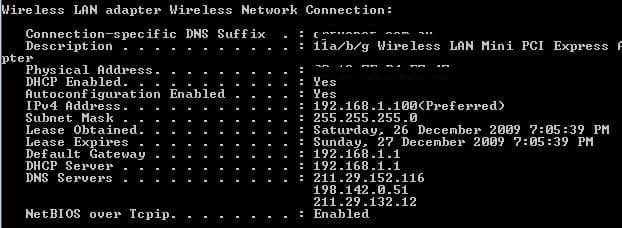
2) From w7, go to a command prompt and obtain ipconfig /all details. Mine looks like this.
attachment.php

3) Note from 1) the IP: 192.168.1.100, Subnet Mask: 255.255.255.0, Default Gateway: 192.168.1.1.

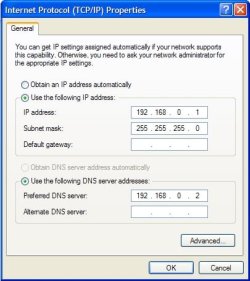
4) Log onto the XP Machine, in Properties of LAN, manually input the following IP settings (as per image). Leave all other settings unchanged. Click the Ok button to exit.
   Warning
The reason i chose 192.168.1.102, and not .101, is because w7 will allocate .101 as the Bridging interface, if you set the IP to .101, you will get a conflict message, and process will fail.

attachment.php

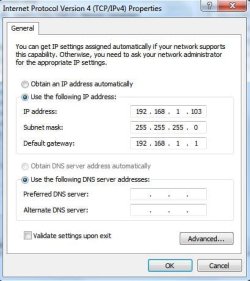
5) From W7 machine Network Connections, right-click on the LAN interface with the cross-cable attached, and input the following IP settings (as per image). Leave all other settings unchanged. Click the Ok button to exit.
attachment.php

6) Open up command prompts, and perform pingtests from one machine to the other. Don't forget to wait a few seconds from the IP settings to take effect. If successfull both machines should successfully ping one another.

   Note
At this stage you can RDP to either machine from the other, using the IPs you manually inputted. You can also create shares$ to share files betweenone the machine. The testing of the ports and cable is a success.


Obtaining Internet Access for the XP Machine

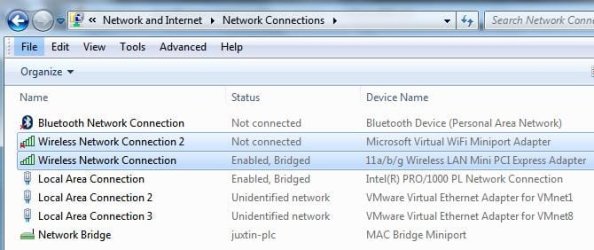
7) From w7 Network Connections, located the two LAN connections (in this example one being the Wireless Network, the other the LAN between the two machines ie LAN of cross-over cable). Select the two, right-click and click Bridge Connections. Once the system finishes bridging the connections, a new LAN called Network Bridge is created as shown. Note: the highlightes are NOT what is used to bridge.

   Note
During bridging, the system will attempt to acquire network addresses. This may take time.


attachment.php


Final Step
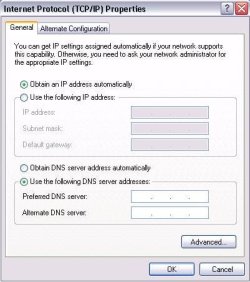
8) Go back to Windows XP, in the tcp/ip Properites untick "Use the following IP Address". And re-select option "Obtain an IP address automatically.
attachment.php

9) After a few seconds of waiting for the system to refresh, you can now surt the net on your XP Machine.
   Note
This is one method of bridging connection as to share internet connections, which should work. I have checked and redo many times. I have not made any attempts to start any special services on either machines, nor installed or enabled any options.


Hope you find this tutorial each to follow. ;)
 

Attachments

  • Noname.jpg
    Noname.jpg
    26.3 KB · Views: 33,658
  • Noname1.jpg
    Noname1.jpg
    29.1 KB · Views: 33,989
  • Noname2.jpg
    Noname2.jpg
    30.9 KB · Views: 34,199
  • Noname3.jpg
    Noname3.jpg
    34.9 KB · Views: 33,573
  • Noname4.jpg
    Noname4.jpg
    29 KB · Views: 33,506
Last edited by a moderator:
Well after a couple of days of intense helping out people in the Network section, i thought i do the tut, just so they can have an idea of how it work...for me anyway :p

PS, if a mod or admin wants to make it look neater and nicer, pls proceed ;)
 

My Computer

Computer Manufacturer/Model Number
Lenovo ThinkPad T60
OS
Windows 7 Ultimate 64Bit
CPU
GenuineIntel Intel(R) Core(TM) DuoCore T2400 @ 1.83GHz
Motherboard
Intel(R) 82801G (ICH7 Family)
Memory
2.00 GB
Graphics Card(s)
Mobile Intel(R) 945 Express Chipset
Sound Card
SoundMAX Integrated Digital HD Audio
Monitor(s) Displays
ThinkPad Display
Screen Resolution
1400x1050
Hard Drives
100Gb SATA
Keyboard
Standard Keyboard
Mouse
HID-compliant Mouse
Internet Speed
Cable Broadband - 54Mbps
Other Info
Intel(R) PRO/1000 PL Network Connection
11a/b/g Wireless LAN Mini PCI Express Adapter
I am going to try this out....BTW thanks aem. May be make this tutorial sticky and open up an error/support to this thread elsewhere. This will make the post remain clean.

May be i'll post a video as soon as this works for me
 

My Computer

OS
Windows 7
CPU
Core2Duo E7400 2.8Ghz
Motherboard
ASUS P5KPL-CM
Memory
2GB Kingston
Graphics Card(s)
None
Sound Card
Built-in
Monitor(s) Displays
1
Screen Resolution
1024x786
Hard Drives
Maxtor 80GB 7400RPM
Internet Speed
256kb/s
Excuse me but what if i want the opposite?
I want my 7 to have access through a XP machine?

Just do the same but on different machines?
 

My Computer

Computer type
PC/Desktop
Computer Manufacturer/Model Number
Custom
OS
Windows 7 SP1 x64
CPU
Intel E8400 3.0 GHz
Motherboard
Gigabyte EP45-DS3R
Memory
4x1 Trascend DDR2 800 Mhz
Graphics Card(s)
Gainward 8800GT 512 Mb
Sound Card
Realtek HD Audio 889A
Monitor(s) Displays
LG L204WS
Screen Resolution
1680x1050
Hard Drives
Intel 520 Series 120Gb SSD (System)
Western Digital 6400AAKS 640Gb (Data)
PSU
Cooler Master 650W
Case
Cooler Master Centurion 532
Cooling
2x 12 cm fans
Keyboard
Logitech Wave
Mouse
Logitech G5
Internet Speed
10 Mbit Cable Flat
Antivirus
NOD32 Smart Security
Browser
Google Chrome
Excuse me but what if i want the opposite?
I want my 7 to have access through a XP machine?

Just do the same but on different machines?

Have you tried it :p. My guttest feeling is it will. The principle idea is the same.
 

My Computer

Computer Manufacturer/Model Number
Lenovo ThinkPad T60
OS
Windows 7 Ultimate 64Bit
CPU
GenuineIntel Intel(R) Core(TM) DuoCore T2400 @ 1.83GHz
Motherboard
Intel(R) 82801G (ICH7 Family)
Memory
2.00 GB
Graphics Card(s)
Mobile Intel(R) 945 Express Chipset
Sound Card
SoundMAX Integrated Digital HD Audio
Monitor(s) Displays
ThinkPad Display
Screen Resolution
1400x1050
Hard Drives
100Gb SATA
Keyboard
Standard Keyboard
Mouse
HID-compliant Mouse
Internet Speed
Cable Broadband - 54Mbps
Other Info
Intel(R) PRO/1000 PL Network Connection
11a/b/g Wireless LAN Mini PCI Express Adapter
Excuse me but what if i want the opposite?
I want my 7 to have access through a XP machine?

Just do the same but on different machines?

Have you tried it :p. My guttest feeling is it will. The principle idea is the same.

I am using a similar method:
network.jpg

But i haven't enabled "Obtain an IP address automatically" on my 7.
I will try it tomorrow because i currently cannot access the machine.
May i add that there is no suffix on the network and
Kaspersky and Nod32 are reporting attacks between these two machines!

Thank you for replying so fast:)
 

My Computer

Computer type
PC/Desktop
Computer Manufacturer/Model Number
Custom
OS
Windows 7 SP1 x64
CPU
Intel E8400 3.0 GHz
Motherboard
Gigabyte EP45-DS3R
Memory
4x1 Trascend DDR2 800 Mhz
Graphics Card(s)
Gainward 8800GT 512 Mb
Sound Card
Realtek HD Audio 889A
Monitor(s) Displays
LG L204WS
Screen Resolution
1680x1050
Hard Drives
Intel 520 Series 120Gb SSD (System)
Western Digital 6400AAKS 640Gb (Data)
PSU
Cooler Master 650W
Case
Cooler Master Centurion 532
Cooling
2x 12 cm fans
Keyboard
Logitech Wave
Mouse
Logitech G5
Internet Speed
10 Mbit Cable Flat
Antivirus
NOD32 Smart Security
Browser
Google Chrome
Kaspersky and Nod32 are reporting attacks between these two machines!

Thank you for replying so fast:)

I'm a fast replier :D

Are they getting attacked becos they are connecting two Pcs using cross-over cable? If so, how can? the point of entry for hackers is thru your existing network, not becos of cross-cabling.
 

My Computer

Computer Manufacturer/Model Number
Lenovo ThinkPad T60
OS
Windows 7 Ultimate 64Bit
CPU
GenuineIntel Intel(R) Core(TM) DuoCore T2400 @ 1.83GHz
Motherboard
Intel(R) 82801G (ICH7 Family)
Memory
2.00 GB
Graphics Card(s)
Mobile Intel(R) 945 Express Chipset
Sound Card
SoundMAX Integrated Digital HD Audio
Monitor(s) Displays
ThinkPad Display
Screen Resolution
1400x1050
Hard Drives
100Gb SATA
Keyboard
Standard Keyboard
Mouse
HID-compliant Mouse
Internet Speed
Cable Broadband - 54Mbps
Other Info
Intel(R) PRO/1000 PL Network Connection
11a/b/g Wireless LAN Mini PCI Express Adapter
Kaspersky and Nod32 are reporting attacks between these two machines!

Thank you for replying so fast:)

I'm a fast replier :D

Are they getting attacked becos they are connecting two Pcs using cross-over cable? If so, how can?

Its a crazy story actually...
The Nod32 Smart Security on the 7 machine is
detecting DNS cache poisoning attack from the xp machine(ip 192.168.0.1)
And the XP machine with Kaspersky is detecting Scan.Generic.UDP
from the 7 machine (ip 192.168.0.2)
 

My Computer

Computer type
PC/Desktop
Computer Manufacturer/Model Number
Custom
OS
Windows 7 SP1 x64
CPU
Intel E8400 3.0 GHz
Motherboard
Gigabyte EP45-DS3R
Memory
4x1 Trascend DDR2 800 Mhz
Graphics Card(s)
Gainward 8800GT 512 Mb
Sound Card
Realtek HD Audio 889A
Monitor(s) Displays
LG L204WS
Screen Resolution
1680x1050
Hard Drives
Intel 520 Series 120Gb SSD (System)
Western Digital 6400AAKS 640Gb (Data)
PSU
Cooler Master 650W
Case
Cooler Master Centurion 532
Cooling
2x 12 cm fans
Keyboard
Logitech Wave
Mouse
Logitech G5
Internet Speed
10 Mbit Cable Flat
Antivirus
NOD32 Smart Security
Browser
Google Chrome
Crazy indeed. The Xp machine in this tutorial only has LAN network access via W7. If there are any unusual activities on it, then it would have been also for w7. They go thru the same network and so share the same risks. I would suggest better securing the network first before looking into individual machines. :)
 

My Computer

Computer Manufacturer/Model Number
Lenovo ThinkPad T60
OS
Windows 7 Ultimate 64Bit
CPU
GenuineIntel Intel(R) Core(TM) DuoCore T2400 @ 1.83GHz
Motherboard
Intel(R) 82801G (ICH7 Family)
Memory
2.00 GB
Graphics Card(s)
Mobile Intel(R) 945 Express Chipset
Sound Card
SoundMAX Integrated Digital HD Audio
Monitor(s) Displays
ThinkPad Display
Screen Resolution
1400x1050
Hard Drives
100Gb SATA
Keyboard
Standard Keyboard
Mouse
HID-compliant Mouse
Internet Speed
Cable Broadband - 54Mbps
Other Info
Intel(R) PRO/1000 PL Network Connection
11a/b/g Wireless LAN Mini PCI Express Adapter
Yes but there was only one attack in Kaspersky and about 20+ in Nod32???:sarc::shock:

As i said i will try out your method of putting "Obtain an IP address automatically" on my Windows 7 machine

Should i remove the DNS server on both machines(they are currently aimed one at another)?

I will report tommorow:D

And thank you!
 

My Computer

Computer type
PC/Desktop
Computer Manufacturer/Model Number
Custom
OS
Windows 7 SP1 x64
CPU
Intel E8400 3.0 GHz
Motherboard
Gigabyte EP45-DS3R
Memory
4x1 Trascend DDR2 800 Mhz
Graphics Card(s)
Gainward 8800GT 512 Mb
Sound Card
Realtek HD Audio 889A
Monitor(s) Displays
LG L204WS
Screen Resolution
1680x1050
Hard Drives
Intel 520 Series 120Gb SSD (System)
Western Digital 6400AAKS 640Gb (Data)
PSU
Cooler Master 650W
Case
Cooler Master Centurion 532
Cooling
2x 12 cm fans
Keyboard
Logitech Wave
Mouse
Logitech G5
Internet Speed
10 Mbit Cable Flat
Antivirus
NOD32 Smart Security
Browser
Google Chrome
If you want to include DNS you can, i had not. My setting is auto config -DHCP on my router and on my W7.

One of the basis of putting in the IP, Subnet, Gateway is cos these are the min requirments and if the min works, then that's all there is to do. If the min is only IP and subnet and it works for you, then buy all means only use these. Remember that you testing the ports and cable at the same time when you are doing this tutorial.

Thanks ratePV. Appreciate your input mate.
 

My Computer

Computer Manufacturer/Model Number
Lenovo ThinkPad T60
OS
Windows 7 Ultimate 64Bit
CPU
GenuineIntel Intel(R) Core(TM) DuoCore T2400 @ 1.83GHz
Motherboard
Intel(R) 82801G (ICH7 Family)
Memory
2.00 GB
Graphics Card(s)
Mobile Intel(R) 945 Express Chipset
Sound Card
SoundMAX Integrated Digital HD Audio
Monitor(s) Displays
ThinkPad Display
Screen Resolution
1400x1050
Hard Drives
100Gb SATA
Keyboard
Standard Keyboard
Mouse
HID-compliant Mouse
Internet Speed
Cable Broadband - 54Mbps
Other Info
Intel(R) PRO/1000 PL Network Connection
11a/b/g Wireless LAN Mini PCI Express Adapter
If you want to include DNS you can, i had not. My setting is auto config -DHCP on my router and on my W7.

One of the basis of putting in the IP, Subnet, Gateway is cos these are the min requirments and if the min works, then that's all there is to do. If the min is only IP and subnet and it works for you, then buy all means only use these. Remember that you testing the ports and cable at the same time when you are doing this tutorial.

Thanks ratePV. Appreciate your input mate.

Yes when i put gateway in XP the connection wont
work.
Now i edited the settings on XP:
IP Adress:192.168.0.1
Subnet:255.255.255.0
everything else is blank

I will enable automatic obtaining of ip's on my 7.

Okay i wont spam your tut. any more:D
 

My Computer

Computer type
PC/Desktop
Computer Manufacturer/Model Number
Custom
OS
Windows 7 SP1 x64
CPU
Intel E8400 3.0 GHz
Motherboard
Gigabyte EP45-DS3R
Memory
4x1 Trascend DDR2 800 Mhz
Graphics Card(s)
Gainward 8800GT 512 Mb
Sound Card
Realtek HD Audio 889A
Monitor(s) Displays
LG L204WS
Screen Resolution
1680x1050
Hard Drives
Intel 520 Series 120Gb SSD (System)
Western Digital 6400AAKS 640Gb (Data)
PSU
Cooler Master 650W
Case
Cooler Master Centurion 532
Cooling
2x 12 cm fans
Keyboard
Logitech Wave
Mouse
Logitech G5
Internet Speed
10 Mbit Cable Flat
Antivirus
NOD32 Smart Security
Browser
Google Chrome
Internet Sharing using a Croos-Over cable

Any reason that this wouldn't work between two Win 7 machines?

R
 

My Computer

Computer Manufacturer/Model Number
Gateway GX7022E
OS
Win 7 32bit
CPU
Pentium D Processor 830 (3Ghz clk, 800 Mhz FSB, 2x1Mb L2)
Memory
3Gb
Graphics Card(s)
Nividia 8500
Sound Card
Generic
Monitor(s) Displays
HP w2207
Screen Resolution
1680 x 1050
Hard Drives
WDC WD5000AAKS-22A7B ATA
WDC WD3200JD-22KLB0 ATA
Case
Tower
Cooling
Ducted fan and CPU fan
Keyboard
Gateway Media Center
Mouse
Logitec wireless
Internet Speed
Verizon 1.5-2 Mb
Thank you, I followed exactly as told to... but when I bridged the Lan and the Wireless together- I lost the wireless connection. What did I do wrong??
 

My Computer

Computer Manufacturer/Model Number
hp quad 600
OS
windows 7 home premium
Cross over cable opposite to USB ethernet to broadband modem

Hello,

I set up a home network between a new computer running Windows 7 and an older XP. After much fiddling I connected with a crossover cable because I couldn't find my old mac router in storage (simple old skool router-should work). Anyhow. I ordered broadband and connected the cable modem to the XP computer via the USB to ethernet cable. It all runs splendidly... my IP numbers are slightly different. I'd enjoy learning a bit about securing the network. I'm running a xampp (apache server, mySQL) I have set up port forwarding for a router before however if there is no router I would assume it is a firewall permissions issue, right? The Windows 7 computer has gigbit internet. Don't know if it matters. Perhaps, I should set it up the other way around. Any suggestions or links to a good security tutorial for a crossover cable network? Ideally with a hosting service I could serve other files at certain times say mon-fri 9-5 or whatever and store my static web documents on a free service like google sites or pay for a fancy domain hosting provider. Any suggestions or clarifications are welcome.
 

My Computer

OS
Window 7 Home 64bit, Windows XP Home Premium 32bit
Hello aem,
Just wanted to thank you for your detailed description. I spent many hours reading various forums, technical guides, but without you I couldn't make it.

I'll try to add as many keywords to this post as possible so other people can find it as well:
Basically I tried to share the internet on my Windows 7 PC for my Sony Bravia TV using a cross-over cable as I couldn't be bothered to add one more router to the network. The PC is connected to a Linksys router via WiFi, and have a stable connection and it's running most of the time anyway. I thought that I'm not a lame on that networking subject, but it just didn't wanted to work with the bloody network sharing function, which was suggested on all the other sites. But once I activated the bridge connection, it's worked straight away and now I can watch various online videos on my TV. So cheeeers!!!!
 

My Computer

OS
Windows 7 Ultimate x64
Hello.
I have a problem trying this method.
I have windows 7 on both computers. The desktop is the one with internet connection, and I want to share this connection to the laptop. I've done all the settings, the computers are seeing each other, I can copy files between them but on the laptop the internet is not working.
What can I do? I don't want and I can't install windows Xp on laptop.
 

My Computer

OS
Windows 7 Ultimate SP1 x86
Any reason that this wouldn't work between two Win 7 machines?

R

Hello.
I have a problem trying this method.
I have windows 7 on both computers. The desktop is the one with internet connection, and I want to share this connection to the laptop. I've done all the settings, the computers are seeing each other, I can copy files between them but on the laptop the internet is not working.
What can I do? I don't want and I can't install windows Xp on laptop.

Hello,
Thank you for an easy to follow tutorial.
But it doesn't seem to work on 2 WIN7 machines.
I have the same problem as darklight86.
 

My Computer

OS
Windows 7 Home Premium x64
I tried this and everything works ok for a few minutes and then I get an IP conflict error message. Really annoying, I need this to work of course. Anyone???
 

My Computer

Computer type
PC/Desktop
Computer Manufacturer/Model Number
custom
OS
Windows 7 Pro 64
CPU
i3-3220 @3.3GHz
Motherboard
Asus
Memory
8Gb
Graphics Card(s)
no
Hard Drives
1 500Mb
Antivirus
MSE
Browser
ALL
Back
Top