internet wont work after ipconfig/release

cyanide6688

New member
Local time
8:07 AM
Messages
3
i posted this on some other forums about 3 days ago and havent had anyone reply yet, so i thought maybe you could help out! thanks

hey everyone i have an issue with connection on my main computer and thought you could be some help :-)
Yesterday i was looking up how to change an IP address, and found out that doing a ipconfig/release in command would get rid of my current IP, the next step was to do a ipconfig/renew to get a new ip address. the problem is that ipconfig/renew wont work for me. the error i get always states that i am not connected. i do have a cable connected to my computer, but the light has turned redish orange instead of green. every other computer works fine, using both ethernet and wireless, but mine still wont connect. i have tried using a different cable, and that still didn't fix it, i even reinstalled windows 7 and that also did nothing, the light in the back is still redish orange. any assistance would be great, and i really appreciate the help.
 

My Computer

OS
windows 7
i posted this on some other forums about 3 days ago and havent had anyone reply yet, so i thought maybe you could help out! thanks

hey everyone i have an issue with connection on my main computer and thought you could be some help :-)
Yesterday i was looking up how to change an IP address, and found out that doing a ipconfig/release in command would get rid of my current IP, the next step was to do a ipconfig/renew to get a new ip address. the problem is that ipconfig/renew wont work for me. the error i get always states that i am not connected. i do have a cable connected to my computer, but the light has turned redish orange instead of green. every other computer works fine, using both ethernet and wireless, but mine still wont connect. i have tried using a different cable, and that still didn't fix it, i even reinstalled windows 7 and that also did nothing, the light in the back is still redish orange. any assistance would be great, and i really appreciate the help.

We need to know your network setup.

cable modem>router>PC?

Have you reset the router, and cable modem?

Have you rebooted everything?


Since you have run ipconfig /flush you might want to run ipconfig /flushdsn. It probably wont run

BTW ipconfig /release, and renew will not help you change you change your IP. IP is assgined by your ISP and is automatic.
 

My Computer

Computer Manufacturer/Model Number
HP Pavillion dv-7 1005 Tx
OS
Win 8 Release candidate 8400
CPU
[email protected]
Memory
4 gigs
Graphics Card(s)
Nvidia 9600M
Sound Card
HD built-in
Monitor(s) Displays
17" Wxga
Screen Resolution
1440x900
Cooling
none
Internet Speed
45Mb down 5Mb up
hey thanks for the reply. i have a westell ultraline series 3 model 9100em router, and i have a cable from that going into my computer. isp is verizon fios. and yes i have tried to reset everything, i even reinstalled windows 7. right after i did the ipconfig/release my internet stopped working, the light where the cord goes into my computer turned redish orange instead of green. hope this was the info you were looking for, anything else you need to know just let me know thanks!
 

My Computer

OS
windows 7
hey thanks for the reply. i have a westell ultraline series 3 model 9100em router, and i have a cable from that going into my computer. isp is verizon fios. and yes i have tried to reset everything, i even reinstalled windows 7. right after i did the ipconfig/release my internet stopped working, the light where the cord goes into my computer turned redish orange instead of green. hope this was the info you were looking for, anything else you need to know just let me know thanks!


You should make sure that your router is using DHCP then reset the router and use the ipconfig /all ,command at the command prompt of the Windows 7 machine. You should be up and running after that.
 

My Computer

Computer type
PC/Desktop
Computer Manufacturer/Model Number
Home built
OS
Windows 7 Ult, Windows 8.1 Pro,
CPU
Q9650-4.275GHz, E8600 4.5GHz, E6750-3.8GHz
Motherboard
Evga 780i FTW
Memory
G.Skill PC2 9600 1200Mhz 5 5 5 15 2T
Graphics Card(s)
GTX480
Sound Card
Asus Xonar D2
Monitor(s) Displays
HannsG
Screen Resolution
1680X1050
Hard Drives
GSkill Phoenix Pro 120GB SSD
PSU
ThermalTake Toughpower 1000Watt modular
Case
ThermalTake XaserV
Cooling
Xigmatek S1283
Keyboard
Logitech G15
Mouse
Logitech G9
Internet Speed
T1
I can help you but you can't use your desktop because obviously you said it isn't working.

Could you go to CMD
and type "ipconfig /all"

I need to find your gateway and DNS numbers for your devices

or if you could be so kindly...
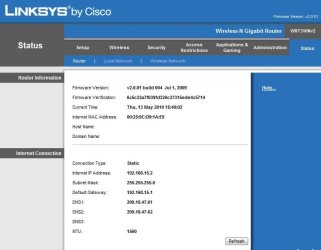
go into the SETUP or STATUS page
where it will show all the information for your router...
I will show you a photo of it.

I would like a picture of that.

that way i could write a text file or even write it here on how to configure your IPv4 to work correctly on the network.
 

Attachments

  • LinksysStatusPage.JPG
    LinksysStatusPage.JPG
    43.8 KB · Views: 127

My Computer

Computer Manufacturer/Model Number
HP Pavilion Elite HPE-410f
OS
Windows 7 Ultimate x64
CPU
AMD Phenom x6 1045t
Motherboard
N/A
Memory
8 GB
Graphics Card(s)
ATI Radeon HD 5570
Sound Card
Realtek Highdefinition Audio / 5.1 Dolby Setup
Monitor(s) Displays
HP w2207h Widescreen
Screen Resolution
1680*1050
Hard Drives
1 TB (fixed), 320 Portable maxtor, Server Hard drives
PSU
350 Watt
Case
HP CASE
Cooling
Bass
Keyboard
Logitech MX 5500
Mouse
Logitech MX 5500
Internet Speed
ROAD RUNNER 16MB D/512 U
Connection

Welcome to Windows 7 Support forums,
We have little information to make intelligent diagnostic.
Deducing from your initial post are we to gather that you are using a router connection? If so what type and manufacture?
If you are attempting to disconnect your ip address whats confusing me is are you doing it thru OS 7 command line or through your router?
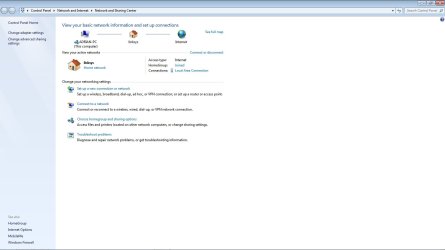
If you are using your router access it via your web browser or through windows 7 using the lower right side tool bar by opening netwrk sharing and follow the trouble shooting guide. (See Attached Image). Or by using your browser type the following command in the upper left of the address bar: http://192.168.1.1
The browser will connect into your router provided you are connecting that way and then enter your user name and password, if you have not set it up the default is usually admin, admin

Adrian
 

Attachments

  • netwrok_share.jpg
    netwrok_share.jpg
    59.7 KB · Views: 137
Last edited:

My Computer

Computer Manufacturer/Model Number
Custom Build
OS
Windows 7 7600 1 X64
CPU
AMD PHENOM II X 550 PROCESSOR 3.1 ghz
Motherboard
ASUS M4A78-TE
Memory
Corsair 4 gig ddr 3
Graphics Card(s)
ati radeon 3300
Sound Card
ati hd
Monitor(s) Displays
syncmaster 2033sw
Screen Resolution
1600X900 60 hz refresh
Hard Drives
twin_seagates SATA's 1 TB & 500 Gig, hitachi_slimline 160 gig
PSU
antec_550 watt
Case
cooler master GLite
Cooling
stock_heat sink
Internet Speed
20mbs up/ 1.5mbs down
Other Info
favorite child "stewie"
favorite dog "brian"
Back
Top