
Solved Invalid Control Panel Item

badadjective

New member
Local time
8:13 AM
Messages
10
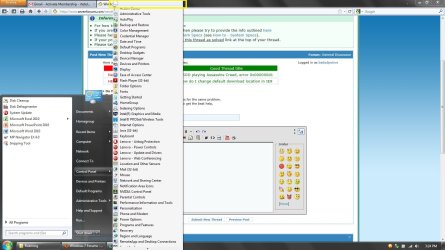
I recently purchased a new laptop and updating some software and drivers, an invalid and blank entry has appeared in the Control Panel section of the Start Menu. Please see attached screenshot, highlighted in yellow at the very top. I have also tried a fresh install, and after updating some drivers, this appeared again.

I have checked about 2 dozen forums and articles on editing the registry in Windows 7 and deleting .cpl files, but none of the solutions address my problem. I can't find an invalid registry entry anywhere. I believe the solution lies somewhere in the registry but I can't find the correct key.

Any help is appreciated, thanks!
 

Attachments
  • CPL.jpg
    CPL.jpg
    138.5 KB · Views: 163

My Computer

Computer Manufacturer/Model Number
Lenovo T420si
OS
Windows 7 Home Premium x64
CPU
Core i3 (2nd Gen) 2.10 GHz
Motherboard
Laptop
Memory
4GB
Graphics Card(s)
nVidia NVS4200M
Sound Card
Integrated
Monitor(s) Displays
Laptop
Hard Drives
320GB 7200RPM
PSU
Laptop
Case
Laptop
Cooling
Laptop
The way I have dealt with this in the past was to use tweak ui.
I don't know if it works properly with windows 7 though.
 

My Computer

Computer Manufacturer/Model Number
Insane hobo technologies. ;-)
OS
Windows 7 x64
CPU
Intel i7 2600k
Motherboard
Asrock z68 extreme 4 gen 3
Memory
G.skill Ripjaw 16gigs @ 1866
Graphics Card(s)
Nvidia gtx580 (evga)
Sound Card
Integrated HD audio + hdmi
Monitor(s) Displays
24" ASUS widescreen + 42" insignia
Screen Resolution
1080p (1920x1080)
Hard Drives
128 Samsung 830
256 Samsung 840
3 x 1tb storage drive (various)
1 western digital 1tb (eSATA)
1 Seagate 1tb (eSATA)
PSU
1 kilowatt SLI/Crossfire rated Silverstone modular
Case
NZXT Phantom + additional 220 fan
Cooling
Zalmann
Keyboard
Microsoft wireless 3000 (v2)
Mouse
MS - wireless 5000 (bluetrack)
Internet Speed
depends on if you ask me or my provider.
Other Info
The above information is provided as is, and the author assumes no responsibility for issues it may cause with your sanity or fanboyism.
TweakUI does not install on Windows 7. I haven't been able to find a tool that has Control Panel editing functionality that works on Windows 7. Can someone recommend such a tool?
 

My Computer

Computer Manufacturer/Model Number
Lenovo T420si
OS
Windows 7 Home Premium x64
CPU
Core i3 (2nd Gen) 2.10 GHz
Motherboard
Laptop
Memory
4GB
Graphics Card(s)
nVidia NVS4200M
Sound Card
Integrated
Monitor(s) Displays
Laptop
Hard Drives
320GB 7200RPM
PSU
Laptop
Case
Laptop
Cooling
Laptop
Does right clicking/deleting it do anything? I doubt that would do anything to a registry entry (I really have no idea. Just taking a stab) but it might make it go away in the Control Panel.
ne_nau.gif
 

My Computer

Computer Manufacturer/Model Number
Dell XPS 400
OS
Windows 7 X64 Professional
CPU
Intel® Pentium D Dual Core 3.6GHZ
Motherboard
DELL Dimension 9150 MotherBoard DXP051 XPS400 FJ030
Memory
4GB DDR2 PC2-5300
Graphics Card(s)
GeForce GT 440 (Fermi) 2GB 128-bit DDR3 PCI Express 2.0 x16
Sound Card
ASUS XONAR DG 5.1 Channels PCI Interface Xonar DG
Monitor(s) Displays
2 X 23" Apple Cinema Display
Screen Resolution
1920 X 1200p
Hard Drives
250GB Intel® 510 Series SSD SATA 6G (w/TRIM) [500MB/s Reads]
1.0TB Western Digital Caviar Black SATA 6G 7200rpm 64MB Cache
PSU
375 Watt Dell
Case
Dell XPS 400 BTX Case
Cooling
Dell XPS 400 Air Cooling
Keyboard
Logitech Illuminated Keyboard
Mouse
Logitech M705 Marathon
Internet Speed
+/- 9929 Kbps
Other Info
This machine was given to me when my dad bought a new computer. I keep throwing upgrades at it and it keeps on ticking. Think I've done everything to it that can be done outside a PSU upgrade so I can run an even BETTER GPU.
When right clicking, the only 2 options that appear are "Create Shortcut" and "Sort by Name." Clicking "Create Shortcut" will give an error message "Windows cannot create the shortcut. Check to see if the disc is full."

There is no option to delete. It's so weird! This blank entry does not appear if you actually open the Control Panel window. It only appears in the Start Menu Control Panel as shown in the screenshot.

I know this seems like a trivial bug, but it's a bit annoying, and seems like a challenge to fix, and I feel I need to conquer this little bugger.
 

My Computer

Computer Manufacturer/Model Number
Lenovo T420si
OS
Windows 7 Home Premium x64
CPU
Core i3 (2nd Gen) 2.10 GHz
Motherboard
Laptop
Memory
4GB
Graphics Card(s)
nVidia NVS4200M
Sound Card
Integrated
Monitor(s) Displays
Laptop
Hard Drives
320GB 7200RPM
PSU
Laptop
Case
Laptop
Cooling
Laptop
Have you had a look in the Startup folder itself?

Navigate to Start>All Programs>Startup then right-click the Startup folder and choose Explore, and then see if you can delete the unwanted icon.
 

My Computer

Computer Manufacturer/Model Number
HP Pavilion Elite 495UK
OS
Windows 7 Ultimate SP1 64-Bit
CPU
Intel Core i7 870 @ 2.93GHz
Motherboard
MSI 2A9C (CPU1)
Memory
8Gb Dual-Channel DDR3 @ 664MHz
Graphics Card(s)
nVidia GeForce GTX 460 1024MB dedicated RAM
Sound Card
Realtek HD Audio
Monitor(s) Displays
HP2310i
Screen Resolution
1920 x 1080
Hard Drives
1x1954GB Hitachi HDS22020ALA 330 (RAID), 1x1954GB Hitachi External for backup and storage
PSU
460W
Case
HP Elite
Cooling
Air cooled
Keyboard
Logitech K750 solar-powered keyboard
Mouse
Logitech Wireless M180 mouse
Internet Speed
2Mb
Other Info
Pure Avanti Flow Internet Radio with iPod Dock, 64Gb iPod, HP USB Speakers, Sony MDR-V500 Headphones, Sony Vaio F-Series Laptop
There is only one icon in the Startup folder and it points to a valid item. How is this related to the Control Panel Start Menu?
 

My Computer

Computer Manufacturer/Model Number
Lenovo T420si
OS
Windows 7 Home Premium x64
CPU
Core i3 (2nd Gen) 2.10 GHz
Motherboard
Laptop
Memory
4GB
Graphics Card(s)
nVidia NVS4200M
Sound Card
Integrated
Monitor(s) Displays
Laptop
Hard Drives
320GB 7200RPM
PSU
Laptop
Case
Laptop
Cooling
Laptop
It's only me rambling on.

I saw the mention of the Start Menu Control Panel and assumed you were thinking of the Startup Folder, sorry about that.

Just a thought though. Do you have Windows configured to show hidden files?
 

My Computer

Computer Manufacturer/Model Number
HP Pavilion Elite 495UK
OS
Windows 7 Ultimate SP1 64-Bit
CPU
Intel Core i7 870 @ 2.93GHz
Motherboard
MSI 2A9C (CPU1)
Memory
8Gb Dual-Channel DDR3 @ 664MHz
Graphics Card(s)
nVidia GeForce GTX 460 1024MB dedicated RAM
Sound Card
Realtek HD Audio
Monitor(s) Displays
HP2310i
Screen Resolution
1920 x 1080
Hard Drives
1x1954GB Hitachi HDS22020ALA 330 (RAID), 1x1954GB Hitachi External for backup and storage
PSU
460W
Case
HP Elite
Cooling
Air cooled
Keyboard
Logitech K750 solar-powered keyboard
Mouse
Logitech Wireless M180 mouse
Internet Speed
2Mb
Other Info
Pure Avanti Flow Internet Radio with iPod Dock, 64Gb iPod, HP USB Speakers, Sony MDR-V500 Headphones, Sony Vaio F-Series Laptop

My Computer

Computer Manufacturer/Model Number
Insane hobo technologies. ;-)
OS
Windows 7 x64
CPU
Intel i7 2600k
Motherboard
Asrock z68 extreme 4 gen 3
Memory
G.skill Ripjaw 16gigs @ 1866
Graphics Card(s)
Nvidia gtx580 (evga)
Sound Card
Integrated HD audio + hdmi
Monitor(s) Displays
24" ASUS widescreen + 42" insignia
Screen Resolution
1080p (1920x1080)
Hard Drives
128 Samsung 830
256 Samsung 840
3 x 1tb storage drive (various)
1 western digital 1tb (eSATA)
1 Seagate 1tb (eSATA)
PSU
1 kilowatt SLI/Crossfire rated Silverstone modular
Case
NZXT Phantom + additional 220 fan
Cooling
Zalmann
Keyboard
Microsoft wireless 3000 (v2)
Mouse
MS - wireless 5000 (bluetrack)
Internet Speed
depends on if you ask me or my provider.
Other Info
The above information is provided as is, and the author assumes no responsibility for issues it may cause with your sanity or fanboyism.
I am configured to view hidden files.

I've tried the namespace solution before as well, I can't find any blank entries there so I don't know what to delete, if anything. I'm thinking there must be another place in the registry where this blank entry is listed. Any thoughts?
 

My Computer

Computer Manufacturer/Model Number
Lenovo T420si
OS
Windows 7 Home Premium x64
CPU
Core i3 (2nd Gen) 2.10 GHz
Motherboard
Laptop
Memory
4GB
Graphics Card(s)
nVidia NVS4200M
Sound Card
Integrated
Monitor(s) Displays
Laptop
Hard Drives
320GB 7200RPM
PSU
Laptop
Case
Laptop
Cooling
Laptop
Unless you know the file extension I think it'll be like looking for the proverbial needle in a haystack to search the registry.

You could try booting into Safe Mode and see if you can delete it then.

Disk Cleanup may also be an option.
 

My Computer

Computer Manufacturer/Model Number
HP Pavilion Elite 495UK
OS
Windows 7 Ultimate SP1 64-Bit
CPU
Intel Core i7 870 @ 2.93GHz
Motherboard
MSI 2A9C (CPU1)
Memory
8Gb Dual-Channel DDR3 @ 664MHz
Graphics Card(s)
nVidia GeForce GTX 460 1024MB dedicated RAM
Sound Card
Realtek HD Audio
Monitor(s) Displays
HP2310i
Screen Resolution
1920 x 1080
Hard Drives
1x1954GB Hitachi HDS22020ALA 330 (RAID), 1x1954GB Hitachi External for backup and storage
PSU
460W
Case
HP Elite
Cooling
Air cooled
Keyboard
Logitech K750 solar-powered keyboard
Mouse
Logitech Wireless M180 mouse
Internet Speed
2Mb
Other Info
Pure Avanti Flow Internet Radio with iPod Dock, 64Gb iPod, HP USB Speakers, Sony MDR-V500 Headphones, Sony Vaio F-Series Laptop

My Computer

Computer Manufacturer/Model Number
Insane hobo technologies. ;-)
OS
Windows 7 x64
CPU
Intel i7 2600k
Motherboard
Asrock z68 extreme 4 gen 3
Memory
G.skill Ripjaw 16gigs @ 1866
Graphics Card(s)
Nvidia gtx580 (evga)
Sound Card
Integrated HD audio + hdmi
Monitor(s) Displays
24" ASUS widescreen + 42" insignia
Screen Resolution
1080p (1920x1080)
Hard Drives
128 Samsung 830
256 Samsung 840
3 x 1tb storage drive (various)
1 western digital 1tb (eSATA)
1 Seagate 1tb (eSATA)
PSU
1 kilowatt SLI/Crossfire rated Silverstone modular
Case
NZXT Phantom + additional 220 fan
Cooling
Zalmann
Keyboard
Microsoft wireless 3000 (v2)
Mouse
MS - wireless 5000 (bluetrack)
Internet Speed
depends on if you ask me or my provider.
Other Info
The above information is provided as is, and the author assumes no responsibility for issues it may cause with your sanity or fanboyism.
Safe Mode does not help as there is still no way to delete the entry.

I am running W7 Home Premium so I don't have the Group Policy editor to modify Control Panel items.

Arg! I know there must be a way!
 

My Computer

Computer Manufacturer/Model Number
Lenovo T420si
OS
Windows 7 Home Premium x64
CPU
Core i3 (2nd Gen) 2.10 GHz
Motherboard
Laptop
Memory
4GB
Graphics Card(s)
nVidia NVS4200M
Sound Card
Integrated
Monitor(s) Displays
Laptop
Hard Drives
320GB 7200RPM
PSU
Laptop
Case
Laptop
Cooling
Laptop
In an attempt to bump this topic, I would also like to add that I've continued to search for a solution online and every forum post and website points to the same few solutions, none of which are applicable in my case. Does anyone have any further ideas? Any help is appreciated, thanks!
 

My Computer

Computer Manufacturer/Model Number
Lenovo T420si
OS
Windows 7 Home Premium x64
CPU
Core i3 (2nd Gen) 2.10 GHz
Motherboard
Laptop
Memory
4GB
Graphics Card(s)
nVidia NVS4200M
Sound Card
Integrated
Monitor(s) Displays
Laptop
Hard Drives
320GB 7200RPM
PSU
Laptop
Case
Laptop
Cooling
Laptop
without a way to trace and identify the errant .cpl I really can't come up with anything.
 

My Computer

Computer Manufacturer/Model Number
Insane hobo technologies. ;-)
OS
Windows 7 x64
CPU
Intel i7 2600k
Motherboard
Asrock z68 extreme 4 gen 3
Memory
G.skill Ripjaw 16gigs @ 1866
Graphics Card(s)
Nvidia gtx580 (evga)
Sound Card
Integrated HD audio + hdmi
Monitor(s) Displays
24" ASUS widescreen + 42" insignia
Screen Resolution
1080p (1920x1080)
Hard Drives
128 Samsung 830
256 Samsung 840
3 x 1tb storage drive (various)
1 western digital 1tb (eSATA)
1 Seagate 1tb (eSATA)
PSU
1 kilowatt SLI/Crossfire rated Silverstone modular
Case
NZXT Phantom + additional 220 fan
Cooling
Zalmann
Keyboard
Microsoft wireless 3000 (v2)
Mouse
MS - wireless 5000 (bluetrack)
Internet Speed
depends on if you ask me or my provider.
Other Info
The above information is provided as is, and the author assumes no responsibility for issues it may cause with your sanity or fanboyism.
Try running a regular and registry cleanup with CCleaner.
 

My Computer

Computer Manufacturer/Model Number
Too many to describe...
OS
Windows 7 x64 pro/ Windows 7 x86 Pro/ XP SP3 x86
Are not the items in the Control Panel name.CPL files? Most of the main ones, appwiz.cpl (Add & Remove programs), are located in C:\Windows\System32. Using a command window CD \ and DIR *.CPL > CPLlist.txt and go carefully through the list. If there is an icon in your Control Panel, it will have to written to that list.

On my system there is more than one that sits in Program Files. I would say that would be one place to take a careful look. The System32 files, I think, belong to Windows. When looking over the list, check for anything that might be connected to any software you have recently removed from your system.

Good Luck,
Rªnce
 

My Computer

Computer type
PC/Desktop
Computer Manufacturer/Model Number
Dell Precision M6500 / Dell Insprion 3847
OS
Windows 7 Pro 32bit / Windows 7 Professional
CPU
Intel Core i7-620M Duel Core 2.66GHz / Intel Core i5-4460
Memory
4.0 GB / 8.0 GB
Graphics Card(s)
1.0 GB NVIDIA Quadro FX 2800M / Intel HD Graphics
Screen Resolution
1440x900 / 1920x1080
Control panel/admin tools and see if is int the left column.
 

My Computer

Computer type
PC/Desktop
Computer Manufacturer/Model Number
Home made Desktop
OS
Windows 10 Pro. 64/ version 1709 Windows 7 Pro/64
CPU
Intel i7-6800K @ 4.3
Motherboard
ASUS X-99 Deluxe II
Memory
Corsair Platinum 16 gig @2400
Graphics Card(s)
EVGA GTX 1070 OC
Monitor(s) Displays
Asus 27" LED LCD/VE278Q
Screen Resolution
1920-1080 or 1280-720 HDMI
Hard Drives
INTEL SSD 730-240 Gb Sata 3.0/
PSU
EVGA Platium 1200W
Case
Phanteks Luxe Tempered Glass 8 fans/ one radiator
Cooling
XSPC/ Water Cooled CPU
Keyboard
Das 4 Professional
Mouse
Logitech M705/MX Anywhere 2-S
Internet Speed
100 mbits
Antivirus
Microsoft Security Essentials/ Malwarebytes Premium 3.0/ SAS
Browser
I.E. 11 default/Firefox/ ISP Time Warner Cable/Spectrum
Other Info
LG BluRay Burner/
Sound system-KLipsch-THX/
Icy Dock ssd Hot Swap bays.
Don't know if you have found a fix yet, just a thought, something you could try ... right click start globe > properties > customize > control panel > change to "Display as a link" > ok > Apply > ok >...... Then go back & change to "Display as a menu" again.
 

My Computer

Computer type
PC/Desktop
Computer Manufacturer/Model Number
Custom
OS
Windows 7 Premium
CPU
AMD Phenom 9750
Motherboard
GA-MA790FX-DS5
Memory
4.00GB
Graphics Card(s)
8600gt
Monitor(s) Displays
Philips 190B
Screen Resolution
1280x1024
Hard Drives
WD 500
PSU
620w High Power
Case
Raidmax
Antivirus
Avast
Browser
IE
SOLVED

After tinkering for a few hours (pathetic, I know, for a "problem" like this) I found a solution!

The issue is that with Windows 7 .cpl files do not need to be in the system32 folder, or any system folder for that matter. They can be located anywhere. However, if the namespace registry key points to an invalid location, or no location at all, you will see this totally blank icon in the Control Panel list.

The following registry location was listing a Intel WiFi Connection Utility cpl item that no longer exists and was part of an older driver version. Deleting this key successfully removed the invalid control panel item.

HKEY_LOCAL_MACHINE\SOFTWARE\Microsoft\Windows\CurrentVersion\Explorer\ControlPanel\NameSpace\{B9F96805-88EC-4952-929F-397985D7B2D7}

If anyone else has this problem, you will have to go to this registry location and delete each key one at a time until the invalid item disappears. Make sure to back up this portion of the registry first so you can restore all the valid items later.
 

My Computer

Computer Manufacturer/Model Number
Lenovo T420si
OS
Windows 7 Home Premium x64
CPU
Core i3 (2nd Gen) 2.10 GHz
Motherboard
Laptop
Memory
4GB
Graphics Card(s)
nVidia NVS4200M
Sound Card
Integrated
Monitor(s) Displays
Laptop
Hard Drives
320GB 7200RPM
PSU
Laptop
Case
Laptop
Cooling
Laptop
Back
Top