Invisible Files

GeeDee

New member
Local time
6:07 AM
Messages
17
I have a PC monitoring program which saves JPG files to a shared folder in Windows\System32 which accessible by all users - permissions are set for full control for "everyone".

These files are invisible with Explorer - I have show hidden files and folders ticked and Hide protected system files is deselected. I can also not see the files using DIR or ATTRIB in a command prompt. Also, properties of the folder indicate 0 Bytes and 0 Files.

However, if I use TreeSizePro to scan the folder I can see the files, which indicate an attribute of A, but only the files created in my User Profile. Equally, when using another User Profile which is being monitored, I can see the files associated with that user but not my files.

I'm guessing this has something to do with Windows controlling access to a new folder within a System Folder.

Can anyone shed any light on this behaviour?
 

My Computer

Computer Manufacturer/Model Number
Wired2fire
OS
Windows 7 Ultimate x64
CPU
Core i7 920
Motherboard
Gigabyte EX58 UD3R
Memory
6GB DDR3
Graphics Card(s)
Radeon HD4890
Sound Card
on board
Monitor(s) Displays
Samsung T240HD + Dell 19"Ultrasharp
Screen Resolution
1920 x 1200 + 1280 x 1024
Hard Drives
2 x 1TB
1 x 300GB
PSU
Thermaltake toughpower 600W
Case
Antec 300
Cooling
Thermalright Ultra 120 + Lots of fans
Keyboard
Logitech Internet 350 Keyboard
Mouse
Razer DeathAdder Gaming Mouse
Internet Speed
5ish MB
Why on earth would any program save jpg files to the system32 folder?? And what exactly are these jpg files?
 

My Computer

Computer Manufacturer/Model Number
Too many to describe...
OS
Windows 7 x64 pro/ Windows 7 x86 Pro/ XP SP3 x86
Not to mention giving a system folder full control to everyone (if that is indeed what you've done...). That's just asking for trouble.


James
 

My Computer

OS
Win7U 64 RTM
CPU
Q9550
Motherboard
GA-EP45-UD3R
Memory
8GB Gskill
Graphics Card(s)
ASUS|EAH4850/HTDI/1GD3/A
Sound Card
xfi Plat
Monitor(s) Displays
Dell 2405fpw
Screen Resolution
1920x1200
Hard Drives
Seagate & WD sata Drives
PSU
Antec
Case
Antec
Keyboard
MS Natural Ergonomic 4000
Mouse
Logitech MX610 USB Cordless
Why on earth would any program save jpg files to the system32 folder?? And what exactly are these jpg files?
As I said, it's PC monitoring software and they are screen shots - internal "security"!

Not to mention giving a system folder full control to everyone (if that is indeed what you've done...). That's just asking for trouble.


James
It is a shared folder created by the software ie, it has no other use.
 

My Computer

Computer Manufacturer/Model Number
Wired2fire
OS
Windows 7 Ultimate x64
CPU
Core i7 920
Motherboard
Gigabyte EX58 UD3R
Memory
6GB DDR3
Graphics Card(s)
Radeon HD4890
Sound Card
on board
Monitor(s) Displays
Samsung T240HD + Dell 19"Ultrasharp
Screen Resolution
1920 x 1200 + 1280 x 1024
Hard Drives
2 x 1TB
1 x 300GB
PSU
Thermaltake toughpower 600W
Case
Antec 300
Cooling
Thermalright Ultra 120 + Lots of fans
Keyboard
Logitech Internet 350 Keyboard
Mouse
Razer DeathAdder Gaming Mouse
Internet Speed
5ish MB
What is the name of this software? I refuse to believe any software would save any kind of generated data in system32. And internal security?? What does that mean? Is this your personal computer or a company one?
 

My Computer

Computer Manufacturer/Model Number
Too many to describe...
OS
Windows 7 x64 pro/ Windows 7 x86 Pro/ XP SP3 x86
It's a personal PC - nothing to do with business at all. The software (GoldenEye) is used to ensure the family are not visiting sites they should not be and was written for XP and has not been updated for Win 7. The folder is the default location although it is user configurable.

All I want to know is what is behind the invisibility of the files.
 

My Computer

Computer Manufacturer/Model Number
Wired2fire
OS
Windows 7 Ultimate x64
CPU
Core i7 920
Motherboard
Gigabyte EX58 UD3R
Memory
6GB DDR3
Graphics Card(s)
Radeon HD4890
Sound Card
on board
Monitor(s) Displays
Samsung T240HD + Dell 19"Ultrasharp
Screen Resolution
1920 x 1200 + 1280 x 1024
Hard Drives
2 x 1TB
1 x 300GB
PSU
Thermaltake toughpower 600W
Case
Antec 300
Cooling
Thermalright Ultra 120 + Lots of fans
Keyboard
Logitech Internet 350 Keyboard
Mouse
Razer DeathAdder Gaming Mouse
Internet Speed
5ish MB
Goldeneye..hmm. A quick google search tells me it has a normal mode and an invisible mode. May have something to do with that. Otherwise, tinker with the settings or contact support.
 

My Computer

Computer Manufacturer/Model Number
Too many to describe...
OS
Windows 7 x64 pro/ Windows 7 x86 Pro/ XP SP3 x86
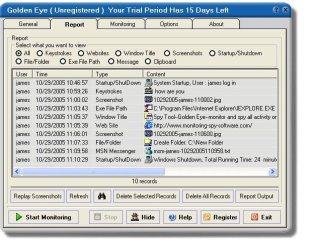
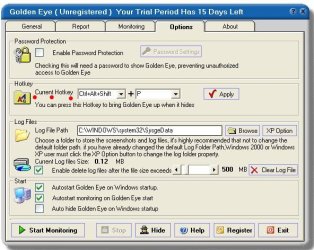
Not sure why you would share the folder...seems counter productive to the purpose of the software. As far as why you can't see your files, my guess would be that it's some setting within the GoldenEye program itself, especially given its 'stealth' and 'invisibility' features. I think that the program must inherently hide its log files from those who use the machine. Have you tried using the hotkey (see screenshot) to view the logs and screenshots from within GoldenEye?

Also, I recommend unsharing the folder and marking it hidden, if that is the default.

James

Note the screenshots. Also note the shortcut key.
 

Attachments

  • Goldeneye1.JPG
    Goldeneye1.JPG
    77.3 KB · Views: 8
  • Goldeneye2.JPG
    Goldeneye2.JPG
    66.1 KB · Views: 5

My Computer

OS
Win7U 64 RTM
CPU
Q9550
Motherboard
GA-EP45-UD3R
Memory
8GB Gskill
Graphics Card(s)
ASUS|EAH4850/HTDI/1GD3/A
Sound Card
xfi Plat
Monitor(s) Displays
Dell 2405fpw
Screen Resolution
1920x1200
Hard Drives
Seagate & WD sata Drives
PSU
Antec
Case
Antec
Keyboard
MS Natural Ergonomic 4000
Mouse
Logitech MX610 USB Cordless
Keylogger?
 

My Computer

Computer type
PC/Desktop
Computer Manufacturer/Model Number
Bruce ... somewhere in his 40's
OS
Windows 7 Ultimate 32bit SP1
CPU
Intel(R) Core(TM)2 Quad CPU @ 2.40GHz, 2400 MHz
Motherboard
INTEL/D975XBX2
Memory
4 GB
Graphics Card(s)
ATI Radeon HD 2600 Pro
Monitor(s) Displays
Samsung SyncMaster 914v
Screen Resolution
1280 x 1024
Hard Drives
2/500GB each ... ST3500630AS ATA Device.
One is not connected
PSU
Rocketfish 700 W
Case
G.Skill Gigabyte Chassis
Keyboard
Standard PS/2 Keyboard
Mouse
Microsoft PS/2 Mouse
Internet Speed
DSL
Antivirus
Avira Internet Security
Browser
IE 11
Other Info
ATI HDMI Audio

My Computer

OS
Win7U 64 RTM
CPU
Q9550
Motherboard
GA-EP45-UD3R
Memory
8GB Gskill
Graphics Card(s)
ASUS|EAH4850/HTDI/1GD3/A
Sound Card
xfi Plat
Monitor(s) Displays
Dell 2405fpw
Screen Resolution
1920x1200
Hard Drives
Seagate & WD sata Drives
PSU
Antec
Case
Antec
Keyboard
MS Natural Ergonomic 4000
Mouse
Logitech MX610 USB Cordless
Keylogging is just one aspect. It tracks almost everything that happens on a PC, including keystrokes, clipboard contents, visited Web sites, launched programs, viewed documents, and instant messages. It also can take screenshots at set intervals.

One heck of a scary software, must be pretty mischievous kids that need to be monitored with this.:)
 

My Computer

Computer Manufacturer/Model Number
Too many to describe...
OS
Windows 7 x64 pro/ Windows 7 x86 Pro/ XP SP3 x86
One heck of a scary software, must be pretty mischievous kids that need to be monitored with this.:)

Maybe the kids have taken over the system and turned it against her/him... :shock:
 

My Computer

OS
Win7U 64 RTM
CPU
Q9550
Motherboard
GA-EP45-UD3R
Memory
8GB Gskill
Graphics Card(s)
ASUS|EAH4850/HTDI/1GD3/A
Sound Card
xfi Plat
Monitor(s) Displays
Dell 2405fpw
Screen Resolution
1920x1200
Hard Drives
Seagate & WD sata Drives
PSU
Antec
Case
Antec
Keyboard
MS Natural Ergonomic 4000
Mouse
Logitech MX610 USB Cordless
Jeez, forget it!! :mad:

It was some software I purchased a while back just to keep an eye on things.

I don't have major problems but it has provided me with some interesting information as to computer usage including understanding what was happening when things have gone pear shaped.

I'm not convinced they are still trading as there is no mention of Win 7 on their site and there have been no updates for quite some time although I did notice that Vista was OK.

I have sent a support request.
 

My Computer

Computer Manufacturer/Model Number
Wired2fire
OS
Windows 7 Ultimate x64
CPU
Core i7 920
Motherboard
Gigabyte EX58 UD3R
Memory
6GB DDR3
Graphics Card(s)
Radeon HD4890
Sound Card
on board
Monitor(s) Displays
Samsung T240HD + Dell 19"Ultrasharp
Screen Resolution
1920 x 1200 + 1280 x 1024
Hard Drives
2 x 1TB
1 x 300GB
PSU
Thermaltake toughpower 600W
Case
Antec 300
Cooling
Thermalright Ultra 120 + Lots of fans
Keyboard
Logitech Internet 350 Keyboard
Mouse
Razer DeathAdder Gaming Mouse
Internet Speed
5ish MB
Jeez, forget it!! :mad:

It was some software I purchased a while back just to keep an eye on things.

I don't have major problems but it has provided me with some interesting information as to computer usage including understanding what was happening when things have gone pear shaped.

I'm not convinced they are still trading as there is no mention of Win 7 on their site and there have been no updates for quite some time although I did notice that Vista was OK.

I have sent a support request.

No offense intended...:). Have you tried checking your options as posted here?:

http://www.sevenforums.com/general-discussion/121702-invisible-files.html#post1047883

Have you checked the help files for such issues? Have you tried running the program as admin? Most programs work in Win7. If you have tried all of these things, the support request is your best option.

James
 

My Computer

OS
Win7U 64 RTM
CPU
Q9550
Motherboard
GA-EP45-UD3R
Memory
8GB Gskill
Graphics Card(s)
ASUS|EAH4850/HTDI/1GD3/A
Sound Card
xfi Plat
Monitor(s) Displays
Dell 2405fpw
Screen Resolution
1920x1200
Hard Drives
Seagate & WD sata Drives
PSU
Antec
Case
Antec
Keyboard
MS Natural Ergonomic 4000
Mouse
Logitech MX610 USB Cordless
No offense intended...:). Have you tried checking your options as posted here?:

http://www.sevenforums.com/general-discussion/121702-invisible-files.html#post1047883

Have you checked the help files for such issues? Have you tried running the program as admin? Most programs work in Win7. If you have tried all of these things, the support request is your best option.

James
Yes thanks James

The sharing of the folder to everyone was to ensure that each profile could access the folder to allow the programme to save the files.

The inbuilt report options you refer to is limited as the Window is too small - I have found in the past that it is easier to scan through using Filmstrip View in Explorer.

I have now created another folder away from System32 with the same results.

The programme does work in that it is saving the files but, and this is where I started, the files are invisible using Explorer and TreeSize Pro is only able to see files created by a profile from within that profile so, somehow, the effect is that there seems to be multiple folders with the same name with invisible files for each profile - if that makes any sense!! TreeSize Pro also only reports total files within the profile and does not reflect the total log size reported by Goldeneye.
 

My Computer

Computer Manufacturer/Model Number
Wired2fire
OS
Windows 7 Ultimate x64
CPU
Core i7 920
Motherboard
Gigabyte EX58 UD3R
Memory
6GB DDR3
Graphics Card(s)
Radeon HD4890
Sound Card
on board
Monitor(s) Displays
Samsung T240HD + Dell 19"Ultrasharp
Screen Resolution
1920 x 1200 + 1280 x 1024
Hard Drives
2 x 1TB
1 x 300GB
PSU
Thermaltake toughpower 600W
Case
Antec 300
Cooling
Thermalright Ultra 120 + Lots of fans
Keyboard
Logitech Internet 350 Keyboard
Mouse
Razer DeathAdder Gaming Mouse
Internet Speed
5ish MB
The inbuilt report options you refer to is limited as the Window is too small - I have found in the past that it is easier to scan through using Filmstrip View in Explorer.

I have now created another folder away from System32 with the same results.

The programme does work in that it is saving the files but, and this is where I started, the files are invisible using Explorer and TreeSize Pro is only able to see files created by a profile from within that profile so, somehow, the effect is that there seems to be multiple folders with the same name with invisible files for each profile - if that makes any sense!! TreeSize Pro also only reports total files within the profile and does not reflect the total log size reported by Goldeneye.


You don't mention if you've ever been able to view these files from within Win7 Explorer (or XP), but perhaps it is not possible either by design or win7 incompatibility. My suggestion would be to try running in in compat mode for XP (since it was written for XP). If that doesn't work, see if you can reach tech support.

Good luck,
James
 

My Computer

OS
Win7U 64 RTM
CPU
Q9550
Motherboard
GA-EP45-UD3R
Memory
8GB Gskill
Graphics Card(s)
ASUS|EAH4850/HTDI/1GD3/A
Sound Card
xfi Plat
Monitor(s) Displays
Dell 2405fpw
Screen Resolution
1920x1200
Hard Drives
Seagate & WD sata Drives
PSU
Antec
Case
Antec
Keyboard
MS Natural Ergonomic 4000
Mouse
Logitech MX610 USB Cordless
I hadn't considered XP mode - I wonder if it would save the files in a different format.

As far as Win 7 Explorer is concerned the files do not exist. There was never a problem with XP Explorer.

I have now received a response from Tech support (which surprised me) suggesting I download the latest version which I suspect is still in beta.

Even if the file save was by design, I'm struggling to understand why an administrator is unable to even detect them using Explorer.
 

My Computer

Computer Manufacturer/Model Number
Wired2fire
OS
Windows 7 Ultimate x64
CPU
Core i7 920
Motherboard
Gigabyte EX58 UD3R
Memory
6GB DDR3
Graphics Card(s)
Radeon HD4890
Sound Card
on board
Monitor(s) Displays
Samsung T240HD + Dell 19"Ultrasharp
Screen Resolution
1920 x 1200 + 1280 x 1024
Hard Drives
2 x 1TB
1 x 300GB
PSU
Thermaltake toughpower 600W
Case
Antec 300
Cooling
Thermalright Ultra 120 + Lots of fans
Keyboard
Logitech Internet 350 Keyboard
Mouse
Razer DeathAdder Gaming Mouse
Internet Speed
5ish MB
Try looking in "C:\Users\[YOU_USER_NAME]\AppData\Local\VirtualStore" for your map files.

Software gets re-directed to the VirtualStore folder when a program tried to save files to the "Program files" or "Program Files (x86)" folders, or any other protected system folders.

One way of preventing software (most notably games) from being re-directed to the VirtualStore folder, is to install them to a user-created folder. For example, when I install games, I always do a custom installation, and make sure the game gets installed to "C:\Games". This has the advantage of also solving many compatibility problems, although this trick doesn't always work...

This is a response I received on a similar issue. It worked for me :D
 

My Computer

OS
Windows 7 Professional 64bit
CPU
Intel Core2 Quad
Monitor(s) Displays
LG Flatron L246WH 24 inch
Hard Drives
1.5 TB (Can't remember the manufacturer atm)
I hadn't considered XP mode - I wonder if it would save the files in a different format.


Sorry...I somehow missed your newest post until Poke responded. But I actually was referring to installing the program in compat mode, as shown here:

http://www.sevenforums.com/tutorials/316-compatibility-mode.html?ltr=C

XP mode might not be the best idea, given that this GoldenEye needs to run continuously to do its thing.

Also, you should (if you haven't already) install the latest version and install to see if this solves your problem, even though still in beta. Do a http://www.sevenforums.com/tutorials/697-system-restore-point-create.html first.

And, of course, Poke's recently posted solution may work. Good luck!

James
 

My Computer

OS
Win7U 64 RTM
CPU
Q9550
Motherboard
GA-EP45-UD3R
Memory
8GB Gskill
Graphics Card(s)
ASUS|EAH4850/HTDI/1GD3/A
Sound Card
xfi Plat
Monitor(s) Displays
Dell 2405fpw
Screen Resolution
1920x1200
Hard Drives
Seagate & WD sata Drives
PSU
Antec
Case
Antec
Keyboard
MS Natural Ergonomic 4000
Mouse
Logitech MX610 USB Cordless
Back
Top