
IP Address - Locate and Find for Your Computer

How to Find the IP Address of Your Computer in Windows


   Information
An IP address identifies a computer that is connected to the Internet or a network by a unique number. Currently this will usually be a Internet Protocol Version 4 (IPv4) number that consists of four groups of numbers separated by periods, for example 192.200.44.69 (not a real one).

This tutorial will show you how to find out what the IP address (Internet Protocol address) is for your computer in XP, Vista, Windows 7, and Windows 8.


OPTION ONE

To Find IP Address in Network Connections Details


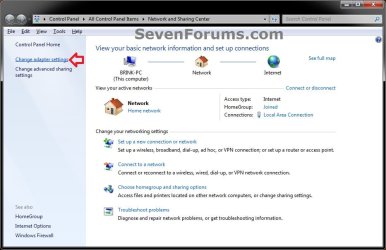
1. Open the Control Panel (icons view), and click on the Network and Sharing Center icon.

2. In the left pane, click on the Change adapter settings link. (see screenshot below)
Step1.jpg
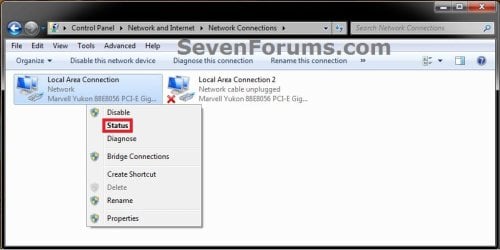
3. Right click on the network connection (network adapter or NIC) that you want to see the IP address of, and click on Status. (see screenshot below)
Step2.jpg
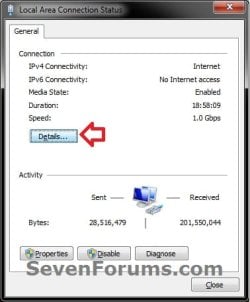
4. Click on the Details button. (see screenshot below)
Step3.jpg
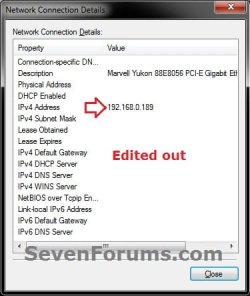
5. To the right of IPv4 Address (Property), you will see your computer's IP address (Value) for the selected network connection (network adapter or NIC). (see screenshot below)
IP-4.jpg
6. When done, click on Close (steps 4 and 5) twice and close the Network Connections window (step 3).


OPTION TWO

To Find IP Address using "ipconfig /all" Command


1. Open a command prompt.

2. In the command prompt, type ipconfig /all and press enter. (see screenshot below step 3)

3. Scroll down to the listed network adapter or NIC that you want to see the IP address of. You will see your computer's IP address listed to the right of IPv4 Address. (see screenshot below)
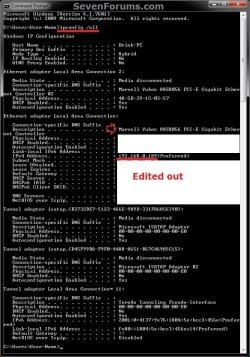
IPCONFIG_IP.jpg
4. When done, you can close the command prompt window.


OPTION THREE

To Find IP Address in PC settings in Windows 8.1


1. Open PC settings, and click/tap on Network on the left side. (see screenshot below)
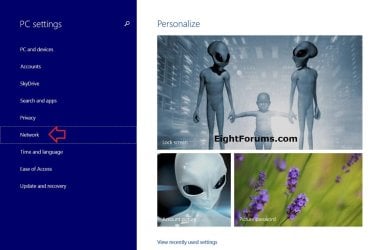
PC_settings-1.jpg
2. Click/tap on Connections on the left side, and click/tap on a connected network (ex: Brink-Router) on the right side. (see screenshot below)
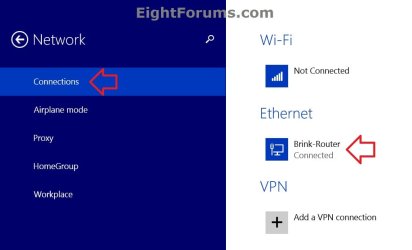
PC_settings-2.jpg
3. To the right of IPv4 address, you will see your computer's IP address for the selected network connection (ex: Brink-Router). (see screenshot below)
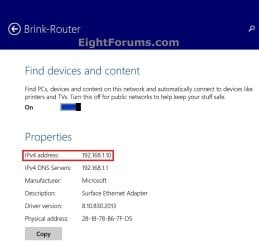
PC_settings_IP-3.jpg
4. When finished, you can close PC settings if you like.


That's it,
Shawn


Last edited:
Thank you!
 

My Computer My Computer

Computer Manufacturer/Model Number
The cousin of our lawyer sold it to us.
OS
Windows 7 Ultimate
CPU
Dual Core
Memory
2GB RAM
Graphics Card(s)
8800 something
Monitor(s) Displays
Small monitor, and not flat
Hard Drives
320 GB HDD
Cooling
It has a strong ventilator, I can perfectly hear it :P
Mouse
Logitech
Internet Speed
No idea.
You're most welcome Stefany. :)
 
Last edited:

My Computer My Computer

Computer type
PC/Desktop
Computer Manufacturer/Model Number
Self built custom
OS
64-bit Windows 11 Pro for Workstations
CPU
Intel i7-8700K OC'd to 5 GHz
Motherboard
ASUS ROG Maximus XI Formula Z390
Memory
64 GB (4x16GB) G.SKILL TridentZ RGB DDR4 3600 MHz
Graphics Card(s)
ASUS ROG-STRIX-GTX1080TI-O11G-GAMING
Sound Card
Integrated
Monitor(s) Displays
2 x Samsung Odyssey G7 27"
Screen Resolution
2560x1440
Hard Drives
1TB Samsung 990 PRO M.2,
4TB Samsung 990 PRO PRO M.2,
TerraMaster F8 SSD Plus NAS
PSU
Seasonic Prime Titanium 850W
Case
Thermaltake Core P3
Cooling
Corsair Hydro H115i
Keyboard
Logitech wireless K800
Mouse
Logitech MX Master 4
Internet Speed
2 Gb/s Download and 100 Mb/s Upload
Antivirus
Malwarebyte Anti-Malware Premium
Browser
Google Chrome
Other Info
Logitech Z625 speaker system,
Logitech BRIO 4K Pro webcam,
HP Color LaserJet Pro MFP M477fdn,
APC SMART-UPS RT 1000 XL - SURT1000XLI,
Galaxy S23 Plus phone
Thank You very much for putting this together. Well Done!
 

My Computer My Computer

Computer Manufacturer/Model Number
Photoshop Machine
OS
Windows 7 Pro 64-bit
CPU
Intel Q6700 @ 3.2Ghz
Motherboard
GIGABYTE GA-EP43-UD3L [rev: 1.0] Bios F1
Memory
8Gb Kingston PC6400 @ 949Mhz
Graphics Card(s)
EVGA GeForce 9500 GT 1Gb
Sound Card
Realtek HD Audio ALC888S (onboard)
Monitor(s) Displays
2 x Acer G235H 23" LCD's and 1 x AOC 2219V1 22" LCD
Screen Resolution
3840x1080 and 1680x1050
Hard Drives
2 x Western Digital Black 1TB - 2 x Hitachi 1TB Drives - 2 X Seagate 7200.10 750Gb
PSU
ULTRA LSP650 650-Watt PSU
Case
Cooler Master HAF 932
Cooling
CPU: Masscool 8W553 HSF, OCZ Freeze - Idle 26C - Load 48C
Keyboard
Logitech G11
Mouse
Logitech G500
Internet Speed
12Mbit down/1.5Mbit up
Other Info
MY Photoshop CS3 Machine
You're most welcome Johny, and welcome to Seven Forums. :)
 

My Computer My Computer

Computer type
PC/Desktop
Computer Manufacturer/Model Number
Self built custom
OS
64-bit Windows 11 Pro for Workstations
CPU
Intel i7-8700K OC'd to 5 GHz
Motherboard
ASUS ROG Maximus XI Formula Z390
Memory
64 GB (4x16GB) G.SKILL TridentZ RGB DDR4 3600 MHz
Graphics Card(s)
ASUS ROG-STRIX-GTX1080TI-O11G-GAMING
Sound Card
Integrated
Monitor(s) Displays
2 x Samsung Odyssey G7 27"
Screen Resolution
2560x1440
Hard Drives
1TB Samsung 990 PRO M.2,
4TB Samsung 990 PRO PRO M.2,
TerraMaster F8 SSD Plus NAS
PSU
Seasonic Prime Titanium 850W
Case
Thermaltake Core P3
Cooling
Corsair Hydro H115i
Keyboard
Logitech wireless K800
Mouse
Logitech MX Master 4
Internet Speed
2 Gb/s Download and 100 Mb/s Upload
Antivirus
Malwarebyte Anti-Malware Premium
Browser
Google Chrome
Other Info
Logitech Z625 speaker system,
Logitech BRIO 4K Pro webcam,
HP Color LaserJet Pro MFP M477fdn,
APC SMART-UPS RT 1000 XL - SURT1000XLI,
Galaxy S23 Plus phone
Just a heads up, the 'Internet Protocol Version 4 (IPv4)' link in the information header seems to take me to the SF homepage. Possible broken link?

Josh :)
 

My Computer My Computer

Computer type
PC/Desktop
Computer Manufacturer/Model Number
Custom Built
OS
Windows 7 Professional x64 SP1 ; Windows Server 2012 R2 Standard
CPU
Intel Core i5 2400 @ 3.10GHz
Motherboard
Foxconn H67MP-S/-V/H67MP
Memory
8.0GB DDR3 @ 665MHz (2GBx4)
Graphics Card(s)
AMD Radeon HD 6870
Sound Card
Realtek High Definition Audio
Monitor(s) Displays
AOC 2243W & SMB1930NW
Screen Resolution
1440x900 & 1920x1080
Hard Drives
977GB Seagate ST31000524AS ATA Drive (SATA)
250GB WD iSCSI attached Drive
PSU
750W Gaming PSU
Case
Novatech Night
Cooling
Fan
Keyboard
Dell Standard PS/2 Keyboard
Mouse
R.A.T 07 Gaming Mouse
Internet Speed
Download: 10 Mbps Ping: 30ms Upload: 0.81 Mbps
Browser
Google Chrome
Other Info
Optiarc DVD RW AD-5260S ATA Device
Thank you Josh. It should have pointed to a Wiki page. It has been corrected now. :)
 

My Computer My Computer

Computer type
PC/Desktop
Computer Manufacturer/Model Number
Self built custom
OS
64-bit Windows 11 Pro for Workstations
CPU
Intel i7-8700K OC'd to 5 GHz
Motherboard
ASUS ROG Maximus XI Formula Z390
Memory
64 GB (4x16GB) G.SKILL TridentZ RGB DDR4 3600 MHz
Graphics Card(s)
ASUS ROG-STRIX-GTX1080TI-O11G-GAMING
Sound Card
Integrated
Monitor(s) Displays
2 x Samsung Odyssey G7 27"
Screen Resolution
2560x1440
Hard Drives
1TB Samsung 990 PRO M.2,
4TB Samsung 990 PRO PRO M.2,
TerraMaster F8 SSD Plus NAS
PSU
Seasonic Prime Titanium 850W
Case
Thermaltake Core P3
Cooling
Corsair Hydro H115i
Keyboard
Logitech wireless K800
Mouse
Logitech MX Master 4
Internet Speed
2 Gb/s Download and 100 Mb/s Upload
Antivirus
Malwarebyte Anti-Malware Premium
Browser
Google Chrome
Other Info
Logitech Z625 speaker system,
Logitech BRIO 4K Pro webcam,
HP Color LaserJet Pro MFP M477fdn,
APC SMART-UPS RT 1000 XL - SURT1000XLI,
Galaxy S23 Plus phone
Back
Top