IP address log

geohei

New member
Local time
4:52 PM
Messages
10
Hi.

Is there any place a Windows 7 system logs the IP address of the LAN/WLAN device?

Background - I have a laptop which is connected to a WLAN router using a fix IP address. This fix IP address is subject to parental control on router side. I suspect that the user of the laptop enabled DHCP in order to overcome this restriction.

Therefore ... is there a log which reveals IP addresses used in the past couple of days?

Thanks,
 

My Computer

OS
Windoes 7 Ultimate x64
I don't know about a log file.

Does the router support DHCP reservations?

This is a process where you grab the PCs MAC address (hardware address), from ipconfig /all, and assign a permanent IP address to that MAC address. With DHCP enabled the PC will always get the same IP address, unless they manually hard code an address and turn of DHCP on the PC.

In the past I set up a scheduled task which reset the TCP/IP parameters because my kids were bypassing OPENDNS for web filtering and using Googles DNS servers, which has no filtering. Using the same process, one could also force DCHP on, so if they did set up a static IP address is would be periodically reset.

Such as task can be hidden, but if the person is desparate to bypass any controls you put in place, you will be playing cat and mouse until you try disciplinary consequences.
 

My Computer

Computer type
PC/Desktop
Computer Manufacturer/Model Number
Home Made
OS
Linux Mint 17 Cinnamon | Win 7 Ult x64
CPU
Intel I7-3770K @ 4.2ghz
Motherboard
ASRock Extreme 4
Memory
32GB G-Skill C10Q
Graphics Card(s)
EVGA GTX 670 2GB SC
Sound Card
Creative Fatality ExtremeGamer
Monitor(s) Displays
LG E2742V x 2
Screen Resolution
1920x1080
Hard Drives
256GB Vertex 4 SSD
2TB Seagate ST2000DM001
1TB Seagate ST1000DM003
PSU
Corsair HX 650
Case
HAF 932 advanced
Cooling
Corsair H100i liquid cooler
Keyboard
Logitech Wireless
Mouse
Logitech Wireless
Internet Speed
OptusNet NBN 100/40
Antivirus
Malwarebytes
Browser
Firefox 30
Other Info
Router: Sagemcom F@st 3846 Crippled by Optus.
...
Such as task can be hidden, but if the person is desparate to bypass any controls you put in place, you will be playing cat and mouse until you try disciplinary consequences.

You are absolutely right! The disciplinary measures will be the last resort I will consider.

I know DHCP reservation, but I can't tell you whether my router (FRITZ!Box 7390) handles that. Will check ... but, if the MAC address (laptop) is assigned to a fix address, then he still gets in using DHCP (that's what he did). Remedy would be to lock him on the router side to a fix IP address! However if he logs in using a DHCP address, I grab him on the DHCP, lock it to the MAC and use parental control on that one, he's blocked probably. Is all this correct? I'll give it a try ...

Related question ...

Is any software able to change the TCP/IP IP4 settings from fix IPs to automatic (DHCP) by its own?

Thanks,
 
Last edited:

My Computer

OS
Windoes 7 Ultimate x64
I think you're on the right track. DHCP reservations LOCK a MAC address to a FIXED address with DHCP enabled.

Regarding other software whilst I have never used any such, as TCP/IP configuration in windows is relataively simple and windows has plenty of tools to manage it, I would think there would absolutely have to be software out there that can play with settings. I have seen stuff for tuning TCP/IP but not specifically for switching between static/DHCP, because as I said, it's a simple enough task to do it in Windows.

TCP/IP configuratrion in windows is a combination of registry settings and a number of files in the system32\drivers\etc folder. The group policy editor (gpedit.msc snapin), and NETSH Command line tool can be used to manager these settings.

If the PC is running Windows 7 pro, enterprise or ultimate, you can manage settings via a group policy, so that everytime the person logs on the policy is applied. You can also use the NETSH settings via a hidden scheduled task if the person continues to "hack"..

Good luck. Drop us a line if you need more help.
 

My Computer

Computer type
PC/Desktop
Computer Manufacturer/Model Number
Home Made
OS
Linux Mint 17 Cinnamon | Win 7 Ult x64
CPU
Intel I7-3770K @ 4.2ghz
Motherboard
ASRock Extreme 4
Memory
32GB G-Skill C10Q
Graphics Card(s)
EVGA GTX 670 2GB SC
Sound Card
Creative Fatality ExtremeGamer
Monitor(s) Displays
LG E2742V x 2
Screen Resolution
1920x1080
Hard Drives
256GB Vertex 4 SSD
2TB Seagate ST2000DM001
1TB Seagate ST1000DM003
PSU
Corsair HX 650
Case
HAF 932 advanced
Cooling
Corsair H100i liquid cooler
Keyboard
Logitech Wireless
Mouse
Logitech Wireless
Internet Speed
OptusNet NBN 100/40
Antivirus
Malwarebytes
Browser
Firefox 30
Other Info
Router: Sagemcom F@st 3846 Crippled by Optus.
I had a look at the router manual and it looks like it doesn't support DHCP reservations with MAC addresses, or MAC address filtering. I believe that without that feature you will find it difficult to lock a computer to a specific IP address. Entering a static address won't work, becuase they will probably just change it.

That leaves you with using a group policy (if your version of windows supports it), or hidden scheduled tasks to reset the configutation periodically, so if they do change it it won't last long. Or talking with them and setting down the rules.

If you were only after content filtering you could set up the DNS servers to OpenDNS and create yourself an account there. But again, they can simply change the DNS settings and bypass that too.

I had the same issue a couple fo years ago.. Here's a couple of related posts..

http://forums.whirlpool.net.au/archive/1345860
http://www.sevenforums.com/network-sharing/142831-stop-ip-address-changes-pcs.html
 

My Computer

Computer type
PC/Desktop
Computer Manufacturer/Model Number
Home Made
OS
Linux Mint 17 Cinnamon | Win 7 Ult x64
CPU
Intel I7-3770K @ 4.2ghz
Motherboard
ASRock Extreme 4
Memory
32GB G-Skill C10Q
Graphics Card(s)
EVGA GTX 670 2GB SC
Sound Card
Creative Fatality ExtremeGamer
Monitor(s) Displays
LG E2742V x 2
Screen Resolution
1920x1080
Hard Drives
256GB Vertex 4 SSD
2TB Seagate ST2000DM001
1TB Seagate ST1000DM003
PSU
Corsair HX 650
Case
HAF 932 advanced
Cooling
Corsair H100i liquid cooler
Keyboard
Logitech Wireless
Mouse
Logitech Wireless
Internet Speed
OptusNet NBN 100/40
Antivirus
Malwarebytes
Browser
Firefox 30
Other Info
Router: Sagemcom F@st 3846 Crippled by Optus.
I checked my router. I can only lock a MAC to a specific IP is the IP is from the HDCL pool. I.e. in my example, the IP is ouside the HDCL pool, hence I cannot nail the MAC to the IP.

I changed the user of the laptop now from Administrator to Standard User. This doesn't allow him anymore to change the IP settings from fix to automatic (DHCP).

Nevertheless, I'd like to know if Windows 7 features a log of IP addresses used for a certain interface (WLAN in my case). Google as well as the search function of this forum didn't reveal any hints.

Any ideas?
 

My Computer

OS
Windoes 7 Ultimate x64
I checked my router. I can only lock a MAC to a specific IP is the IP is from the HDCL pool. I.e. in my example, the IP is ouside the HDCL pool, hence I cannot nail the MAC to the IP.

I changed the user of the laptop now from Administrator to Standard User. This doesn't allow him anymore to change the IP settings from fix to automatic (DHCP).

Nevertheless, I'd like to know if Windows 7 features a log of IP addresses used for a certain interface (WLAN in my case). Google as well as the search function of this forum didn't reveal any hints.

Any ideas?

These types of logs are stored in my routers log pages, Windows 7 has no such feature that I'm aware of.
 

My Computer

Computer type
PC/Desktop
Computer Manufacturer/Model Number
Home built
OS
Windows 7 Ult, Windows 8.1 Pro,
CPU
Q9650-4.275GHz, E8600 4.5GHz, E6750-3.8GHz
Motherboard
Evga 780i FTW
Memory
G.Skill PC2 9600 1200Mhz 5 5 5 15 2T
Graphics Card(s)
GTX480
Sound Card
Asus Xonar D2
Monitor(s) Displays
HannsG
Screen Resolution
1680X1050
Hard Drives
GSkill Phoenix Pro 120GB SSD
PSU
ThermalTake Toughpower 1000Watt modular
Case
ThermalTake XaserV
Cooling
Xigmatek S1283
Keyboard
Logitech G15
Mouse
Logitech G9
Internet Speed
T1
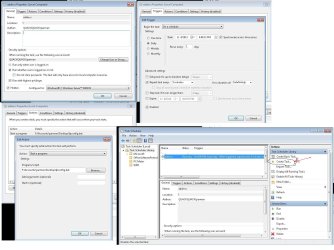
You could write a batch file that gets the ipconfig and saves it to the disk. Then setup a task schedule to run ever 5 minutes then just check the log to see if it changes.

I can write one up for you if you want.

Update just made it since i was bored.

Create a new text file then past the coded text below in and save it. Then rename it from .txt to .bat

There are a few things that can change depending on how many adapters you have.

I can modify it specify for you if you post your Ipconfig /all output.

I chose the filters the way i did because my network has multiple adapters not knowing how many will show up on the OP's i didnt want him to get lost in addresses.


Code:
echo off
ipconfig.exe /all > C:\ipconfig_output.txt
date /T >> c:\ipconfig.log 
time /T >> c:\ipconfig.log
findstr /c:"Local Area Connection:" c:\ipconfig_output.txt >> c:\ipconfig.log

findstr /c:"192.168.1" c:\ipconfig_output.txt >> c:\ipconfig.log

del c:\ipconfig_output.txt

You can also add a task that deletes the c:\ipconfig.log file so the file doesnt get to big.

Task Schedule settings.

in picture let me know if you have any issue. the file that you will need to look at for the address is c:\ipconfig.log
 

Attachments

  • task.jpg
    task.jpg
    198.8 KB · Views: 22
Last edited:

My Computer

OS
Windows 7 Ultimate x64
Nevertheless, I'd like to know if Windows 7 features a log of IP addresses used for a certain interface (WLAN in my case). Google as well as the search function of this forum didn't reveal any hints.

I do not believe that windows keeps track of IP adresses used on an interface, or for an entire machine.

Again, you could set up a scheduled task to write the IP address to a file periodically.

Tanya
 

My Computer

Computer type
PC/Desktop
Computer Manufacturer/Model Number
Home Made
OS
Linux Mint 17 Cinnamon | Win 7 Ult x64
CPU
Intel I7-3770K @ 4.2ghz
Motherboard
ASRock Extreme 4
Memory
32GB G-Skill C10Q
Graphics Card(s)
EVGA GTX 670 2GB SC
Sound Card
Creative Fatality ExtremeGamer
Monitor(s) Displays
LG E2742V x 2
Screen Resolution
1920x1080
Hard Drives
256GB Vertex 4 SSD
2TB Seagate ST2000DM001
1TB Seagate ST1000DM003
PSU
Corsair HX 650
Case
HAF 932 advanced
Cooling
Corsair H100i liquid cooler
Keyboard
Logitech Wireless
Mouse
Logitech Wireless
Internet Speed
OptusNet NBN 100/40
Antivirus
Malwarebytes
Browser
Firefox 30
Other Info
Router: Sagemcom F@st 3846 Crippled by Optus.
@parman
Thanks a lot for the script.
Will implement it on the concerned system this weekend.
Many thanks !!!

@TanyaC
Checked further ... couldn't find anything.
Seems that you are right. W7 doesn't log.

Thanks, for the help!
 

My Computer

OS
Windoes 7 Ultimate x64
If you can post an ipconfig /all output I can customize it for u
 

My Computer

OS
Windows 7 Ultimate x64
Many thanks, but I managed already!
 

My Computer

OS
Windoes 7 Ultimate x64
Thank You Parman! Exactly what I needed. I was using Automate to log into an online IP address site and then stripping out the IP Address. With a minor modification, you batch file works like a charm! :D

Code:
echo off
ipconfig.exe /all > C:\ipconfig_output.txt
date /T >> c:\ipconfig.log 
time /T >> c:\ipconfig.log
findstr /c:"Local Area Connection:" c:\ipconfig_output.txt >> c:\ipconfig.log

findstr /c:"192.168.1" c:\ipconfig_output.txt >> c:\ipconfig.log

del c:\ipconfig_output.txt

[/CODE
 

My Computer

Computer type
PC/Desktop
Computer Manufacturer/Model Number
Super Homie
OS
DOS 3.11
CPU
8086
Motherboard
Yes
Memory
128k
Graphics Card(s)
Hercules
Hard Drives
WD 30MB
Antivirus
GodMode1
Browser
Gopher
Back
Top