ipv6 no internet

Woodhouse588

New member
Local time
5:15 AM
Messages
19
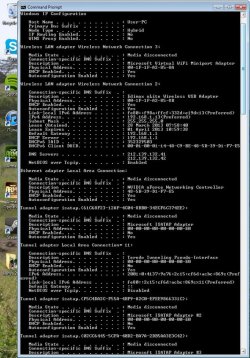
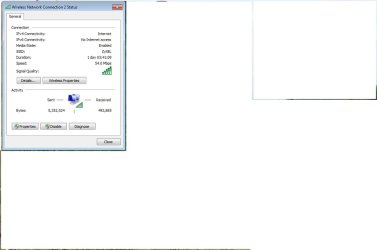
my ipv6 has no internet connection and therefore i cannot use the internet on my pc. attached screenshots of ip config and network status.
 

Attachments

  • ImageUploadedBySeven Forums1364556891.628920.jpg
    ImageUploadedBySeven Forums1364556891.628920.jpg
    131.9 KB · Views: 12
  • ImageUploadedBySeven Forums1364556917.215573.jpg
    ImageUploadedBySeven Forums1364556917.215573.jpg
    24 KB · Views: 9

My Computer

Computer type
PC/Desktop
Computer Manufacturer/Model Number
Techsonic
OS
Windows 7 home 32 bit
Memory
4gb
Everyone's computer is like that you don't need ipv6. It isn't up and running yet. That shouldn't effect your internet.
 

My Computer

Computer type
PC/Desktop
Computer Manufacturer/Model Number
Dell / Lenovo g550
OS
Windows 7 Ultimate 64-bit
CPU
Intel Core 2 Duo E6550 @2.33GHz
Motherboard
foxconn g33m02
Memory
4GB DDR"
Graphics Card(s)
NVIDIA GeForce 8600 GS
Hard Drives
HDD 1 = 150GB
HDD 2 = 1.5TB
PSU
450W
Cooling
Stock fan
Internet Speed
12Mb
Antivirus
AVG Internet Security
Please try the following commands in cmd for me.

ping www.google.ie
(post back results)
 

My Computer

Computer type
PC/Desktop
Computer Manufacturer/Model Number
Dell / Lenovo g550
OS
Windows 7 Ultimate 64-bit
CPU
Intel Core 2 Duo E6550 @2.33GHz
Motherboard
foxconn g33m02
Memory
4GB DDR"
Graphics Card(s)
NVIDIA GeForce 8600 GS
Hard Drives
HDD 1 = 150GB
HDD 2 = 1.5TB
PSU
450W
Cooling
Stock fan
Internet Speed
12Mb
Antivirus
AVG Internet Security
what commands?
 

My Computer

Computer type
PC/Desktop
Computer Manufacturer/Model Number
Techsonic
OS
Windows 7 home 32 bit
Memory
4gb
open command prompt by going to - start - all programs - accessories - command prompt

then type:

ping www.google.ie
 

My Computer

Computer type
PC/Desktop
Computer Manufacturer/Model Number
Dell / Lenovo g550
OS
Windows 7 Ultimate 64-bit
CPU
Intel Core 2 Duo E6550 @2.33GHz
Motherboard
foxconn g33m02
Memory
4GB DDR"
Graphics Card(s)
NVIDIA GeForce 8600 GS
Hard Drives
HDD 1 = 150GB
HDD 2 = 1.5TB
PSU
450W
Cooling
Stock fan
Internet Speed
12Mb
Antivirus
AVG Internet Security
my ipv6 has no internet connection and therefore i cannot use the internet on my pc. attached screenshots of ip config and network status.

IPv6 is actually used internally with Windows for a number of functions including Homegroup connectivity but it doesn't connect to the internet in the true sense. IPv4 is the one that counts and you are showing a valid IP and should be connected.

Because you are showing a valid IP here most likely your anti virus software or firewall is blocking the connection. Try disabling, reconfiguring or uninstalling your A/V software.
 

My Computer

Computer type
PC/Desktop
Computer Manufacturer/Model Number
Home built
OS
Windows 7 Ult, Windows 8.1 Pro,
CPU
Q9650-4.275GHz, E8600 4.5GHz, E6750-3.8GHz
Motherboard
Evga 780i FTW
Memory
G.Skill PC2 9600 1200Mhz 5 5 5 15 2T
Graphics Card(s)
GTX480
Sound Card
Asus Xonar D2
Monitor(s) Displays
HannsG
Screen Resolution
1680X1050
Hard Drives
GSkill Phoenix Pro 120GB SSD
PSU
ThermalTake Toughpower 1000Watt modular
Case
ThermalTake XaserV
Cooling
Xigmatek S1283
Keyboard
Logitech G15
Mouse
Logitech G9
Internet Speed
T1
Well yes it's used but you don't use it to access the internet so that wouldn't be causing no internet access. So im trying to get him to ping google.com and if that doesn't reply try get him to ping there ip address and if that replies that's going to be a dns problem
 

My Computer

Computer type
PC/Desktop
Computer Manufacturer/Model Number
Dell / Lenovo g550
OS
Windows 7 Ultimate 64-bit
CPU
Intel Core 2 Duo E6550 @2.33GHz
Motherboard
foxconn g33m02
Memory
4GB DDR"
Graphics Card(s)
NVIDIA GeForce 8600 GS
Hard Drives
HDD 1 = 150GB
HDD 2 = 1.5TB
PSU
450W
Cooling
Stock fan
Internet Speed
12Mb
Antivirus
AVG Internet Security
it said request timed out after i pinged it and said packets sent= 4 received =0 amd lost =4
 

My Computer

Computer type
PC/Desktop
Computer Manufacturer/Model Number
Techsonic
OS
Windows 7 home 32 bit
Memory
4gb
Well yes it's used but you don't use it to access the internet so that wouldn't be causing no internet access. So im trying to get him to ping google.com and if that doesn't reply try get him to ping there ip address and if that replies that's going to be a dns problem

Yes I explained that, and IPv6 is used for a variety of functions so it is required, but I'm going to stick with my original assessment of the problem. :)
 

My Computer

Computer type
PC/Desktop
Computer Manufacturer/Model Number
Home built
OS
Windows 7 Ult, Windows 8.1 Pro,
CPU
Q9650-4.275GHz, E8600 4.5GHz, E6750-3.8GHz
Motherboard
Evga 780i FTW
Memory
G.Skill PC2 9600 1200Mhz 5 5 5 15 2T
Graphics Card(s)
GTX480
Sound Card
Asus Xonar D2
Monitor(s) Displays
HannsG
Screen Resolution
1680X1050
Hard Drives
GSkill Phoenix Pro 120GB SSD
PSU
ThermalTake Toughpower 1000Watt modular
Case
ThermalTake XaserV
Cooling
Xigmatek S1283
Keyboard
Logitech G15
Mouse
Logitech G9
Internet Speed
T1
if norton is my antivirus software shall i disable it?
 

My Computer

Computer type
PC/Desktop
Computer Manufacturer/Model Number
Techsonic
OS
Windows 7 home 32 bit
Memory
4gb

My Computer

Computer type
PC/Desktop
Computer Manufacturer/Model Number
Home built
OS
Windows 7 Ult, Windows 8.1 Pro,
CPU
Q9650-4.275GHz, E8600 4.5GHz, E6750-3.8GHz
Motherboard
Evga 780i FTW
Memory
G.Skill PC2 9600 1200Mhz 5 5 5 15 2T
Graphics Card(s)
GTX480
Sound Card
Asus Xonar D2
Monitor(s) Displays
HannsG
Screen Resolution
1680X1050
Hard Drives
GSkill Phoenix Pro 120GB SSD
PSU
ThermalTake Toughpower 1000Watt modular
Case
ThermalTake XaserV
Cooling
Xigmatek S1283
Keyboard
Logitech G15
Mouse
Logitech G9
Internet Speed
T1
the whole thing or just the firewall
 

My Computer

Computer type
PC/Desktop
Computer Manufacturer/Model Number
Techsonic
OS
Windows 7 home 32 bit
Memory
4gb

My Computer

Computer type
PC/Desktop
Computer Manufacturer/Model Number
Home built
OS
Windows 7 Ult, Windows 8.1 Pro,
CPU
Q9650-4.275GHz, E8600 4.5GHz, E6750-3.8GHz
Motherboard
Evga 780i FTW
Memory
G.Skill PC2 9600 1200Mhz 5 5 5 15 2T
Graphics Card(s)
GTX480
Sound Card
Asus Xonar D2
Monitor(s) Displays
HannsG
Screen Resolution
1680X1050
Hard Drives
GSkill Phoenix Pro 120GB SSD
PSU
ThermalTake Toughpower 1000Watt modular
Case
ThermalTake XaserV
Cooling
Xigmatek S1283
Keyboard
Logitech G15
Mouse
Logitech G9
Internet Speed
T1
how should i do that, i dont no if i have to turn it all offmanually or of there is one button o can clik
 

My Computer

Computer type
PC/Desktop
Computer Manufacturer/Model Number
Techsonic
OS
Windows 7 home 32 bit
Memory
4gb
how should i do that, i dont no if i have to turn it all offmanually or of there is one button o can clik

Try starting up in safe mode with networking in that case, this will prevent Norton from starting up.

If the connection works in safe mode then you can be sure that Norton is the most likely cause of the problem.

The link that shows you how to start in safe mode is one post up.

Or here again. Safe Mode :)
 
Last edited:

My Computer

Computer type
PC/Desktop
Computer Manufacturer/Model Number
Home built
OS
Windows 7 Ult, Windows 8.1 Pro,
CPU
Q9650-4.275GHz, E8600 4.5GHz, E6750-3.8GHz
Motherboard
Evga 780i FTW
Memory
G.Skill PC2 9600 1200Mhz 5 5 5 15 2T
Graphics Card(s)
GTX480
Sound Card
Asus Xonar D2
Monitor(s) Displays
HannsG
Screen Resolution
1680X1050
Hard Drives
GSkill Phoenix Pro 120GB SSD
PSU
ThermalTake Toughpower 1000Watt modular
Case
ThermalTake XaserV
Cooling
Xigmatek S1283
Keyboard
Logitech G15
Mouse
Logitech G9
Internet Speed
T1
how do i start safe mode
 

My Computer

Computer type
PC/Desktop
Computer Manufacturer/Model Number
Techsonic
OS
Windows 7 home 32 bit
Memory
4gb
have started in safe mode and found that i cant access anythingmore than google (homepage) which i could already do. also i have been playing the game dayz and an error message came up on program for that around the same time my intenet wnent down so would uninstalling it be an option.
 

My Computer

Computer type
PC/Desktop
Computer Manufacturer/Model Number
Techsonic
OS
Windows 7 home 32 bit
Memory
4gb
Has your ISP recently done anything like replace the modem? Has this modem router combo ever provided a working connection for this machine?

This can only go to Google sites problem usually relates to the modem not being registered with your ISP or you need to use the MAC clone setting on your routers set up page.

Also try changing the security and encryption in your routers set up page, you should be using WPA2 with AES encryption although with old NIC's it may work better to use WEP security

You should call your ISP to see if they know anything about this problem.

I'm finding one other fix for this Google only problem, You could try opening an elevated command prompt, type or paste the following command

netsh interface ipv4 set sub interface wireless network connection mtu=1492 store= persistent

then hit enter you should get a ok and after that type exit, reboot and check connection.

It may also be required that Norton is uninstalled using it's special tool.
 

My Computer

Computer type
PC/Desktop
Computer Manufacturer/Model Number
Home built
OS
Windows 7 Ult, Windows 8.1 Pro,
CPU
Q9650-4.275GHz, E8600 4.5GHz, E6750-3.8GHz
Motherboard
Evga 780i FTW
Memory
G.Skill PC2 9600 1200Mhz 5 5 5 15 2T
Graphics Card(s)
GTX480
Sound Card
Asus Xonar D2
Monitor(s) Displays
HannsG
Screen Resolution
1680X1050
Hard Drives
GSkill Phoenix Pro 120GB SSD
PSU
ThermalTake Toughpower 1000Watt modular
Case
ThermalTake XaserV
Cooling
Xigmatek S1283
Keyboard
Logitech G15
Mouse
Logitech G9
Internet Speed
T1
i'm not sure how to get to my routers set up page as its wireless and not connected to the computor. i tried that commandbutnothing happened.
 

My Computer

Computer type
PC/Desktop
Computer Manufacturer/Model Number
Techsonic
OS
Windows 7 home 32 bit
Memory
4gb
when i entered the command it said the syntax supplied is not valid
 

My Computer

Computer type
PC/Desktop
Computer Manufacturer/Model Number
Techsonic
OS
Windows 7 home 32 bit
Memory
4gb
Back
Top