
IRQ Problems

xrl

New member
Local time
4:03 PM
Messages
9
Location
Sweden
Hello.. since i installed w7 RC1 i had a slow freezing cpu..

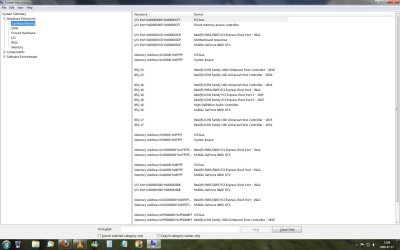
i think i have IRQ Conflicts Grafic, Audio, Motherboard, Chipset Share IRQ 16
Look picture pls =)

and the second problem i think is that i installed 2 chipset drivers.. first my old one.. then i released its a new update so 2 days after i installed that one..

Greetings xrl !
 

Attachments
  • IRQ.jpg
    IRQ.jpg
    124.7 KB · Views: 2,668

My Computer

Computer Manufacturer/Model Number
Dell Dimension 9200
OS
windows 7 RC1
CPU
Intel Duo2 E6600
Motherboard
Intel 965/G965 Express
Memory
4 GB PC5300
Graphics Card(s)
8800 GTX
Internet Speed
24/1
freezing issue

Hello.. since i installed w7 RC1 i had a slow freezing cpu..

i think i have IRQ Conflicts Grafic, Audio, Motherboard, Chipset Share IRQ 16
Look picture pls =)

and the second problem i think is that i installed 2 chipset drivers.. first my old one.. then i released its a new update so 2 days after i installed that one..

Greetings xrl !

hi and welcome

First things first we need to know your computer specs, if it was a clean install etc.

kEN
 

My Computer

Computer Manufacturer/Model Number
HP Pavillion dv-7 1005 Tx
OS
Win 8 Release candidate 8400
CPU
[email protected]
Memory
4 gigs
Graphics Card(s)
Nvidia 9600M
Sound Card
HD built-in
Monitor(s) Displays
17" Wxga
Screen Resolution
1440x900
Cooling
none
Internet Speed
45Mb down 5Mb up
yes clean install,

8800GTX Geforce
Intel Duo2 E6600
Intel P965/G965
Samsung DD2 667 MHZ 1024x4
Seagate ST3250820AS 2x 250gb

Windows 7 RC1 64 Bit Activated, All windows updates

i found something else abit wierd?
DirectX Version: DirectX 11
From DXDIAG, but no errors found..

The Errors im noticing is "not responding" for some secs time to time when i do something on the computer after that its fine again.. there isnt any big issues just small errors all the time. And
 

My Computer

Computer Manufacturer/Model Number
Dell Dimension 9200
OS
windows 7 RC1
CPU
Intel Duo2 E6600
Motherboard
Intel 965/G965 Express
Memory
4 GB PC5300
Graphics Card(s)
8800 GTX
Internet Speed
24/1
freezing problem

yes clean install,

8800GTX Geforce
Intel Duo2 E6600
Intel P965/G965
Samsung DD2 667 MHZ 1024x4
Seagate ST3250820AS 2x 250gb

Windows 7 RC1 64 Bit Activated, All windows updates

i found something else abit wierd?
DirectX Version: DirectX 11
From DXDIAG, but no errors found..

The Errors im noticing is "not responding" for some secs time to time when i do something on the computer after that its fine again.. there isnt any big issues just small errors all the time. And

Well 2 things come to mind. first 4 gigs on 4 bit isnt a ton of ram. the other things is are the mouse and keyboard wired, wireles, usb, or bluetooth?

Ken

Edit: whats the network setup like?
 
Last edited:

My Computer

Computer Manufacturer/Model Number
HP Pavillion dv-7 1005 Tx
OS
Win 8 Release candidate 8400
CPU
[email protected]
Memory
4 gigs
Graphics Card(s)
Nvidia 9600M
Sound Card
HD built-in
Monitor(s) Displays
17" Wxga
Screen Resolution
1440x900
Cooling
none
Internet Speed
45Mb down 5Mb up
32 Bit Windows 7 Beta worked very fine just to make that clear.

Mouse, Keyboard is running bluetooth USB
Network Router DI-524, Eset Smart security 64bit. Intel 82556DC Gigabite Network
 

My Computer

Computer Manufacturer/Model Number
Dell Dimension 9200
OS
windows 7 RC1
CPU
Intel Duo2 E6600
Motherboard
Intel 965/G965 Express
Memory
4 GB PC5300
Graphics Card(s)
8800 GTX
Internet Speed
24/1
bluetooth

32 Bit Windows 7 Beta worked very fine just to make that clear.

Mouse, Keyboard is running bluetooth USB
Network Router DI-524, Eset Smart security 64bit. Intel 82556DC Gigabite Network


I figured. You probably need to update the bluetooth drivers. I have been seeing bluetooth causing freezes etc. If you computer is working 100% what makes you think you have an IRQ problem?

Ken
 

My Computer

Computer Manufacturer/Model Number
HP Pavillion dv-7 1005 Tx
OS
Win 8 Release candidate 8400
CPU
[email protected]
Memory
4 gigs
Graphics Card(s)
Nvidia 9600M
Sound Card
HD built-in
Monitor(s) Displays
17" Wxga
Screen Resolution
1440x900
Cooling
none
Internet Speed
45Mb down 5Mb up
  • Like
Reactions: xrl
IRQ sharing is not an IRQ conflict. It is perfectly normal for several devices to share an IRQ. There is a slight amount of extra overhead for the devices that share an IRQ to inquire from the PCI bus if the IRQ was from the specific hardware they service or from one of the devices sharing that IRQ. If it's from a sharing partner, there is a nice system call to pass control to the next device in the sharing group. That is a feature of the PCI bus.

Since you have only 4GB of system memory, there is little advantage to running the 64-bit W7 except for the bragging rights. If 32-bit works, run that.

Bye. :cool:
 

My Computer

Computer Manufacturer/Model Number
Home Brew
OS
Windows 7 Ultimate x64
CPU
i7 970
Motherboard
ASUS Rampage III GENE
Memory
9 GB
Graphics Card(s)
9600GT
Monitor(s) Displays
dual 24" Samsung
Screen Resolution
1920x1200
Hard Drives
VelociRaptor and 4TB of Hitachi RAID 0
PSU
Thermaltake toughpower W0104RU 650W
Case
Thermaltake LANBOX Lite
Internet Speed
30 Mbps Download 1 Mbps Upload (Speedtest.com)
Ken, You mean drivers for my MX3000 key, MX 600 Mouse bluetooth drivers?
theese are up to date, hopefully you mean some other bluetooth driver?

Since it was named Conflicts/sharing
I ran into a guide for IRQ problems
M-AUDIO - Knowledge Base
"Those devices will have to share the priority when interrupting the CPU and will have to "fight" over who can talk to the CPU first. Although the sharing of IRQs is OK with most devices, it can be a problem for audio and MIDI devices"

I had my Audio and other stuffs thats why i thought it might be a problem.

Thx Crunchy Doodle for the nice information about IRQ.
I dont think its memory related if thats the case Microsoft will be ruined by angry people. I have double size of what microsoft recommends.

When i did the W7 installation i didnt totally Clean partition with 3e apps
Windows just did a quick formatation before installing.

Maybe i should just wait for W7 RTM and try that out.
But i like the idea to learn from problems to become better.
 

My Computer

Computer Manufacturer/Model Number
Dell Dimension 9200
OS
windows 7 RC1
CPU
Intel Duo2 E6600
Motherboard
Intel 965/G965 Express
Memory
4 GB PC5300
Graphics Card(s)
8800 GTX
Internet Speed
24/1
not irq conflict

Ken, You mean drivers for my MX3000 key, MX 600 Mouse bluetooth drivers?
theese are up to date, hopefully you mean some other bluetooth driver?

Since it was named Conflicts/sharing
I ran into a guide for IRQ problems
M-AUDIO - Knowledge Base
"Those devices will have to share the priority when interrupting the CPU and will have to "fight" over who can talk to the CPU first. Although the sharing of IRQs is OK with most devices, it can be a problem for audio and MIDI devices"

I had my Audio and other stuffs thats why i thought it might be a problem.

Thx Crunchy Doodle for the nice information about IRQ.
I dont think its memory related if thats the case Microsoft will be ruined by angry people. I have double size of what microsoft recommends.

When i did the W7 installation i didnt totally Clean partition with 3e apps
Windows just did a quick formatation before installing.

Maybe i should just wait for W7 RTM and try that out.
But i like the idea to learn from problems to become better.

hey

well now that its straight. since the bluetooth is current and its not irq we can start to eliminate things till we find what it is. Can you go into device manager (type device manager in search) and see if there are any errors showing. You can also go into event viewer (event viewer in search) and see if there are any errors under apps. that will tell us if something isnt working correctly. If you do fnd any errors in either could you use the snipping tool (snipping tool in search) to take a snip and upload it to us

Thanks in advance

ken
 

My Computer

Computer Manufacturer/Model Number
HP Pavillion dv-7 1005 Tx
OS
Win 8 Release candidate 8400
CPU
[email protected]
Memory
4 gigs
Graphics Card(s)
Nvidia 9600M
Sound Card
HD built-in
Monitor(s) Displays
17" Wxga
Screen Resolution
1440x900
Cooling
none
Internet Speed
45Mb down 5Mb up
By the way thx for helping!

Device manager is perfect no questions mark etc in any Sub category.

MSINFO32 shows, PNPdrivernotfound, PNP Request additional software alot.
Scripted diag failure, PCA2 Error.

Event shows

So many dont know what to post and the list is long alrdy

The device, \Device\CdRom0, has a bad block.

The device, \Device\Ide\iaStor0, did not respond within the timeout period.

A timeout (30000 milliseconds) was reached while waiting for a transaction response from the lmhosts service.

The DNS Client service depends on the NetIO Legacy TDI Support Driver service which failed to start because of the following error:

The shadow copies of volume D: were aborted because the shadow copy storage could not grow due to a user imposed limit.

A device attached to the system is not functioning.

Volume Shadow Copy Service error: Unexpected error querying for the IVssWriterCallback interface. hr = 0x80070005, Access is denied.
. This is often caused by incorrect security settings in either the writer or requestor process.

InitializePrintProvider failed for provider inetpp.dll. This can occur because of system instability or a lack of system resources.


Session "Circular Kernel Context Logger" failed to start with the following error: 0xC0000035


DCOM got error "1068" attempting to start the service netprofm with arguments "" in order to run the server:
{A47979D2-C419-11D9-A5B4-001185AD2B89}

The SMB MiniRedirector Wrapper and Engine service depends on the Redirected Buffering Sub Sysytem service which failed to start because of the following error:
A device attached to the system is not functioning.

The DHCP Client service depends on the Ancillary Function Driver for Winsock service which failed to start because of the following error:
A device attached to the system is not functioning.

The Network Location Awareness service depends on the Network Store Interface Service service which failed to start because of the following error:
The dependency service or group failed to start.

The following boot-start or system-start driver(s) failed to load:
AFD
CSC
DfsC
discache
ehdrv
NetBIOS
NetBT
nsiproxy
Psched
rdbss
spldr
tdx
Wanarpv6
WfpLwf

wlcomm (2792) C:\Users\turbo\AppData\Local\Microsoft\Windows Live Contacts\{803d488e-6bd0-425a-bf4d-02034617e696}\: A request to read from the file "C:\Users\turbo\AppData\Local\Microsoft\Windows Live Contacts\{803d488e-6bd0-425a-bf4d-02034617e696}\DBStore\contacts.edb" at offset 7577600 (0x000000000073a000) for 8192 (0x00002000) bytes succeeded, but took an abnormally long time (1523 seconds) to be serviced by the OS. This problem is likely due to faulty hardware

Windows detected your registry file is still in use by other applications or services. The file will be unloaded now. The applications or services that hold your registry file may not function properly afterwards.

DETAIL -
1 user registry handles leaked from \Registry\User\S-1-5-21-3887792266-1183097629-180639610-1000_Classes:
Process 2800 (\Device\HarddiskVolume4\Windows\System32\svchost.exe) has opened key \REGISTRY\USER\S-1-5-21-3887792266-1183097629-180639610-1000_CLASSES


/ Robin
 
Last edited:

My Computer

Computer Manufacturer/Model Number
Dell Dimension 9200
OS
windows 7 RC1
CPU
Intel Duo2 E6600
Motherboard
Intel 965/G965 Express
Memory
4 GB PC5300
Graphics Card(s)
8800 GTX
Internet Speed
24/1
Back
Top