Is anyone still using Windows 7?

Unfortunately both my credit unions now got a stick up their butts and have basically froze me out of online banking. With my previous credit union (Patelco), all I needed user name and password. With these two the latest&greatest browser is required, and I was unable to install Firefox 115 even temporarily on either LiveCDs. Tried to circumvent it by using the library computer, which worked, but then I found out the next hurdle was I had to play Secret Agent/I Spy with them. They required me to get a super-top-secret-ultra-classified-your-eyes-only code by text. Yeah, don't have a text phone, nor will I ever, so that was the dealbreaker.

I can however still do online shopping with Linux LiveCDs.
Some might say 'tuff titty' for me because I don't want to get with the times. Others might tell me to shut up and stop whining just because I don't want to get with the program and shell out the clams for the latest gimmick going. My point is that I happen to be the end user here. That makes me the paying customer. The tree should bend to me — not me to the tree. OMGG some people talk like tech is their Lord and Master when it was made by man, designed to serve mankind.

I greatly value this thing called Liberty and part of maintaining it is maintaining one's options. When we start running out of choices we begin to lose this and we are in danger of becoming monopolized. Recently this year I could not log into my PayPal account because I didn't own a cell. I called PayPal about this and finally found a way to speak with a genuine, flesh and blood human being there. They verified that this was the standard policy now and insisted that they could not help me if I didn't have access to a cell phone. I asked if our conversation was being recorded and I was assured that it was. Then I stated that this is good because I want it on record that I think PayPal is cutting the nose off their own face by excluding people without cell phones in this manner and that I was surprised that in this age of technology that they would be so inflexible. "Sir," she said, "I'm sorry but I cannot help you." "On the contrary," I said, "you can make sure that your superiors get this recording so that they can make better business decisions." I went on further to state that not even Microsoft does this to people. That they provide options for verification and authentication.

Yeah, some here might tell me to shut up, but they're missing out on something of fundamental importance: Liberty. As natural living, breathing creatures we need to keep our options open to us. We are not cyborgs. (Although I'm beginning to wonder about some people.) If people like me don't stand up and speak up we will all fall under the blanket of monopolistic tyranny and become the servants of those who claim to serve us. I'm not about to pay a monopoly to do that to me.

Change doesn't happen when people shut up and put up with blatant and callous behaviour. A corporation only understands the language of money. So I spoke PayPal's language and stopped using them. Now I realize I'm not alone here. An amazing thing happened this week. It would seem that PayPal finally got the message and made an alternative way to verify ones account so that one could access it online. This is news. I have yet to try this but my wife verified it and she's been trying to access her PayPal account online for over a year now. So yes, it really does pay to COMPLAIN, BROADCAST, and EXPOSE those things that are less than advantageous to a paying customer and to make one's views known.

I'm happy to learn that Linux still provides you with an option. I don't recommend using a public network for financial transactions and you really should not have to. Often times what is being passed off as "progress" is really just a means of bringing we, the plebs, under the thumb of a tyrant. Call your credit union and tell them what you think. There is a difference between service and dis-service. Limiting authentication to cell phone technology is flat-out lazy dis-service on the part of those with the money and means to be flexible.

- - - Updated - - -

Firefox works fine for me.

My favourite browser, my friend! ;)
 

My Computers

System One System Two

  • Computer type
    PC/Desktop
    Computer Manufacturer/Model Number
    ASUS CUSTOM BUILD IN THERMALTAKE LEVEL 10 GT CASE
    OS
    Windows 7 Ultimate, Windows 8.1 Pro, Linux Mint/Cinnimon (Triple Boot)
    CPU
    INTEL 6900K
    Motherboard
    X99-E WS USB 3.1
    Memory
    CORSAIR DOMINATOR PLATINUM 128GB
    Graphics Card(s)
    EVGA GTX 1070 FTW
    Sound Card
    Onboard Crystal Sound - very nice ;)
    Monitor(s) Displays
    SAMSUNG 4K 28"
    Screen Resolution
    3140 x 2160 - A little extreme. Need to change it.
    Hard Drives
    1) LSI LOGICAL VOLUME RAID 10 (250 GBX4) SSD ARRAY
    2) INTEL RAID 0 KINGSTON (2) SSD ARRAY
    3) INTEL RAID 1 SEAGATE (2) 1TB ARRAY (secured backup)
    4) INTEL RAID 1 SEAGATE HYBRID (2) (secure secured backup)
    5) AHCI SEAGATE 3TB (1) BACKUP & STORAGE (back
    PSU
    CORSAIR HX 1000i
    Case
    THERMAL TAKE LEVEL 10 GT
    Cooling
    NOCTUA TOWER COOLING - PUSH/PULL
    Keyboard
    LOGITECH PRODIGY (One day I'll get a real keyboard.)
    Mouse
    LOGITECH (One day I'll get a real mouse.)
    Internet Speed
    300 Gb down 12 up Intel(R) I210 Gigabit Network Connection
    Antivirus
    several - Network implementing vs from other PCs - ask me
    Browser
    Mostly FireFox these days
    Other Info
    NOT ENOUGH ROOM TO LIST ALL HARD DRIVES HERE. Cuts me off at 5. Did you know that if you run a network you can scan your PC for viruses via other PCs using several different virus scanners? No virus scanner gets it all. This is narrows down the window for contracting a virus. By using multiple operating systems you can use different virus scanners with no risk of conflict.
  • Antivirus
    KASPERSKY
Unfortunately both my credit unions now got a stick up their butts and have basically froze me out of online banking. With my previous credit union (Patelco), all I needed user name and password. With these two the latest&greatest browser is required

Are those CU websites malfunctioning or freezing with your chosen browser? Or are they merely doing a browser check and refusing to let you continue? If the latter, you might want to try using Ray's "User-Agent Switcher and Manager" extension, available for both Chrome and Firefox. (Warning: if you do a search, there are multiple extensions with the same name, so the one I'm talking about is authored by the developer "Ray".)

"User-Agent Switcher and Manager" works by masquerading your OS and browser versions to make websites think you're using a different version of Windows and/or a different browser version. This has allowed me to continue using my favorite, locked-down OS and browser version with my bank and credit card websites.

Aside: I also have a Patelco account, which I've kept even though I've recently moved out of their service area. I've been a long-time fan of Patelco because they're the only financial institution I've had experience with that supports proper TOTP authenticator apps (like Authy, WinAuth, Google Authenticator, et al). Most financial sites only support the less secure SMS authentication, if at all. With Patelco, I can use TOTP authentication from my desktop without requiring a smartphone.

I opened a new CU account local to my new state, but not only do they support no form of 2FA at all, their Bill Pay functions are farmed out to some rando third-party website with its own login. That's not gonna happen, so I'm still looking for alternatives.
 

My Computer

Computer type
PC/Desktop
Computer Manufacturer/Model Number
Dell Optiplex 7050
OS
Windows 7/8.1/10 multiboot
CPU
Intel Core i7-7700
Motherboard
Dell, Intel Q270 chipset
Memory
48GB (2x16GB Crucial DDR4-3200 + 2x8GB Hynix DDR4-2400)
Graphics Card(s)
Intel HD630 + AMD Radeon R7 450 PCIe
Monitor(s) Displays
Asus VC279 (27")
Screen Resolution
1920x1080
Hard Drives
Toshiba M.2 NVMe (256GB),
Samsung 960 Evo (500GB),
WD Red Plus 80EFBX (8TB)
Are those CU websites malfunctioning or freezing with your chosen browser? Or are they merely doing a browser check and refusing to let you continue? If the latter, you might want to try using Ray's "User-Agent Switcher and Manager" extension, available for both Chrome and Firefox. (Warning: if you do a search, there are multiple extensions with the same name, so the one I'm talking about is authored by the developer "Ray".)

"User-Agent Switcher and Manager" works by masquerading your OS and browser versions to make websites think you're using a different version of Windows and/or a different browser version. This has allowed me to continue using my favorite, locked-down OS and browser version with my bank and credit card websites.

Aside: I also have a Patelco account, which I've kept even though I've recently moved out of their service area. I've been a long-time fan of Patelco because they're the only financial institution I've had experience with that supports proper TOTP authenticator apps (like Authy, WinAuth, Google Authenticator, et al). Most financial sites only support the less secure SMS authentication, if at all. With Patelco, I can use TOTP authentication from my desktop without requiring a smartphone.

I opened a new CU account local to my new state, but not only do they support no form of 2FA at all, their Bill Pay functions are farmed out to some rando third-party website with its own login. That's not gonna happen, so I'm still looking for alternatives.

I hate to say it, but I don't have these sorts of issues with FireFox on Linux Mint. There really should be a difference between secure and convenient vs frustrating and ridiculous. I refuse to use the GOOGLE browser for ethical reasons. They'll tell everyone else not to be evil while they endeavour to become world leader in spyware. They've already come up with a nasty way to put TPM requirements to work for them and to censor any potential competition. They really don't care about the end user.

Web Environment Integrity Must Be Stopped: Enslavement By "Remote Attestation" - Jody Bruchon Tech - YouTube


My Computers

System One System Two

  • Computer type
    PC/Desktop
    Computer Manufacturer/Model Number
    ASUS CUSTOM BUILD IN THERMALTAKE LEVEL 10 GT CASE
    OS
    Windows 7 Ultimate, Windows 8.1 Pro, Linux Mint/Cinnimon (Triple Boot)
    CPU
    INTEL 6900K
    Motherboard
    X99-E WS USB 3.1
    Memory
    CORSAIR DOMINATOR PLATINUM 128GB
    Graphics Card(s)
    EVGA GTX 1070 FTW
    Sound Card
    Onboard Crystal Sound - very nice ;)
    Monitor(s) Displays
    SAMSUNG 4K 28"
    Screen Resolution
    3140 x 2160 - A little extreme. Need to change it.
    Hard Drives
    1) LSI LOGICAL VOLUME RAID 10 (250 GBX4) SSD ARRAY
    2) INTEL RAID 0 KINGSTON (2) SSD ARRAY
    3) INTEL RAID 1 SEAGATE (2) 1TB ARRAY (secured backup)
    4) INTEL RAID 1 SEAGATE HYBRID (2) (secure secured backup)
    5) AHCI SEAGATE 3TB (1) BACKUP & STORAGE (back
    PSU
    CORSAIR HX 1000i
    Case
    THERMAL TAKE LEVEL 10 GT
    Cooling
    NOCTUA TOWER COOLING - PUSH/PULL
    Keyboard
    LOGITECH PRODIGY (One day I'll get a real keyboard.)
    Mouse
    LOGITECH (One day I'll get a real mouse.)
    Internet Speed
    300 Gb down 12 up Intel(R) I210 Gigabit Network Connection
    Antivirus
    several - Network implementing vs from other PCs - ask me
    Browser
    Mostly FireFox these days
    Other Info
    NOT ENOUGH ROOM TO LIST ALL HARD DRIVES HERE. Cuts me off at 5. Did you know that if you run a network you can scan your PC for viruses via other PCs using several different virus scanners? No virus scanner gets it all. This is narrows down the window for contracting a virus. By using multiple operating systems you can use different virus scanners with no risk of conflict.
  • Antivirus
    KASPERSKY
Windows 7 is still my primary operating system. I just prefer it. I have a notebook with Windows 10 and I think it's inferior. XP is also a good platform. I still use Lotus... am I considered a technological neanderthal or cro-magnon?
 

My Computers

System One System Two

  • Computer type
    PC/Desktop
    Computer Manufacturer/Model Number
    Gateway SX2803
    OS
    Windows 7 Home Premium 64 bit Service Pack 1
    CPU
    Pentium Dual-Core E5800 @ 3.20GHz 3.20GHz
    Memory
    6.00 GB
    Graphics Card(s)
    Intel G45/G43 Express Chipset
    Monitor(s) Displays
    Dell E207WFP
    Internet Speed
    1.0 GB
  • Computer type
    PC/Desktop
    System Manufacturer/Model Number
    eMachine T3095
    OS
    XP SP3
    CPU
    AMD Athlon Clock Rate 1191MHz
    Motherboard
    C255346807
    Memory
    704 MB
    Graphics Card(s)
    NVIDIA GeoForce4 MX In GPU VMem 65344KB
    Sound Card
    nForce 6-Channel/Audio
    Monitor(s) Displays
    DELL 174FPC
    Screen Resolution
    1024 by 768
    Hard Drives
    Disk C: NTFS 70.7 GB
    Disk D: NTFS 37.25 GB
My main desktop has Windows 10 Pro while my main laptop has Windows 11 Pro. However, I still have some old computers with Windows XP and Windows 7. These old computers are just to play around with and not used every day like my Windows 10 & 11 ones are.
 

My Computers

System One System Two

  • Computer type
    PC/Desktop
    Computer Manufacturer/Model Number
    Custom build
    OS
    Windows 7 Home Premium 64-bits
    CPU
    AMD FX-8350
    Motherboard
    Gigabyte GA-990FXA-UD3 (AM3+)
    Memory
    GSKILL Ripjaw-X PC3 12800 8GB (2x4GB)
    Graphics Card(s)
    ASUS ROG STRIX GTX 1060 6GB
    Sound Card
    Integrated
    Monitor(s) Displays
    Asus VE228H (21.5-in)
    Screen Resolution
    1920x1080 60Hz
    Hard Drives
    SAMSUNG 870 EVO 2.5 Inch SATA SSD (1TB)
    SAMSUNG 870 EVO 2.5 Inch SATA SSD (1TB)
    SAMSUNG 870 EVO 2.5 Inch SATA SSD (1TB)
    PSU
    Corsair RM750x (750 watts)
    Case
    Corsair Carbide Series 200R
    Cooling
    Corsair Hydro Series H60 (CWCH60)
    Keyboard
    Logitech Elite
    Mouse
    Logitech M510 Wireless Mouse
    Internet Speed
    Comcast Gigabit Extra (1200Mbps down / 35Mbps up)
    Antivirus
    Malwarebytes
    Browser
    Firefox, Edge, Chrome
    Other Info
    ASUS DRW-24B1ST DVD-RW (24X) optical drive
    Seagate Expansion Desk (5TB) external SATA/USB HDD
    Comcast XB8 Internet Gateway
  • Computer type
    PC/Desktop
    System Manufacturer/Model Number
    Custom
    OS
    Windows 7 Pro (64-bit)
    CPU
    AMD Phenom II 960T X4
    Motherboard
    ASUS M4N82 Deluxe
    Memory
    Corsair XMS2 DDR2-800 8GB (4x2GB)
    Graphics Card(s)
    ASUS ENGTX560 DCII OC/2DI/1GD5 1GB
    Monitor(s) Displays
    Samsung 930B 19-inch LCD
    Screen Resolution
    1280x1024
    Hard Drives
    Samsung SSD 870 EVO 1000 GB (Windows 10)
    Seagate ST1000DM003 1000 GB (Windows 7)
    PSU
    Antec TruePower (new) TP-650
    Case
    Antec Three Hundred
    Cooling
    AMD stock cooler from FX8350
    Mouse
    Logitech M100
    Internet Speed
    Xfinity Gigabit Extra 1200/35 Mbps
Hello everyone, I still use Windows 7 and like plan to keep using it for daily browsing.

Bitdefender will stop supporting 7 in January, haven't heard about the others. What antivirus do you use or plan to use in the future? Or what else do you plan to do with regards security.

I wonder if any browers will continue to support 7 with updates after Firefox ends in 2024. Such as Waterfox, I suppose not as they hobble along after FF.

(Off Topic) Mister Ed was a great old show.
 

My Computers

System One System Two

  • Computer type
    PC/Desktop
    OS
    Windows 7 Pro 64 bit
    Browser
    Firefox
  • Computer type
    PC/Desktop
I hadn't heard that Firefox is ending!
 

My Computers

System One System Two

  • Computer type
    PC/Desktop
    Computer Manufacturer/Model Number
    Gateway SX2803
    OS
    Windows 7 Home Premium 64 bit Service Pack 1
    CPU
    Pentium Dual-Core E5800 @ 3.20GHz 3.20GHz
    Memory
    6.00 GB
    Graphics Card(s)
    Intel G45/G43 Express Chipset
    Monitor(s) Displays
    Dell E207WFP
    Internet Speed
    1.0 GB
  • Computer type
    PC/Desktop
    System Manufacturer/Model Number
    eMachine T3095
    OS
    XP SP3
    CPU
    AMD Athlon Clock Rate 1191MHz
    Motherboard
    C255346807
    Memory
    704 MB
    Graphics Card(s)
    NVIDIA GeoForce4 MX In GPU VMem 65344KB
    Sound Card
    nForce 6-Channel/Audio
    Monitor(s) Displays
    DELL 174FPC
    Screen Resolution
    1024 by 768
    Hard Drives
    Disk C: NTFS 70.7 GB
    Disk D: NTFS 37.25 GB
The issue I keep running-into is when I pull-up my bank login screen it says "we'll be ending our support of your browser unless you update it" and at least with one bank I've now seen this with Firefox, Brave, and yesterday I tried Pale Moon (no dice). So I'm looking now for a browser that appears "up to date" to these sites and yet works with Windows 7.
 

My Computer

Computer type
Laptop
Computer Manufacturer/Model Number
Dell Latitude E6540 Laptop
OS
Windows 7 Professional 64bit
CPU
Intel Core i7 4600M @ 2.90GHz
Motherboard
Dell Inc. 0CYT5F (SOCKET 0)
Memory
16.0GB Dual-Channel DDR3 @ 797MHz (11-11-11-28)
Graphics Card(s)
Intel HD Graphics 4600 (Dell) 2048MB ATI AMD Radeon HD 8790M
Sound Card
Realtek High Definition Audio
Monitor(s) Displays
HP ZR30w (2560x1600@60Hz)
Hard Drives
256GB LITEONIT LMT-256M6M-41 mm SATA (SSD)
1TB Samsung SSD 860 EVO mSATA SATA (SSD)
2TB USB 3.0 USB Device
115GB SanDisk Ultra Fit USB
Other Info
Multiple Dell E-Port Plus II Port Replicator/Docking Stations 0Y72NH USB 3.0 + 130W AC Adapters
The issue I keep running-into is when I pull-up my bank login screen it says "we'll be ending our support of your browser unless you update it" and at least with one bank I've now seen this with Firefox, Brave, and yesterday I tried Pale Moon (no dice). So I'm looking now for a browser that appears "up to date" to these sites and yet works with Windows 7.

I used to get that kind of message from my bank. Have you tried the "User-Agent Switcher and Manager" extension I mentioned above? It allows you to change your browser's HTTP header data to mimic a variety of different browsers, browser versions, and OS versions. My bank now quite happily thinks I'm using a different OS and browser version.

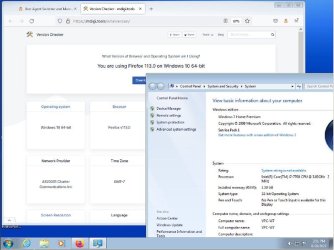
For example, here's an screenshot (in a VM to avoid accidental PII for illustration purposes) of 32-bit Windows 7 running Firefox 99, but websites think it's 64-bit Win 10 running FF 113. If you wanted, you could even make the website think you were on a Mac, iPhone, Android, linux, and more, running Safari, Chrome, Opera, et al.
 

Attachments

  • 800.jpg
    800.jpg
    79.9 KB · Views: 1

My Computer

Computer type
PC/Desktop
Computer Manufacturer/Model Number
Dell Optiplex 7050
OS
Windows 7/8.1/10 multiboot
CPU
Intel Core i7-7700
Motherboard
Dell, Intel Q270 chipset
Memory
48GB (2x16GB Crucial DDR4-3200 + 2x8GB Hynix DDR4-2400)
Graphics Card(s)
Intel HD630 + AMD Radeon R7 450 PCIe
Monitor(s) Displays
Asus VC279 (27")
Screen Resolution
1920x1080
Hard Drives
Toshiba M.2 NVMe (256GB),
Samsung 960 Evo (500GB),
WD Red Plus 80EFBX (8TB)
[MENTION=255879]dg1261[/MENTION]

Interesting posts on User-Agent.

Thanks for the information
 

My Computer

Computer type
Laptop
Computer Manufacturer/Model Number
HP 250 G7
OS
Windows 7 Pro x64
CPU
Intel i5-8265U
Motherboard
Intel Coffee Lake
Memory
8gb
Graphics Card(s)
Intel Iris Plus 655
Sound Card
Realtek HDA
Monitor(s) Displays
Generic
Screen Resolution
1366 x 768
Hard Drives
Crucial P5 NVMe 1Tb internal
WD's 4Tb, 3Tb, 2 x 2Tb external
Mouse
Logi wireless
Internet Speed
45 Mbps
Antivirus
AVG
Browser
Firefox 88, Pale Moon 29, Brave 129
Other Info
Combination of i5-8265U with Crucial P5 achieves Crystal Bench scores > 5000

Iris Plus GPU (Whiskey Lake) driver from BioStar

HP 250 G7 is a budget machine
I used to get that kind of message from my bank. Have you tried the "User-Agent Switcher and Manager" extension I mentioned above? It allows you to change your browser's HTTP header data to mimic a variety of different browsers, browser versions, and OS versions. My bank now quite happily thinks I'm using a different OS and browser version...
Not only did I overlook your first post about this, but I missed the above until just now too! :o

It took me a bit to decipher its operation but once I got it running and selected the "latest Firefox" with it, I can now goto my bank and not get the "You're soon to be screwed" message!

Thank you.
 

My Computer

Computer type
Laptop
Computer Manufacturer/Model Number
Dell Latitude E6540 Laptop
OS
Windows 7 Professional 64bit
CPU
Intel Core i7 4600M @ 2.90GHz
Motherboard
Dell Inc. 0CYT5F (SOCKET 0)
Memory
16.0GB Dual-Channel DDR3 @ 797MHz (11-11-11-28)
Graphics Card(s)
Intel HD Graphics 4600 (Dell) 2048MB ATI AMD Radeon HD 8790M
Sound Card
Realtek High Definition Audio
Monitor(s) Displays
HP ZR30w (2560x1600@60Hz)
Hard Drives
256GB LITEONIT LMT-256M6M-41 mm SATA (SSD)
1TB Samsung SSD 860 EVO mSATA SATA (SSD)
2TB USB 3.0 USB Device
115GB SanDisk Ultra Fit USB
Other Info
Multiple Dell E-Port Plus II Port Replicator/Docking Stations 0Y72NH USB 3.0 + 130W AC Adapters
Yes, I see a lot of people still use it,
 

My Computers

System One System Two

  • Computer type
    PC/Desktop
    Computer Manufacturer/Model Number
    HP
    OS
    Windows 7 Professional 64-bit
    CPU
    Amd Ryzen 5 3500U with Radeon Vega Mobile GFX
    Motherboard
    N/A
    Memory
    8 GB of RAM
    Graphics Card(s)
    Amd Ryzen 5 3500U Radeon vega Mobile GFX
    Hard Drives
    Samsung NVMe

    Western Digital hard Drive
    Antivirus
    Kaspersky Premium
    Browser
    Mozzila Firefox
  • Computer type
    PC/Desktop
    Antivirus
    Kaspersky Premium
Well the issue is everyone expects everyone else to immediately jump on the bandwagon with every new tech advancement, be conversant with it, and want to use it. People look at me with astonishment when they find I do not carry this alleged "smart" phone around with me (I have never taken a photo with it, nor made a video or gone online, for me it is just a telephone ...and it most certainly is not smart).
Simply registering at a website has become an onerous and invasive procedure, much less accessing a bank or credit card site. I've leased commercial property with less trouble than getting an account balance online.
pay_bills.jpg
 

My Computers

System One System Two

  • Computer type
    PC/Desktop
    Computer Manufacturer/Model Number
    custom
    OS
    win7 Pro SP1 x86
    CPU
    64x2 6000+
    Motherboard
    winfast
    Memory
    2gig
    Graphics Card(s)
    GTX950
    Antivirus
    Avast
    Browser
    Brave
  • Computer type
    PC/Desktop
    Antivirus
    Avast
Say what?

Yes!
 

My Computer

Computer type
PC/Desktop
Computer Manufacturer/Model Number
Two HP Desktops. One in the Laundry Room / Bed Room.
OS
Microsoft Windows 7 Professional 64-bit 7601 Multiprocessor Free Service Pack 1
CPU
Intel(R) Core(TM) i7-3770 CPU @ 3.40GHz
Motherboard
Hewlett-Packard 3396
Memory
8.00 GB
Graphics Card(s)
Intel(R) HD Graphics 4000
Sound Card
(1) Realtek High Definition Audio (2) Intel(R) Display Aud
Monitor(s) Displays
Hanns-G
Screen Resolution
1440 x 900 x 32 bits (4294967296 colors) @ 59 Hz
Hard Drives
(1) ATA WDC WD40EZRX-00S SCSI Disk Device (2) HP Officejet Pro 86 USB Device (3) WD My Book 1230 USB Device
PSU
Whatever came with the CMT.
Case
HP CMT Black.
Cooling
Whatever came with the CMT.
Keyboard
Logitech K740.
Mouse
Microsoft Optical Mouse 1000.
Internet Speed
Spectrum 25Mbs.
Antivirus
WebRoot, Microsoft Security Essentials.
Browser
EDGE
Other Info
HP Officejet Pro 8600 Plus.
WD MyBook 4TB.
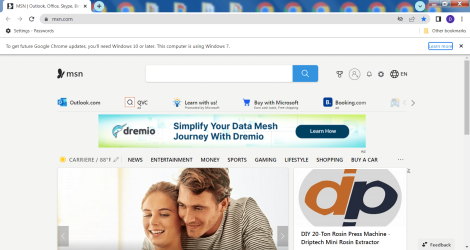
Howcan I get rid of this annoying notice concerning Win 10 update at the top of the page?
image.png
 

My Computer

Computer type
PC/Desktop
Computer Manufacturer/Model Number
HP
OS
Win 7 Home Premium 64 bit
Antivirus
Windows defender
Browser
IE 11

My Computers

System One System Two

  • Computer type
    PC/Desktop
    Computer Manufacturer/Model Number
    custom build
    OS
    Windows 7 HP 64
    CPU
    i5 6600K - 800MHz to 4200MHz
    Motherboard
    GA-Z170-HD3P
    Memory
    4+4G GSkill DDR4 3000
    Graphics Card(s)
    IG - Intel 530
    Monitor(s) Displays
    Samsung 226BW
    Screen Resolution
    1680x1050
    Hard Drives
    (1) -1 SM951 – 128GB M.2 AHCI PCIe SSD drive for Windows 7 and Lubuntu
    (2) -1 WD SATA 3 - 1T for Data
    (3) -1 WD SATA 3 - 1T for backup
    PSU
    Thermaltake 450W TR2 gold
    Keyboard
    Old and good Chicony mechanical keyboard
    Mouse
    Logitech mX performance - 9 buttons (had to disable some)
    Internet Speed
    500Mb/s
    Browser
    Firefox 64
    Other Info
    TinyWall firewall
  • Computer type
    Laptop
    System Manufacturer/Model Number
    Asus Q550LF
    OS
    Windows 7 Pro
    CPU
    i7-4500U 800MHz to 3.0GHz
    Motherboard
    Asus Q550LF
    Memory
    (4+4)G DDR3 1600
    Graphics Card(s)
    IG intel 4400 + NVIDIA GeForce GT 745M
    Sound Card
    Realtek
    Monitor(s) Displays
    LG Display LP156WF4-SPH1
    Screen Resolution
    1920 x 1080
    Hard Drives
    BX500 120G SSD for Windows and programs +
    1T HDD for data
    Internet Speed
    500 Mb/s
    Browser
    Firefox
    Other Info
    TinyWall firewall
I have IBM 286's with DOS v3.2 up to Win7 Pro that was upgraded from Vista...and that's far enough at my age. That stuff from the '70's still works as it did when it was new...5 1/4" floppy's and 10Mb hard drives...you can "feel" the computing power right through the table-top !
 

My Computers

System One System Two

  • Computer type
    Laptop
    Computer Manufacturer/Model Number
    Dell Latitude E6400
    OS
    Windows 7 professional x64 bit
    CPU
    Dual core
    Memory
    4 Gb
    Hard Drives
    WD Scopio black 320 Gb
    Antivirus
    none
    Browser
    Chrome; Edge; Fox
  • Computer type
    PC/Desktop
"Call for Pall Mall"!

Hey Pall, I didn't realize there were others out there with "vintage" tin.
I do also but never tried installing Windows on it.
I'm "vintage" 1944 and if GOD allows, I'll give W7 a try.
I'm worried however that I might not have enough strength to actuate the Power Switch.
They were monsters!

Best regards,

Mike Lynch
 

My Computer

Computer type
PC/Desktop
Computer Manufacturer/Model Number
Two HP Desktops. One in the Laundry Room / Bed Room.
OS
Microsoft Windows 7 Professional 64-bit 7601 Multiprocessor Free Service Pack 1
CPU
Intel(R) Core(TM) i7-3770 CPU @ 3.40GHz
Motherboard
Hewlett-Packard 3396
Memory
8.00 GB
Graphics Card(s)
Intel(R) HD Graphics 4000
Sound Card
(1) Realtek High Definition Audio (2) Intel(R) Display Aud
Monitor(s) Displays
Hanns-G
Screen Resolution
1440 x 900 x 32 bits (4294967296 colors) @ 59 Hz
Hard Drives
(1) ATA WDC WD40EZRX-00S SCSI Disk Device (2) HP Officejet Pro 86 USB Device (3) WD My Book 1230 USB Device
PSU
Whatever came with the CMT.
Case
HP CMT Black.
Cooling
Whatever came with the CMT.
Keyboard
Logitech K740.
Mouse
Microsoft Optical Mouse 1000.
Internet Speed
Spectrum 25Mbs.
Antivirus
WebRoot, Microsoft Security Essentials.
Browser
EDGE
Other Info
HP Officejet Pro 8600 Plus.
WD MyBook 4TB.
I have IBM 286's with DOS v3.2 up to Win7 Pro that was upgraded from Vista...and that's far enough at my age. That stuff from the '70's still works as it did when it was new...5 1/4" floppy's and 10Mb hard drives...you can "feel" the computing power right through the table-top !
You must be thinking about the 1980's...

The first microcomputer was the Altair 8800 in 1975. I never used one but did get to use a couple IMSAI 8080s where I worked. They had dual 8-inch floppy drives. They also had 10MB (5MB fixed/5MB removable) hard drives. BTW, the hard drives were about 2/3 the size of a washing machine.

The IBM PC didn't come out until 1981. They came with 5-1/4 inch floppy drives. Most people probably didn't use hard drives for a few years because they were very expensive then. The IBM PC/AT that came out in 1984 did come with a 20MB hard drive. It was very expensive at $6000 which was a lot of money back then.
 

My Computers

System One System Two

  • Computer type
    PC/Desktop
    Computer Manufacturer/Model Number
    Custom build
    OS
    Windows 7 Home Premium 64-bits
    CPU
    AMD FX-8350
    Motherboard
    Gigabyte GA-990FXA-UD3 (AM3+)
    Memory
    GSKILL Ripjaw-X PC3 12800 8GB (2x4GB)
    Graphics Card(s)
    ASUS ROG STRIX GTX 1060 6GB
    Sound Card
    Integrated
    Monitor(s) Displays
    Asus VE228H (21.5-in)
    Screen Resolution
    1920x1080 60Hz
    Hard Drives
    SAMSUNG 870 EVO 2.5 Inch SATA SSD (1TB)
    SAMSUNG 870 EVO 2.5 Inch SATA SSD (1TB)
    SAMSUNG 870 EVO 2.5 Inch SATA SSD (1TB)
    PSU
    Corsair RM750x (750 watts)
    Case
    Corsair Carbide Series 200R
    Cooling
    Corsair Hydro Series H60 (CWCH60)
    Keyboard
    Logitech Elite
    Mouse
    Logitech M510 Wireless Mouse
    Internet Speed
    Comcast Gigabit Extra (1200Mbps down / 35Mbps up)
    Antivirus
    Malwarebytes
    Browser
    Firefox, Edge, Chrome
    Other Info
    ASUS DRW-24B1ST DVD-RW (24X) optical drive
    Seagate Expansion Desk (5TB) external SATA/USB HDD
    Comcast XB8 Internet Gateway
  • Computer type
    PC/Desktop
    System Manufacturer/Model Number
    Custom
    OS
    Windows 7 Pro (64-bit)
    CPU
    AMD Phenom II 960T X4
    Motherboard
    ASUS M4N82 Deluxe
    Memory
    Corsair XMS2 DDR2-800 8GB (4x2GB)
    Graphics Card(s)
    ASUS ENGTX560 DCII OC/2DI/1GD5 1GB
    Monitor(s) Displays
    Samsung 930B 19-inch LCD
    Screen Resolution
    1280x1024
    Hard Drives
    Samsung SSD 870 EVO 1000 GB (Windows 10)
    Seagate ST1000DM003 1000 GB (Windows 7)
    PSU
    Antec TruePower (new) TP-650
    Case
    Antec Three Hundred
    Cooling
    AMD stock cooler from FX8350
    Mouse
    Logitech M100
    Internet Speed
    Xfinity Gigabit Extra 1200/35 Mbps
Back
Top