Is anyone still using Windows 7?

Thanks SIW2, I'll look for those. So, pretty much any 300 series should be OK?

- - - Updated - - -

Yes as far as I know all the intel 300 series consumer motherboards work fine. If it comes with a wifi card that might not have win7 drivers ( e.g. ac9560) but they can be changed with a cheap card that does support win7 for about a fiver.
Canonkong : replace the WiFi card with 8260/8265AC,RTL8822CE,Killer 1535 which can work on win7.


If you don't use wifi it is irrelevant.
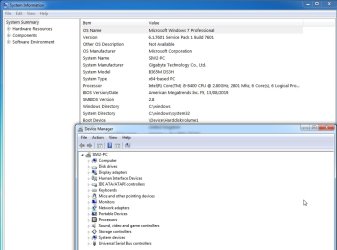

b365-msinfo32.jpg
 
Last edited:

My Computers My Computers

System One System Two

  • Computer type
    PC/Desktop
    OS
    7 X64
    CPU
    i5 8400
    Motherboard
    gigabyte b365m ds3h
    Memory
    2x8gb 3200mhz
    Hard Drives
    various
    PSU
    pure power 11 400w cm
    Case
    Coolermaster
    Cooling
    cryorig m9i
  • Computer type
    PC/Desktop
    OS
    7x64
    CPU
    g5400
    Motherboard
    ga b365m ds3h
    Memory
    8gb ddr4 2400
    PSU
    xfx pro 450w
It you extract from he wireless driver in a folder, you could try manually force it in Device Manager. It might work and only the installer being incompatible with Windows 7.
 

My Computer My Computer

Computer type
PC/Desktop
Computer Manufacturer/Model Number
custom
OS
Windows 7 Ultimate 64-bit (now 11 24H2)
CPU
Intel Core-i3 3770 3.5GHz
Motherboard
Asus P8H61
Memory
16GB DDR3 1600Mhz
Graphics Card(s)
nVidia Geforce RTX 3050
Sound Card
Realtek HD audio
Monitor(s) Displays
Sony 19" LCD TV via VGA
Screen Resolution
1440x900
Hard Drives
WD 1TB SATA III SSD
PSU
unknown
Case
unknown
Cooling
Intel's provided with CPU
Antivirus
Windows Defender (Windows 11)
Browser
Microsoft Edge
Other Info
Previously Windows 7 Ultimate, now Windows 11 24H2
No. Some of the z390 come with wifi cards that cannot work with win7. It is not a problem. If wireless is not needed, disable it in bios. If it is needed replace the card.

Depends what you want. The advantage of b365 over the h310

6 usb3 ports gen1 ( instead of just 4 on h310 )
6 sata 3 ( instead of just 4 on h310 )
4 ram slots ( instead of just 2 on h310)
pcie 3.0 x4 m2 ( instead of pcie 3.0 x2 on h310 so twice the speed )
pcie 3.0 x4 port for an extra nvme with a cheap adapter or any other peripheral ( not present on h310)
pcie 3.0 x1 port ( instead of pcie 2.0 x1 on h310 so twice the speed)

some of the b360 have couple of usb3 gen 2 type A slots on the back panel
 
Last edited:

My Computers My Computers

System One System Two

  • Computer type
    PC/Desktop
    OS
    7 X64
    CPU
    i5 8400
    Motherboard
    gigabyte b365m ds3h
    Memory
    2x8gb 3200mhz
    Hard Drives
    various
    PSU
    pure power 11 400w cm
    Case
    Coolermaster
    Cooling
    cryorig m9i
  • Computer type
    PC/Desktop
    OS
    7x64
    CPU
    g5400
    Motherboard
    ga b365m ds3h
    Memory
    8gb ddr4 2400
    PSU
    xfx pro 450w
I use windows 7 professional anyways i do not care about ending support. i still use it.
 

My Computers My Computers

System One System Two

  • Computer type
    PC/Desktop
    Computer Manufacturer/Model Number
    HP EliteDesk 705 G4
    OS
    Windows 7 Professional x64
    CPU
    AMD Pro A6-9500
    Motherboard
    HP 8463
    Memory
    DDR4 8 Gigabytes
    Graphics Card(s)
    AMD Radeon R7 Integrated Graphics
    Sound Card
    HP 8463 Integrated Motherboard Sound Card
    Monitor(s) Displays
    HP Compaq LA2306x
    Screen Resolution
    1920x1080p
    Hard Drives
    NVM Express M.2 SSD
    PSU
    HP EliteDesk 705 G4 OEM PSU (?)
    Case
    HP EliteDesk 705 G4 Case
    Cooling
    Fan Exhaust Pipe
    Keyboard
    Lenovo Keyboard
    Mouse
    Lenovo Mouse
    Internet Speed
    No WiFi Adapter/Ethernet
    Antivirus
    Windows Defender
    Browser
    Supermium
    Other Info
    The Problem is theres no WiFi adapter and i do not have ethernet. I Play offline games, I transfer them using USB Flash Drive.
  • Computer type
    PC/Desktop
I hate 11 more so that 10. It's like they decided to hide anything useful. The settings menu seems incomplete and like everything else it's hard to get to. With both that and 10 the settings menu doesn't seem logical to me. For example recommended apps or documents under start menu (at least in 11), to change that you'd think that it would be under start menu settings. Nope. It's under personalization. It's a mess.
 
Last edited:

My Computers My Computers

System One System Two

I hate 11 more so that 10. It's like they decided to hide anything useful. The settings menu seems incomplete and like everything else it's hard to get to. With both that and 10 the settings menu doesn't seem logical to me. For example recommended apps or documents under start menu (at least in 11), to change that you'd think that it would be under start menu settings. Nope. It's under personalization. It's a mess.

Yes, it just continue to get worse. It's like somebody decided, Hey, let's destroy Windows 7 and create a truly awful operating system. Well, mission accomplished.
 

My Computer My Computer

Computer type
PC/Desktop
Computer Manufacturer/Model Number
Gateway GT5656
OS
Windows 7 x64 SP1
CPU
AMD Athlon 64 X2 6000+ / 3.0 GHz
Motherboard
NVIDIA GeForce 6150 SE
Memory
6 GB
Monitor(s) Displays
Lenovo LED
Screen Resolution
1920 X 1080
Hard Drives
Windows on 500 GB spinner; Ubuntu 16 on Sandisk 250GB SSD; Bodhi5 on Samsung 250GB SSD; another old spinner for fooling around.
PSU
Original that came with computer
Keyboard
Logitech wireless
Mouse
Logitech wireless
Antivirus
Microsoft Sec Essentials
Browser
Vivaldi
You can use Winaero Tweaker and other Winaero utilities to restore some "legacy" functionality in Control Panel in Windows 10 and 11.
 

My Computer My Computer

Computer type
PC/Desktop
Computer Manufacturer/Model Number
custom
OS
Windows 7 Ultimate 64-bit (now 11 24H2)
CPU
Intel Core-i3 3770 3.5GHz
Motherboard
Asus P8H61
Memory
16GB DDR3 1600Mhz
Graphics Card(s)
nVidia Geforce RTX 3050
Sound Card
Realtek HD audio
Monitor(s) Displays
Sony 19" LCD TV via VGA
Screen Resolution
1440x900
Hard Drives
WD 1TB SATA III SSD
PSU
unknown
Case
unknown
Cooling
Intel's provided with CPU
Antivirus
Windows Defender (Windows 11)
Browser
Microsoft Edge
Other Info
Previously Windows 7 Ultimate, now Windows 11 24H2
I haven't been on here for a few years, but just curious - is anyone still using Windows 7 and if so, how? Offline or paying for updates?
I use Windows 7 because themes and free Microsoft Office.
 

My Computers My Computers

System One System Two

  • Computer type
    PC/Desktop
    Computer Manufacturer/Model Number
    HP Pavilion p7-1007c
    OS
    Windows 7 Home Premium SP1 (64bit)
    CPU
    AMD Phenom II X2 521 (3.5 GHz)
    Memory
    6 GB
    Graphics Card(s)
    ATI Radeon HD 4200
    Monitor(s) Displays
    Samsung SyncMaster T220 (Analog Mode)
    Screen Resolution
    1680x1050
    Hard Drives
    1TB Hard Drive
    Keyboard
    Manhattan EKB-3 Wired Keyboard
    Mouse
    Logitech B100 Wired Mouse
    Internet Speed
    30.3 Mbps
    Antivirus
    Microsoft Security Essentials
    Browser
    Supermium
    Other Info
    TV Tuner - Hauppauge WinTV-HVR-1265
    Disc Drive - DVD
  • Computer type
    PC/Desktop
    Antivirus
    Microsoft Security Essentials
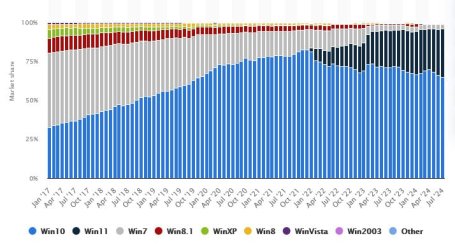
Follow the link then mouse over the graphic to see that W7's market share(grey) in July 2024 is 3.04%. I've no idea what this percentage equates to in user numbers but I'd guess at 50m to 60m. IMHO, this figure would be WAY higher if most W10 and W11 users hadn't been forced out of W7 by Microsoft. Windows operating system market share by version 2017-2024 | Statista

winpic.jpg
 

My Computer My Computer

Computer type
PC/Desktop
Computer Manufacturer/Model Number
My build
OS
Win7 Ultimate SP1
CPU
Intel Core i5 9400 Coffee Lake 14nm
Motherboard
Asus Prime H310M-E R2.0 (LGA1151)
Memory
16G DDR4
Graphics Card(s)
NVidia GeForce GTX 960
Sound Card
Realtek High Definition Audio (mobo)
Monitor(s) Displays
Asus PA248 24" 16:10 format
Screen Resolution
1920x1200@59Hz
Hard Drives
1863GB Seagate ST2000DM
3726GB Seagate ST4000DM
1863GB Seagate ST2000DM
6TB Seagate
465GB NVMe Samsung SSD 970
PSU
750G2
Case
Tower
Cooling
Standard
Keyboard
USB
Mouse
USB
Internet Speed
920Mbs/480Mbs
Antivirus
Malwarebytes
Browser
Firefox
I use Windows 7 because themes and free Microsoft Office.
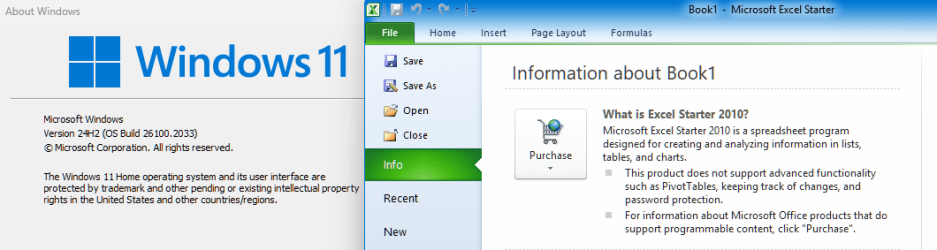
Office Starter 2010? I have that too, very useful.

That was only available on OEM Windows 7 that came with Office 2010 pre-installed by the OEM. On first opening MS Office you had the option of purchasing Office or using the free Office Starter (Excel and Word with a few restrictions - no macros for example).

I had Office Starter 2010 on a W7 laptop, it survived the upgrade to Windows 10 in 2015 and, after migrating the installed OS to a new machine, the upgrade to Windows 11.

image.png
 

My Computers My Computers

System One System Two

  • Computer type
    Laptop
    Computer Manufacturer/Model Number
    Toshiba satellite C650D
    OS
    Windows 7 Home Premium x64
    CPU
    AMD V120
    Memory
    4GB
    Internet Speed
    150 Mbps
    Antivirus
    MSE
    Browser
    IE11, Edge, Firefox
    Other Info
    I also have W7 Pro on my System Two, and several W7 Hyper-V VMs. My other machines run Windows 10/11. Their specs are in my Ten Forums & Eleven Forum profiles.
  • Computer type
    Laptop
    System Manufacturer/Model Number
    Lenovo Thinkpad T430
    OS
    Windows 7 Pro x64
    CPU
    Intel i5-3320M
    Memory
    8 GB
    Hard Drives
    250GB Samsung SSD 860 EVO
    Antivirus
    MSE
No actual way your copy of Starter Office survived 2 major OS upgrades with the main functionality still intact. :shock:
 

My Computers My Computers

System One System Two

  • Computer type
    PC/Desktop
    Computer Manufacturer/Model Number
    HP Pavilion p7-1007c
    OS
    Windows 7 Home Premium SP1 (64bit)
    CPU
    AMD Phenom II X2 521 (3.5 GHz)
    Memory
    6 GB
    Graphics Card(s)
    ATI Radeon HD 4200
    Monitor(s) Displays
    Samsung SyncMaster T220 (Analog Mode)
    Screen Resolution
    1680x1050
    Hard Drives
    1TB Hard Drive
    Keyboard
    Manhattan EKB-3 Wired Keyboard
    Mouse
    Logitech B100 Wired Mouse
    Internet Speed
    30.3 Mbps
    Antivirus
    Microsoft Security Essentials
    Browser
    Supermium
    Other Info
    TV Tuner - Hauppauge WinTV-HVR-1265
    Disc Drive - DVD
  • Computer type
    PC/Desktop
    Antivirus
    Microsoft Security Essentials
No actual way your copy of Starter Office survived 2 major OS upgrades with the main functionality still intact. :shock:
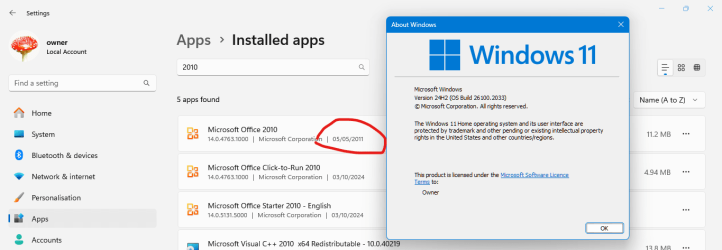
No one could have been more (pleasantly) surprised than me, but yes, it did. :-)

Look at my original install date for Microsoft Office 2010....

image.png

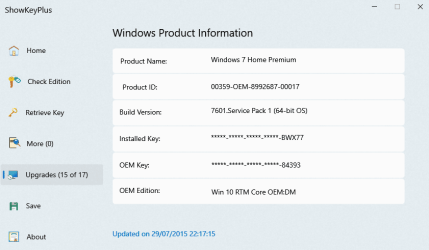
...and the date of its first upgrade (of 17) from Win7 to Win10.

image.png
 

My Computers My Computers

System One System Two

  • Computer type
    Laptop
    Computer Manufacturer/Model Number
    Toshiba satellite C650D
    OS
    Windows 7 Home Premium x64
    CPU
    AMD V120
    Memory
    4GB
    Internet Speed
    150 Mbps
    Antivirus
    MSE
    Browser
    IE11, Edge, Firefox
    Other Info
    I also have W7 Pro on my System Two, and several W7 Hyper-V VMs. My other machines run Windows 10/11. Their specs are in my Ten Forums & Eleven Forum profiles.
  • Computer type
    Laptop
    System Manufacturer/Model Number
    Lenovo Thinkpad T430
    OS
    Windows 7 Pro x64
    CPU
    Intel i5-3320M
    Memory
    8 GB
    Hard Drives
    250GB Samsung SSD 860 EVO
    Antivirus
    MSE
I know it's an old thread but so what. Recently joined. I have several systems with Win7 Pro that I've maintained, tweaked, repaired, etc, all in daily use for myself and other users since their original builds, despite motherboard repairs/replacements and other hardware redo's. They're included in my private remote service. They are all online for the net and intranet, but some are full-fledged net crawlers including primary emailers (no social media). I also have 10 and 11 all tweaked to increase their efficiencies and privacy. I'll maintain this setup for as long as I'm able being a component level tech for 50 years, retired, and still at it.
 

My Computers My Computers

System One System Two

  • Computer Manufacturer/Model Number
    Various System Intel and AMD, Laptops to Desktops
    OS
    Ver 6.1 Build 7601 SP1
  • Computer type
    PC/Desktop
Good for you. W7 forever!
 

My Computer My Computer

Computer type
PC/Desktop
Computer Manufacturer/Model Number
My build
OS
Win7 Ultimate SP1
CPU
Intel Core i5 9400 Coffee Lake 14nm
Motherboard
Asus Prime H310M-E R2.0 (LGA1151)
Memory
16G DDR4
Graphics Card(s)
NVidia GeForce GTX 960
Sound Card
Realtek High Definition Audio (mobo)
Monitor(s) Displays
Asus PA248 24" 16:10 format
Screen Resolution
1920x1200@59Hz
Hard Drives
1863GB Seagate ST2000DM
3726GB Seagate ST4000DM
1863GB Seagate ST2000DM
6TB Seagate
465GB NVMe Samsung SSD 970
PSU
750G2
Case
Tower
Cooling
Standard
Keyboard
USB
Mouse
USB
Internet Speed
920Mbs/480Mbs
Antivirus
Malwarebytes
Browser
Firefox
I recently upgraded an old Intel Celeron PC from XP to Vista and then to 7. For the discrete nVidia Geforce 440 MX with AGP 8x model I installed the Windows XP driver (XPDM mode) since there is no WDDM driver. DirectDraw acceleration works OK, Direct3D acceleration produces a BSOD, although it worked perfectly in XP. Using MPC-HC I discovered that the DirectX 7 renderer works OK, while the DirectX 9 renderer produces a BSOD (it worked fine in XP). So there is some incompatibility with the DirectX 9 implementation in Windows 7.

Question: I have already disabled DirectDraw and Direct3D acceleration in Display troubleshooting settings, but is there any way to disable only Direct3D acceleration and leave DirectDraw acceleration enabled, so at least the screensaver works? Is there any wrapper to convert DirectX 9 to DirectX 7 so it doesn't crash?
 

My Computer My Computer

Computer type
PC/Desktop
Computer Manufacturer/Model Number
custom
OS
Windows 7 Ultimate 64-bit (now 11 24H2)
CPU
Intel Core-i3 3770 3.5GHz
Motherboard
Asus P8H61
Memory
16GB DDR3 1600Mhz
Graphics Card(s)
nVidia Geforce RTX 3050
Sound Card
Realtek HD audio
Monitor(s) Displays
Sony 19" LCD TV via VGA
Screen Resolution
1440x900
Hard Drives
WD 1TB SATA III SSD
PSU
unknown
Case
unknown
Cooling
Intel's provided with CPU
Antivirus
Windows Defender (Windows 11)
Browser
Microsoft Edge
Other Info
Previously Windows 7 Ultimate, now Windows 11 24H2
Hi guys, im still using Windows 7 on a few systems. I have it on my latitude e6420 which i purchased recently just to bring back some childhood memories (and to max it out with better RAM, CPU and SSD), and on my HP pavilion p6330f which has a triple boot config (10, 7 and XP). Glad to see other people out there who are still using 7 to this day :D
 

My Computers My Computers

System One System Two

  • Computer type
    Laptop
    Computer Manufacturer/Model Number
    DELL Latitude E6420
    OS
    Windows 7 Ultimate x64
    CPU
    Intel® Core™ i7-2960XM @ 2.7 GHz
    Motherboard
    Latitude E6420 PAL50 LA-6591P
    Memory
    2x8GB DDR3L @ 1333 MHz
    Graphics Card(s)
    Intel® HD Graphics 3000
    Sound Card
    IDT High Definition Audio
    Screen Resolution
    1600x900 @ 60 Hz
    Hard Drives
    Crucial MX500 1TB SATA III SSD
    Mouse
    ONN Gaming Mouse
    Internet Speed
    249.10 Mbps Down / 11.33 Mbps Up
    Antivirus
    HitmanPro/MBAM
    Browser
    Supermium 126.0.6478.254 (Official Build) (64-bit)
    Other Info
    My childhood laptop :)
  • Computer type
    PC/Desktop
    System Manufacturer/Model Number
    HP Pavilion p6330f
    OS
    Triple-Boot; please read description
    CPU
    Intel® Core™ i7-870 @ 2.93 GHz
    Motherboard
    MSI IONA MS-7163 (Rev 1.0)
    Memory
    4x4GB DDR3L @ 1333 MHz
    Graphics Card(s)
    NVIDIA GeForce GTX 660
    Sound Card
    NVIDIA High Definition Audio
    Monitor(s) Displays
    Sceptre E275W-19203R
    Screen Resolution
    1920x1080 @ 75 Hz
    Hard Drives
    Silicon Power 256GB SSD (Win10/7)
    WDC WD800JD (WinXP)
    WDC WD5000AAKS (Stuff)
    Keyboard
    Redragon K660 (K556 TKL)
    Mouse
    ONN Gaming Mouse
    Browser
    Supermium 126.0.6478.254 (Official Build) (32-bit)
    Antivirus
    HitmanPro/MBAM
For Geforce 440 MX Windows 7 driver
I did google, you can try the two solutions in the link

Drivers for NVIDIA GeForce4 MX 440 with AGP8X (Windows 7) - Super User


indeed, sevenforums here had the discussion too.
HELP driver for geforce 4 mx 440 agp8x

I recently upgraded an old Intel Celeron PC from XP to Vista and then to 7. For the discrete nVidia Geforce 440 MX with AGP 8x model I installed the Windows XP driver (XPDM mode) since there is no WDDM driver. DirectDraw acceleration works OK, Direct3D acceleration produces a BSOD, although it worked perfectly in XP. Using MPC-HC I discovered that the DirectX 7 renderer works OK, while the DirectX 9 renderer produces a BSOD (it worked fine in XP). So there is some incompatibility with the DirectX 9 implementation in Windows 7.

Question: I have already disabled DirectDraw and Direct3D acceleration in Display troubleshooting settings, but is there any way to disable only Direct3D acceleration and leave DirectDraw acceleration enabled, so at least the screensaver works? Is there any wrapper to convert DirectX 9 to DirectX 7 so it doesn't crash?
 

My Computers My Computers

System One System Two

  • Computer type
    PC/Desktop
    Computer Manufacturer/Model Number
    HP Elite 800 G5
    OS
    Windows 7 Pro 64-bit
    CPU
    I7-9700
    Memory
    32 GB
  • Computer type
    Laptop
    System Manufacturer/Model Number
    ASUS UX305C
    OS
    Windows 7 Pro 64-bit
Windows 7 Was a good friend......but the apps stoped updates in windows 7 so i changed to windows 10 on my main but i still have a old desktop runs win7
 

My Computers My Computers

System One System Two

  • Computer type
    PC/Desktop
    Computer Manufacturer/Model Number
    HP
    OS
    Windows 10 Professional 32bit
    CPU
    Intel Pentium Dual Core 2.00Ghz E2180 x64 Processor
    Motherboard
    GMA3100
    Memory
    3GB (2GB DDR2 800Mhz + 1GB DD2 600 Mhz)
    Graphics Card(s)
    Intel G33/G31 Express Chipset Family
    Sound Card
    Creative SB AudioPCI
    Monitor(s) Displays
    Oray Display Mirror + AOC
    Screen Resolution
    Oray 1400x900 + AOC 1600x1050
    Hard Drives
    WDC WD1600AAJS-60PSA0 ATA Device
    PSU
    Unkown
    Case
    HP
    Cooling
    Unkown
    Keyboard
    HID Keyboard
    Mouse
    EVGA Clickpad
    Internet Speed
    From 30MB to 50Mb
    Antivirus
    Windows Security Antivirus
    Browser
    Edge + Chrome
    Other Info
    USB Wireless Realtek 802 b/g/n Wifi 4
    USB Wireless NIC 802 ax/ac/b/g/n Wifi 6
    Xioami 2TB USB Disk
    TSSTcorp CDW/DVD TS-H492 ATA
    Realtek PCIe GbE Family (Ethernet)
  • Computer type
    Laptop
    System Manufacturer/Model Number
    Toshiba
    OS
    Windows 7/8/10 Pack
    Memory
    2GB
    Graphics Card(s)
    Intel HD Graphics 4000
    Screen Resolution
    1366x768
    Keyboard
    None
    Mouse
    None
    Internet Speed
    30Mb to 50Mb
    Browser
    Chrome + Edge + Opera + Firefox + Torbrowser
    Antivirus
    Windows Security Antivirus
For Geforce 440 MX Windows 7 driver
I did google, you can try the two solutions in the link

Drivers for NVIDIA GeForce4 MX 440 with AGP8X (Windows 7) - Super User


indeed, sevenforums here had the discussion too.
HELP driver for geforce 4 mx 440 agp8x
Million Thanks! This older driver for Windows XP Media Center Edition supports up to DirectX 8.1 which is implemented properly on Windows 7. DirectX 9 is implemented differently from XP and hence the crashes due to incompatibility. I installed this older driver and started Windows Experience Index which completed without BSOD. Of course the score is 1.0 because of no Aero (to enable Aero you need a score of 2.0 or higher), but who cares! I then tested my screensavers, they all worked! I then loaded MPC-HC and changed the renderer to DirectX 9. It didn't work, there was an error it could not start Direct3D 9 or similar, since the driver supports at to DirectX 8.1 I returned to DirectX 7 renderer and it plays my videos, this time without stuttering because there is some acceleration. Perfect! I could not ask more from such an old card as my Geforce 440 MX with AGP 8x acceleration. I don't want more, I only wanted the same performance as in Windows XP.

Thanks again!
 

My Computer My Computer

Computer type
PC/Desktop
Computer Manufacturer/Model Number
custom
OS
Windows 7 Ultimate 64-bit (now 11 24H2)
CPU
Intel Core-i3 3770 3.5GHz
Motherboard
Asus P8H61
Memory
16GB DDR3 1600Mhz
Graphics Card(s)
nVidia Geforce RTX 3050
Sound Card
Realtek HD audio
Monitor(s) Displays
Sony 19" LCD TV via VGA
Screen Resolution
1440x900
Hard Drives
WD 1TB SATA III SSD
PSU
unknown
Case
unknown
Cooling
Intel's provided with CPU
Antivirus
Windows Defender (Windows 11)
Browser
Microsoft Edge
Other Info
Previously Windows 7 Ultimate, now Windows 11 24H2
Just out of curiosity, I checked for newest Windows 7 graphics drivers for my nVidia Geforce 1050 Ti. Should I want to dual boot with Windows 11 and Windows 7, for Windows 7 64-bit there are fairly recent drivers. For Windows 7 32-bit the latest drivers are from 2018. Of course with 16GB RAM it doesn't make sense to install 32-bit (unless you use patchpae3 to force Windows 7 32-bit see the whole RAM), but I just wanted to know.
 

My Computer My Computer

Computer type
PC/Desktop
Computer Manufacturer/Model Number
custom
OS
Windows 7 Ultimate 64-bit (now 11 24H2)
CPU
Intel Core-i3 3770 3.5GHz
Motherboard
Asus P8H61
Memory
16GB DDR3 1600Mhz
Graphics Card(s)
nVidia Geforce RTX 3050
Sound Card
Realtek HD audio
Monitor(s) Displays
Sony 19" LCD TV via VGA
Screen Resolution
1440x900
Hard Drives
WD 1TB SATA III SSD
PSU
unknown
Case
unknown
Cooling
Intel's provided with CPU
Antivirus
Windows Defender (Windows 11)
Browser
Microsoft Edge
Other Info
Previously Windows 7 Ultimate, now Windows 11 24H2
Back
Top