Is csrss.exe a trojan?

My Computer

Computer type
Laptop
Computer Manufacturer/Model Number
HP G71 447US
OS
Win 7 Pro 32 Bit
This is one old thread! What are we doing here?

DonnaB mentioned csrss.exe is a Protected Operating System File, and that is correct.

To Show Protected Operating System Files:
http://www.sevenforums.com/tutorials/394-hidden-files-folders-show-hide.html

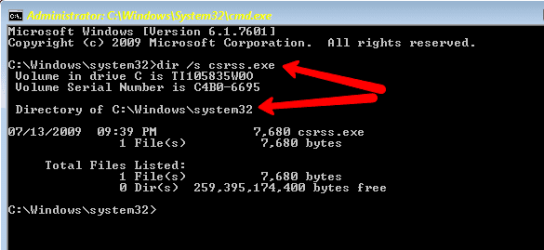
If you wish to view the csrss.exe file using the Command Prompt (CP), right-click the CP, and select: Run as Administrator

Then use:
dir /s csrss.exe


My Computer

Computer type
PC/Desktop
Computer Manufacturer/Model Number
An ol' eMachines
OS
Windows 7 Home Premium
Internet Speed
Fine for me...I'm retired!
Those of us who aren't quite as knowledgeable about these things, and are new to this forum, do not know which of the responses to our requests for help can be trusted. If you read back on this thread, you will see that there are posts that indicate that the "csrss.exe" that we find in our task manager may not be the Protected Operating System File that DonnaB mentioned. In order for us, the less knowledgeable, to find out which it is, we must inquire. NOW, if we inquire about this malicious file in an old thread, that might be because we have been CHEWED OUT by rude members of forums for repeating the same question that is addressed in an existing thread. It seems that the same problem occurs when we try to avoid that problem here. It would be nice to have some experts help the less knowledgeable without thumbing their noses at us. RULE #1--- Rudeness, insults, racial/hate slander, flaming, attacks, stalking, and trolling will not be tolerated. So far, I have found that this rule is ignore by some on here.

Cottonball, I am not saying that your response here was rude. What I am saying is that without the idea in you mind that this thread should no longer be used, you cannot come up with the question "What are we doing here?" It just all goes back to being patient with those of us that aren't sure what is going on. And yes, I do have a difficult time putting my thoughts down without seeming rude or judgmental to others. That is another issue that I don't fully understand.
 
Last edited:

My Computer

Computer type
PC/Desktop
Computer Manufacturer/Model Number
Dell n5040
OS
Windows 7, 64 bit
CPU
Intel Core i3
Memory
4.0 GB RAM
Antivirus
Norton Internet Security
Browser
Chrome, Firefox, IE .....commonly used in that order
When I right click on csrss in task manager and click on "Open File Location", absolutely nothing happens. This is a suggestion in #5 in this thread. This type of non-result is part of the reason that we, the less knowledgeable, remain in the dark on such issues. The Norton issue I had resulted in not being able to do what you request earlier in this thread. We are looking for answers and sometimes even your honest polite help results in nothing. Thus, we will continue to search for the answers, and sometimes that takes us back to old posts, like this one. And now that I responded to Anak's rudeness and impatience with me, I am getting ZERO responses to these issues. So, where is one to go to find reliable help on our computer problems? I suggest some patience to those who think they are above the rest of us. And to those of you who put up with their impatience and rudeness, I suggest you let them know that they hurting your forum by acting that way. I have found some that truly are here in kindness, but I can't say that about all of you!

BTW, Thank you DonnaB for your help!
 

My Computer

Computer type
PC/Desktop
Computer Manufacturer/Model Number
Dell n5040
OS
Windows 7, 64 bit
CPU
Intel Core i3
Memory
4.0 GB RAM
Antivirus
Norton Internet Security
Browser
Chrome, Firefox, IE .....commonly used in that order
Hi mrick36,

I am going to ask you to go HERE and start your own thread by clicking on the orange New Thread button in the upper left hand corner. Give your thread a title and post the problem you are having.

This way we can isolate your problems into it's own thread since, even though this concerns the csrss.exe file your issue may not be the same as the guys who started this thread.

I'll be watching for your thread to be posted.

Thank you,
Donna :)
 

My Computer

Computer type
Laptop
OS
Win7 64-bit, Vista 32-bit, XP 32-bit, W2K 32-bit (VM)
Antivirus
Avast, MSE
Browser
Firefox
Other Info
Multiple systems. Too many specs to name.
Thanks for the replies.

When I click properties on csrss.exe it doesn't show me anything, my PC goes really 'laggy' and I have a desktop gadget of my cpu performance and that goes crazy the graph shows really high volumes. I'm gathering this is something sinister afterall :(

Manged to find it in C:\Windows\System32, although when trying to upload to virustotal it disappears from the folder after I click 'Browse'. I'm really confused I can see it in the folder but not after clicking browse

Also in Task manager its the only process without a 'User' or 'Description'


I have this problem too. This is an old thread.
My Task Manager shows csrss.exe activity yet I cannot find it on the system.
(cmd) dir /s csrss.exe shows "file not found"


Updated thoughts appreciated.
I am using Win7

Is there any solution for this?


I have the exact same problem.
This is the response I got when I typed in dir /s csrss.exe in cmd

Microsoft Windows [Version 6.1.7600]
Copyright (c) 2009 Microsoft Corporation. All rights reserved.

C:\Users\*****>dir /s csrss.exe
Volume in drive C has no label.
Volume Serial Number is 90DF-0529
File Not Found

C:\Users\*****>
 

My Computer

Computer type
PC/Desktop
OS
Windows 7 Ultimate 32bit
Go back and re-read post #22 very carefully.

You need to either:

Or

There is a third way, type csrss.exe into the Start/Search box it should be listed at the top under Programs, right click on it and then click on open file location.

csrss.exe is a valid component of the operating system and as such resides in C:\Windows\System32 If it is found anywhere other than C:\Windows\System32 then you might, have a problem.


Related Links:
A system file is in use when the OS is up and running and to remove or open it while it's in use would crash the system. Oh, you could open it, but you would have to jump through hoops resetting the permissions to do it.

There are other system files that need to be looked at, most notably is the .cbs file when checking for update errors, but if you try to open it you will see an Access Denied popup, what you have to do then is copy it to your desktop, open and read it there or send it to Virustotal.

You can make a copy of any system file and send that to virustotal.


As long as you only found one instance of csrss and it is located in C:\Windows\System32\csrss.exe you have nothing to worry about.

If your machine is slow there are two other reasons it is that way, 1.) Malware, you need to do scans of a third-party tool like mbam or SAS; 2.) You have a corrupt profile.
https://social.technet.microsoft.co...6c-dc438af72d31/csrssexe?forum=w7itprogeneral

What is the Windows csrss.exe file / process?
 

My Computer

Computer type
PC/Desktop
Computer Manufacturer/Model Number
Gateway DX4831-01e (Mid-Tower Desktop)
OS
Originally Win 7 Hm Prem x64 Ver 6.1.7600 Build 7601-SP1 | Upgraded to Windows 10 December 14, 2019
CPU
Intel i3 530 2.93GHz, 2933MHz 2 Cores 4 Logical Processors
Motherboard
Gateway H57M01 133 megahertz
Memory
6GB of 1,333MHz DDR3 SDRAM
Graphics Card(s)
32MB Intel Graphics Media Accelerator HD IGChip
Sound Card
Realtek High Definition Audio
Monitor(s) Displays
Gateway HX2000 20inch TFT active matrix TN
Screen Resolution
1600 x 900 x 59 hertz
Hard Drives
WDC WD10EADS-00M2B0 [HDD] (1000.20 GB) -- drive 0,
HL-DT-ST DVDRAM GH41N [CD-ROM dr]
Four card readers, and Four USB 2.0
PSU
300watts.
Case
Mid-Tower Desktop
Cooling
Stock from Gateway
Keyboard
Natural Ergonomic Keyboard 4000, see Other Info
Mouse
Orig. Gateway wore out now using Insignia USB wired optical
Internet Speed
Vz FIOS 10ms png 57.64Mbps down 65.53Mbps up Speedtest.org
Antivirus
Zamana Anti-logger with Anti-malware, MSE, Windows Firewall,
Browser
IE11.0.9600.19399-Upd ver11.0.135, Firefox 68.0.1 x64
Other Info
System Specs by Belarc.

BIOS: American Megatrends Inc. P01-A0 11/17/2009

Replaced the MS 'Natural' Standard PS/2 Enhanced 101-102 Keyboard with a new Natural Ergonomic Keyboard 4000 on August 1st 2014.

Canon Pixma MG3222 Printer.

Updated to IE11 on 12102015 | Fios Quantum Router g1100

Additional AV: SpywareBlaster, manual Mbam, SAS
Task Manager - Show processes from all users

Hi mrick36,

Welcome to Windows Seven Forums! :)

I am finding csrss.exe in the task manager with no User Name or Description listed.
That is normal. That same file is located in my Task Manager as well, without information for User Name nor Description.

What issues are you experiencing that you feel the need to download and install FRST?

You can learn more about csrss.exe in the link below:

What is the Client/Server Run-time Subsystem?


I also saw the same "... no User Name or Description listed" for csrss.exe.
At the bottom of the Task Manager Processes tab click on "Show processes from all users".
NOW csrss.exe shows "SYSTEM" as a user and "Client Server Runtime Process" shows in the Description field, and a right click on Properties shows the location in "C:\Windows\System32".
 

My Computer

Computer type
Laptop
Computer Manufacturer/Model Number
Toshiba
OS
Win 7 Home Premium 64-bit
CPU
Intel Core i7 - 1.73 Ghz
Memory
8GB
Graphics Card(s)
NVIDIA GeForce GT 330M
Antivirus
Kaspersky Internet Sec & Malwarebytes Anti-Malware Home Prem
Browser
Chrome
Hi stealthsub2win7, welcome to 7F! :)

Have you performed a through search for csrss as noted in my post above yours and post #22?

csrss.exe is a valid component of the operating system and as such resides in C:\Windows\System32 If it is found anywhere other than C:\Windows\System32 then you might, have a problem.
If you find csrss only in C:\Windows\System32 you are okay.
 

My Computer

Computer type
PC/Desktop
Computer Manufacturer/Model Number
Gateway DX4831-01e (Mid-Tower Desktop)
OS
Originally Win 7 Hm Prem x64 Ver 6.1.7600 Build 7601-SP1 | Upgraded to Windows 10 December 14, 2019
CPU
Intel i3 530 2.93GHz, 2933MHz 2 Cores 4 Logical Processors
Motherboard
Gateway H57M01 133 megahertz
Memory
6GB of 1,333MHz DDR3 SDRAM
Graphics Card(s)
32MB Intel Graphics Media Accelerator HD IGChip
Sound Card
Realtek High Definition Audio
Monitor(s) Displays
Gateway HX2000 20inch TFT active matrix TN
Screen Resolution
1600 x 900 x 59 hertz
Hard Drives
WDC WD10EADS-00M2B0 [HDD] (1000.20 GB) -- drive 0,
HL-DT-ST DVDRAM GH41N [CD-ROM dr]
Four card readers, and Four USB 2.0
PSU
300watts.
Case
Mid-Tower Desktop
Cooling
Stock from Gateway
Keyboard
Natural Ergonomic Keyboard 4000, see Other Info
Mouse
Orig. Gateway wore out now using Insignia USB wired optical
Internet Speed
Vz FIOS 10ms png 57.64Mbps down 65.53Mbps up Speedtest.org
Antivirus
Zamana Anti-logger with Anti-malware, MSE, Windows Firewall,
Browser
IE11.0.9600.19399-Upd ver11.0.135, Firefox 68.0.1 x64
Other Info
System Specs by Belarc.

BIOS: American Megatrends Inc. P01-A0 11/17/2009

Replaced the MS 'Natural' Standard PS/2 Enhanced 101-102 Keyboard with a new Natural Ergonomic Keyboard 4000 on August 1st 2014.

Canon Pixma MG3222 Printer.

Updated to IE11 on 12102015 | Fios Quantum Router g1100

Additional AV: SpywareBlaster, manual Mbam, SAS
Hi stealthsub2win7, welcome to 7F! :)

Have you performed a through search for csrss as noted in my post above yours and post #22?

csrss.exe is a valid component of the operating system and as such resides in C:\Windows\System32 If it is found anywhere other than C:\Windows\System32 then you might, have a problem.
If you find csrss only in C:\Windows\System32 you are okay.


Anak,
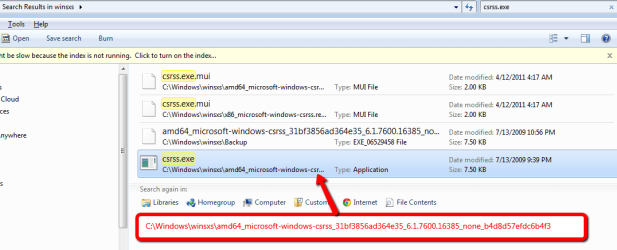
Yes, I have done multiple searches for csrss.exe (see attachments). I also find this file in
C:\Windows\winsxs\amd64_microsoft-windows-csrss_31bf3856ad364e35_6.1.7600.16385_none_b4d8d57efdc6b4f3 (attachments 1 & 3)
but the file dates are EXACTLY the same as the System32 location (attachment 1).

So, based on attachment 1, I conclude my system is clean.
- Barry
 

Attachments

  • 1 Agent Ransack -- csrss.exe_file_032615.png
    1 Agent Ransack -- csrss.exe_file_032615.png
    16.6 KB · Views: 2
  • 2 csrss.exe_in_System32_Folder_032615.png
    2 csrss.exe_in_System32_Folder_032615.png
    7.9 KB · Views: 1
  • 3 csrss.exe_in_C_Windows_winsxs_Location_032615.png
    3 csrss.exe_in_C_Windows_winsxs_Location_032615.png
    23.5 KB · Views: 1
  • 4 csrss.exe_Location_via_Administrator_Cmd.exe_032615.png
    4 csrss.exe_Location_via_Administrator_Cmd.exe_032615.png
    5.6 KB · Views: 54

My Computer

Computer type
Laptop
Computer Manufacturer/Model Number
Toshiba
OS
Win 7 Home Premium 64-bit
CPU
Intel Core i7 - 1.73 Ghz
Memory
8GB
Graphics Card(s)
NVIDIA GeForce GT 330M
Antivirus
Kaspersky Internet Sec & Malwarebytes Anti-Malware Home Prem
Browser
Chrome
I concur.

You're good, I have the exact same file in mine;
Code:
C:\Windows\winsxs\amd64_microsoft-windows csrss_31bf3856ad364e35_6.1.7600.16385_none_b4d8d57efdc6b4f3
 

My Computer

Computer type
PC/Desktop
Computer Manufacturer/Model Number
Gateway DX4831-01e (Mid-Tower Desktop)
OS
Originally Win 7 Hm Prem x64 Ver 6.1.7600 Build 7601-SP1 | Upgraded to Windows 10 December 14, 2019
CPU
Intel i3 530 2.93GHz, 2933MHz 2 Cores 4 Logical Processors
Motherboard
Gateway H57M01 133 megahertz
Memory
6GB of 1,333MHz DDR3 SDRAM
Graphics Card(s)
32MB Intel Graphics Media Accelerator HD IGChip
Sound Card
Realtek High Definition Audio
Monitor(s) Displays
Gateway HX2000 20inch TFT active matrix TN
Screen Resolution
1600 x 900 x 59 hertz
Hard Drives
WDC WD10EADS-00M2B0 [HDD] (1000.20 GB) -- drive 0,
HL-DT-ST DVDRAM GH41N [CD-ROM dr]
Four card readers, and Four USB 2.0
PSU
300watts.
Case
Mid-Tower Desktop
Cooling
Stock from Gateway
Keyboard
Natural Ergonomic Keyboard 4000, see Other Info
Mouse
Orig. Gateway wore out now using Insignia USB wired optical
Internet Speed
Vz FIOS 10ms png 57.64Mbps down 65.53Mbps up Speedtest.org
Antivirus
Zamana Anti-logger with Anti-malware, MSE, Windows Firewall,
Browser
IE11.0.9600.19399-Upd ver11.0.135, Firefox 68.0.1 x64
Other Info
System Specs by Belarc.

BIOS: American Megatrends Inc. P01-A0 11/17/2009

Replaced the MS 'Natural' Standard PS/2 Enhanced 101-102 Keyboard with a new Natural Ergonomic Keyboard 4000 on August 1st 2014.

Canon Pixma MG3222 Printer.

Updated to IE11 on 12102015 | Fios Quantum Router g1100

Additional AV: SpywareBlaster, manual Mbam, SAS
hi new to the forum, was wondering if having 2 of the csrss.exe was normal?? I've looked at the where they were and they both say c:\windows\system 32. they both say the user is the system so just wondering. anyone might know? thanks
 

My Computer

Computer type
PC/Desktop
Computer Manufacturer/Model Number
ASUS/custom build
OS
windows 7 ultimate 64bit
Browser
internet explorer 11
Having multiple instances of csrss.exe in the task manager is normal. There should be one instance of csrss.exe for system processes and another instance for interactive logons. If you have multiple users logged in, you can have even more instances of crss.exe in the Task Manager.

The "one csrss.exe only" rule applies to XP and earlier.

csrss.exe (Client/Server Runtime Subsystem) is legitimate windows file; and yes it is located in c:\windows\system32; however; if you try to run the original file csrss.exe (in win7 x64) file on a dos prompt it wont run telling you it can not run in win32 mode.

My csrss.exe is only taking 944 K of memory in Task Manager.
 

My Computer

Computer type
PC/Desktop
Computer Manufacturer/Model Number
ASUS X550ZE
OS
Windows 7 Home Premium 64-BIT
CPU
AMD A8 7200P
Motherboard
N/A
Memory
8GB 1600mhz
Graphics Card(s)
Radeon R5 (APU) + Radeon R5 M230 2GB Dual Graphics
Sound Card
Realtek ALC269 with SonicMaster
Monitor(s) Displays
Laptop Display
Screen Resolution
1920 x 1080 @60hz
Hard Drives
WDC WD50 00LPVX-80V0TT0 (500GB)
PSU
Laptop Charger
Mouse
ARMAGGEDON TEXTRON SCORPION 7
Internet Speed
100 mbps DOWN / 50 mbps UP
Antivirus
Windows Defender
Browser
Mozzila FireFox, Valve Steam in-game internet browser
Starting with Vista there will be one instance of csrss.exe for the system session plus one for each logged on user. This was done to enhance security. It is also normal to have multiple instances of svchost.exe. I currently have 12 but it can be more or less. There may also be multiple instances of other processes.

The memory usage of processes can vary greatly. The 944 K quoted by RoasterMen is only an example. It can be much higher or lower and be completely normal.
 

My Computer

Computer type
PC/Desktop
Computer Manufacturer/Model Number
HP
OS
Windows 7 Pro 64 bit
CPU
Xeon W3520
Memory
8 GB
Graphics Card(s)
Nvidia Geforce 210
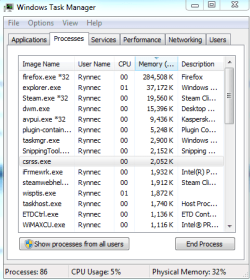
Hello. Bumping this topic because I noticed the crss.exe process while troubleshooting issues in Google Chrome. Is it normal for it to not list a user-name or description in the task manager? I tried opening the file location and clicking on properties, but nothing pops up (as in, it doesn't even open up explorer), yet when I try to do the same for other processes, it works just fine. I opened up the System32 file and found the crss there, but I just want to know if I have anything to worry about.
 

Attachments

  • csrss.PNG
    csrss.PNG
    15.4 KB · Views: 59

My Computer

Computer type
Laptop
Computer Manufacturer/Model Number
Samsung
OS
Windows 7 64-bit Service Pack 1
CPU
Interl(R) Core(TM) i5 CPU
Antivirus
Kaspersky Internet Security 2015
Hi Rynnec, welcome to 7F! :)

Unless you find crss.exe anywhere other than C:\Windows\System32; Then no, you have nothing to worry about.

crss.exe is a system core file, as such it has special privileges. See the button below the list of processes that says "show processes from all users" ? Click on that and you should see the blank user area fill in with SYSTEM and all the other blank areas should fill in to.
 

My Computer

Computer type
PC/Desktop
Computer Manufacturer/Model Number
Gateway DX4831-01e (Mid-Tower Desktop)
OS
Originally Win 7 Hm Prem x64 Ver 6.1.7600 Build 7601-SP1 | Upgraded to Windows 10 December 14, 2019
CPU
Intel i3 530 2.93GHz, 2933MHz 2 Cores 4 Logical Processors
Motherboard
Gateway H57M01 133 megahertz
Memory
6GB of 1,333MHz DDR3 SDRAM
Graphics Card(s)
32MB Intel Graphics Media Accelerator HD IGChip
Sound Card
Realtek High Definition Audio
Monitor(s) Displays
Gateway HX2000 20inch TFT active matrix TN
Screen Resolution
1600 x 900 x 59 hertz
Hard Drives
WDC WD10EADS-00M2B0 [HDD] (1000.20 GB) -- drive 0,
HL-DT-ST DVDRAM GH41N [CD-ROM dr]
Four card readers, and Four USB 2.0
PSU
300watts.
Case
Mid-Tower Desktop
Cooling
Stock from Gateway
Keyboard
Natural Ergonomic Keyboard 4000, see Other Info
Mouse
Orig. Gateway wore out now using Insignia USB wired optical
Internet Speed
Vz FIOS 10ms png 57.64Mbps down 65.53Mbps up Speedtest.org
Antivirus
Zamana Anti-logger with Anti-malware, MSE, Windows Firewall,
Browser
IE11.0.9600.19399-Upd ver11.0.135, Firefox 68.0.1 x64
Other Info
System Specs by Belarc.

BIOS: American Megatrends Inc. P01-A0 11/17/2009

Replaced the MS 'Natural' Standard PS/2 Enhanced 101-102 Keyboard with a new Natural Ergonomic Keyboard 4000 on August 1st 2014.

Canon Pixma MG3222 Printer.

Updated to IE11 on 12102015 | Fios Quantum Router g1100

Additional AV: SpywareBlaster, manual Mbam, SAS
My listing in Task Manager also has blanks under User Name and Description.

If I do a search through Windows Exploxer it shows two copies of csrss.exe in System32 and amd64, but it also shows 4 versions of csrss.exe.mui two in the same locations as the csrss.exe file, but the other two in x86_microsoft-windows-csrss.resources and C:\Wndows/WOW64

If I do dir /s csrss.exe in CMD it finds just one file in windows\system32
 

My Computer

Computer type
Laptop
Computer Manufacturer/Model Number
Dell
OS
Windows 7
Browser
Firefox, IE, Chrome
Hi DWN13, welcome to 7F! :)
My listing in Task Manager also has blanks under User Name and Description.
Did you
"show processes from all users" ?
as in my last post to reveal those users?

If I do a search through Windows Exploxer it shows two copies of csrss.exe in System32 and amd64, but it also shows 4 versions of csrss.exe.mui two in the same locations as the csrss.exe file, but the other two in x86_microsoft-windows-csrss.resources and C:\Wndows/WOW64

If I do dir /s csrss.exe in CMD it finds just one file in windows\system32
All these locations sounds suspicious, when was the last time you ran any malware scans, and what are you using to do those scans? I ask because your system specs don't list any anti-virus/malware programs.

You can try any or all of these, use their free versions:
Hitmanpro: Unlimited thirty day free trial.
Malwarebytes; Watch for the check-mark during the install to try the pro version, it's up to you if you want to try it or not.
Superantispyware;
 

My Computer

Computer type
PC/Desktop
Computer Manufacturer/Model Number
Gateway DX4831-01e (Mid-Tower Desktop)
OS
Originally Win 7 Hm Prem x64 Ver 6.1.7600 Build 7601-SP1 | Upgraded to Windows 10 December 14, 2019
CPU
Intel i3 530 2.93GHz, 2933MHz 2 Cores 4 Logical Processors
Motherboard
Gateway H57M01 133 megahertz
Memory
6GB of 1,333MHz DDR3 SDRAM
Graphics Card(s)
32MB Intel Graphics Media Accelerator HD IGChip
Sound Card
Realtek High Definition Audio
Monitor(s) Displays
Gateway HX2000 20inch TFT active matrix TN
Screen Resolution
1600 x 900 x 59 hertz
Hard Drives
WDC WD10EADS-00M2B0 [HDD] (1000.20 GB) -- drive 0,
HL-DT-ST DVDRAM GH41N [CD-ROM dr]
Four card readers, and Four USB 2.0
PSU
300watts.
Case
Mid-Tower Desktop
Cooling
Stock from Gateway
Keyboard
Natural Ergonomic Keyboard 4000, see Other Info
Mouse
Orig. Gateway wore out now using Insignia USB wired optical
Internet Speed
Vz FIOS 10ms png 57.64Mbps down 65.53Mbps up Speedtest.org
Antivirus
Zamana Anti-logger with Anti-malware, MSE, Windows Firewall,
Browser
IE11.0.9600.19399-Upd ver11.0.135, Firefox 68.0.1 x64
Other Info
System Specs by Belarc.

BIOS: American Megatrends Inc. P01-A0 11/17/2009

Replaced the MS 'Natural' Standard PS/2 Enhanced 101-102 Keyboard with a new Natural Ergonomic Keyboard 4000 on August 1st 2014.

Canon Pixma MG3222 Printer.

Updated to IE11 on 12102015 | Fios Quantum Router g1100

Additional AV: SpywareBlaster, manual Mbam, SAS
Having multiple instances of csrss.exe in the task manager is normal. There should be one instance of csrss.exe for system processes and another instance for interactive logons. If you have multiple users logged in, you can have even more instances of crss.exe in the Task Manager.

The "one csrss.exe only" rule applies to XP and earlier.

csrss.exe (Client/Server Runtime Subsystem) is legitimate windows file; and yes it is located in c:\windows\system32; however; if you try to run the original file csrss.exe (in win7 x64) file on a dos prompt it wont run telling you it can not run in win32 mode.

My csrss.exe is only taking 944 K of memory in Task Manager.


thank u for the help, mine is higher but long as its normal im ok with it, thanks again ;)
 

My Computer

Computer type
PC/Desktop
Computer Manufacturer/Model Number
ASUS/custom build
OS
windows 7 ultimate 64bit
Browser
internet explorer 11
When i try to do properties it does not do any thing ... please help . is it a virus ?
 

My Computer

Computer type
Laptop
Computer Manufacturer/Model Number
unknown
OS
windows 7 64bit
CPU
unknown
Motherboard
unknown
Memory
unknown
Graphics Card(s)
unknown
Hard Drives
unknown
Antivirus
all of them
Browser
chrome
Back
Top