Is csrss.exe a trojan?

From Anak

Layback Bear; Do you know who I am trying to think of?

No I don't remember but my brain does not have a SXS folder.
 

My Computer

Computer type
PC/Desktop
Computer Manufacturer/Model Number
Home made Desktop
OS
Windows 10 Pro. 64/ version 1709 Windows 7 Pro/64
CPU
Intel i7-6800K @ 4.3
Motherboard
ASUS X-99 Deluxe II
Memory
Corsair Platinum 16 gig @2400
Graphics Card(s)
EVGA GTX 1070 OC
Monitor(s) Displays
Asus 27" LED LCD/VE278Q
Screen Resolution
1920-1080 or 1280-720 HDMI
Hard Drives
INTEL SSD 730-240 Gb Sata 3.0/
PSU
EVGA Platium 1200W
Case
Phanteks Luxe Tempered Glass 8 fans/ one radiator
Cooling
XSPC/ Water Cooled CPU
Keyboard
Das 4 Professional
Mouse
Logitech M705/MX Anywhere 2-S
Internet Speed
100 mbits
Antivirus
Microsoft Security Essentials/ Malwarebytes Premium 3.0/ SAS
Browser
I.E. 11 default/Firefox/ ISP Time Warner Cable/Spectrum
Other Info
LG BluRay Burner/
Sound system-KLipsch-THX/
Icy Dock ssd Hot Swap bays.
The reason why you cannot see any information on 'csrss.exe' in the task manager, is because you have to tick 'Show processes from all users' @ the bottom of the Processes tab.

After doing this, right click 'csrss' and choose either 'properties' or 'open file location', then you can tell what the source dir of the file is.

If it is in the \Windows\System32 folder & it is signed by Microsoft, then you're fine. If you still do not feel safe, upload the file to a virus scan website or scan with your own software.

Hope that helps.
 

My Computer

Computer type
PC/Desktop
OS
Windows 7 64-Bit
Hi iCod3r, welcome to 7F! :)

If it has not been touched on before your post is a timely reminder. :thumbsup:
 

My Computer

Computer type
PC/Desktop
Computer Manufacturer/Model Number
Gateway DX4831-01e (Mid-Tower Desktop)
OS
Originally Win 7 Hm Prem x64 Ver 6.1.7600 Build 7601-SP1 | Upgraded to Windows 10 December 14, 2019
CPU
Intel i3 530 2.93GHz, 2933MHz 2 Cores 4 Logical Processors
Motherboard
Gateway H57M01 133 megahertz
Memory
6GB of 1,333MHz DDR3 SDRAM
Graphics Card(s)
32MB Intel Graphics Media Accelerator HD IGChip
Sound Card
Realtek High Definition Audio
Monitor(s) Displays
Gateway HX2000 20inch TFT active matrix TN
Screen Resolution
1600 x 900 x 59 hertz
Hard Drives
WDC WD10EADS-00M2B0 [HDD] (1000.20 GB) -- drive 0,
HL-DT-ST DVDRAM GH41N [CD-ROM dr]
Four card readers, and Four USB 2.0
PSU
300watts.
Case
Mid-Tower Desktop
Cooling
Stock from Gateway
Keyboard
Natural Ergonomic Keyboard 4000, see Other Info
Mouse
Orig. Gateway wore out now using Insignia USB wired optical
Internet Speed
Vz FIOS 10ms png 57.64Mbps down 65.53Mbps up Speedtest.org
Antivirus
Zamana Anti-logger with Anti-malware, MSE, Windows Firewall,
Browser
IE11.0.9600.19399-Upd ver11.0.135, Firefox 68.0.1 x64
Other Info
System Specs by Belarc.

BIOS: American Megatrends Inc. P01-A0 11/17/2009

Replaced the MS 'Natural' Standard PS/2 Enhanced 101-102 Keyboard with a new Natural Ergonomic Keyboard 4000 on August 1st 2014.

Canon Pixma MG3222 Printer.

Updated to IE11 on 12102015 | Fios Quantum Router g1100

Additional AV: SpywareBlaster, manual Mbam, SAS
csrss.exe size conflict

In win7 System 32 csrss.exe shows as 8K. in task manager it shows using 2,076KB memory. Can this be the same file? Yesterday, I had Baidu do a deep scan. How do I determine if the csrss.exe in the task manager is the same one in System 32?
 

My Computer

Computer type
PC/Desktop
Computer Manufacturer/Model Number
Dell
OS
Windows 7 Ultimate x64

My Computer

Computer type
Laptop
Computer Manufacturer/Model Number
Employer provided Dell Latitude
OS
W7 Pro SP1 64bit
CPU
i7
Memory
8GB
Graphics Card(s)
Intel HD Graphics
Hard Drives
crappy SSD
Antivirus
Employer mandated Symantec Endpoint Protection
Browser
Pale Moon 64bit, IE11 64bit & Chrome 64bit
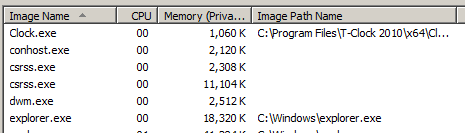
Windows explorer shows the size of the csrss.exe file while Task Manager shows the memory that process is consuming. These are totally different things. If they ever showed the same numbers it would be pure coincidence. To see the location of the file in Task Manager you must add the "Image Path Name" column. You also need to be logged in with an admin account and select "Show processes from all users"
 

My Computer

Computer type
PC/Desktop
Computer Manufacturer/Model Number
HP
OS
Windows 7 Pro 64 bit
CPU
Xeon W3520
Memory
8 GB
Graphics Card(s)
Nvidia Geforce 210
I'm logged in with an admin account and have selected "Show processes from all users". This is what I see:

image-path.PNG
 

My Computer

Computer type
Laptop
Computer Manufacturer/Model Number
Employer provided Dell Latitude
OS
W7 Pro SP1 64bit
CPU
i7
Memory
8GB
Graphics Card(s)
Intel HD Graphics
Hard Drives
crappy SSD
Antivirus
Employer mandated Symantec Endpoint Protection
Browser
Pale Moon 64bit, IE11 64bit & Chrome 64bit
Windows explorer shows the size of the csrss.exe file while Task Manager shows the memory that process is consuming. These are totally different things. If they ever showed the same numbers it would be pure coincidence. To see the location of the file in Task Manager you must add the "Image Path Name" column. You also need to be logged in with an admin account and select "Show processes from all users"
This showed csrss.exe is from the System32 directory. Thank you.
 

My Computer

Computer type
PC/Desktop
Computer Manufacturer/Model Number
Dell
OS
Windows 7 Ultimate x64
csrss.exe might be a malware file

It is a legitimate files which was developed by Microsoft Corporation. Csrss.exe is used to manage the majority of graphical instructions set in the Client/server runtime subsystem under Microsoft windows Operating system. It is basically not a trojan file, Malware attackers create a malware file and name it as csrss.exe to spread malware over the internet. To know more about csrss.exe, have a look at file-intelligence website, which is a malware search engine, where i got to know about this file.
 

My Computer

Computer type
PC/Desktop
OS
Windows 7 home premium 32 bit
Hi kristen theron, welcome to 7F! :)

Nice explanation for the csrss file, do you have a link to this file-intelligence website? Would it possibly be? https://file-intelligence.comodo.com/exe/csrss This comodo site is one that I will save for quick reference.

One many that I use: http://www.systemlookup.com/search=csrss.exe Just as the comodo site, most larger anti-malware companies will have a searchable database.


Related:

Systemlookup with Status Key legend at top
https://Client/Server Runtime Subsystem | en.wikipedia.org
 

My Computer

Computer type
PC/Desktop
Computer Manufacturer/Model Number
Gateway DX4831-01e (Mid-Tower Desktop)
OS
Originally Win 7 Hm Prem x64 Ver 6.1.7600 Build 7601-SP1 | Upgraded to Windows 10 December 14, 2019
CPU
Intel i3 530 2.93GHz, 2933MHz 2 Cores 4 Logical Processors
Motherboard
Gateway H57M01 133 megahertz
Memory
6GB of 1,333MHz DDR3 SDRAM
Graphics Card(s)
32MB Intel Graphics Media Accelerator HD IGChip
Sound Card
Realtek High Definition Audio
Monitor(s) Displays
Gateway HX2000 20inch TFT active matrix TN
Screen Resolution
1600 x 900 x 59 hertz
Hard Drives
WDC WD10EADS-00M2B0 [HDD] (1000.20 GB) -- drive 0,
HL-DT-ST DVDRAM GH41N [CD-ROM dr]
Four card readers, and Four USB 2.0
PSU
300watts.
Case
Mid-Tower Desktop
Cooling
Stock from Gateway
Keyboard
Natural Ergonomic Keyboard 4000, see Other Info
Mouse
Orig. Gateway wore out now using Insignia USB wired optical
Internet Speed
Vz FIOS 10ms png 57.64Mbps down 65.53Mbps up Speedtest.org
Antivirus
Zamana Anti-logger with Anti-malware, MSE, Windows Firewall,
Browser
IE11.0.9600.19399-Upd ver11.0.135, Firefox 68.0.1 x64
Other Info
System Specs by Belarc.

BIOS: American Megatrends Inc. P01-A0 11/17/2009

Replaced the MS 'Natural' Standard PS/2 Enhanced 101-102 Keyboard with a new Natural Ergonomic Keyboard 4000 on August 1st 2014.

Canon Pixma MG3222 Printer.

Updated to IE11 on 12102015 | Fios Quantum Router g1100

Additional AV: SpywareBlaster, manual Mbam, SAS
It is a legitimate files which was developed by Microsoft Corporation. Csrss.exe is used to manage the majority of graphical instructions set in the Client/server runtime subsystem under Microsoft windows Operating system. It is basically not a trojan file, Malware attackers create a malware file and name it as csrss.exe to spread malware over the internet. To know more about csrss.exe, have a look at file-intelligence website, which is a malware search engine, where i got to know about this file.

I see that you understand that an infected file can have the same name as a legitimate MS file. It is unclear to me how looking up the file's name on a website can assure a user that the file on their computer is not infected. I would suggest using the free tool named Process Explorer that I mention in this post earlier in this thread. There is nothing to install, just download and run the tool.
 

My Computer

Computer type
Laptop
Computer Manufacturer/Model Number
Employer provided Dell Latitude
OS
W7 Pro SP1 64bit
CPU
i7
Memory
8GB
Graphics Card(s)
Intel HD Graphics
Hard Drives
crappy SSD
Antivirus
Employer mandated Symantec Endpoint Protection
Browser
Pale Moon 64bit, IE11 64bit & Chrome 64bit
Hi! this question has always been bouncing back and forth.IMHO, from experience when csrss.exe is acting up (being used by Windows Update to update the Windows 7 and any malware already downloaded and running on your system). Masqueraded csrss.exe can be a real problem.

Main problem:csrss.exe taking up a lot of RAM during surfing of the WWW.

If your system is clean and the RAM memory is small (ie your system has only 2GB RAM or less ).Windows Update scheduled to update the Windows 7 using csrss.exe as the command will jammed up or slowed your system to halt just to download all the updates.
If you are browsing the WWW everything is slow.Add more RAM to speed up. Once the updating is over, the speed is up again.

Try and see if stopping updates will help.

Look out for multiples csrss.exe running as some are malware in disguise.

TQ
 

My Computer

Computer type
Laptop
Computer Manufacturer/Model Number
Acer Aspire 4736G
OS
Windows 7 Home Premium 64bit
CPU
Intel Core 2 Duo T6600 2.2 GHz 800MHz
Motherboard
Intel PM65
Memory
4GB
Graphics Card(s)
Nvidia Geforce G105M
Hard Drives
Toshiba MK5055GSX 99FKS993S LBAS 976773167
Antivirus
AVG Free AV 2015
Browser
IE & Chrome
I have this same problem. I right click it, click properties, and nothing happens. Please help! :(
 

My Computer

Computer type
PC/Desktop
OS
Windows 7, 32 bit
Hi Sparky and Chip welcome to 7F! :)

Have either of you perused the previous 70 some posts in this thread, especially the first 15? It does sound like both of you have some degree of malware infection.

The basics are:


  • Then do a start menu search for csrss.exe, if you find it anywhere other than in the C:\Windows\System32 Folder you will then need further help with better tools to eradicate the offending file.

Oh, and Chip; The appuals.com site has some good points, like scanning for malware and farbar is a legitimate tool but have you searched for reviews on Reimage Plus Software? It's up to you if you really want to try reimage, and trying the new user account is a last resort if malware scans don't help.
 
Last edited:

My Computer

Computer type
PC/Desktop
Computer Manufacturer/Model Number
Gateway DX4831-01e (Mid-Tower Desktop)
OS
Originally Win 7 Hm Prem x64 Ver 6.1.7600 Build 7601-SP1 | Upgraded to Windows 10 December 14, 2019
CPU
Intel i3 530 2.93GHz, 2933MHz 2 Cores 4 Logical Processors
Motherboard
Gateway H57M01 133 megahertz
Memory
6GB of 1,333MHz DDR3 SDRAM
Graphics Card(s)
32MB Intel Graphics Media Accelerator HD IGChip
Sound Card
Realtek High Definition Audio
Monitor(s) Displays
Gateway HX2000 20inch TFT active matrix TN
Screen Resolution
1600 x 900 x 59 hertz
Hard Drives
WDC WD10EADS-00M2B0 [HDD] (1000.20 GB) -- drive 0,
HL-DT-ST DVDRAM GH41N [CD-ROM dr]
Four card readers, and Four USB 2.0
PSU
300watts.
Case
Mid-Tower Desktop
Cooling
Stock from Gateway
Keyboard
Natural Ergonomic Keyboard 4000, see Other Info
Mouse
Orig. Gateway wore out now using Insignia USB wired optical
Internet Speed
Vz FIOS 10ms png 57.64Mbps down 65.53Mbps up Speedtest.org
Antivirus
Zamana Anti-logger with Anti-malware, MSE, Windows Firewall,
Browser
IE11.0.9600.19399-Upd ver11.0.135, Firefox 68.0.1 x64
Other Info
System Specs by Belarc.

BIOS: American Megatrends Inc. P01-A0 11/17/2009

Replaced the MS 'Natural' Standard PS/2 Enhanced 101-102 Keyboard with a new Natural Ergonomic Keyboard 4000 on August 1st 2014.

Canon Pixma MG3222 Printer.

Updated to IE11 on 12102015 | Fios Quantum Router g1100

Additional AV: SpywareBlaster, manual Mbam, SAS

My Computers

System One System Two

townsbg I'm glad I could bring a little laughter to your day.
 

My Computer

Computer type
PC/Desktop
Computer Manufacturer/Model Number
Home made Desktop
OS
Windows 10 Pro. 64/ version 1709 Windows 7 Pro/64
CPU
Intel i7-6800K @ 4.3
Motherboard
ASUS X-99 Deluxe II
Memory
Corsair Platinum 16 gig @2400
Graphics Card(s)
EVGA GTX 1070 OC
Monitor(s) Displays
Asus 27" LED LCD/VE278Q
Screen Resolution
1920-1080 or 1280-720 HDMI
Hard Drives
INTEL SSD 730-240 Gb Sata 3.0/
PSU
EVGA Platium 1200W
Case
Phanteks Luxe Tempered Glass 8 fans/ one radiator
Cooling
XSPC/ Water Cooled CPU
Keyboard
Das 4 Professional
Mouse
Logitech M705/MX Anywhere 2-S
Internet Speed
100 mbits
Antivirus
Microsoft Security Essentials/ Malwarebytes Premium 3.0/ SAS
Browser
I.E. 11 default/Firefox/ ISP Time Warner Cable/Spectrum
Other Info
LG BluRay Burner/
Sound system-KLipsch-THX/
Icy Dock ssd Hot Swap bays.
Totally geekish.
 

Attachments

  • dork.gif
    dork.gif
    1.9 KB · Views: 25
Last edited:

My Computers

System One System Two

What's the removal treat

What will happen if if end the proses and it is the legit process, because when I went to select "Open file location", nothing happened.
 

My Computer

Computer type
PC/Desktop
OS
Windows 7 home
Hi Samuelogan987, welcome to 7F! :)

A couple of things:


  • And do a search for csrss.exe if it shows up anywhere, but, the system32, syswow, winsxs, folders, then you have a problem. This is not to say you have a problem, but check there first.

  • Did you read any of the previous postings like my #74?

Hi Sparky and Chip welcome to 7F! :)

Have either of you perused the previous 70 some posts in this thread, especially the first 15? It does sound like both of you have some degree of malware infection.

The basics are:


  • Then do a start menu search for csrss.exe, if you find it anywhere other than in the C:\Windows\System32 Folder you will then need further help with better tools to eradicate the offending file.

Oh, and Chip; The appuals.com site has some good points, like scanning for malware and farbar is a legitimate tool but have you searched for reviews on Reimage Plus Software? It's up to you if you really want to try reimage, and trying the new user account is a last resort if malware scans don't help.
 

My Computer

Computer type
PC/Desktop
Computer Manufacturer/Model Number
Gateway DX4831-01e (Mid-Tower Desktop)
OS
Originally Win 7 Hm Prem x64 Ver 6.1.7600 Build 7601-SP1 | Upgraded to Windows 10 December 14, 2019
CPU
Intel i3 530 2.93GHz, 2933MHz 2 Cores 4 Logical Processors
Motherboard
Gateway H57M01 133 megahertz
Memory
6GB of 1,333MHz DDR3 SDRAM
Graphics Card(s)
32MB Intel Graphics Media Accelerator HD IGChip
Sound Card
Realtek High Definition Audio
Monitor(s) Displays
Gateway HX2000 20inch TFT active matrix TN
Screen Resolution
1600 x 900 x 59 hertz
Hard Drives
WDC WD10EADS-00M2B0 [HDD] (1000.20 GB) -- drive 0,
HL-DT-ST DVDRAM GH41N [CD-ROM dr]
Four card readers, and Four USB 2.0
PSU
300watts.
Case
Mid-Tower Desktop
Cooling
Stock from Gateway
Keyboard
Natural Ergonomic Keyboard 4000, see Other Info
Mouse
Orig. Gateway wore out now using Insignia USB wired optical
Internet Speed
Vz FIOS 10ms png 57.64Mbps down 65.53Mbps up Speedtest.org
Antivirus
Zamana Anti-logger with Anti-malware, MSE, Windows Firewall,
Browser
IE11.0.9600.19399-Upd ver11.0.135, Firefox 68.0.1 x64
Other Info
System Specs by Belarc.

BIOS: American Megatrends Inc. P01-A0 11/17/2009

Replaced the MS 'Natural' Standard PS/2 Enhanced 101-102 Keyboard with a new Natural Ergonomic Keyboard 4000 on August 1st 2014.

Canon Pixma MG3222 Printer.

Updated to IE11 on 12102015 | Fios Quantum Router g1100

Additional AV: SpywareBlaster, manual Mbam, SAS
I followed your instruction and here's the result:

"Microsoft Windows [Version 6.1.7601]
Copyright (c) 2009 Microsoft Corporation. All rights reserved.

C:\Users\Asus>dir /s csrss.exe
Volume in drive C is OS
Volume Serial Number is 24AF-7AFF
File Not Found

C:\Users\Asus>"

Does it mean malware because it connot be found in C:Windows\Systems32?

I found in the other website that it is normal when you check the Show processes from all users and find the file (csrss) you can find its user name and description and can click Properties or Open File Location and there it is located in C:\Windows\System32

But what about winlogon.exe? Are their conditions the same? Thanks!
 

My Computer

Computer type
PC/Desktop
Computer Manufacturer/Model Number
AOC
OS
Windows & Ultimate x64
CPU
Intel(R) Core(TM) i3-4170 CPU @ 3.70 GHz 3.7 GHz
Memory
4.00 GB (3.87 GB usable)
Antivirus
None
Browser
Chrome, Firefox and Internet Explorer
Back
Top