
You are using an out of date browser. It may not display this or other websites correctly.
You should upgrade or use an alternative browser.
You should upgrade or use an alternative browser.
Is it OK to Delete Internet Explorer?
- Thread starter SilverPop
- Start date
No, you don't need it. As long as you have a browser than you're ok. As you know you can always download it from Microsoft if you need it again. Some versions of Windows were even sold without it
My Computer
- Computer Manufacturer/Model Number
- Dell Vostro 1000
- OS
- Windows 7 Ultimate x86
- CPU
- AMD Sempron 3600+
- Graphics Card(s)
- ATI Radeon Xpress 1150
- Monitor(s) Displays
- Generic PnP Monitor
- Screen Resolution
- 1200 x 800
- Hard Drives
- WD Scorpio Blue 500 GB (WD5000BEVT)
- Mouse
- Logitech V320 Cordless Optical Mouse

Hello!
Since I use Firefox as my internet browser, can I delete Internet Explorer from my computer. Do I need IE for any internet functions??
Thanks for any advice.
Silver Pop
As far as I know, it cannot be removed, you can only disable and yes it is safe to do. But no reason just make FF your default. Type default in search and the rest is easy.
My Computer
- Computer type
- PC/Desktop
- Computer Manufacturer/Model Number
- Dell XPS 420
- OS
- Windows 10, Home Clean Install
- CPU
- Intel Core2 processsor Q8200(2.33Ghz 1333FSB) Quad Core Tech
- Motherboard
- Dell
- Memory
- 6 gb
- Graphics Card(s)
- ATI Radeon 256MB HD3650
- Sound Card
- Intergrated 7.1 Channel Audio
- Monitor(s) Displays
- Dell SP2009W 20"
- Hard Drives
- 640 GB Serial ATA Hard drive
- Cooling
- Fan
- Keyboard
- Dell USB Keyboard
- Mouse
- Dell Premium Optical USB
- Internet Speed
- DSL 2.85

You can deactivate it from the Add & Remove programs window under Windows Services. Then Reboot, and you'll never have to worry about it again.
http://www.sevenforums.com/tutorials/5023-windows-features-turn-off.html
http://www.sevenforums.com/tutorials/5023-windows-features-turn-off.html
My Computer
- Computer Manufacturer/Model Number
- HP G50 Laptop
- OS
- Windows 7 Home Premium 64-bit
- CPU
- 2.0ghz Intel Pentium Duel-Core (Merom)
- Motherboard
- Winston 360Bf
- Memory
- 2x 4.0GB Centon Duel-Channel DDR2 @ 333MHz
- Sound Card
- High Definition Audio Device
- Monitor(s) Displays
- 16" lcd monitor
- Screen Resolution
- 1280x800
- Hard Drives
- 160GB Toshiba MK1652GSX
- Internet Speed
- Satalite Internet. Where I live it's uber slow.

If you really want t0o make sure that IE is fine to get rid of...install IE-Tab in firefox...
IE is no longer needed
IE is no longer needed
My Computer
- Computer Manufacturer/Model Number
- Compal JFT02 (Custom Build Laptop)
- OS
- Windows 7 Home Premium x64 - Mac OS X 10.6.4 x64
- CPU
- Intel Core 2 Duo T9300 2.5 GHz
- Motherboard
- JFT02
- Memory
- 4GB Kingston DDR2-800
- Graphics Card(s)
- NVIDIA Geforce 8600M GT (512MB Model)
- Sound Card
- Realtek HD Audio
- Monitor(s) Displays
- WUXGA Standard Laptop Display
- Screen Resolution
- 1680*1050
- Hard Drives
- Toshiba 320GB 5400RPM Laptop HD
- PSU
- Standard Laptop Power Supply
- Case
- Standard Laptop Case
- Cooling
- Standard Laptop Cooling
- Keyboard
- Standard Laptop 105 Key-Keyboard
- Mouse
- Synaptics Touchpad
- Internet Speed
- Verizion Online DSL 3360/864 kbs (dl/up)

You can deactivate it from the Add & Remove programs window under Windows Services. Then Reboot, and you'll never have to worry about it again.
http://www.sevenforums.com/tutorials/5023-windows-features-turn-off.html
Where do you see IE on that?
BTW: I would leave it - you can only deactivate it anyhow. You can never have enough browsers. I have 5 because some can do what others can't.
My Computer
- Computer Manufacturer/Model Number
- HP, Dell, Gateway, Toshiba - 4 laptops and 2 desktops
- OS
- Vista, Windows7, Mint Mate, Zorin, Windows 8
- CPU
- from 1.6GHz Duo to i7
- Monitor(s) Displays
- 2x HP w2207
- Hard Drives
- 5x HDD, 7x SSD, 12x Externals
- Keyboard
- with trackball - no mices
- Mouse
- Trackball mice
- Internet Speed
- DSL 6000
My Computer
- Computer Manufacturer/Model Number
- Dell Vostro 1000
- OS
- Windows 7 Ultimate x86
- CPU
- AMD Sempron 3600+
- Graphics Card(s)
- ATI Radeon Xpress 1150
- Monitor(s) Displays
- Generic PnP Monitor
- Screen Resolution
- 1200 x 800
- Hard Drives
- WD Scorpio Blue 500 GB (WD5000BEVT)
- Mouse
- Logitech V320 Cordless Optical Mouse
Yeah, for deactivation, but not for uninstallation. Right?
My Computer
- Computer Manufacturer/Model Number
- HP, Dell, Gateway, Toshiba - 4 laptops and 2 desktops
- OS
- Vista, Windows7, Mint Mate, Zorin, Windows 8
- CPU
- from 1.6GHz Duo to i7
- Monitor(s) Displays
- 2x HP w2207
- Hard Drives
- 5x HDD, 7x SSD, 12x Externals
- Keyboard
- with trackball - no mices
- Mouse
- Trackball mice
- Internet Speed
- DSL 6000

You can deactivate it from the Add & Remove programs window under Windows Services. Then Reboot, and you'll never have to worry about it again.
http://www.sevenforums.com/tutorials/5023-windows-features-turn-off.html
Where do you see IE on that?
BTW: I would leave it - you can only deactivate it anyhow. You can never have enough browsers. I have 5 because some can do what others can't.
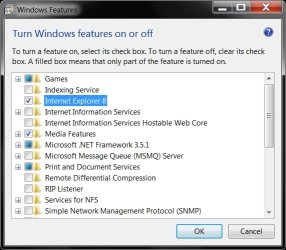
You see it here in the screenshot.

Just uncheck the box & click OK, then you'll probably
have to restart your computer for it to take effect.

Attachments
My Computer
- Computer Manufacturer/Model Number
- ABS Tech Ultimate X9
- OS
- Windows® 7 Ultimate x64 SP1
- CPU
- Intel Core 2 Duo E8400 (E0) @ 4.0GHz
- Motherboard
- ASUS P5Q Pro Turbo / 1780 FSB
- Memory
- G.SKILL-F2-8500CL5D-4GBPK (2x2Gbs) (5-5-5-15) @ 1067Mhz
- Graphics Card(s)
- EVGA GTX 470 SC (845/1690/2000) 160Gbs
- Sound Card
- VIA HD Audio / Boston Acoustics
- Monitor(s) Displays
- Acer X222W HD 22" LCD 2500:1 / 5ms
- Screen Resolution
- 1680x1050
- Hard Drives
- Seagate Barracuda SATAII 2 x 320GB
Seagate Barracuda SATAII 1Tb
Intel® Rapid Storage Technology v10.1.0.1008
AHCI-NCQ Enabled
- PSU
- Silent Pro GOLD 80 PLUS 800w /95% efficiency / SLI-Crossfire
- Case
- ABS Stealth Black-Custom
- Cooling
- CoolerMaster V6GT 6 Heatpipe 200w CPU Cooler
- Keyboard
- Logitech G15 Gaming Keyboard (Old Style Blue!)
- Mouse
- Logitech MX518 Gaming Mouse
- Internet Speed
- 1Mbs-up/ 6Mbs-down
IE can only be deactivated, as mentioned previously. But deactivation is the same as uninstalled, you will not even know that it is there.
My Computer
- Computer type
- PC/Desktop
- Computer Manufacturer/Model Number
- Dell XPS 420
- OS
- Windows 10, Home Clean Install
- CPU
- Intel Core2 processsor Q8200(2.33Ghz 1333FSB) Quad Core Tech
- Motherboard
- Dell
- Memory
- 6 gb
- Graphics Card(s)
- ATI Radeon 256MB HD3650
- Sound Card
- Intergrated 7.1 Channel Audio
- Monitor(s) Displays
- Dell SP2009W 20"
- Hard Drives
- 640 GB Serial ATA Hard drive
- Cooling
- Fan
- Keyboard
- Dell USB Keyboard
- Mouse
- Dell Premium Optical USB
- Internet Speed
- DSL 2.85
You can deactivate it from the Add & Remove programs window under Windows Services. Then Reboot, and you'll never have to worry about it again.
http://www.sevenforums.com/tutorials/5023-windows-features-turn-off.html
Where do you see IE on that?
BTW: I would leave it - you can only deactivate it anyhow. You can never have enough browsers. I have 5 because some can do what others can't.
You see it here in the screenshot.
Just uncheck the box & click OK, then you'll probably
have to restart your computer for it to take effect.
Here again, that does deactivate it, but does not uninstall it. But the OP wanted to uninstall it.
My Computer
- Computer Manufacturer/Model Number
- HP, Dell, Gateway, Toshiba - 4 laptops and 2 desktops
- OS
- Vista, Windows7, Mint Mate, Zorin, Windows 8
- CPU
- from 1.6GHz Duo to i7
- Monitor(s) Displays
- 2x HP w2207
- Hard Drives
- 5x HDD, 7x SSD, 12x Externals
- Keyboard
- with trackball - no mices
- Mouse
- Trackball mice
- Internet Speed
- DSL 6000
Whs,
Yes, just deactivating it. It will seem deleted because you wont see it, but technically it is not uninstalled
Yes, just deactivating it. It will seem deleted because you wont see it, but technically it is not uninstalled
My Computer
- Computer Manufacturer/Model Number
- Dell Vostro 1000
- OS
- Windows 7 Ultimate x86
- CPU
- AMD Sempron 3600+
- Graphics Card(s)
- ATI Radeon Xpress 1150
- Monitor(s) Displays
- Generic PnP Monitor
- Screen Resolution
- 1200 x 800
- Hard Drives
- WD Scorpio Blue 500 GB (WD5000BEVT)
- Mouse
- Logitech V320 Cordless Optical Mouse

What makes IE, IE is "uninstalled" however, the core components that are included with IE like the HTML Engine, and file save dialog are retained. These need to be saved! A lot of third-party programs use them.
My Computer
- Computer type
- PC/Desktop
- Computer Manufacturer/Model Number
- Alienware Aurora ALX R4
- OS
- Windows 10 Pro (x64)
- CPU
- Intel Core i7-3930K (3.2GHz - 4.5GHz)
- Motherboard
- Alienware Aurora-R4 x79
- Memory
- 4x Samsung 4GB PC3-12800 DDR3 (16GB 1600MHz)
- Graphics Card(s)
- Nvidia Geforce GTX 690
- Sound Card
- SteelSeries Siberia Elite
- Monitor(s) Displays
- Dell UltraSharp U3011
- Screen Resolution
- 2560x1600
- Hard Drives
- Samsung 850 Pro 256 GB, Seagate 1TB Desktop Hybrid HDD, 2x Western Digital 4TB Green HDD
- PSU
- 875W Some Dell PSU <.<
- Case
- Alienware Aurora ALX
- Cooling
- Custom Liquid Cooling (EK CPU & GPU blocks) dual EK 480RAD
- Keyboard
- Logitech G710+ Mechanical
- Mouse
- Logitech G700s
- Internet Speed
- Verizon Fios (50 mbps average)
- Other Info
- Server: Intel NUC D54250WYK: i5-4250U, 16GB, 256 GB mSATA, Windows Server 2012 R2
Anyone have any idea if deactivating IE frees up any memory, improves boot speed, etc? Or is IE so rooted into the OS that it still takes up resources when it's disabled?
My Computer
- OS
- Win7 Home Premium x64
- CPU
- Intel Core i7/860
- Motherboard
- Gigabyte GA-P55M-UD2
- Memory
- 4 GB PC 1333
- Graphics Card(s)
- Nvidia GTS 250 (1 GB mem)
- Sound Card
- Onboard Realtek ALC888B
- Hard Drives
- Western Digital 500 gig, 7200 rpm
- PSU
- 700W
There will not be much change.
My Computer
- Computer type
- PC/Desktop
- Computer Manufacturer/Model Number
- Dell XPS 420
- OS
- Windows 10, Home Clean Install
- CPU
- Intel Core2 processsor Q8200(2.33Ghz 1333FSB) Quad Core Tech
- Motherboard
- Dell
- Memory
- 6 gb
- Graphics Card(s)
- ATI Radeon 256MB HD3650
- Sound Card
- Intergrated 7.1 Channel Audio
- Monitor(s) Displays
- Dell SP2009W 20"
- Hard Drives
- 640 GB Serial ATA Hard drive
- Cooling
- Fan
- Keyboard
- Dell USB Keyboard
- Mouse
- Dell Premium Optical USB
- Internet Speed
- DSL 2.85

- Local time
- 1:01 PM
- Messages
- 713
How do I uninstall or remove Internet Explorer 8?
It's is not advised to uninstall it but only to disable.
However it is still possible to uninstall it
more: Removal of Internet Explorer - Wikipedia, the free encyclopedia
There shouldn't be much difference.
It's is not advised to uninstall it but only to disable.
However it is still possible to uninstall it
Wikipedia said:While a major upgrade of Internet Explorer can be uninstalled in a traditional way if the user has saved the original application files for installation, the matter of uninstalling the version of the browser that has shipped with an operating system remains a controversial one.
The idea of removing a stock install of Internet Explorer from a Windows system was proposed during the United States v. Microsoft case. One of Microsoft's arguments during the trial was that removing Internet Explorer from Windows may result in system instability.
Removing Internet Explorer does have a number of consequences. Applications that depend on libraries installed by IE will fail to function, or have unexpected behaviors. The Windows help and support system will also not function due to the heavy reliance on HTML help files and components of IE. In versions of Windows before Vista, it is also not possible to run Microsoft's Windows Update or Microsoft Update with any other browser due to the service's implementation of an ActiveX control, which no other browser supports. In Windows Vista, Windows Update is implemented as a Control Panel applet.
With Windows 7, Microsoft added the ability to safely remove Internet Explorer 8 from Windows.[88] Microsoft does not allow the dependencies to be removed through this process, but the Internet Explorer executable (iexplore.exe) is removed without harming any other Windows components.
Simply installing and using another browser does not prevent third party programs and core operating system components from using IE libraries. Thus, a user who does not use IE to browse the Web can still be targeted by attacks against vulnerabilities in these libraries—for instance, via Outlook Express or the Windows Help subsystem. However, removing the IE libraries will cause these programs, and other software which depends upon them, to cease functioning or even to crash the system.
http://kb.mozillazine.org/Mozilla_Suite_:_FAQs_:_Remove_IE#Remove_Internet_Explorer_from_Windows said:Remove Internet Explorer from Windows
Although uninstalling Internet Explorer from Windows is possible, you are strongly advised not to remove IE, for a number of reasons [1]:
If you still want to remove IE despite these warnings, there are third-party programs available like LitePC that remove IE but these are most definitely not recommended for novice users. Instead of uninstalling IE, you should consider the alternatives first, such as making IE more secure, or hiding Internet Explorer.
- Many web sites are programmed to work only with Internet Explorer. For example, webmasters authoring a site may have not tested with other web browsers. The majority of websites on the Internet should work with Mozilla browsers, but there are some sites that appear distorted or inaccessible unless IE is used as a browser.
- Windows Update requires Internet Explorer. As an alternative, you may be able to manually download security updates, but it will require more monitoring and work than letting Windows Update handle this for you. (Personal comment: not true for Windows 7)
- Some applications depend on libraries installed by Internet Explorer. These applications may no longer work or they may behave unexpectedly if IE is removed.
- Some anti-virus products require IE for updates. Live updates or automatic DAT updates used by both Norton and McAfee are built on Internet Explorer's foundation. You may be able to manually update your virus signature files but it could require more work.
- Both removing and restoring IE is risky and difficult. IE is complex with extensive hooks built into Windows, for efficiency and functionality. Thus unplugging it from your system may impact Internet connectivity, Windows functionality, and break functionality in Microsoft Office and non-MS products.
- IE is more than a browser, it is the foundation for Internet functionality in Windows.
more: Removal of Internet Explorer - Wikipedia, the free encyclopedia
Anyone have any idea if deactivating IE frees up any memory, improves boot speed, etc? Or is IE so rooted into the OS that it still takes up resources when it's disabled?
There shouldn't be much difference.
My Computer
- OS
- Windows 7 Ultimate x86 SP1
I think you are chasing a red herring. Disabling IE is completely counterproductive and does not help with anything. I suggest you leave it as is. You can never have enough browser options.
My Computer
- Computer Manufacturer/Model Number
- HP, Dell, Gateway, Toshiba - 4 laptops and 2 desktops
- OS
- Vista, Windows7, Mint Mate, Zorin, Windows 8
- CPU
- from 1.6GHz Duo to i7
- Monitor(s) Displays
- 2x HP w2207
- Hard Drives
- 5x HDD, 7x SSD, 12x Externals
- Keyboard
- with trackball - no mices
- Mouse
- Trackball mice
- Internet Speed
- DSL 6000

I would advise against removing IE for one reason and one reason only - Some websites still utilise activex controls, that only work with IE, to perform tasks.
This includes many Microsoft sites such as the windows catalog , and although Java is taking over some banking and online shopping sites will only work with IE.
I personally only use IE when I have to, and keep an entirely stock, (no add-ons), version for this purpose
This includes many Microsoft sites such as the windows catalog , and although Java is taking over some banking and online shopping sites will only work with IE.
I personally only use IE when I have to, and keep an entirely stock, (no add-ons), version for this purpose
Last edited:
My Computers
System One System Two
-
- Computer type
- PC/Desktop
- Computer Manufacturer/Model Number
- ChillBlast - Custom to my design
- OS
- Windows 11 Pro x64 [Latest Release and Release Preview]
- CPU
- Ryzen 9 5950X, 3.8 - 5.2 MHz
- Motherboard
- Asus Prime X570-Pro
- Memory
- 64GB [2 x 32GB] DDR4 3200MHz
- Graphics Card(s)
- 4GB NVIDIA GEFORCE GTX 1650 Ti
- Sound Card
- On-board SPDIF to 5.1 System + HDMI [5.1 system]
- Monitor(s) Displays
- 32" UHD 32 Bit HDR Monitor + 43" UHD 4K 32Bit HDR TV
- Screen Resolution
- 2 x 3840 x 2160 @60Hz
- Hard Drives
- 1TB M2 SSD OS, 500GB Fast Access SSD, 2 x 8TB Data + Various Externals from 1TB to 4TB, 10TB NAS
- PSU
- NZXT C750 80 PLUS Gold 750W Modular PSU
- Case
- Workstation Case [Matt Black]
- Cooling
- NZXT Kraken X63 280mm CPU Cooler +2x Quiet Case fans
- Keyboard
- Logitech Wireless MX Keys & K400 + others
- Mouse
- Logitech Wireless MX Master 3S
- Internet Speed
- 920 MB Down 50 MB Up
- Antivirus
- BitDefender Total Security Pro
- Browser
- Chrome (always run latest Non-Beta)
- Other Info
- Also run ...
Laptop - Quad 8GB - Windows 10 Pro x64
Nexus 7 Android tablet x2
Samsung 10.2" tablet
Blackview TAB 8 4G Android Tablet c/w Keyboard
Wacom Intuos Pro Medium Pen Pad
Wacom Intuos Pro Small Pen Pad
Wacom Expresskeys Remote
Loopdeck+ Graphics Controller
Shuttle Pro v2 Control
-
- Computer type
- Laptop
- System Manufacturer/Model Number
- Dell XPS 17 10750H
- OS
- Windows 11 Pro x64 Latest RP
- CPU
- Intel I7 10750H 5.0GHz
- Motherboard
- Dell XPS
- Memory
- 32GB [2x16GB] DDR4 2933 MHz
- Graphics Card(s)
- nVidia GTX1650Ti 4 GB GDDR6
- Sound Card
- Stock [Realtek] 4 Speaker
- Monitor(s) Displays
- 17" IPS UHD+ Infinity Edge Touchscreen
- Screen Resolution
- 3840 x 2400
- Hard Drives
- 2TB M2 NVMe, 4TB External + various 500GB & 1TB External NVMe (also have access to spinner HDD from
- PSU
- Stock
- Case
- Stock XPS Aluminium & Carbon Fibre
- Cooling
- Stock - Active Fan Control
- Keyboard
- Backlit + Various Logitech
- Mouse
- Stock Track Pad + Logitech MX Trackball
- Internet Speed
- 72 MB Down 18MB Up
- Browser
- Chrome
- Other Info
- Also run ...
Laptop - Quad 8GB - Windows 10 Pro x64
Nexus 7 Android tablet x2
10.2" tablet
Sony Z3 Android Smartphone
Wacom Intuos Pro Medium Pen Pad
Wacom Intuos Pro Small Pen Pad
Wacom Expresskeys Remote
Loopdeck+ Graphics Controller
Shuttle Pro v2 Control Pad
10TB NAS

Thanks Barman - good info.
My Computer
- Computer Manufacturer/Model Number
- 24c Built
- OS
- Win7 x64 Ult
- CPU
- Intel i7-950
- Motherboard
- ASUS PT6
- Memory
- 12 GB DDR3
- Graphics Card(s)
- NVIDIA 9800GT+
- Sound Card
- none
- Monitor(s) Displays
- 2 Samsung SyncMaster 2343bwx
- Screen Resolution
- 2048X1152
- Hard Drives
- 1st-4 OCZ Vertex Turbos 32GB RAID 0
2nd-2 WD 640GB RAID 1
- PSU
- Thermaltake Toughpower XT W0229RU 750W
- Case
- Antec 900
- Cooling
- case fans
- Keyboard
- Logitech cordless
- Mouse
- Logitech cordless
- Internet Speed
- up to 15 MB/s
Similar threads
- Replies
- 6
- Views
- 1K

- Replies
- 9
- Views
- 4K


- Replies
- 0
- Views
- 492
- Replies
- 5
- Views
- 2K
