Is it possible to change default OS at boot?

Greg,
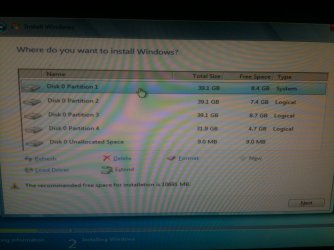
I am attaching a pic. This is how I did it when I installed win7 and I chose the C drive which now shows as partition 1.
When I did it, that partition had 16 GB space and it went about doing its installation.

Why I don't want to lose data is because I have so many programs I use and I will spend several hours installing them again.
 

Attachments
  • image.jpg
    image.jpg
    244.4 KB · Views: 0

My Computer My Computer

At a glance

Win 7 Ultimate 32 bit
Computer type
PC/Desktop
Computer Manufacturer/Model Number
Custom built
OS
Win 7 Ultimate 32 bit
If you can confirm there is no way by which I can change the display time during boot up ( so that it gives me 30 seconds to choose an OS) without actually booting up the OS in a machine then I will just format partition drive 1 and do a fresh install of win7..
 

My Computer My Computer

At a glance

Win 7 Ultimate 32 bit
Computer type
PC/Desktop
Computer Manufacturer/Model Number
Custom built
OS
Win 7 Ultimate 32 bit
Then where was XP? If you had an XP system as you say then XP is always on the first partition.

When you finished installing WIn7 did it show a Dual Boot menu with an XP listing that actually booted? WHich partition was XP on? Surely you would know this.

If Win7 is on the first partition and Startup Repair will not repair it when run 3 separate times with the Active flag we know from Diskpart is in place there, then I would reinstall Win7 to the first partition, explore the other partitions to find out where the XP partition is, if it's the second partition move the data you want off of it and delete it in Disk Mgmt to extend C into it as I've laid out three times now.

You can also browse in now with the WIn7 disk to see the files on each partition to determine which is Win7 and XP, and even rescue your data to another HD or external using http://www.sevenforums.com/tutorials/93347-copy-paste-windows-recovery-console.html

The only way I know to undo the changes you made is System Restore. Try an earlier Restore Point.
 
Greg,
I cannot confirm if the old XP sp2 was working because ever since I installed win7 I have never touched win xp2
But what I can confirm is that C drive had a windows.old folder and there was no change in the disk space of other drives. Each one has hardly 5-8 GB and there was no change in disk size.
 

My Computer My Computer

At a glance

Win 7 Ultimate 32 bit
Computer type
PC/Desktop
Computer Manufacturer/Model Number
Custom built
OS
Win 7 Ultimate 32 bit
There are two restore points. One that is installation and one that says system updates. I tried both and they do restore but Everytime at startup it still tries to do the sp3 installation and fails and goes into its endless loop..
 

My Computer My Computer

At a glance

Win 7 Ultimate 32 bit
Computer type
PC/Desktop
Computer Manufacturer/Model Number
Custom built
OS
Win 7 Ultimate 32 bit
Do you have access to another PC where you can create a bootable DVD ?
I'm wondering if it wouldn't be better for the OP to boot a Linux disc to see what is on all the HD partitions ???
 

My Computer My Computer

At a glance

Multi-Boot W7_Pro_x64 W8.1_Pro_x64 W10_Pro_x6...AMD Athlon II x4 6206GB GSkill DDR2 800AMD 4670 GPU + AMD 4200 IGP
Computer type
PC/Desktop
Computer Manufacturer/Model Number
home built
OS
Multi-Boot W7_Pro_x64 W8.1_Pro_x64 W10_Pro_x64 +Linux_VMs +Chromium_VM
CPU
AMD Athlon II x4 620
Motherboard
Gigabyte GA-MA785G-UD3H
Memory
6GB GSkill DDR2 800
Graphics Card(s)
AMD 4670 GPU + AMD 4200 IGP
Sound Card
on board Realtek ALC889A
Monitor(s) Displays
RCA 40" LCD TV, Insignia 32" LCD TV, HP 15" LCD monitor
Screen Resolution
1680 x 1050
Hard Drives
OCZ Vertex 3 120GB,
Samsung F3 1TB (3),
Several others - WD, Seagate, Hitachi, ...
PSU
Corsair 500 W
Case
Rosewill mid tower
Cooling
CM 90mm rifle
Keyboard
Gyration wireless, Logitech wireless, Dell USB wired
Mouse
Gyration wireless, Logitech wireless, V7 USB wired
Internet Speed
Spectrum - 100Mbps D / 10Mbps U
Antivirus
Avast, MBAM3, EMET, WinPatrol
Browser
Pale Moon, Firefox, IE
Other Info
2 multi-boot PC's
Mainly HTPC/Office/Gen purpose (no gaming).
Trendnet USB KVM.
LG DVD burner/Blue Ray Player.
Tray system for removable SATA backup drives.

Not currently OCd, under-volted.
I use Hybrid sleep, rarely re-boot or shutdown.

Hauppauge HD-PVR, Avermedia PCIe TV Tuner, Hauppauge PCI TV Tuner.
Hi David, unfortunately its the only machine I have.
 

My Computer My Computer

At a glance

Win 7 Ultimate 32 bit
Computer type
PC/Desktop
Computer Manufacturer/Model Number
Custom built
OS
Win 7 Ultimate 32 bit
I would not waste any more time with a dead OS that's XPired anyway. Reinstall Win7 to the first partition, delete XP partition after moving its data off, then resize Win7 into the space. Even if XP is on third or fourth partition you can move the data off, delete it in Disk Mgmt and then annex the space into the WIn7 partition using extend partition easily with Partition Wizard - video help.

In fact you can borrow space from any other partition using that cool tool. I would equalize my partitions so you have one OS and one data.
 
OK, but do you have any friends with PCs that would let you create a bootable disc ?
 

My Computer My Computer

At a glance

Multi-Boot W7_Pro_x64 W8.1_Pro_x64 W10_Pro_x6...AMD Athlon II x4 6206GB GSkill DDR2 800AMD 4670 GPU + AMD 4200 IGP
Computer type
PC/Desktop
Computer Manufacturer/Model Number
home built
OS
Multi-Boot W7_Pro_x64 W8.1_Pro_x64 W10_Pro_x64 +Linux_VMs +Chromium_VM
CPU
AMD Athlon II x4 620
Motherboard
Gigabyte GA-MA785G-UD3H
Memory
6GB GSkill DDR2 800
Graphics Card(s)
AMD 4670 GPU + AMD 4200 IGP
Sound Card
on board Realtek ALC889A
Monitor(s) Displays
RCA 40" LCD TV, Insignia 32" LCD TV, HP 15" LCD monitor
Screen Resolution
1680 x 1050
Hard Drives
OCZ Vertex 3 120GB,
Samsung F3 1TB (3),
Several others - WD, Seagate, Hitachi, ...
PSU
Corsair 500 W
Case
Rosewill mid tower
Cooling
CM 90mm rifle
Keyboard
Gyration wireless, Logitech wireless, Dell USB wired
Mouse
Gyration wireless, Logitech wireless, V7 USB wired
Internet Speed
Spectrum - 100Mbps D / 10Mbps U
Antivirus
Avast, MBAM3, EMET, WinPatrol
Browser
Pale Moon, Firefox, IE
Other Info
2 multi-boot PC's
Mainly HTPC/Office/Gen purpose (no gaming).
Trendnet USB KVM.
LG DVD burner/Blue Ray Player.
Tray system for removable SATA backup drives.

Not currently OCd, under-volted.
I use Hybrid sleep, rarely re-boot or shutdown.

Hauppauge HD-PVR, Avermedia PCIe TV Tuner, Hauppauge PCI TV Tuner.
Greg, So for my clean install in partition 1, I do a format of the partition right.
I attached an image with the list of partitions and advanced options below. Do I select partition1 and click format?
 

My Computer My Computer

At a glance

Win 7 Ultimate 32 bit
Computer type
PC/Desktop
Computer Manufacturer/Model Number
Custom built
OS
Win 7 Ultimate 32 bit
If there is no option to change the display time to see my list of OS at boot up then I guess this is the only way.
Sadly I will have to install all the software that I use again.
 

My Computer My Computer

At a glance

Win 7 Ultimate 32 bit
Computer type
PC/Desktop
Computer Manufacturer/Model Number
Custom built
OS
Win 7 Ultimate 32 bit
He has a bootable Win7 disk which can access files using http://www.sevenforums.com/tutorials/93347-copy-paste-windows-recovery-console.html. I was just suggesting a method to confirm no data is on C or determine for sure where each OS is before reinstall.

But if he's sure he installed to first partition then unless there's something he really needs off of there he can wait til he reinstalls to Explore for his XP partition and access his data on the other partitions.

You have to reinstall your software anyway on a Clean Install of Win7. This time look over these steps for http://www.sevenforums.com/tutorials/219487-clean-reinstall-factory-oem-windows-7-a.html#post1839164 which compile everything that works best.

If you're sure you have your data off C then format it first. The booted installer will do this anyway if you don't.
 
Greg, So for my clean install in partition 1, I do a format of the partition right.
I attached an image with the list of partitions and advanced options below. Do I select partition1 and click format?

You don't format anything.

You tell Windows where you want to install.

It then does the necessary, to include formatting.
 

My Computer My Computer

At a glance

Windows 7 Home Premium SP1, 64-bitIntel Skylake i5-6600K, not overclocked8 GB HyperX DDR4-2666 (2 x 4 GB)none; graphics are integrated on CPU
Computer type
PC/Desktop
Computer Manufacturer/Model Number
Ignatz Special; 4 speed manual gearbox; factory air conditioning; one of one
OS
Windows 7 Home Premium SP1, 64-bit
CPU
Intel Skylake i5-6600K, not overclocked
Motherboard
AsRock Z170M Extreme 4, micro ATX
Memory
8 GB HyperX DDR4-2666 (2 x 4 GB)
Graphics Card(s)
none; graphics are integrated on CPU
Sound Card
onboard: Realtek ALC1150; external: USB Behringer UF0-202
Monitor(s) Displays
Dell S2340M 23 inch IPS
Screen Resolution
1600 x 900
Hard Drives
System: Crucial MX100 series SSD, 128 GB;
Data: Samsung Spinpoint 103SJ, 1 TB;
Backup: WD Caviar Green WD30EZRX-00D8PB0, 3 TB
PSU
Rosewill SilentNight 500 watt fanless, semi-modular
Case
Antec Solo II
Cooling
Noctua NH-U12S; Noctua F12 intake, Noctua S12A exhaust
Keyboard
Microsoft 200 6JH-00001 USB
Mouse
Dell or Microsoft optical wired; USB
Antivirus
Microsoft Security Essentials and Malwarebytes Premium
Browser
Pale Moon
Other Info
All fans PWM; speeds at idle: CPU circa 500 rpm; intake circa 600 rpm; exhaust circa 600 rpm; CPU temps 27 idle and 47 C load in a warm room (27 C/81 F) when running Intel Extreme Tuning Utility stress test.
Thanks Sonic. Will try it and reply shortly.
 

My Computer My Computer

At a glance

Win 7 Ultimate 32 bit
Computer type
PC/Desktop
Computer Manufacturer/Model Number
Custom built
OS
Win 7 Ultimate 32 bit
Hi All,
I did a reinstall of win7. My problem seems to be resolved.but I'm so confused.
I get 3 options while boot up.
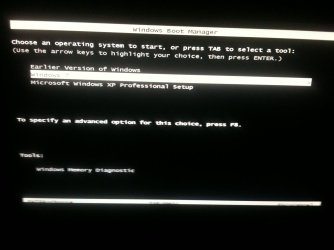
Old version of windows (most likely XP sp2), 1 windows 7 and one windows xp installation set up ( which must be the XP sp3 corrupt installation file). This is how it was before I ruined things..
So I think the install of win7 overwrote the last win7...

All my program files still exist. I
Got to windows old and recreate all the shortcuts which existed on my desktop before this issue..I think i will survive with this.. rather than try to remove the corrupt XP sp3 which is still the default OS trying to boot at install.. I will
post pictures...
 

My Computer My Computer

At a glance

Win 7 Ultimate 32 bit
Computer type
PC/Desktop
Computer Manufacturer/Model Number
Custom built
OS
Win 7 Ultimate 32 bit
First thing you should do if post a picture of Windows Disk Management so we can see once and for all what's going on.

If the new install in fact boots, you should get anti-virus installed before you go very far on the net.

Have you confirmed you have an Internet connection on the new install?

If the Windows Disk Management pic checks out, you should be able to delete unnecessary partitions from that screen.
 

My Computer My Computer

At a glance

Windows 7 Home Premium SP1, 64-bitIntel Skylake i5-6600K, not overclocked8 GB HyperX DDR4-2666 (2 x 4 GB)none; graphics are integrated on CPU
Computer type
PC/Desktop
Computer Manufacturer/Model Number
Ignatz Special; 4 speed manual gearbox; factory air conditioning; one of one
OS
Windows 7 Home Premium SP1, 64-bit
CPU
Intel Skylake i5-6600K, not overclocked
Motherboard
AsRock Z170M Extreme 4, micro ATX
Memory
8 GB HyperX DDR4-2666 (2 x 4 GB)
Graphics Card(s)
none; graphics are integrated on CPU
Sound Card
onboard: Realtek ALC1150; external: USB Behringer UF0-202
Monitor(s) Displays
Dell S2340M 23 inch IPS
Screen Resolution
1600 x 900
Hard Drives
System: Crucial MX100 series SSD, 128 GB;
Data: Samsung Spinpoint 103SJ, 1 TB;
Backup: WD Caviar Green WD30EZRX-00D8PB0, 3 TB
PSU
Rosewill SilentNight 500 watt fanless, semi-modular
Case
Antec Solo II
Cooling
Noctua NH-U12S; Noctua F12 intake, Noctua S12A exhaust
Keyboard
Microsoft 200 6JH-00001 USB
Mouse
Dell or Microsoft optical wired; USB
Antivirus
Microsoft Security Essentials and Malwarebytes Premium
Browser
Pale Moon
Other Info
All fans PWM; speeds at idle: CPU circa 500 rpm; intake circa 600 rpm; exhaust circa 600 rpm; CPU temps 27 idle and 47 C load in a warm room (27 C/81 F) when running Intel Extreme Tuning Utility stress test.
The screen at boot up.. Please not the I have changed the OS choice to the second one in the list so that you can see the default option that is the third one in that list..
 

Attachments

  • image.jpg
    image.jpg
    149.7 KB · Views: 0

My Computer My Computer

At a glance

Win 7 Ultimate 32 bit
Computer type
PC/Desktop
Computer Manufacturer/Model Number
Custom built
OS
Win 7 Ultimate 32 bit
Yes the Internet works fine... Which is like last time when I didn't have to do anything to get it working..
Now windows 7 boots fine... It did ask me stuff to do when a fresh install is in place.. Like giving a name to the PC ...
Only thing is that Everytime at start of the machine I need to change the OS option to windows 7 else it goes into that endless loop of installing sp3 attempt.
Another change I see is that disk space on C drive is eaten. Earlier I had 16 GB and after win 7 install it became 9 GB now it says 3.5 GB.
 

My Computer My Computer

At a glance

Win 7 Ultimate 32 bit
Computer type
PC/Desktop
Computer Manufacturer/Model Number
Custom built
OS
Win 7 Ultimate 32 bit
Show us the pic of Windows Disk Management.

Preferably a screen shot, rather than a camera snap. But something.
 

My Computer My Computer

At a glance

Windows 7 Home Premium SP1, 64-bitIntel Skylake i5-6600K, not overclocked8 GB HyperX DDR4-2666 (2 x 4 GB)none; graphics are integrated on CPU
Computer type
PC/Desktop
Computer Manufacturer/Model Number
Ignatz Special; 4 speed manual gearbox; factory air conditioning; one of one
OS
Windows 7 Home Premium SP1, 64-bit
CPU
Intel Skylake i5-6600K, not overclocked
Motherboard
AsRock Z170M Extreme 4, micro ATX
Memory
8 GB HyperX DDR4-2666 (2 x 4 GB)
Graphics Card(s)
none; graphics are integrated on CPU
Sound Card
onboard: Realtek ALC1150; external: USB Behringer UF0-202
Monitor(s) Displays
Dell S2340M 23 inch IPS
Screen Resolution
1600 x 900
Hard Drives
System: Crucial MX100 series SSD, 128 GB;
Data: Samsung Spinpoint 103SJ, 1 TB;
Backup: WD Caviar Green WD30EZRX-00D8PB0, 3 TB
PSU
Rosewill SilentNight 500 watt fanless, semi-modular
Case
Antec Solo II
Cooling
Noctua NH-U12S; Noctua F12 intake, Noctua S12A exhaust
Keyboard
Microsoft 200 6JH-00001 USB
Mouse
Dell or Microsoft optical wired; USB
Antivirus
Microsoft Security Essentials and Malwarebytes Premium
Browser
Pale Moon
Other Info
All fans PWM; speeds at idle: CPU circa 500 rpm; intake circa 600 rpm; exhaust circa 600 rpm; CPU temps 27 idle and 47 C load in a warm room (27 C/81 F) when running Intel Extreme Tuning Utility stress test.
Oh I am a fool... My system is now working and I'm struggling to type from my phone.. Will respond from the system directly.. :D
Yes will upload the snapshot.
 

My Computer My Computer

At a glance

Win 7 Ultimate 32 bit
Computer type
PC/Desktop
Computer Manufacturer/Model Number
Custom built
OS
Win 7 Ultimate 32 bit
Back
Top