Solved Is it possible to connect a particular screen saver to a power plan?

pxfragonard

New member
Power User
VIP
Local time
12:11 PM
Messages
339
Probably not but it would be cool and convenient.
 

My Computer My Computer

At a glance

Microsoft Windows 7 Home Premium 64-bit 7601 ...Intel(R) Core(TM) i5-2300 CPU @ 2.80GHz6 GBRadeon 6750 1gb
Computer Manufacturer/Model Number
HP Pavilion p6745f
OS
Microsoft Windows 7 Home Premium 64-bit 7601 Multiprocessor Free Service Pack 1
CPU
Intel(R) Core(TM) i5-2300 CPU @ 2.80GHz
Motherboard
PEGATRON CORPORATION 2AB6
Memory
6 GB
Graphics Card(s)
Radeon 6750 1gb
Sound Card
(1) IDT High Definition Audio CODEC (2) Intel(R) Display A
Monitor(s) Displays
Acer x193w
Hard Drives
(1) WDC WD15EARS-60MVWB0 (2) Generic- Compact Flash USB Device (3) Generic- MS/MS-Pro USB Device (4) Generic- SD/MMC USB Device (5) Generic- SM/xD-Picture USB Device (6) WD My Book 1110 USB Device
PSU
Internal 500W (100V-240V)
Case
Mid-size ATX
Cooling
unknown
Keyboard
HP usb multimedia keyboard
Mouse
HP usb compliant mouse
Internet Speed
256 kbps
Other Info
Ver: CHI_713.bin vCHI7.13
AFAIK, no. Screensavers are "connected" to your desktop theme - if you save a theme different from your current, and assign another screensaver to it, it should change when you which between themes.
 

My Computer My Computer

At a glance

Windows 7 Home Premium x64Intel Core i5 2500K8GB DDR3nVidia GeForce GTX650 Ti BOOST
Computer type
Laptop
Computer Manufacturer/Model Number
Custom
OS
Windows 7 Home Premium x64
CPU
Intel Core i5 2500K
Motherboard
MSI MS-7750
Memory
8GB DDR3
Graphics Card(s)
nVidia GeForce GTX650 Ti BOOST
Sound Card
Realtek
Monitor(s) Displays
21' Philips
Screen Resolution
Full HD
Hard Drives
1TB
PSU
500W
Scrren Saver - change power plan

Well I don't actually use screen savers so I cannot test this theory but:

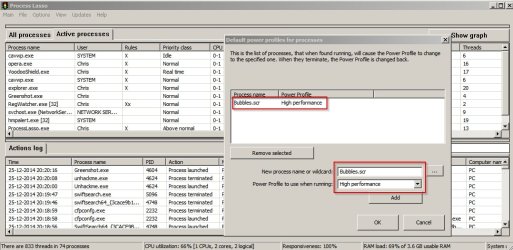
ProcessLasso has an option to change power plans if a certain process is running so if you've got different screen-savers with different .scr running process names then it's possible.

Configure power plan to switch to high performance when bubbles screen-saver is active:

Process Lasso.jpg

The problem with this approach is that you might not want or need ProcessLasso's other process taming features but it does seem to indicate that what you're asking for is possible.

Also see: Change Power Plan when application starts
 

My Computer My Computer

At a glance

Microsoft Windows 7 Home Premium 64-bit 7601 ...AMD C-60 APU with Radeon(tm) HD Graphics4.00 GBAMD Radeon HD 6290 Graphics
Computer type
Laptop
Computer Manufacturer/Model Number
ASUS
OS
Microsoft Windows 7 Home Premium 64-bit 7601 Multiprocessor Free Service Pack 1
CPU
AMD C-60 APU with Radeon(tm) HD Graphics
Motherboard
ASUSTeK COMPUTER INC. X501U
Memory
4.00 GB
Graphics Card(s)
AMD Radeon HD 6290 Graphics
Sound Card
(1) AMD High Definition Audio Device (2) Realtek High Defi
Screen Resolution
1366 x 768 x 32 bits (4294967296 colors) @ 60 Hz
Hard Drives
Hitachi HTS545050A7E380 SATA Disk Device
Antivirus
Comodo CIS & FW, SecureAplus App Whitelisting, Threatfire
Browser
Cyberfox 64bit, Opera 64bit, Airfox
Other Info
Spy-The-Spy, HitmanPro.Alert, Norton Connect Safe, MJRegWatcher, BitDefender TrafficLight, Voodoo Shield, Zemana AntiMalware
Along with what Callender mentioned about ProcessLasso, another avenue could be you copying the .scr saver information into the theme.

Now, whether or not you can just copy the .scr into the theme or if this involves a set of related .dlls to make the .scr work as it should would require some experimentation on your part.

Related Link;
OLE for Process Control
 

My Computer My Computer

At a glance

Originally Win 7 Hm Prem x64 Ver 6.1.7600 Bui...Intel i3 530 2.93GHz, 2933MHz 2 Cores 4 Logic...6GB of 1,333MHz DDR3 SDRAM32MB Intel Graphics Media Accelerator HD IGChip
Computer type
PC/Desktop
Computer Manufacturer/Model Number
Gateway DX4831-01e (Mid-Tower Desktop)
OS
Originally Win 7 Hm Prem x64 Ver 6.1.7600 Build 7601-SP1 | Upgraded to Windows 10 December 14, 2019
CPU
Intel i3 530 2.93GHz, 2933MHz 2 Cores 4 Logical Processors
Motherboard
Gateway H57M01 133 megahertz
Memory
6GB of 1,333MHz DDR3 SDRAM
Graphics Card(s)
32MB Intel Graphics Media Accelerator HD IGChip
Sound Card
Realtek High Definition Audio
Monitor(s) Displays
Gateway HX2000 20inch TFT active matrix TN
Screen Resolution
1600 x 900 x 59 hertz
Hard Drives
WDC WD10EADS-00M2B0 [HDD] (1000.20 GB) -- drive 0,
HL-DT-ST DVDRAM GH41N [CD-ROM dr]
Four card readers, and Four USB 2.0
PSU
300watts.
Case
Mid-Tower Desktop
Cooling
Stock from Gateway
Keyboard
Natural Ergonomic Keyboard 4000, see Other Info
Mouse
Orig. Gateway wore out now using Insignia USB wired optical
Internet Speed
Vz FIOS 10ms png 57.64Mbps down 65.53Mbps up Speedtest.org
Antivirus
Zamana Anti-logger with Anti-malware, MSE, Windows Firewall,
Browser
IE11.0.9600.19399-Upd ver11.0.135, Firefox 68.0.1 x64
Other Info
System Specs by Belarc.

BIOS: American Megatrends Inc. P01-A0 11/17/2009

Replaced the MS 'Natural' Standard PS/2 Enhanced 101-102 Keyboard with a new Natural Ergonomic Keyboard 4000 on August 1st 2014.

Canon Pixma MG3222 Printer.

Updated to IE11 on 12102015 | Fios Quantum Router g1100

Additional AV: SpywareBlaster, manual Mbam, SAS
Along with what Callender mentioned about ProcessLasso, another avenue could be you copying the .scr saver information into the theme.

Now, whether or not you can just copy the .scr into the theme or if this involves a set of related .dlls to make the .scr work as it should would require some experimentation on your part.

Related Link;
OLE for Process Control

AFAIK, no. Screensavers are "connected" to your desktop theme - if you save a theme different from your current, and assign another screensaver to it, it should change when you which between themes.
Brilliant! Just change the theme. Do you know how I could make a shortcut to the theme and drag it onto the taskbar?

The other options are beyond my computer skills by thanks for your replies!!!
 

My Computer My Computer

At a glance

Microsoft Windows 7 Home Premium 64-bit 7601 ...Intel(R) Core(TM) i5-2300 CPU @ 2.80GHz6 GBRadeon 6750 1gb
Computer Manufacturer/Model Number
HP Pavilion p6745f
OS
Microsoft Windows 7 Home Premium 64-bit 7601 Multiprocessor Free Service Pack 1
CPU
Intel(R) Core(TM) i5-2300 CPU @ 2.80GHz
Motherboard
PEGATRON CORPORATION 2AB6
Memory
6 GB
Graphics Card(s)
Radeon 6750 1gb
Sound Card
(1) IDT High Definition Audio CODEC (2) Intel(R) Display A
Monitor(s) Displays
Acer x193w
Hard Drives
(1) WDC WD15EARS-60MVWB0 (2) Generic- Compact Flash USB Device (3) Generic- MS/MS-Pro USB Device (4) Generic- SD/MMC USB Device (5) Generic- SM/xD-Picture USB Device (6) WD My Book 1110 USB Device
PSU
Internal 500W (100V-240V)
Case
Mid-size ATX
Cooling
unknown
Keyboard
HP usb multimedia keyboard
Mouse
HP usb compliant mouse
Internet Speed
256 kbps
Other Info
Ver: CHI_713.bin vCHI7.13
Hi,

Do you know how I could make a shortcut to the theme and drag it onto the taskbar?
Custom user themes reside in %LOCALAPPDATA%\Microsoft\Windows\Themes. So Context-Menu -> New -> Shortcut and create a shorcut how you would normally, but append the word 'explorer' in front of the path to the selected theme file.

Example shortcut:
Code:
explorer "%LOCALAPPDATA%\Microsoft\Windows\Themes\Custom.theme"

Lastly, stick it to the taskbar. (Or change the icon and/or filename first.)


A thing to note, though, is that the Personalization window must be open for the theme to change. Windows will open the Personalization window if it isn't already.
 

My Computer My Computer

At a glance

Windows 10, Windows 8.1 Pro, Windows 7 Profes...
Computer type
PC/Desktop
OS
Windows 10, Windows 8.1 Pro, Windows 7 Professional, OS X El Capitan
Once you actually save the theme, it's not too difficult to change it via right click -> Personalize -> choosing your theme, instead of making a bunch of shortcuts on your desktop/taskbar.

So here's an idea: if you're constantly switching between screensavers but don't want to change the rest of the theme, just use the screensaver name as the theme name, and manage them in Personalization.
 

My Computer My Computer

At a glance

Windows 7 Home Premium x64Intel Core i5 2500K8GB DDR3nVidia GeForce GTX650 Ti BOOST
Computer type
Laptop
Computer Manufacturer/Model Number
Custom
OS
Windows 7 Home Premium x64
CPU
Intel Core i5 2500K
Motherboard
MSI MS-7750
Memory
8GB DDR3
Graphics Card(s)
nVidia GeForce GTX650 Ti BOOST
Sound Card
Realtek
Monitor(s) Displays
21' Philips
Screen Resolution
Full HD
Hard Drives
1TB
PSU
500W
Hi,

Do you know how I could make a shortcut to the theme and drag it onto the taskbar?
Custom user themes reside in %LOCALAPPDATA%\Microsoft\Windows\Themes. So Context-Menu -> New -> Shortcut and create a shorcut how you would normally, but append the word 'explorer' in front of the path to the selected theme file.

Example shortcut:
Code:
explorer "%LOCALAPPDATA%\Microsoft\Windows\Themes\Custom.theme"
Lastly, stick it to the taskbar. (Or change the icon and/or filename first.)


A thing to note, though, is that the Personalization window must be open for the theme to change. Windows will open the Personalization window if it isn't already.
Why would I use that code rather than, say, C:\Users\User\AppData\Local\Microsoft\Windows\Themes\Theme.theme? I tried that and it worked, opening the personalization, choosing and applying the file in one click. Just curious about the use of the percentage symbol. Is it a shortcut eliminating the need to write the full path? Thanks for telling me where they're stored! I didn't know that.
 
Last edited:

My Computer My Computer

At a glance

Microsoft Windows 7 Home Premium 64-bit 7601 ...Intel(R) Core(TM) i5-2300 CPU @ 2.80GHz6 GBRadeon 6750 1gb
Computer Manufacturer/Model Number
HP Pavilion p6745f
OS
Microsoft Windows 7 Home Premium 64-bit 7601 Multiprocessor Free Service Pack 1
CPU
Intel(R) Core(TM) i5-2300 CPU @ 2.80GHz
Motherboard
PEGATRON CORPORATION 2AB6
Memory
6 GB
Graphics Card(s)
Radeon 6750 1gb
Sound Card
(1) IDT High Definition Audio CODEC (2) Intel(R) Display A
Monitor(s) Displays
Acer x193w
Hard Drives
(1) WDC WD15EARS-60MVWB0 (2) Generic- Compact Flash USB Device (3) Generic- MS/MS-Pro USB Device (4) Generic- SD/MMC USB Device (5) Generic- SM/xD-Picture USB Device (6) WD My Book 1110 USB Device
PSU
Internal 500W (100V-240V)
Case
Mid-size ATX
Cooling
unknown
Keyboard
HP usb multimedia keyboard
Mouse
HP usb compliant mouse
Internet Speed
256 kbps
Other Info
Ver: CHI_713.bin vCHI7.13
Once you actually save the theme, it's not too difficult to change it via right click -> Personalize -> choosing your theme, instead of making a bunch of shortcuts on your desktop/taskbar.

So here's an idea: if you're constantly switching between screensavers but don't want to change the rest of the theme, just use the screensaver name as the theme name, and manage them in Personalization.
Actually, it's the screen saver I want to change because I have one attached to one theme and a different one attached to another. I just use the two: one for day, one for night. Having a different background image tells me at a glance which screensaver is going to be employed.
 

My Computer My Computer

At a glance

Microsoft Windows 7 Home Premium 64-bit 7601 ...Intel(R) Core(TM) i5-2300 CPU @ 2.80GHz6 GBRadeon 6750 1gb
Computer Manufacturer/Model Number
HP Pavilion p6745f
OS
Microsoft Windows 7 Home Premium 64-bit 7601 Multiprocessor Free Service Pack 1
CPU
Intel(R) Core(TM) i5-2300 CPU @ 2.80GHz
Motherboard
PEGATRON CORPORATION 2AB6
Memory
6 GB
Graphics Card(s)
Radeon 6750 1gb
Sound Card
(1) IDT High Definition Audio CODEC (2) Intel(R) Display A
Monitor(s) Displays
Acer x193w
Hard Drives
(1) WDC WD15EARS-60MVWB0 (2) Generic- Compact Flash USB Device (3) Generic- MS/MS-Pro USB Device (4) Generic- SD/MMC USB Device (5) Generic- SM/xD-Picture USB Device (6) WD My Book 1110 USB Device
PSU
Internal 500W (100V-240V)
Case
Mid-size ATX
Cooling
unknown
Keyboard
HP usb multimedia keyboard
Mouse
HP usb compliant mouse
Internet Speed
256 kbps
Other Info
Ver: CHI_713.bin vCHI7.13
Well I don't actually use screen savers so I cannot test this theory but:

ProcessLasso has an option to change power plans if a certain process is running so if you've got different screen-savers with different .scr running process names then it's possible.

Configure power plan to switch to high performance when bubbles screen-saver is active:

View attachment 344166

The problem with this approach is that you might not want or need ProcessLasso's other process taming features but it does seem to indicate that what you're asking for is possible.

Also see: Change Power Plan when application starts
Thanks very much but it sounds way too complicated and I prefer to work within what the system offers first. And within my limited knowledge.
 

My Computer My Computer

At a glance

Microsoft Windows 7 Home Premium 64-bit 7601 ...Intel(R) Core(TM) i5-2300 CPU @ 2.80GHz6 GBRadeon 6750 1gb
Computer Manufacturer/Model Number
HP Pavilion p6745f
OS
Microsoft Windows 7 Home Premium 64-bit 7601 Multiprocessor Free Service Pack 1
CPU
Intel(R) Core(TM) i5-2300 CPU @ 2.80GHz
Motherboard
PEGATRON CORPORATION 2AB6
Memory
6 GB
Graphics Card(s)
Radeon 6750 1gb
Sound Card
(1) IDT High Definition Audio CODEC (2) Intel(R) Display A
Monitor(s) Displays
Acer x193w
Hard Drives
(1) WDC WD15EARS-60MVWB0 (2) Generic- Compact Flash USB Device (3) Generic- MS/MS-Pro USB Device (4) Generic- SD/MMC USB Device (5) Generic- SM/xD-Picture USB Device (6) WD My Book 1110 USB Device
PSU
Internal 500W (100V-240V)
Case
Mid-size ATX
Cooling
unknown
Keyboard
HP usb multimedia keyboard
Mouse
HP usb compliant mouse
Internet Speed
256 kbps
Other Info
Ver: CHI_713.bin vCHI7.13
Once you actually save the theme, it's not too difficult to change it via right click -> Personalize -> choosing your theme, instead of making a bunch of shortcuts on your desktop/taskbar.

So here's an idea: if you're constantly switching between screensavers but don't want to change the rest of the theme, just use the screensaver name as the theme name, and manage them in Personalization.
Actually, it's the screen saver I want to change because I have one attached to one theme and a different one attached to another. I just use the two: one for day, one for night. Having a different background image tells me at a glance which screensaver is going to be employed.

Awesome :D
 

My Computer My Computer

At a glance

Windows 7 Home Premium x64Intel Core i5 2500K8GB DDR3nVidia GeForce GTX650 Ti BOOST
Computer type
Laptop
Computer Manufacturer/Model Number
Custom
OS
Windows 7 Home Premium x64
CPU
Intel Core i5 2500K
Motherboard
MSI MS-7750
Memory
8GB DDR3
Graphics Card(s)
nVidia GeForce GTX650 Ti BOOST
Sound Card
Realtek
Monitor(s) Displays
21' Philips
Screen Resolution
Full HD
Hard Drives
1TB
PSU
500W
It's because I have so many themes and don't want to fish all the time for them. Thanks again.
 

My Computer My Computer

At a glance

Microsoft Windows 7 Home Premium 64-bit 7601 ...Intel(R) Core(TM) i5-2300 CPU @ 2.80GHz6 GBRadeon 6750 1gb
Computer Manufacturer/Model Number
HP Pavilion p6745f
OS
Microsoft Windows 7 Home Premium 64-bit 7601 Multiprocessor Free Service Pack 1
CPU
Intel(R) Core(TM) i5-2300 CPU @ 2.80GHz
Motherboard
PEGATRON CORPORATION 2AB6
Memory
6 GB
Graphics Card(s)
Radeon 6750 1gb
Sound Card
(1) IDT High Definition Audio CODEC (2) Intel(R) Display A
Monitor(s) Displays
Acer x193w
Hard Drives
(1) WDC WD15EARS-60MVWB0 (2) Generic- Compact Flash USB Device (3) Generic- MS/MS-Pro USB Device (4) Generic- SD/MMC USB Device (5) Generic- SM/xD-Picture USB Device (6) WD My Book 1110 USB Device
PSU
Internal 500W (100V-240V)
Case
Mid-size ATX
Cooling
unknown
Keyboard
HP usb multimedia keyboard
Mouse
HP usb compliant mouse
Internet Speed
256 kbps
Other Info
Ver: CHI_713.bin vCHI7.13
Hi,

Do you know how I could make a shortcut to the theme and drag it onto the taskbar?
Custom user themes reside in %LOCALAPPDATA%\Microsoft\Windows\Themes. So Context-Menu -> New -> Shortcut and create a shorcut how you would normally, but append the word 'explorer' in front of the path to the selected theme file.

Example shortcut:
Code:
explorer "%LOCALAPPDATA%\Microsoft\Windows\Themes\Custom.theme"
Lastly, stick it to the taskbar. (Or change the icon and/or filename first.)


A thing to note, though, is that the Personalization window must be open for the theme to change. Windows will open the Personalization window if it isn't already.
Why would I use that code rather than, say, C:\Users\User\AppData\Local\Microsoft\Windows\Themes\Theme.theme? I tried that and it worked, opening the personalization, choosing and applying the file in one click. Just curious about the use of the percentage symbol. Is it a shortcut eliminating the need to write the full path? Thanks for telling me where they're stored! I didn't know that.

Only if you want to pin the theme to the taskbar, is the 'Explorer' prefix really necessary... You see, Windows only permits applications on the taskbar, a .theme file is nothing near an application, so it cannot be pinned under normal circumstances.

Explorer on the other hand is an application (C:\Windows\explorer.exe) and is pin-able. If a file path argument is parsed to explorer.exe, the application will invoke the file. This is a neat trick to allow for non-applications to be pinned to the taskbar.

Appologies I didn't make this clear earlier.


Regarding the mysterious percent business (I like your curiosity btw), Pxfragonard, %LOCALAPPDATA% is an environment variable that expands to "C:\Users\%USERNAME%\AppData\Local" -- and you can probably guess what %USERNAME% expands to.

So "%LOCALAPPDATA%\Microsoft\Windows\Themes\Theme.theme" would just represent the same path as "C:\Users\User\AppData\Local\Microsoft\Windows\Themes\Theme.theme".

All operating systems will have their own implementations of these so called environment variables. In Windows 7, environment variables are (usually) denoted by text surrounded by percent symbols.

A (non)complete list of avaliable environment variables can be obtained by the SET command via the command prompt.
 

My Computer My Computer

At a glance

Windows 10, Windows 8.1 Pro, Windows 7 Profes...
Computer type
PC/Desktop
OS
Windows 10, Windows 8.1 Pro, Windows 7 Professional, OS X El Capitan
You needn't apologize. I should have just followed your advice. I wasn't able to drag it to the taskbar and now I know why! Just as well, it's getting crowded there. Anyway, the whole thing is fascinating. It reminds me of doing searches in the way olden days when asterisks served a different purpose. Or did they? Idle curiosity! I tried typing SET and saved what I found there. I'll look at it later when I've done some work. I only have so much time for idle curiosity, which often needs a working computer! Back to the BSOD thread. Cheers!
 

My Computer My Computer

At a glance

Microsoft Windows 7 Home Premium 64-bit 7601 ...Intel(R) Core(TM) i5-2300 CPU @ 2.80GHz6 GBRadeon 6750 1gb
Computer Manufacturer/Model Number
HP Pavilion p6745f
OS
Microsoft Windows 7 Home Premium 64-bit 7601 Multiprocessor Free Service Pack 1
CPU
Intel(R) Core(TM) i5-2300 CPU @ 2.80GHz
Motherboard
PEGATRON CORPORATION 2AB6
Memory
6 GB
Graphics Card(s)
Radeon 6750 1gb
Sound Card
(1) IDT High Definition Audio CODEC (2) Intel(R) Display A
Monitor(s) Displays
Acer x193w
Hard Drives
(1) WDC WD15EARS-60MVWB0 (2) Generic- Compact Flash USB Device (3) Generic- MS/MS-Pro USB Device (4) Generic- SD/MMC USB Device (5) Generic- SM/xD-Picture USB Device (6) WD My Book 1110 USB Device
PSU
Internal 500W (100V-240V)
Case
Mid-size ATX
Cooling
unknown
Keyboard
HP usb multimedia keyboard
Mouse
HP usb compliant mouse
Internet Speed
256 kbps
Other Info
Ver: CHI_713.bin vCHI7.13
Although there were some shaky moments in this thread, these last two posts show a grand example of the camaraderie, and honesty amongst friends.

Members working towards a common goal!

My hats off to not only, pxfragonard, and, Pyprohly, but also, Gornot, and Callender.

Well Done!
 

My Computer My Computer

At a glance

Originally Win 7 Hm Prem x64 Ver 6.1.7600 Bui...Intel i3 530 2.93GHz, 2933MHz 2 Cores 4 Logic...6GB of 1,333MHz DDR3 SDRAM32MB Intel Graphics Media Accelerator HD IGChip
Computer type
PC/Desktop
Computer Manufacturer/Model Number
Gateway DX4831-01e (Mid-Tower Desktop)
OS
Originally Win 7 Hm Prem x64 Ver 6.1.7600 Build 7601-SP1 | Upgraded to Windows 10 December 14, 2019
CPU
Intel i3 530 2.93GHz, 2933MHz 2 Cores 4 Logical Processors
Motherboard
Gateway H57M01 133 megahertz
Memory
6GB of 1,333MHz DDR3 SDRAM
Graphics Card(s)
32MB Intel Graphics Media Accelerator HD IGChip
Sound Card
Realtek High Definition Audio
Monitor(s) Displays
Gateway HX2000 20inch TFT active matrix TN
Screen Resolution
1600 x 900 x 59 hertz
Hard Drives
WDC WD10EADS-00M2B0 [HDD] (1000.20 GB) -- drive 0,
HL-DT-ST DVDRAM GH41N [CD-ROM dr]
Four card readers, and Four USB 2.0
PSU
300watts.
Case
Mid-Tower Desktop
Cooling
Stock from Gateway
Keyboard
Natural Ergonomic Keyboard 4000, see Other Info
Mouse
Orig. Gateway wore out now using Insignia USB wired optical
Internet Speed
Vz FIOS 10ms png 57.64Mbps down 65.53Mbps up Speedtest.org
Antivirus
Zamana Anti-logger with Anti-malware, MSE, Windows Firewall,
Browser
IE11.0.9600.19399-Upd ver11.0.135, Firefox 68.0.1 x64
Other Info
System Specs by Belarc.

BIOS: American Megatrends Inc. P01-A0 11/17/2009

Replaced the MS 'Natural' Standard PS/2 Enhanced 101-102 Keyboard with a new Natural Ergonomic Keyboard 4000 on August 1st 2014.

Canon Pixma MG3222 Printer.

Updated to IE11 on 12102015 | Fios Quantum Router g1100

Additional AV: SpywareBlaster, manual Mbam, SAS
Back
Top