Solved Is it possible to run Windows 7 on a Dell Inspiron 15R (

2W10

New member
Power User
Local time
12:36 PM
Messages
84
Location
your mom's basement
Hi,

I have a Dell Inspiron 15R and I tried to dual boot Windows 7 with Windows 10 and the installation failed.
I tried just copying the files into the partition but Windows said it was bootloader.efi was not valid. Is it possible to run Windows 7 on a Dell Inspiron 15R (which came with Windows 8). If it isn't, can you run Windows 7 on a computer that was built for Windows 8 or 10?
 

My Computer My Computer

At a glance

Windows 11 x64
Computer type
Laptop
Computer Manufacturer/Model Number
MSI
OS
Windows 11 x64
The biggest hurdle is whether Dell provides Win 7 drivers for that laptop. Check the Dell support site to see if they have the Win 7 drivers available.
 

My Computer My Computer

At a glance

W10 Pro desktop, W11 laptop, W11 Pro tablet (...3.7Ghz 8700K i7, i7-11800H, i7-1065G716G desktop, 16G laptop, 4G tabletAMD Radeon RX580, RTX 3060, Intel Iris Plus
Computer type
PC/Desktop
Computer Manufacturer/Model Number
Home Built desktop, Dell G15 5511 Gaming laptop,MS Surface Pro 7 tablet
OS
W10 Pro desktop, W11 laptop, W11 Pro tablet (all 64-bit)
CPU
3.7Ghz 8700K i7, i7-11800H, i7-1065G7
Motherboard
ASUS TUF Z370-Pro Gaming in desktop
Memory
16G desktop, 16G laptop, 4G tablet
Graphics Card(s)
AMD Radeon RX580, RTX 3060, Intel Iris Plus
Sound Card
High Definition Audio (Built-in to mobo)
Monitor(s) Displays
Samsung U32J59 32" (2x), 15.6", 12"
Screen Resolution
3840x2160, 3840x2160, 1920x1080, 2160x1440
Hard Drives
500G SSD for OS; 2T, 10T & 15T HDDs for Data on Desktop, 1TB SSD laptop, 128G SSD tablet.
PSU
Corsair CX 750M
Case
Antec 100
Cooling
CM 212+
Keyboard
IBM Model M - used continuously since 1986
Mouse
Microsoft Pro IntelliMouse
Internet Speed
400M down 8M up
Antivirus
Windows Defender
Browser
FireFox
Other Info
Built my first computer (8Mhz 8088cpu, 640K RAM, 20MB HDD, 2 360K floppy drives) in 1985 and have been building them for myself, relatives and friends ever since.
Thanks!
 

My Computer My Computer

At a glance

Windows 11 x64
Computer type
Laptop
Computer Manufacturer/Model Number
MSI
OS
Windows 11 x64
what kind of drivers would i need to get
 

My Computer My Computer

At a glance

Windows 11 x64
Computer type
Laptop
Computer Manufacturer/Model Number
MSI
OS
Windows 11 x64
Is the model name slightly longer than 15R ?
 

My Computers My Computers

  • At a glance

    7 X64i5 84002x8gb 3200mhz
    Computer type
    PC/Desktop
    OS
    7 X64
    CPU
    i5 8400
    Motherboard
    gigabyte b365m ds3h
    Memory
    2x8gb 3200mhz
    Hard Drives
    various
    PSU
    pure power 11 400w cm
    Case
    Coolermaster
    Cooling
    cryorig m9i
  • At a glance

    7x64g54008gb ddr4 2400
    Computer type
    PC/Desktop
    OS
    7x64
    CPU
    g5400
    Motherboard
    ga b365m ds3h
    Memory
    8gb ddr4 2400
    PSU
    xfx pro 450w
yes its 15R-5537
 

My Computer My Computer

At a glance

Windows 11 x64
Computer type
Laptop
Computer Manufacturer/Model Number
MSI
OS
Windows 11 x64

Attachments

  • drp.jpg
    drp.jpg
    21.5 KB · Views: 0

My Computers My Computers

  • At a glance

    7 X64i5 84002x8gb 3200mhz
    Computer type
    PC/Desktop
    OS
    7 X64
    CPU
    i5 8400
    Motherboard
    gigabyte b365m ds3h
    Memory
    2x8gb 3200mhz
    Hard Drives
    various
    PSU
    pure power 11 400w cm
    Case
    Coolermaster
    Cooling
    cryorig m9i
  • At a glance

    7x64g54008gb ddr4 2400
    Computer type
    PC/Desktop
    OS
    7x64
    CPU
    g5400
    Motherboard
    ga b365m ds3h
    Memory
    8gb ddr4 2400
    PSU
    xfx pro 450w
You need to go into bios with F2 and set Load Legacy Option ROM to true. It might be called something slightly different in your bios, but the word legacy, or csm is what you are looking for. secure boot needs to be turned off.

G13K9_PW4KGA00_W7SP1PRO64_ROW(DL).iso

seems to be the dell iso for all the pro models. it is a big download - about 7gb if you want to go that route.
 

My Computers My Computers

  • At a glance

    7 X64i5 84002x8gb 3200mhz
    Computer type
    PC/Desktop
    OS
    7 X64
    CPU
    i5 8400
    Motherboard
    gigabyte b365m ds3h
    Memory
    2x8gb 3200mhz
    Hard Drives
    various
    PSU
    pure power 11 400w cm
    Case
    Coolermaster
    Cooling
    cryorig m9i
  • At a glance

    7x64g54008gb ddr4 2400
    Computer type
    PC/Desktop
    OS
    7x64
    CPU
    g5400
    Motherboard
    ga b365m ds3h
    Memory
    8gb ddr4 2400
    PSU
    xfx pro 450w
I forgot to mention this, but I am dual booting Windows 7 with Windows 10. Do I need to install the drivers on the Windows 7 partition?
 

My Computer My Computer

At a glance

Windows 11 x64
Computer type
Laptop
Computer Manufacturer/Model Number
MSI
OS
Windows 11 x64
But setup won't let me change it from UEFI to legacy.
 

My Computer My Computer

At a glance

Windows 11 x64
Computer type
Laptop
Computer Manufacturer/Model Number
MSI
OS
Windows 11 x64

My Computers My Computers

  • At a glance

    7 X64i5 84002x8gb 3200mhz
    Computer type
    PC/Desktop
    OS
    7 X64
    CPU
    i5 8400
    Motherboard
    gigabyte b365m ds3h
    Memory
    2x8gb 3200mhz
    Hard Drives
    various
    PSU
    pure power 11 400w cm
    Case
    Coolermaster
    Cooling
    cryorig m9i
  • At a glance

    7x64g54008gb ddr4 2400
    Computer type
    PC/Desktop
    OS
    7x64
    CPU
    g5400
    Motherboard
    ga b365m ds3h
    Memory
    8gb ddr4 2400
    PSU
    xfx pro 450w
Yes, it can be done. The 15R-5537 is my daughter's main machine. We had it dual-booting 7 and 8.1, but recently she replaced the 7 partition with another 8.1 so she's dual-booting two 8.1 partitions now. (Like me, she has no interest in 10. But dual-booting 7+10 would be no different than 7+8.1.)

Her machine originally came with 8 in UEFI mode, but we changed that to dual-boot 7+8 in MBR mode, later 7+8.1 in MBR, and now 8.1+8.1 in MBR. You could also dual-boot in UEFI if you prefer--there are threads here and elsewhere on how to do it.

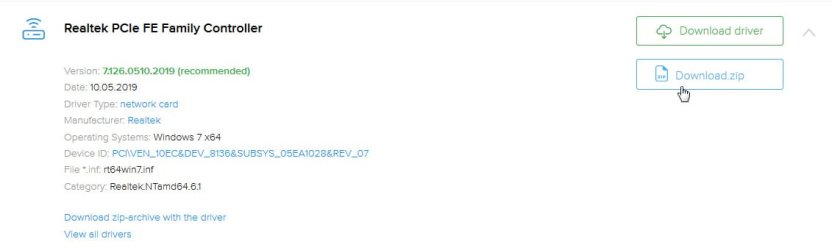
When you initially install 7, you'll have a basic 7 installation with ugly video, no USB3, and no internet. You'll need to install Dell's drivers to fix all that. Remember the "no internet" part--make sure you download your drivers before you start (at least the network drivers) so that you'll have them available after 7 is initially installed.

I'm not sure why people in some of those third-party links had so much trouble finding drivers. I found all the Win 7 drivers right on Dell's 5537 drivers page.

You'll need at least drivers for Intel Chipset, Intel Management Engine, Intel USB 3.0, Realtek Ethernet, Realtek Card Reader, Audio, Touchpad, and Intel HD Graphics. Depending on equipment you may also need AMD Radeon driver, Bluetooth, and wifi. The wifi driver can be troublesome because Dell has used a variety of manufacturers, so it helps if you can identify beforehand which wifi card you have. Perhaps look in Win10's Device Manager for hints, or maybe use something like Belarc Advisor. Or put your Service Tag number into Dell's site and check "Original Configuration" to see which wifi card your machine shipped with.

Note Dell's page also lists a BIOS update. That's for the Spectre/Meltdown mitigation. I don't know if you already have that installed, but you may (or may not) also want that. Some people (not specifically 5537, but in general) have reported performance throttling after applying Spectre/Meltdown patches, so you may want to proceed with caution on that one.

 

My Computer My Computer

At a glance

Windows 7/8.1/10 multibootIntel Core i7-770048GB (2x16GB Crucial DDR4-3200 + 2x8GB Hynix ...Intel HD630 + AMD Radeon R7 450 PCIe
Computer type
PC/Desktop
Computer Manufacturer/Model Number
Dell Optiplex 7050
OS
Windows 7/8.1/10 multiboot
CPU
Intel Core i7-7700
Motherboard
Dell, Intel Q270 chipset
Memory
48GB (2x16GB Crucial DDR4-3200 + 2x8GB Hynix DDR4-2400)
Graphics Card(s)
Intel HD630 + AMD Radeon R7 450 PCIe
Monitor(s) Displays
Asus VC279 (27")
Screen Resolution
1920x1080
Hard Drives
Toshiba M.2 NVMe (256GB),
Samsung 960 Evo (500GB),
WD Red Plus 80EFBX (8TB)
Thank you. But my computer's bios is locked so I can't turn off UEFI or Secure Boot :cry::cry:.
 

My Computer My Computer

At a glance

Windows 11 x64
Computer type
Laptop
Computer Manufacturer/Model Number
MSI
OS
Windows 11 x64
Back
Top