Is it possible to install Windows 7 home 64-bit on a non empty disk?

MSwhip

New member
Member
VIP
Local time
7:49 PM
Messages
101
With the current high prices of HHDs I would like to install Windows 7 Home 64 bit on a half empty HHD which I would like to re-purpose without having to re-format it.

Can anyone offer me a step by step tutorial on how to do it?

Thank you kindly.
 

My Computer My Computer

At a glance

Windows 7 Home Premium 64 bitAMD A10-7870K + onboard Radeon HD Graphics16 GB in 2 slots: 2 x 8GB Kingston Hyper Blu ...Nvidia GT 740 GT SC 4 GB GDRR5 + onboard Rade...
Computer type
PC/Desktop
Computer Manufacturer/Model Number
Custom Built
OS
Windows 7 Home Premium 64 bit
CPU
AMD A10-7870K + onboard Radeon HD Graphics
Motherboard
ASUS A88XM-E
Memory
16 GB in 2 slots: 2 x 8GB Kingston Hyper Blu DDR3 1600Mhz
Graphics Card(s)
Nvidia GT 740 GT SC 4 GB GDRR5 + onboard Radeon HD Graphics
Sound Card
Realtek
Monitor(s) Displays
Dell W2309 16:9 Aspect ratio
Hard Drives
Drive 0: Intel 320 Series 160GB
Drive 1: WD Caviar Black 2TB Sata 2 (no OS installed on it))

External Enclosure USB 2.0 or eSata Interfaces linked to the Desktop PC contain 4 mechanical HDDs for total storage cap
PSU
Corsair RM 550 Modular
Case
Antec P70
Cooling
N/A
Internet Speed
1000 (*UP TO) Mbps Download 50 Mbps Upload (*UP TO)
Antivirus
Active online AVG and Avira -
Browser
Most current Firefox and/or Waterfox alternatively
Other Info
Periodic Scans of the 2 hardware Drives with Malwarebytes, SuperMalwarebytes and Spybot and Destroy
Sure that's possible. Create a primary active partition on the disk (maybe 60GB in size) and install into that. You can create the partition in Disk Management. Just make sure that all other disks are disconnected during the installation.
 

My Computer My Computer

At a glance

Vista, Windows7, Mint Mate, Zorin, Windows 8from 1.6GHz Duo to i7
Computer Manufacturer/Model Number
HP, Dell, Gateway, Toshiba - 4 laptops and 2 desktops
OS
Vista, Windows7, Mint Mate, Zorin, Windows 8
CPU
from 1.6GHz Duo to i7
Monitor(s) Displays
2x HP w2207
Hard Drives
5x HDD, 7x SSD, 12x Externals
Keyboard
with trackball - no mices
Mouse
Trackball mice
Internet Speed
DSL 6000
You'd need to shrink the existing partition in Disk Mgmt or using a partition manager, to create and format a new one during the Booted install using the Drive Options pictured in Steps 7/8 of Clean Install Windows 7.

To have the OS on the left-hand fastest side of the drive, you can shrink it from the left using Partition Wizard to Resize Partition - Video Help. Use the disk if you don't have another OS attached.

If you need more help or advice on doing this, post back a screenshot of Disk Management - Post a Screen Capture Image with the drive attached.
 
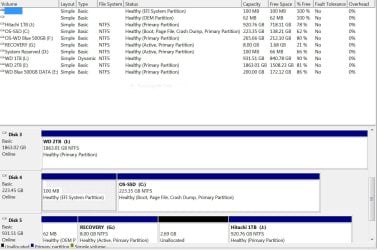
Installing Windows 7 Home 64bit on a non empty disk

Attached are 2 "half" files to show my full disk selection on my main computer (a custom made one).
C is main disk with 240GB Intel 530 (has the OS on it + 2 WD 500GB AAKS in Raid 1.
3 other disks without operating system on them.
I would like to remove the Hitachi and install Windows 7 on it which will have another Keycode which will go on a second computer (a Dell Studio 540 Desktop)
That is what I need to do

I would appreciate a step by step process tutorial. I do have a Windows 7 OS Disk from Dell who is the original manufacturer of the that second PC saying that its contents is what i already have installed on the PC. is that a full version of Windows 7 that all it requires is to use a genuine keycode? Or would i need to download an iso file burn it on a disk with some third party software and then things get more complicated?

Thank you kindly

Notes:
1. I have no way to boot the Dell PC until i have an OS installed on a drive -hopefully the Hitachi one-
1.1 I have Linux Ubuntu disks in case they could be used to boot the PC until the Windows is installed (although I am not familiar with that OS - managing it is an unfinished project of mine)
2. I do have an External dual Thermaltake dock that holds up to 2 x 2.5 or 3.5in. SSD or HDD drives that i could use to support this project.
 

Attachments

  • Capture for Seven Forums post File  Part 1 of 2.JPG
    Capture for Seven Forums post File Part 1 of 2.JPG
    144.1 KB · Views: 1
  • For SevenForums post File  Part 2 of 2.JPG
    For SevenForums post File Part 2 of 2.JPG
    156 KB · Views: 0
Last edited:

My Computer My Computer

At a glance

Windows 7 Home Premium 64 bitAMD A10-7870K + onboard Radeon HD Graphics16 GB in 2 slots: 2 x 8GB Kingston Hyper Blu ...Nvidia GT 740 GT SC 4 GB GDRR5 + onboard Rade...
Computer type
PC/Desktop
Computer Manufacturer/Model Number
Custom Built
OS
Windows 7 Home Premium 64 bit
CPU
AMD A10-7870K + onboard Radeon HD Graphics
Motherboard
ASUS A88XM-E
Memory
16 GB in 2 slots: 2 x 8GB Kingston Hyper Blu DDR3 1600Mhz
Graphics Card(s)
Nvidia GT 740 GT SC 4 GB GDRR5 + onboard Radeon HD Graphics
Sound Card
Realtek
Monitor(s) Displays
Dell W2309 16:9 Aspect ratio
Hard Drives
Drive 0: Intel 320 Series 160GB
Drive 1: WD Caviar Black 2TB Sata 2 (no OS installed on it))

External Enclosure USB 2.0 or eSata Interfaces linked to the Desktop PC contain 4 mechanical HDDs for total storage cap
PSU
Corsair RM 550 Modular
Case
Antec P70
Cooling
N/A
Internet Speed
1000 (*UP TO) Mbps Download 50 Mbps Upload (*UP TO)
Antivirus
Active online AVG and Avira -
Browser
Most current Firefox and/or Waterfox alternatively
Other Info
Periodic Scans of the 2 hardware Drives with Malwarebytes, SuperMalwarebytes and Spybot and Destroy
What I would do is install free Partition Wizard, right click the DISK5 System Reserved and Recovery partitions which are useless to select Delete on each, then right click the J to Resize it from the left by as much as you want, dragging the left border to the right as shown in Partition Wizard Resize Partition - Video Help, Apply all steps.

Next power down to remove Disk 5 and place alone in the Dell, boot the Dell Reinstallation DVD which is a full version of Win7 with only preactivation and a logo added, at the drive selection screen click on the Unallocated Space you have created for your new Win7 partition, select Drive Options, then New, to create and Format a partition in the Unallocated space, then click Next to install.

If you stick with the steps in Clean Reinstall Windows 7 you will end up with a perfect install which will remain that way as long as only the tools and methods suggested are followed, as have 1.3 million others who have used that tutorial without a single complaint or return here with problems. So read it over carefully and ask back any questions now.

You have a lot of partitions marked Active which should not be, as Active flag only points to the partition intended to boot an OS. Partition - Mark as Inactive - Windows 7 Forums.

Once you do that I'd delete the unused System Reserved partitions and clean up your disk configuration , is made easy by Partition Wizard which can move space around between any partitions whether they are adjacent or not: How to extend partition easily with Partition Wizard - video help.
 
Back
Top