Is it possible to install Windows 7 on a Windows 8 computer?

Ok ill get my other computer out as soon as I get home and try to create the usb in windows 7.
 

My Computer My Computer

At a glance

windows 8 x64intel core i7-365qm cpu @ 2.40ghz 2.40ghz8GB?
Computer type
Laptop
Computer Manufacturer/Model Number
samsung
OS
windows 8 x64
CPU
intel core i7-365qm cpu @ 2.40ghz 2.40ghz
Motherboard
?
Memory
8GB
Graphics Card(s)
?
Hard Drives
1Tb
Antivirus
?
Browser
firefox, chrome
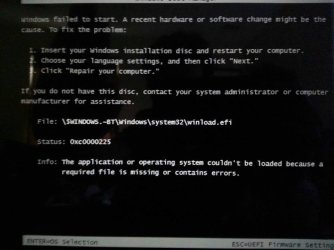
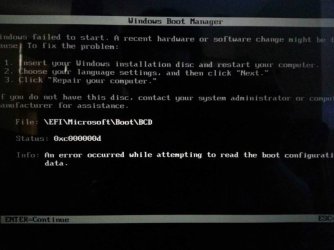
Well I used my asus with windows 7 x64 and I have same results as before: pic 1, then I press enter to continue "simply out of curiosity" and this screen shows up (see pic 2), then befor I am able to press anything it shows this error (pic 3)
 

Attachments

  • uploadfromtaptalk1369252518461.jpg
    uploadfromtaptalk1369252518461.jpg
    39.7 KB · Views: 4
  • uploadfromtaptalk1369252578196.jpg
    uploadfromtaptalk1369252578196.jpg
    28.5 KB · Views: 3
  • uploadfromtaptalk1369252608435.jpg
    uploadfromtaptalk1369252608435.jpg
    40.8 KB · Views: 4

My Computer My Computer

At a glance

windows 8 x64intel core i7-365qm cpu @ 2.40ghz 2.40ghz8GB?
Computer type
Laptop
Computer Manufacturer/Model Number
samsung
OS
windows 8 x64
CPU
intel core i7-365qm cpu @ 2.40ghz 2.40ghz
Motherboard
?
Memory
8GB
Graphics Card(s)
?
Hard Drives
1Tb
Antivirus
?
Browser
firefox, chrome
Is there anything else I can do to help you guys better understand where im messing up?
 

My Computer My Computer

At a glance

windows 8 x64intel core i7-365qm cpu @ 2.40ghz 2.40ghz8GB?
Computer type
Laptop
Computer Manufacturer/Model Number
samsung
OS
windows 8 x64
CPU
intel core i7-365qm cpu @ 2.40ghz 2.40ghz
Motherboard
?
Memory
8GB
Graphics Card(s)
?
Hard Drives
1Tb
Antivirus
?
Browser
firefox, chrome
Also if I hit the down arrow I can select windows 8 and it will boot fine if I hit the button at the right time.
 

My Computer My Computer

At a glance

windows 8 x64intel core i7-365qm cpu @ 2.40ghz 2.40ghz8GB?
Computer type
Laptop
Computer Manufacturer/Model Number
samsung
OS
windows 8 x64
CPU
intel core i7-365qm cpu @ 2.40ghz 2.40ghz
Motherboard
?
Memory
8GB
Graphics Card(s)
?
Hard Drives
1Tb
Antivirus
?
Browser
firefox, chrome
Then I hit enter to continue and this pops up and is followed be another error message


2) Bad installer.
3) Secure Boot is ENABLED.
4) Try booting the Windows 7 x64 DVD to install.


Things to check, Make sure you are doing, Work down this list
1) setting BIOS.
2) doing Step 11 in
UEFI Bootable USB Flash Drive - Create in Windows
3) booting DVD/USB in UEFI mode.
4) using a USB 2.0 port.
5) using Windows 7 x64.


Where do you buy your Windows 7 x64 DVD from?
 

My Computer My Computer

At a glance

ME/XP/Vista/Win7
OS
ME/XP/Vista/Win7
The first image I downloaded from Microsoft and it is a 2 year student edition, the second was download from Microsoft's web site.
 

My Computer My Computer

At a glance

windows 8 x64intel core i7-365qm cpu @ 2.40ghz 2.40ghz8GB?
Computer type
Laptop
Computer Manufacturer/Model Number
samsung
OS
windows 8 x64
CPU
intel core i7-365qm cpu @ 2.40ghz 2.40ghz
Motherboard
?
Memory
8GB
Graphics Card(s)
?
Hard Drives
1Tb
Antivirus
?
Browser
firefox, chrome
The usb port is 2.0 I did however try the 3.0 and I received the same results im always missing that boot file
 

My Computer My Computer

At a glance

windows 8 x64intel core i7-365qm cpu @ 2.40ghz 2.40ghz8GB?
Computer type
Laptop
Computer Manufacturer/Model Number
samsung
OS
windows 8 x64
CPU
intel core i7-365qm cpu @ 2.40ghz 2.40ghz
Motherboard
?
Memory
8GB
Graphics Card(s)
?
Hard Drives
1Tb
Antivirus
?
Browser
firefox, chrome
Did you read the full discussion I had in the Comments section when I was editing the boot file in Step 11 of UEFI Bootable USB Flash Drive - Create in Windows?

It took me a half day to sort it out getting very similar errors, then suddenly when I moved the file back up a directory as suggested by Saltgrass it worked. I think the tutorial was changed after that.
 
The second time I made the flash drive I didn't move the boot folder I created a boot folder in th UEFI folder with the microsoft folder and I then put the bootx64.efi file in it. Then I ejected the flash drive and plugged it into the windows 8 laptop I then tried to boot the computer and bam same error. I have tried to search for this file online but have had little success
 

My Computer My Computer

At a glance

windows 8 x64intel core i7-365qm cpu @ 2.40ghz 2.40ghz8GB?
Computer type
Laptop
Computer Manufacturer/Model Number
samsung
OS
windows 8 x64
CPU
intel core i7-365qm cpu @ 2.40ghz 2.40ghz
Motherboard
?
Memory
8GB
Graphics Card(s)
?
Hard Drives
1Tb
Antivirus
?
Browser
firefox, chrome
Well still no luck I think im just going to get a computer with windows 7 or delete the whole hard drive and install windows 7 then 8. However I dont think thid will solve anything because its the usb drive with the issue
 

My Computer My Computer

At a glance

windows 8 x64intel core i7-365qm cpu @ 2.40ghz 2.40ghz8GB?
Computer type
Laptop
Computer Manufacturer/Model Number
samsung
OS
windows 8 x64
CPU
intel core i7-365qm cpu @ 2.40ghz 2.40ghz
Motherboard
?
Memory
8GB
Graphics Card(s)
?
Hard Drives
1Tb
Antivirus
?
Browser
firefox, chrome
Did you try UltraISO using the Format button first as shown in tutorial? It always works, so if not its something else besides stick formatting. And if you have the file edit correct as it appears then How about trying another flash stick?

Wipe the stick first with Diskpart Clean All Command to clear its boot sector and all code.
 
Did you try UltraISO using the Format button first as shown in tutorial? It always works, so if not its something else besides stick formatting. And if you have the file edit correct as it appears then How about trying another flash stick?

Wipe the stick first with Diskpart Clean All Command to clear its boot sector and all code.

Doesn't Rufus do all of that?
 

My Computer My Computer

At a glance

Win8x64A64Gb7520G
Computer type
Laptop
Computer Manufacturer/Model Number
HP
OS
Win8x64
CPU
A6
Memory
4Gb
Graphics Card(s)
7520G
Hard Drives
500Gb 5400RPM
Antivirus
Norton
Browser
Mozilla
The second time I made the flash drive I didn't move the boot folder I created a boot folder in th UEFI folder with the microsoft folder and I then put the bootx64.efi file in it. Then I ejected the flash drive and plugged it into the windows 8 laptop I then tried to boot the computer and bam same error. I have tried to search for this file online but have had little success

What file?
 

My Computer My Computer

At a glance

ME/XP/Vista/Win7
OS
ME/XP/Vista/Win7
Refus does everthing thwt is explained in the manuat tutorials includint step 11 as far as I know, however boot files are still missing. Even though rufus automatically crwates the boot folder in the efi folder and puts the bootx64.efi in the folder it still has the errors. The manual way is to insure everything is done properly and is handy to learn. My biggest issue is that im going to school for computer programing and I feel like insalling an OS shuold be easy to accomplish even if it is being instaled after windows 8!
 

My Computer My Computer

At a glance

windows 8 x64intel core i7-365qm cpu @ 2.40ghz 2.40ghz8GB?
Computer type
Laptop
Computer Manufacturer/Model Number
samsung
OS
windows 8 x64
CPU
intel core i7-365qm cpu @ 2.40ghz 2.40ghz
Motherboard
?
Memory
8GB
Graphics Card(s)
?
Hard Drives
1Tb
Antivirus
?
Browser
firefox, chrome
The missing files are the BCD and winload.efi
 

My Computer My Computer

At a glance

windows 8 x64intel core i7-365qm cpu @ 2.40ghz 2.40ghz8GB?
Computer type
Laptop
Computer Manufacturer/Model Number
samsung
OS
windows 8 x64
CPU
intel core i7-365qm cpu @ 2.40ghz 2.40ghz
Motherboard
?
Memory
8GB
Graphics Card(s)
?
Hard Drives
1Tb
Antivirus
?
Browser
firefox, chrome
I am downloading ultraiso now is there anything special I need to chang in the settings or do I just format the usb and extract the files to the flashdrive? I have used ultraiso before however I have never created a bootable flash drive.
 

My Computer My Computer

At a glance

windows 8 x64intel core i7-365qm cpu @ 2.40ghz 2.40ghz8GB?
Computer type
Laptop
Computer Manufacturer/Model Number
samsung
OS
windows 8 x64
CPU
intel core i7-365qm cpu @ 2.40ghz 2.40ghz
Motherboard
?
Memory
8GB
Graphics Card(s)
?
Hard Drives
1Tb
Antivirus
?
Browser
firefox, chrome
Power iso also wants to be installed in the x86 program files folder shouldn't it install in the normal program files folder?
 

My Computer My Computer

At a glance

windows 8 x64intel core i7-365qm cpu @ 2.40ghz 2.40ghz8GB?
Computer type
Laptop
Computer Manufacturer/Model Number
samsung
OS
windows 8 x64
CPU
intel core i7-365qm cpu @ 2.40ghz 2.40ghz
Motherboard
?
Memory
8GB
Graphics Card(s)
?
Hard Drives
1Tb
Antivirus
?
Browser
firefox, chrome
I have it installed in a different drive that I have for all my installed programs.
 

My Computer My Computer

At a glance

Win8x64A64Gb7520G
Computer type
Laptop
Computer Manufacturer/Model Number
HP
OS
Win8x64
CPU
A6
Memory
4Gb
Graphics Card(s)
7520G
Hard Drives
500Gb 5400RPM
Antivirus
Norton
Browser
Mozilla
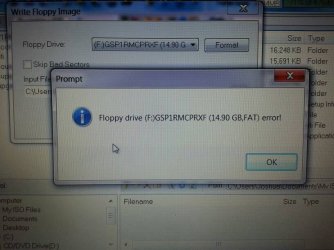
Have you created a bootable flash drive with ultra iso? I am assuming that you write a bootable floppy image and select the flash drive, quick format it to fat32, select the the windows 7 iso and then click write? When I do that I get this error (see image) so now I am going to format the flash drive in command promp and try again.
 

Attachments

  • uploadfromtaptalk1369326682970.jpg
    uploadfromtaptalk1369326682970.jpg
    61.1 KB · Views: 3

My Computer My Computer

At a glance

windows 8 x64intel core i7-365qm cpu @ 2.40ghz 2.40ghz8GB?
Computer type
Laptop
Computer Manufacturer/Model Number
samsung
OS
windows 8 x64
CPU
intel core i7-365qm cpu @ 2.40ghz 2.40ghz
Motherboard
?
Memory
8GB
Graphics Card(s)
?
Hard Drives
1Tb
Antivirus
?
Browser
firefox, chrome
Back
Top