Is it possible to install Windows 7 on a Windows 8 computer?

ok well i wiped the drive an I am starting the install for windows 7 how do I insure it installs as UEFI?
 

My Computer My Computer

At a glance

windows 8 x64intel core i7-365qm cpu @ 2.40ghz 2.40ghz8GB?
Computer type
Laptop
Computer Manufacturer/Model Number
samsung
OS
windows 8 x64
CPU
intel core i7-365qm cpu @ 2.40ghz 2.40ghz
Motherboard
?
Memory
8GB
Graphics Card(s)
?
Hard Drives
1Tb
Antivirus
?
Browser
firefox, chrome
Shoot even with the drive wiped my install freezes at the same screen.
 

My Computer My Computer

At a glance

windows 8 x64intel core i7-365qm cpu @ 2.40ghz 2.40ghz8GB?
Computer type
Laptop
Computer Manufacturer/Model Number
samsung
OS
windows 8 x64
CPU
intel core i7-365qm cpu @ 2.40ghz 2.40ghz
Motherboard
?
Memory
8GB
Graphics Card(s)
?
Hard Drives
1Tb
Antivirus
?
Browser
firefox, chrome
When I put the disk in my other computer they boot fine.
 

My Computer My Computer

At a glance

windows 8 x64intel core i7-365qm cpu @ 2.40ghz 2.40ghz8GB?
Computer type
Laptop
Computer Manufacturer/Model Number
samsung
OS
windows 8 x64
CPU
intel core i7-365qm cpu @ 2.40ghz 2.40ghz
Motherboard
?
Memory
8GB
Graphics Card(s)
?
Hard Drives
1Tb
Antivirus
?
Browser
firefox, chrome
I created a windows 8 disk and the install freezes at the same place the windows 7 install freezes.
 

My Computer My Computer

At a glance

windows 8 x64intel core i7-365qm cpu @ 2.40ghz 2.40ghz8GB?
Computer type
Laptop
Computer Manufacturer/Model Number
samsung
OS
windows 8 x64
CPU
intel core i7-365qm cpu @ 2.40ghz 2.40ghz
Motherboard
?
Memory
8GB
Graphics Card(s)
?
Hard Drives
1Tb
Antivirus
?
Browser
firefox, chrome
Never mind after I restarted the computer again the windows 8 dvd booted fine. So now what are my options I have cleaned the drive with the windows 8 dvd. I then inserted the windows 7 dvd and restarted then I used boot override to boot the windows 7 dvd and it still freezes at the starting windows screen.
 

My Computer My Computer

At a glance

windows 8 x64intel core i7-365qm cpu @ 2.40ghz 2.40ghz8GB?
Computer type
Laptop
Computer Manufacturer/Model Number
samsung
OS
windows 8 x64
CPU
intel core i7-365qm cpu @ 2.40ghz 2.40ghz
Motherboard
?
Memory
8GB
Graphics Card(s)
?
Hard Drives
1Tb
Antivirus
?
Browser
firefox, chrome
If I change the boot option from OS UEFI to OS UEFI or OS CSM then windows 7 boots in to setup just fine. So does that mean that I am no longer in UEFI?
 

My Computer My Computer

At a glance

windows 8 x64intel core i7-365qm cpu @ 2.40ghz 2.40ghz8GB?
Computer type
Laptop
Computer Manufacturer/Model Number
samsung
OS
windows 8 x64
CPU
intel core i7-365qm cpu @ 2.40ghz 2.40ghz
Motherboard
?
Memory
8GB
Graphics Card(s)
?
Hard Drives
1Tb
Antivirus
?
Browser
firefox, chrome
I now have windows 7 installed but I dont know if it is UEFI.
 

My Computer My Computer

At a glance

windows 8 x64intel core i7-365qm cpu @ 2.40ghz 2.40ghz8GB?
Computer type
Laptop
Computer Manufacturer/Model Number
samsung
OS
windows 8 x64
CPU
intel core i7-365qm cpu @ 2.40ghz 2.40ghz
Motherboard
?
Memory
8GB
Graphics Card(s)
?
Hard Drives
1Tb
Antivirus
?
Browser
firefox, chrome
I shrunk the C drive and formatted the new partition to NTFS. Do I just boot the computer from the windows 8 dvd and install it on the new partition?
 

My Computer My Computer

At a glance

windows 8 x64intel core i7-365qm cpu @ 2.40ghz 2.40ghz8GB?
Computer type
Laptop
Computer Manufacturer/Model Number
samsung
OS
windows 8 x64
CPU
intel core i7-365qm cpu @ 2.40ghz 2.40ghz
Motherboard
?
Memory
8GB
Graphics Card(s)
?
Hard Drives
1Tb
Antivirus
?
Browser
firefox, chrome
Windows 8 is installing now. Both installs booted from UEFI but I'm still not sure if either is actually installed using UEFI. I guess Ill find out when windows 8 boots up, I figure if it registers itself then its UEFI because the key is in the BIOS. What do you guys recommend that I do to find all of the drivers for windows 7 and 8. I have a driver software that checks the information on the computer and then checks for driver updates, however I dont know if this is good enough I always have unknown hardware.
 

My Computer My Computer

At a glance

windows 8 x64intel core i7-365qm cpu @ 2.40ghz 2.40ghz8GB?
Computer type
Laptop
Computer Manufacturer/Model Number
samsung
OS
windows 8 x64
CPU
intel core i7-365qm cpu @ 2.40ghz 2.40ghz
Motherboard
?
Memory
8GB
Graphics Card(s)
?
Hard Drives
1Tb
Antivirus
?
Browser
firefox, chrome
Did it make the EFI Boot partition as shown in UEFI (Unified Extensible Firmware Interface) - Install Windows 7 with - Windows 7 Forums? Did you delete all partitions first or wipe the HD as instructed?

6. Delete all partitions/volumes on the disk # (ex: Disk 0) that you want to install Windows 7 as UEFI on until that disk # shows as unallocated space. (see screenshot below)

7. When you are finished, click/tap on New, Apply (for full size of disk), and OK. (see screenshot above)

8. You will notice that the disk has now been formatted as GPT with 3 partitions. Select the "Primary" partition 3, and click/tap on Next. (see screenshot below)
NOTE: You might receive a "Windows can't be installed on drive 0" warning, but as long as you can click on the Next button, you're fine.
notesmall1.png
Note
The 3 partitions are:
  • Partition 1 - System - The EFI System partition that contains the NTLDR, HAL, Boot.txt, and other files that are needed to boot the system, such as drivers.
  • Partition 2 - MSR - The Microsoft Reserved (MSR) partition that reserves space on each disk drive for subsequent use by operating system software.
  • Partition 3 - Primary - Where Windows is to be installed to.

    It is imperative that these 3 partitions remain in the exact order as they are
 
Driver finder software is not needed in Win7 or Win8 which are fully automated for drivers in the installer and then via running all rounds of Important and Optional Updates after enabling Automatically get recommended drivers and updates for your hardware (Step 3).

You may need your wireless driver in backup to install to get online to do all rounds of Important and Optional Updates if it isnt' provided during install. Check the System Tray to see if your network is showing for connection.

There are other tips here to assure you'll get a perfect Clean Reinstall - Factory OEM Windows 7 as long as you stick with the tools and methods given.
 
I followed all of the steps I just want to be sure it is UEFI.
 

My Computer My Computer

At a glance

windows 8 x64intel core i7-365qm cpu @ 2.40ghz 2.40ghz8GB?
Computer type
Laptop
Computer Manufacturer/Model Number
samsung
OS
windows 8 x64
CPU
intel core i7-365qm cpu @ 2.40ghz 2.40ghz
Motherboard
?
Memory
8GB
Graphics Card(s)
?
Hard Drives
1Tb
Antivirus
?
Browser
firefox, chrome
I cant figure out how to find my Ethernet driver for windowd 7 any suggestions?
 

My Computer My Computer

At a glance

windows 8 x64intel core i7-365qm cpu @ 2.40ghz 2.40ghz8GB?
Computer type
Laptop
Computer Manufacturer/Model Number
samsung
OS
windows 8 x64
CPU
intel core i7-365qm cpu @ 2.40ghz 2.40ghz
Motherboard
?
Memory
8GB
Graphics Card(s)
?
Hard Drives
1Tb
Antivirus
?
Browser
firefox, chrome
On the Samsung Support Downloads webpage for your exact model or serial number.

If it doesnt' have Win7 drivers use Win8, or google for a Win7 driver for that make/model device, check the maker's Support Downloads webpage.

If you can get online with wireless driver easier, then Windows Updates should deliver the rest of the drivers if run as I explained in my last post.
 
I found it on realtek site. Thanks for all of the help from everybody! If any one is aware of a way to check if the OS is instaled as UEFI or not let me know and again thanks.
 

My Computer My Computer

At a glance

windows 8 x64intel core i7-365qm cpu @ 2.40ghz 2.40ghz8GB?
Computer type
Laptop
Computer Manufacturer/Model Number
samsung
OS
windows 8 x64
CPU
intel core i7-365qm cpu @ 2.40ghz 2.40ghz
Motherboard
?
Memory
8GB
Graphics Card(s)
?
Hard Drives
1Tb
Antivirus
?
Browser
firefox, chrome
I told you before it will have the extra boot partitions shown in the tutorial screenshot I posted.

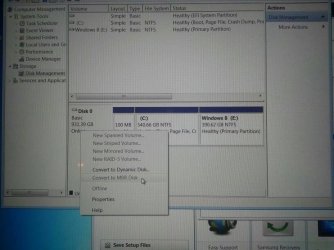
In Disk Mgmt if you rightclick on the Disk # box at the left of the HD as shown below, it will say Convert to GPT if it's a normal MBR install, or it will say Convert to MBR if it's a UEFI install to GPT disk. Don't click.

29342d1253822832-convert-gpt-disk-mbr-disk-step3.jpg
 
So it is UEFI then?
 

Attachments

  • uploadfromtaptalk1369715790149.jpg
    uploadfromtaptalk1369715790149.jpg
    56.6 KB · Views: 7

My Computer My Computer

At a glance

windows 8 x64intel core i7-365qm cpu @ 2.40ghz 2.40ghz8GB?
Computer type
Laptop
Computer Manufacturer/Model Number
samsung
OS
windows 8 x64
CPU
intel core i7-365qm cpu @ 2.40ghz 2.40ghz
Motherboard
?
Memory
8GB
Graphics Card(s)
?
Hard Drives
1Tb
Antivirus
?
Browser
firefox, chrome
If I change the boot option from OS UEFI to OS UEFI or OS CSM then windows 7 boots in to setup just fine. So does that mean that I am no longer in UEFI?

This may have been key. Did you have these choices before or did they only appear after wiping the HD for the Clean Reinstall of both OS's?

If these choices appeared before then they needed to be chosen to boot.

If they did not appear before then something changed causing UEFI BIOS to offer them, likely a BIOS setting.
 
Back
Top