Hi all,
I recently face a problem on windows 7 unable to access many sites in my office network.
The whole story goes like this.
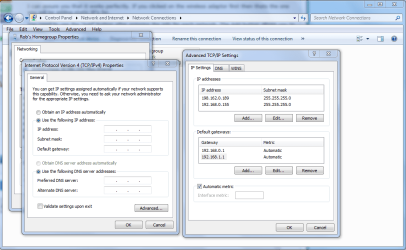
As my company is a regional subsidiary, we have a cisco router that route back to the main office for applications and emails. The local LAN has a fortigate 60 that has an ip address of 172.16.0.13 while the cisco router has an ip address of 172.16.0.1. We have a Win2K server (172.16.0.12) as the DHCP server which has 4 entries of DNS and 2 entries of gateway(172.16.0.1 & 172.16.0.13). the 4 entries of DNS being 210.80.58.205 and 210.80.58.210. 172.16.10.201 and 172.16.0.202 are the DNS for network application.
The Problem :
Everything has been working fine for all the Windows XP machine, they are able to surf the net, check mails from exchange server and access application. However, for the Windows 7 machines, I have no luck at all. surfing of sites are most of the time time-out or not accessible at all (ping to the webserver is successful though). However, checking of emails from exchange server and accessing application on main office server has got no problem. I did a ipconfig /all and it shows identical from the Windows XP ones.
Next, I tried with a static ip setting on Windows 7, with gateway pointing to 172.16.0.13(fortigate) and DNS pointing to 210.80.58.205 & 210 yield great success on surfing websites, BUT, accessing exchange server and running application is unsuccessful. As you can see, I get one I don't get the other.
I hope someone can help me out on this and point to me what and where went wrong, like I said, Win XP machines has not problem at all. What kind of issue is this? Routing or DNS?
Thanks in advance
regards,
Lonetree
I recently face a problem on windows 7 unable to access many sites in my office network.
The whole story goes like this.
As my company is a regional subsidiary, we have a cisco router that route back to the main office for applications and emails. The local LAN has a fortigate 60 that has an ip address of 172.16.0.13 while the cisco router has an ip address of 172.16.0.1. We have a Win2K server (172.16.0.12) as the DHCP server which has 4 entries of DNS and 2 entries of gateway(172.16.0.1 & 172.16.0.13). the 4 entries of DNS being 210.80.58.205 and 210.80.58.210. 172.16.10.201 and 172.16.0.202 are the DNS for network application.
The Problem :
Everything has been working fine for all the Windows XP machine, they are able to surf the net, check mails from exchange server and access application. However, for the Windows 7 machines, I have no luck at all. surfing of sites are most of the time time-out or not accessible at all (ping to the webserver is successful though). However, checking of emails from exchange server and accessing application on main office server has got no problem. I did a ipconfig /all and it shows identical from the Windows XP ones.
Next, I tried with a static ip setting on Windows 7, with gateway pointing to 172.16.0.13(fortigate) and DNS pointing to 210.80.58.205 & 210 yield great success on surfing websites, BUT, accessing exchange server and running application is unsuccessful. As you can see, I get one I don't get the other.
I hope someone can help me out on this and point to me what and where went wrong, like I said, Win XP machines has not problem at all. What kind of issue is this? Routing or DNS?
Thanks in advance
regards,
Lonetree
My Computer
- OS
- Windows 7 Professional 32 bits