Is My Ram Usage Normal?

Robbgt

New member
Local time
9:58 AM
Messages
7
Hi Folks, I'm new to windows 7 and new to the forums here. I upgraded my old HP Dv-1000 (running XP pro, a 1.8gh and 2g ram) to my new rig here a HP dv6-1355dx with 64 bit win 7 home premium, 4Gb DDR3, dual core @2.2ghz.

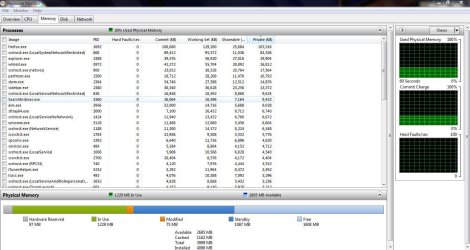
I know a little about computers, but not a whole lot, my question is this, the new laptop seems to use quite a bit of ram, even at idle (40-50%).

For security I'm running Norton Internet Security 2010

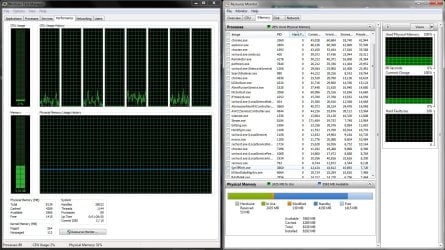
Is this normal for the specified laptop? Here are some imaged from task manager and resource manager.

picture.php


picture.php


picture.php


Any help would be great! thanks!

Robb
 

My Computer

Computer Manufacturer/Model Number
HP Pavilion dv6-1355dx
OS
Win 7 64bit
Memory
4GB DDR3
Welcome Robbgt!

I'd say that is certainly within the range of reasonable. Your RAM usage is on the high side I'd say, but not unreasonable.

Many factors could contribute to this, including what anti-virus you are using, and whatever all is running in the background.

I notice the sidebar is using the 3rd most memory. If you don't use it, that may be something to get rid of.

Hope this helps,
~JK
 

My Computer

Computer Manufacturer/Model Number
Custom
OS
Windows 7 Professional x64
CPU
Intel i7 2600K OC'd @ 4620 MHz
Motherboard
Asus P8Z68-V Pro
Memory
16GB GSkill Sniper 2133 Mhz (4x4GB)
Graphics Card(s)
EVGA GeForce GTX 480 SuperClocked+
Sound Card
Realtek High Definition Audio
Monitor(s) Displays
2x Acer S273HLbmii 27"
Screen Resolution
2 x 1920x1080
Hard Drives
64GB Crucial M4 SSD

Storage: Hitachi 1TB 5400RPM, Samsung 1.5TB 5400RPM
PSU
Corsair HW Series 750w (modular)
Case
Cooler Master HAF 932 Advanced Blue Edition
Cooling
CM Hyper 212+ CPU cooler, 3x 230mm + 1x 140mm case fans
Keyboard
Logitech MK320 (wireless)
Mouse
Logitech MK320 (wireless)
Internet Speed
30 Mb/s : 2 Mb/s
Thank you for your prompt response! I'm running NIS 2010 for virus protection, I'm sure that must use some juice.

Just for giggles i disconnected the USB Hub i have connected (Printer, External HDD and Wireless keyboard reliever) and ram usage dropped from 46% to about 35%... I'm guessing something connected to the HUB may be using ram? The external is just for file storage, no apps or page filing or anything

Robb
 

My Computer

Computer Manufacturer/Model Number
HP Pavilion dv6-1355dx
OS
Win 7 64bit
Memory
4GB DDR3
Since you seem to have pinned it down more, why not do a bit of testing? There are only a few possibilities, shouldn't take long to find which device is taking up the RAM.

I'm just guessing it is the wireless keyboard, but don't go on that.
 

My Computer

Computer Manufacturer/Model Number
Custom
OS
Windows 7 Professional x64
CPU
Intel i7 2600K OC'd @ 4620 MHz
Motherboard
Asus P8Z68-V Pro
Memory
16GB GSkill Sniper 2133 Mhz (4x4GB)
Graphics Card(s)
EVGA GeForce GTX 480 SuperClocked+
Sound Card
Realtek High Definition Audio
Monitor(s) Displays
2x Acer S273HLbmii 27"
Screen Resolution
2 x 1920x1080
Hard Drives
64GB Crucial M4 SSD

Storage: Hitachi 1TB 5400RPM, Samsung 1.5TB 5400RPM
PSU
Corsair HW Series 750w (modular)
Case
Cooler Master HAF 932 Advanced Blue Edition
Cooling
CM Hyper 212+ CPU cooler, 3x 230mm + 1x 140mm case fans
Keyboard
Logitech MK320 (wireless)
Mouse
Logitech MK320 (wireless)
Internet Speed
30 Mb/s : 2 Mb/s
Sounds good! Thank you for your help sir! I'll post the results once I've figured out what has been eating all this ram!
 

My Computer

Computer Manufacturer/Model Number
HP Pavilion dv6-1355dx
OS
Win 7 64bit
Memory
4GB DDR3
As a rule of thumb you could say: the more RAM that's being used, the better the performance - because RAM beats any other storage media in performance. With that being said, there can be unusual situations, but your's is not one of them. As an academic exercise it is interesting to explore the users of RAM, but at the end of the day, there is not much you can do about it one way ot the other.
Now that you have all that RAM (and I assumed it is all payed for), you might as well let the system use it. There is no need for "saving" it for better days. And don't fall for all those "tweaks". You will only shoot yourself into the foot.
 

My Computer

Computer Manufacturer/Model Number
HP, Dell, Gateway, Toshiba - 4 laptops and 2 desktops
OS
Vista, Windows7, Mint Mate, Zorin, Windows 8
CPU
from 1.6GHz Duo to i7
Monitor(s) Displays
2x HP w2207
Hard Drives
5x HDD, 7x SSD, 12x Externals
Keyboard
with trackball - no mices
Mouse
Trackball mice
Internet Speed
DSL 6000
whs, you make a very good point. I never thought of it that way. I just wanted to be sure that my computer wasn't using excessive ram at idle, so that when I really need it for hungry apps, such as Auto CAD 2010, I will have it available when it's needed. Am I looking at this the right way? I guess I'm not completely understanding how a computer utilizes RAM then. I apologies I'm learning as I go here.

Thank you for the help!

Robb
 

My Computer

Computer Manufacturer/Model Number
HP Pavilion dv6-1355dx
OS
Win 7 64bit
Memory
4GB DDR3
If you are using windows 7, most probably the reason can be because of pinning the programs to the Taskbar.... It uses the actual file to load rather than using the shortcut.
 

My Computer

Computer Manufacturer/Model Number
Microsoft
OS
Windows 7 and MAC
Graphics Card(s)
NVIDIA 9200 GT
Sound Card
NvIdiA
Stecy22, Yes I have Word, Windows Live mail, and Firefox pinned. I usually only have mail and Firefox open though. I guess that would explain some of it then. I do like the convenience of having pinned programs.

Robb
 

My Computer

Computer Manufacturer/Model Number
HP Pavilion dv6-1355dx
OS
Win 7 64bit
Memory
4GB DDR3
whs, you make a very good point. I never thought of it that way. I just wanted to be sure that my computer wasn't using excessive ram at idle, so that when I really need it for hungry apps, such as Auto CAD 2010, I will have it available when it's needed. Am I looking at this the right way? I guess I'm not completely understanding how a computer utilizes RAM then. I apologies I'm learning as I go here.

Thank you for the help!

Robb

As a little study tour, do the following:

1. Start Task Manager > Performance Tab
2. Click on Performance Monitor (bottom right), Memory tab
3. On the bottom half you see a bar in color for the different RAM uses - hover over it and it will give you some clues about the RAM (only the grey and the green parts are really in use - the rest is "available", the orange awaits to be written out)
4. Have a look at the upper part of the page where it says " Hard Faults" - you probably only see "Hard F". If that row is all zeros or small numbers, you are in good shape. That means you have no page faults and run at maximum speed.
 
Last edited:

My Computer

Computer Manufacturer/Model Number
HP, Dell, Gateway, Toshiba - 4 laptops and 2 desktops
OS
Vista, Windows7, Mint Mate, Zorin, Windows 8
CPU
from 1.6GHz Duo to i7
Monitor(s) Displays
2x HP w2207
Hard Drives
5x HDD, 7x SSD, 12x Externals
Keyboard
with trackball - no mices
Mouse
Trackball mice
Internet Speed
DSL 6000
As a little study tour, do the following:

1. Start Task Manager > Performance Tab
2. Cick on Performance Monitor (bottom right), Memory tab
3. On the bottom half you see a bar in color for the different RAM uses - hover over it and it will give you some clues about the RAM (only the grey and the green parts are really in use - the rest is "available", the orange awaits to be written out)
4. Have a look at the upper part of the page where it says " Hard Faults" - you probably only see "Hard F". If that row is all zeros or small numbers, you are in good shape. That means you have no page faults and run at maximum speed.

whs,
I did what you asked and got the following:

(as attachment)

As a not there were no faults on the page, I guess I'm looking ok then?

Thanks again for your help, this forum is awesome!

Robb
 

Attachments

  • 2398804840062074462cRjBsH_fs.jpg
    2398804840062074462cRjBsH_fs.jpg
    122.9 KB · Views: 236
Last edited:

My Computer

Computer Manufacturer/Model Number
HP Pavilion dv6-1355dx
OS
Win 7 64bit
Memory
4GB DDR3
Robb, you are in great shape. Half of your RAM is free and another big part is cached but "available". You have miles to go before you will ever get a RAM problem.
 

My Computer

Computer Manufacturer/Model Number
HP, Dell, Gateway, Toshiba - 4 laptops and 2 desktops
OS
Vista, Windows7, Mint Mate, Zorin, Windows 8
CPU
from 1.6GHz Duo to i7
Monitor(s) Displays
2x HP w2207
Hard Drives
5x HDD, 7x SSD, 12x Externals
Keyboard
with trackball - no mices
Mouse
Trackball mice
Internet Speed
DSL 6000
why does win7 pro use all my cpu but not my full 2g ram

My PC is using 35% of my 2 gigs of ram even when my cpu is burning up at 100%.

what could be causing this? Is my ram bad? I am using amd64 3400+ 2.2gB with win7 pro 32.

win7 looks great and is running but CPU is running very hot and memory is not being used which could help reduce the cpu use.
 

My Computer

OS
windows 7
My PC is using 35% of my 2 gigs of ram even when my cpu is burning up at 100%.

what could be causing this? Is my ram bad? I am using amd64 3400+ 2.2gB with win7 pro 32.

win7 looks great and is running but CPU is running very hot and memory is not being used which could help reduce the cpu use.

Filling out your system specs (here: http://www.sevenforums.com/profile.php?do=extra) would help us help you.

RAM and CPU's are different, your computer isn't using more RAM because it likely doesn't need to. Whatever is using your CPU only needs your CPU.
 

My Computer

Computer Manufacturer/Model Number
Custom | Whitebox
OS
Windows 7 Ultimate, OS X 10.7, Ubuntu 11.04
CPU
Intel E6750 @ 3.80GHz
Motherboard
Gigabyte GA-EP45-UD3L (Revision 1.1)
Memory
2x2GB & 2x1GB (6GB) OCZ Reaper 1066MHz @ 1080MHz
Graphics Card(s)
EVGA nVidia GTX 260 896mb (216 Core) FTW Edition
Sound Card
Realtek ALC888
Monitor(s) Displays
21" VIZIO TV
Screen Resolution
1680x1050 @ 60Hz
Hard Drives
Western Digital WD6401AALS - 640GB
Hitachi HDP725016GLA380 - 160GB
PSU
Corsair 750W
Case
NZXT Nemesis Elite
Cooling
Thermaltake SpinQ
Keyboard
Logitech Wireless S520
Mouse
Logitech Wireless S520 - Microsoft Wireless Arc Mouse
Internet Speed
Download: 20mbps, Upload: 3mbps
is sounds alittle high but not bad, u could try getting rid of norton and get something better and more light like avast. also u have itunes helper running u can get rid of that.
 

My Computer

OS
Windows 7 Ultimate 64bit
CPU
AMD Phenom II X4 945 @3.0ghz
Motherboard
Asrock
Memory
4gb kingston hyperX
Graphics Card(s)
1gb Radeon HD 5670
is sounds alittle high but not bad, u could try getting rid of norton and get something better and more light like avast. also u have itunes helper running u can get rid of that.
There is no need to skimp on RAM. You might as well use what you have, and 35% usage is quite normal. What do you want to do with the unused RAM - Save it for a rainy day?
 

My Computer

Computer Manufacturer/Model Number
HP, Dell, Gateway, Toshiba - 4 laptops and 2 desktops
OS
Vista, Windows7, Mint Mate, Zorin, Windows 8
CPU
from 1.6GHz Duo to i7
Monitor(s) Displays
2x HP w2207
Hard Drives
5x HDD, 7x SSD, 12x Externals
Keyboard
with trackball - no mices
Mouse
Trackball mice
Internet Speed
DSL 6000
Related matter

Hi..

I stumbled upon this thread so i thought I'd just reply here instead of making a new one.

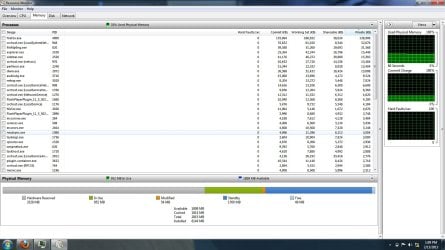
I just got this Alienware laptop (i7 2720, 8GB RAM, 3GB nVIDIA M555).. during the first week ram usage hardly reached 2GB (was between 1.6-1.8 with Firefox or Chrome on) when the laptop was idle. However, after i installed some windows updates and Microsoft Office suit it went up to 2.4GB while idle, 2.9 when i start Firefox and sometimes it continues to increase. This unexplained increase is really bugging me and want to know if this is common/normal occurrence?

Thanks!
(screenie attached
 

Attachments

  • Untitled.jpg
    Untitled.jpg
    261.3 KB · Views: 74

My Computer

Computer Manufacturer/Model Number
Alienware M14x
OS
Windows 7 Home Premium 64 bit
CPU
I7 QM2720 2.2 GHz (3.3 GHz with boost)
Memory
8GB @ 1600 Hz
Graphics Card(s)
3GB nVIDIA M555
Hard Drives
750GB SATA
Hello ice 77x and welcome to Seven Forums.

is sounds alittle high but not bad, u could try getting rid of norton and get something better and more light like avast. also u have itunes helper running u can get rid of that.
There is no need to skimp on RAM. You might as well use what you have, and 35% usage is quite normal. What do you want to do with the unused RAM - Save it for a rainy day?

Hi..

I stumbled upon this thread so i thought I'd just reply here instead of making a new one.

I just got this Alienware laptop (i7 2720, 8GB RAM, 3GB nVIDIA M555).. during the first week ram usage hardly reached 2GB (was between 1.6-1.8 with Firefox or Chrome on) when the laptop was idle. However, after i installed some windows updates and Microsoft Office suit it went up to 2.4GB while idle, 2.9 when i start Firefox and sometimes it continues to increase. This unexplained increase is really bugging me and want to know if this is common/normal occurrence?

Thanks!
(screenie attached

As whs said in the post prior to yours, what do you want to do with the unused RAM? Save it for a rainy day? :) Windows 7 uses RAM differently than previous Windows operating systems. If RAM is available, it makes use of it. I have 8GB RAM on a Sony Vaio and it pretty much uses 2.5GB right after startup. I also have a Dell Vostro with 4GB RAM, and it uses about 1.5-1.8GB at startup. I don't think you have anything to worry about. You may find some of these comments on a Microsoft forum interesting.
How much RAM is usage is normal?
 

My Computer

Computer type
Laptop
Computer Manufacturer/Model Number
Sony Vaio VPCEB47GM Laptop
OS
Win 7 Pro 64-bit
CPU
Intel i5 2.4 Ghz
Memory
8GB DDR3
Graphics Card(s)
Intel HD 3000
Sound Card
IDT High Definition
Monitor(s) Displays
15.6 WGXA Anti-Glare LED
Screen Resolution
1280x800
Hard Drives
640Gb 7200rpm
Antivirus
MSE
Browser
Opera (primary) with IE9 backup
marsmimar is right. Your Resource Monitor graph is completely normal. Nothing to worry about.
 

My Computer

Computer Manufacturer/Model Number
HP, Dell, Gateway, Toshiba - 4 laptops and 2 desktops
OS
Vista, Windows7, Mint Mate, Zorin, Windows 8
CPU
from 1.6GHz Duo to i7
Monitor(s) Displays
2x HP w2207
Hard Drives
5x HDD, 7x SSD, 12x Externals
Keyboard
with trackball - no mices
Mouse
Trackball mice
Internet Speed
DSL 6000
Please help me. It takes long time to boot.

how about mine?

I seriously think there's some problem.
Please help me. It takes long time to boot.
ram usage.jpg
 

My Computer

Computer Manufacturer/Model Number
asus rog
OS
Windows 7 Home Premium 32bit.
CPU
intel core2duo P8700 @ 2.53Ghz
Memory
6 Gb Ram
Graphics Card(s)
Nvidia GEForce GTx 260M
Hard Drives
500 GB
Cooling
no
Back
Top