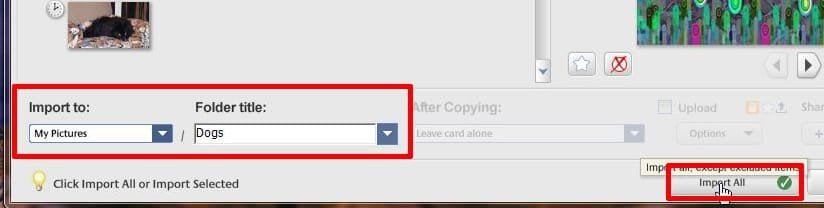
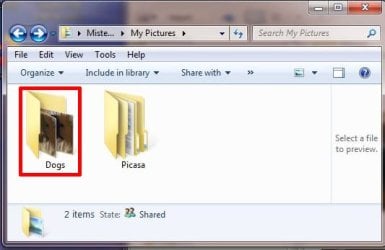
Solved Is Picasa still available to download?

Mike Lynch

New member
Pro User
VIP
Local time
2:10 PM
Messages
958
Location
Clearwater Florida
I have been working on creating a Windows-7 System for offline use to be used exclusively for archiving family photos.

For decades now, I have used Picasa.

I have tried to find it for downloading and installation but Nada!

Has its Download been totally eliminated from the WEB?

Enough!

No lectures on unsupported / updated Software.

Save the Internet and its Forums from unnecessary Reply's only seeking "higher Post Counts" or some form of "Accolades" for useless information.

Yes, I know like Windows-7 and Edge, it's no longer Updated for any reason.

I just want to download and install it, living offline with it in safety.

If I am unable to find a download site offering Picasa, is it possible to "move" it from one Windows-7 PC to another?

If so, can you help me do that?

I am a Novice so any instructions for moving it must be very basic.

Thanks in advance.

Mike Lynch
 
Last edited:

My Computer My Computer

At a glance

Microsoft Windows 7 Professional 64-bit 7601 ...Intel(R) Core(TM) i7-3770 CPU @ 3.40GHz8.00 GBIntel(R) HD Graphics 4000
Computer type
PC/Desktop
Computer Manufacturer/Model Number
Two HP Desktops. One in the Laundry Room / Bed Room.
OS
Microsoft Windows 7 Professional 64-bit 7601 Multiprocessor Free Service Pack 1
CPU
Intel(R) Core(TM) i7-3770 CPU @ 3.40GHz
Motherboard
Hewlett-Packard 3396
Memory
8.00 GB
Graphics Card(s)
Intel(R) HD Graphics 4000
Sound Card
(1) Realtek High Definition Audio (2) Intel(R) Display Aud
Monitor(s) Displays
Hanns-G
Screen Resolution
1440 x 900 x 32 bits (4294967296 colors) @ 59 Hz
Hard Drives
(1) ATA WDC WD40EZRX-00S SCSI Disk Device (2) HP Officejet Pro 86 USB Device (3) WD My Book 1230 USB Device
PSU
Whatever came with the CMT.
Case
HP CMT Black.
Cooling
Whatever came with the CMT.
Keyboard
Logitech K740.
Mouse
Microsoft Optical Mouse 1000.
Internet Speed
Spectrum 25Mbs.
Antivirus
WebRoot, Microsoft Security Essentials.
Browser
EDGE
Other Info
HP Officejet Pro 8600 Plus.
WD MyBook 4TB.

My Computers My Computers

  • At a glance

    Windows 7 Professional 64bit / Windows 10 Hom...AMD FX-8350GSKILL Ripjaw-X PC3 12800 12GB (2x4GB, 2x2GB)ASUS ENGTX560 DCII OC/2DI/1GD5 1GB
    Computer type
    PC/Desktop
    Computer Manufacturer/Model Number
    Custom build
    OS
    Windows 7 Professional 64bit / Windows 10 Home 64bit
    CPU
    AMD FX-8350
    Motherboard
    Gigabyte GA-990FXA-UD3 (AM3+) Rev. 4.0
    Memory
    GSKILL Ripjaw-X PC3 12800 12GB (2x4GB, 2x2GB)
    Graphics Card(s)
    ASUS ENGTX560 DCII OC/2DI/1GD5 1GB
    Sound Card
    Integrated
    Monitor(s) Displays
    Asus VE228H (21.5-in)
    Screen Resolution
    1920x1080 60Hz
    Hard Drives
    SAMSUNG 870 EVO 1TB (2.5" SATA SSD)
    SAMSUNG 870 EVO 500GB (2.5" SATA SSD)
    PSU
    Antec TruePower (new) TP-650 (650 watts)
    Case
    Antec Three Hundred
    Cooling
    AMD stock (plan to upgrade to Cooler Master Hyper 212 EVO)
    Keyboard
    Logitech K540 (wireless)
    Mouse
    Logitech M310 (wireless)
    Internet Speed
    Comcast Gigabit X2 Internet (2100Mbps down / 300Mbps up)
    Browser
    Firefox, Edge, Chrome
    Other Info
    Optical drive: ASUS DRW-24B3ST/BLK/G (Black) (24X)
    External hard drives: 2TB & 6TB
    Internet Gateway: Comcast XB8
  • Computer type
    PC/Desktop
Mike:
Google Picasa supposedly will still install and work in Windows 7.
However, certain features of it supposedly will no longer work.
Let us know how it turned out for you.
 

My Computer My Computer

At a glance

Windows 7 Professional SP1 64-bitIntel Core i7-4790 3.60 GHz32 GB DDR3-1600 MHzIntegrated Intel HD Graphics 4600
Computer type
PC/Desktop
Computer Manufacturer/Model Number
Dell OptiPlex 9020
OS
Windows 7 Professional SP1 64-bit
CPU
Intel Core i7-4790 3.60 GHz
Memory
32 GB DDR3-1600 MHz
Graphics Card(s)
Integrated Intel HD Graphics 4600
Monitor(s) Displays
Viewsonic 32" LCD
Hard Drives
Kingston SATA 3 240 GB SSD
Internet Speed
Spectrum Internet 1000 Mbps
Thank you all for your responses.

I had come across MajorGeeks as I searched foe Picasa.

I actually tried their "supposed" Downloads.

They are Downloads alright, full of feces!

They surprise the User at the end of their prearranged Rabbit Hole, Picasa is SOL.

I personally, now detest anything to do with Majorgeeks.

I am desperate however and tried them, I got what I expected NOTHING.

Thanks again for trying to help me.
 
Last edited:

My Computer My Computer

At a glance

Microsoft Windows 7 Professional 64-bit 7601 ...Intel(R) Core(TM) i7-3770 CPU @ 3.40GHz8.00 GBIntel(R) HD Graphics 4000
Computer type
PC/Desktop
Computer Manufacturer/Model Number
Two HP Desktops. One in the Laundry Room / Bed Room.
OS
Microsoft Windows 7 Professional 64-bit 7601 Multiprocessor Free Service Pack 1
CPU
Intel(R) Core(TM) i7-3770 CPU @ 3.40GHz
Motherboard
Hewlett-Packard 3396
Memory
8.00 GB
Graphics Card(s)
Intel(R) HD Graphics 4000
Sound Card
(1) Realtek High Definition Audio (2) Intel(R) Display Aud
Monitor(s) Displays
Hanns-G
Screen Resolution
1440 x 900 x 32 bits (4294967296 colors) @ 59 Hz
Hard Drives
(1) ATA WDC WD40EZRX-00S SCSI Disk Device (2) HP Officejet Pro 86 USB Device (3) WD My Book 1230 USB Device
PSU
Whatever came with the CMT.
Case
HP CMT Black.
Cooling
Whatever came with the CMT.
Keyboard
Logitech K740.
Mouse
Microsoft Optical Mouse 1000.
Internet Speed
Spectrum 25Mbs.
Antivirus
WebRoot, Microsoft Security Essentials.
Browser
EDGE
Other Info
HP Officejet Pro 8600 Plus.
WD MyBook 4TB.
I had come across MajorGeeks as I searched foe Picasa.

I actually tried their "supposed" Downloads.

They are Downloads alright, full of feces!

They surprise the User at the end of their prearranged Rabit Hole, Picasa is SOL.

I personally, now detest anything to do with Majorgeeks.


I don't know what your problem with MajorGeeks is, but MisterEd's link worked perfectly fine for me (other than the download actually being build 141.255 instead of the advertised 141.303), so perhaps there's some problem with your browser or add-ons. I tested the MajorGeeks download, and it installed on Win7 and appears to be identical to the build 141.259 installer I have in my own private archive library.

If your argument is instead with the way that particular Picasa version functions compared to whatever version you're used to, then note you can still get other versions at oldversion.com. (Ignore their indexing, which incorrectly identifies the "latest version", but you can figure it out.)
 

My Computer My Computer

At a glance

Windows 7/8.1/10 multibootIntel Core i7-770048GB (2x16GB Crucial DDR4-3200 + 2x8GB Hynix ...Intel HD630 + AMD Radeon R7 450 PCIe
Computer type
PC/Desktop
Computer Manufacturer/Model Number
Dell Optiplex 7050
OS
Windows 7/8.1/10 multiboot
CPU
Intel Core i7-7700
Motherboard
Dell, Intel Q270 chipset
Memory
48GB (2x16GB Crucial DDR4-3200 + 2x8GB Hynix DDR4-2400)
Graphics Card(s)
Intel HD630 + AMD Radeon R7 450 PCIe
Monitor(s) Displays
Asus VC279 (27")
Screen Resolution
1920x1080
Hard Drives
Toshiba M.2 NVMe (256GB),
Samsung 960 Evo (500GB),
WD Red Plus 80EFBX (8TB)
So your reply said, "I don't know what your problem with MajorGeeks is, but MisterEd's link worked perfectly fine for me (other than the download actually being build 141.255 instead of the advertised 141.303), so perhaps there's some problem with your browser or add-ons."

I appreciate your Reply and Mr. Ed's and any other Forum Members that choose to.

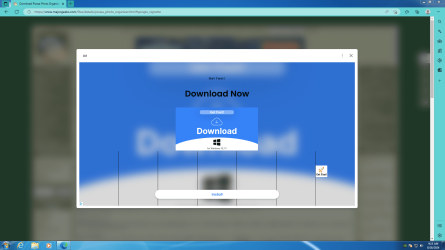
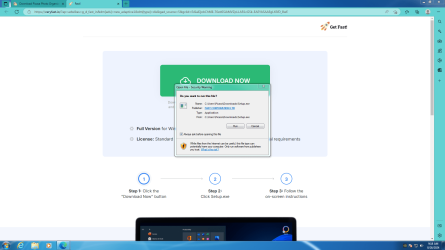
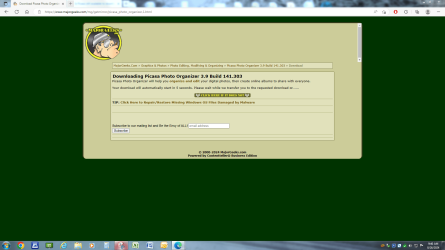
The Picasa Archive PC I am trying to assemble has nothing on it but Windows-7 Pro, all the Simplix Updates for Windows-7 and the most current Microsoft Edge Browser. When I searched for Picasa Downloads on this new PC, I was presented with the MajorGeeks offering. I chose it and was presented with a mindboggling array of Green Rectangles stating DOWNLOAD. I tried them and soon realized they were DOWNLOADS for anything and everything that MajorGeeks wanted to push at the time. That's when I tried other sites offering PICASA DOWNLOADS which when executed stated that they had "ceased" providing PICASA but attempted to "sell" another product. Here is the MajorGeek sequence I was presented with this morning on the new PC. CAPTURES: 01,02,03.

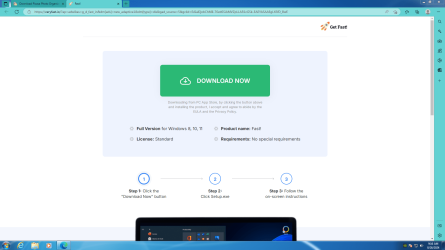
I then went to my old "severely hacked" PC and search for PICASA DOWNLOADS and was presented with a completely different offering from MajorGeeks. CAPTURES: 04, 05

Quite a difference and NOT actually what MajorGeeks originally presented. Their original offering was page after page of DOANLOAD green rectangles none of which were associated with anything. By clicking on any of them the User, me was presented with a DOWNLOAD for a "associated" product having little or nothing to do with PICASA. Literally the bottom line: I DOWNLOADED what MajorGeeks offered as the PICASA Download. perhaps what Mr. Ed found and reported on, putting it on a Thumb Drive. I took the Thumb Drive to the New PC and installed what MajorGeeks offered. Unfortunately, the DOWNLOADED Picasa from MajorGeeks opened but does not function properly. It's there, but it does NOT allow the USER, me, to import Photos or Videos from any source. USB Sticks, USB attached Drives, USB attached Docks whit USB drives in the Dock. Zero, Nada, nice try but no cigar. Why would MajorGeeks use what "appears" to be a vulgar Tag Line like: "the bunny gets it" in their Ad? Again, I Googled the The Tag Line and read what was reported back. FILTH! Enough said so far, I'll let my Post percolate a week or so and if there isn't a solution, I'll assume Picasa has gone the way of Windows-7, and Edge. Then I'll try the sites that offer to sell Picasa to see what they actually provide. Lastly, if any Forum Member can instruct me on how to transfer the Picasa Application and Photos from our OLD PC to the NEW ONE, I'd appreciate it. Thanks again for the Feedback. We sincerely appreciate your efforts.


Attachments

  • Capture - 01.PNG
    Capture - 01.PNG
    218.5 KB · Views: 3
  • Capture - 02.PNG
    Capture - 02.PNG
    71 KB · Views: 3
  • Capture - 03.PNG
    Capture - 03.PNG
    75.5 KB · Views: 4
  • Capture - 04.PNG
    Capture - 04.PNG
    129.7 KB · Views: 4
  • Capture - 05.PNG
    Capture - 05.PNG
    74.4 KB · Views: 2

My Computer My Computer

At a glance

Microsoft Windows 7 Professional 64-bit 7601 ...Intel(R) Core(TM) i7-3770 CPU @ 3.40GHz8.00 GBIntel(R) HD Graphics 4000
Computer type
PC/Desktop
Computer Manufacturer/Model Number
Two HP Desktops. One in the Laundry Room / Bed Room.
OS
Microsoft Windows 7 Professional 64-bit 7601 Multiprocessor Free Service Pack 1
CPU
Intel(R) Core(TM) i7-3770 CPU @ 3.40GHz
Motherboard
Hewlett-Packard 3396
Memory
8.00 GB
Graphics Card(s)
Intel(R) HD Graphics 4000
Sound Card
(1) Realtek High Definition Audio (2) Intel(R) Display Aud
Monitor(s) Displays
Hanns-G
Screen Resolution
1440 x 900 x 32 bits (4294967296 colors) @ 59 Hz
Hard Drives
(1) ATA WDC WD40EZRX-00S SCSI Disk Device (2) HP Officejet Pro 86 USB Device (3) WD My Book 1230 USB Device
PSU
Whatever came with the CMT.
Case
HP CMT Black.
Cooling
Whatever came with the CMT.
Keyboard
Logitech K740.
Mouse
Microsoft Optical Mouse 1000.
Internet Speed
Spectrum 25Mbs.
Antivirus
WebRoot, Microsoft Security Essentials.
Browser
EDGE
Other Info
HP Officejet Pro 8600 Plus.
WD MyBook 4TB.
Sorry for the difficulty you are having. Maybe I should have warned you about MajorGeeks. I just tried it again.
To download Picasa from Majorgeeks
  1. Click on Download@MajorGeeks
  2. If an ad pops up then just close it
  3. Picasa then automatically downloads the file picasa39-setup.exe

Note that Chrome insisted on showing Google ads on MajorGeeks. Firefox someimes didn't show any ads.

I realize that a lot of these free download sites are now confusing things with ads. You just have to learn how to deal with each site. Actually MajorGeeks is not as bad as some other sites. In fact on some sites it was so confusing that I simply gave up.

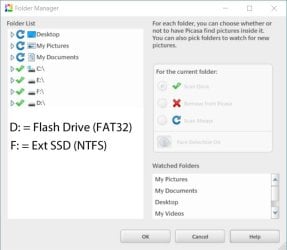
Why is my external drive missing from Picasa?
file management - Why is my external drive missing from Picasa? - Photography Stack Exchange

I just tried several external devices. The only device Picasa couldn't see was an external SSD that was formatted exFAT.
In the example below I could see both a flash drive and external SSD.

p1.jpg

p2.jpg
 

My Computers My Computers

  • At a glance

    Windows 7 Professional 64bit / Windows 10 Hom...AMD FX-8350GSKILL Ripjaw-X PC3 12800 12GB (2x4GB, 2x2GB)ASUS ENGTX560 DCII OC/2DI/1GD5 1GB
    Computer type
    PC/Desktop
    Computer Manufacturer/Model Number
    Custom build
    OS
    Windows 7 Professional 64bit / Windows 10 Home 64bit
    CPU
    AMD FX-8350
    Motherboard
    Gigabyte GA-990FXA-UD3 (AM3+) Rev. 4.0
    Memory
    GSKILL Ripjaw-X PC3 12800 12GB (2x4GB, 2x2GB)
    Graphics Card(s)
    ASUS ENGTX560 DCII OC/2DI/1GD5 1GB
    Sound Card
    Integrated
    Monitor(s) Displays
    Asus VE228H (21.5-in)
    Screen Resolution
    1920x1080 60Hz
    Hard Drives
    SAMSUNG 870 EVO 1TB (2.5" SATA SSD)
    SAMSUNG 870 EVO 500GB (2.5" SATA SSD)
    PSU
    Antec TruePower (new) TP-650 (650 watts)
    Case
    Antec Three Hundred
    Cooling
    AMD stock (plan to upgrade to Cooler Master Hyper 212 EVO)
    Keyboard
    Logitech K540 (wireless)
    Mouse
    Logitech M310 (wireless)
    Internet Speed
    Comcast Gigabit X2 Internet (2100Mbps down / 300Mbps up)
    Browser
    Firefox, Edge, Chrome
    Other Info
    Optical drive: ASUS DRW-24B3ST/BLK/G (Black) (24X)
    External hard drives: 2TB & 6TB
    Internet Gateway: Comcast XB8
  • Computer type
    PC/Desktop
The Picasa Archive PC I am trying to assemble has nothing on it but Windows-7 Pro, all the Simplix Updates for Windows-7 and the most current Microsoft Edge Browser. When I searched for Picasa Downloads on this new PC, I was presented with the MajorGeeks offering. I chose it and was presented with a mindboggling array of Green Rectangles stating DOWNLOAD.
[...]
I then went to my old "severely hacked" PC and search for PICASA DOWNLOADS and was presented with a completely different offering from MajorGeeks. Quite a difference and NOT actually what MajorGeeks originally presented.

Understand that what MajorGeeks controls is what is shown in your fourth screenshot. What you were "originally" seeing was a bunch of embedded and/or popup ads. Those don't come from MajorGeeks itself, those come from an ad service MG gets money from.

So is MG to blame? Well, yeah, because they agreed to take the ad money. But that's how they support themselves. So does nearly every other third-party download repository, so get used to it. Not to be a MG apologist, but many of the others are far, far sneakier and less obvious.

In your screenshot #1, notice the popup window says "Ad" in the upper-left corner. In your screenshot #2, notice the URL bar shows you're no longer at "majorgeeks.com", but got redirected to "veryfast.io". A third, though less common, clue is that screenshot #2 shows "Product name: Fast!" instead of "Picasa". It's critical to always be on alert for these kinds of clues because that's how so many people get suckered into downloading malware -- they click a link thinking they're downloading one thing and don't realize they got redirected.

So how do you protect yourself? First, use a better browser. Edge is not it. Chrome is not it. There are Chromium forks that do a better job re: security and ad-blocking, such as Supermium, Brave, Thorium, et al. Those developers start with a copy of the Chromium base and strip out the annoying parts. There are also non-Chromium based browsers, such as Firefox and its forks, that don't have the annoying parts to begin with.

Second, consider using an ad-blocker. Your screenshot #4 shows you have the Ad-Block extension installed on that computer, but not on the new build in screenshot #1. That is almost certainly why you didn't have the same MajorGeeks experience on the two computers.

Third, be wary of any download that doesn't contain the name you're expecting in its filename. In your screenshot #3, note the filename is simply "Setup.exe" without Picasa as part of its name, and the Publisher is "Fast Corporation", not "Google". The "C:\Users\Picasa\Downloads" folder location is a sneaky bit of subterfuge to make you think "Setup.exe" relates to Picasa, but that's just a folder Fast Corp is going to create to fool you. FTR, keep in mind that's not MajorGeeks doing that, it's Fast Corp. being slimy.

And fourth, never ever allow a download to run directly or auto-install (the Run popup in your screenshot #3). Always select "Cancel" or "Save file", then examine the file before running it. Find the download file (in this case, it looks like it's in "C:\Users\Picasa\Downloads"), then right-click and examine Properties. Check the "Details" and "Digital Signatures" tabs to see if things look legit. That would have quickly revealed the Fast setup file wasn't Picasa.

As for your problem importing photos, I don't know. But a couple things to try might be to copy the Picasa installer from the USB stick to the hard drive in the new computer and install from there instead of directly from USB. Before installing, right-click the installer file and check Properties. If you see an "Unblock" button, click it and apply the change. Downloads from the internet will often be marked like this for security reasons, which could create problems for installing. When trying to install, the UAC popup is supposed to alleviate that problem, but it may do so only partially, depending on exactly what the program is supposed to be able to do.
 

My Computer My Computer

At a glance

Windows 7/8.1/10 multibootIntel Core i7-770048GB (2x16GB Crucial DDR4-3200 + 2x8GB Hynix ...Intel HD630 + AMD Radeon R7 450 PCIe
Computer type
PC/Desktop
Computer Manufacturer/Model Number
Dell Optiplex 7050
OS
Windows 7/8.1/10 multiboot
CPU
Intel Core i7-7700
Motherboard
Dell, Intel Q270 chipset
Memory
48GB (2x16GB Crucial DDR4-3200 + 2x8GB Hynix DDR4-2400)
Graphics Card(s)
Intel HD630 + AMD Radeon R7 450 PCIe
Monitor(s) Displays
Asus VC279 (27")
Screen Resolution
1920x1080
Hard Drives
Toshiba M.2 NVMe (256GB),
Samsung 960 Evo (500GB),
WD Red Plus 80EFBX (8TB)
I'm bewildered!

- - - Updated - - -

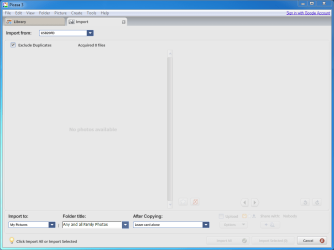
Here is the latest after installing the MajorGeeks Picasa Down LOAD.

Note in the lower left-hand corner "Click Import all or Import selected".

Both are Greyed out.

Must be me, nothing else could be this difficult.
 

Attachments

  • Capture - Picasa Setup.PNG
    Capture - Picasa Setup.PNG
    10.8 KB · Views: 40
  • Capture - 04.PNG
    Capture - 04.PNG
    24.7 KB · Views: 0

My Computer My Computer

At a glance

Microsoft Windows 7 Professional 64-bit 7601 ...Intel(R) Core(TM) i7-3770 CPU @ 3.40GHz8.00 GBIntel(R) HD Graphics 4000
Computer type
PC/Desktop
Computer Manufacturer/Model Number
Two HP Desktops. One in the Laundry Room / Bed Room.
OS
Microsoft Windows 7 Professional 64-bit 7601 Multiprocessor Free Service Pack 1
CPU
Intel(R) Core(TM) i7-3770 CPU @ 3.40GHz
Motherboard
Hewlett-Packard 3396
Memory
8.00 GB
Graphics Card(s)
Intel(R) HD Graphics 4000
Sound Card
(1) Realtek High Definition Audio (2) Intel(R) Display Aud
Monitor(s) Displays
Hanns-G
Screen Resolution
1440 x 900 x 32 bits (4294967296 colors) @ 59 Hz
Hard Drives
(1) ATA WDC WD40EZRX-00S SCSI Disk Device (2) HP Officejet Pro 86 USB Device (3) WD My Book 1230 USB Device
PSU
Whatever came with the CMT.
Case
HP CMT Black.
Cooling
Whatever came with the CMT.
Keyboard
Logitech K740.
Mouse
Microsoft Optical Mouse 1000.
Internet Speed
Spectrum 25Mbs.
Antivirus
WebRoot, Microsoft Security Essentials.
Browser
EDGE
Other Info
HP Officejet Pro 8600 Plus.
WD MyBook 4TB.
I don't know. Time to do some troubleshooting, I guess.

Can this Picasa instance import other images correctly? A Win7 install usually includes some gratuitous pictures in "C:\Users\Public\Pictures\Sample Pictures", so navigate there and see if Picasa can import them. If yes, continue.

From Windows (outside of Picasa), can you manually drag-and-drop pictures from the USB20FD card to a folder on your hard drive (e.g., "My Documents" or "My Pictures")? If yes, continue.

Will Picasa import those copied pictures from that intermediate location?

These troubleshooting steps may help you zero in on where the problem is -- either with Picasa, the memory card, or the image files themselves.
 

My Computer My Computer

At a glance

Windows 7/8.1/10 multibootIntel Core i7-770048GB (2x16GB Crucial DDR4-3200 + 2x8GB Hynix ...Intel HD630 + AMD Radeon R7 450 PCIe
Computer type
PC/Desktop
Computer Manufacturer/Model Number
Dell Optiplex 7050
OS
Windows 7/8.1/10 multiboot
CPU
Intel Core i7-7700
Motherboard
Dell, Intel Q270 chipset
Memory
48GB (2x16GB Crucial DDR4-3200 + 2x8GB Hynix DDR4-2400)
Graphics Card(s)
Intel HD630 + AMD Radeon R7 450 PCIe
Monitor(s) Displays
Asus VC279 (27")
Screen Resolution
1920x1080
Hard Drives
Toshiba M.2 NVMe (256GB),
Samsung 960 Evo (500GB),
WD Red Plus 80EFBX (8TB)
YES
Can this Picasa instance import other images correctly? A Win7 install usually includes some gratuitous pictures in "C:\Users\Public\Pictures\Sample Pictures", so navigate there and see if Picasa can import them. If yes, continue.
This was performed without me doing anything, they are there.
I'll try your next recommendation now.


- - - Updated - - -

YES
From Windows (outside of Picasa), can you manually drag-and-drop pictures from the USB20FD card to a folder on your hard drive (e.g., "My Documents" or "My Pictures")? If yes, continue.
I was able to drag and drop a photo from the "card" to an "SSD".
I'll try your next recommendation now.


- - - Updated - - -

YES
Will Picasa import those copied pictures from that intermediate location?
Picasa imported the selected photo.
To do that I needed to do some "manipulation".
I'll explain with the help of several Screen Shots which will follow.


- - - Updated - - -

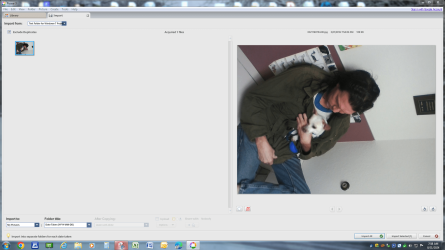
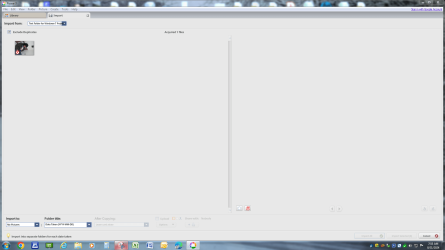
Note that in the first photo, #6, there is a RED X on it.
By dragging the photo, #6, to the right pane, the RED X goes away.
Once there, the RED X has gone away and in the lower right-hand corner, the Import Options are available.
I imported it, more than once to "test" the Non-Duplicate Option.
It appears that it does not work either as I now have four copies of the photo.

- - - Updated - - -

My current observation:

All of the Picasa Options, that I have "set" and used for years, appeared to be REVERSED.

Why, I have no idea.

- - - Updated - - -

I'm beginning to lose confidence in myself.
The frustration is unbelievable.
Something so very simple.
Perhaps I should just invest in the Picasa Downloads for sale.
If I do however, they could be filled with a myriad of frustration also.

Should I throw in the towel?
 

Attachments

  • Capture - 8.PNG
    Capture - 8.PNG
    315.4 KB · Views: 3
  • Capture - 7.PNG
    Capture - 7.PNG
    327.7 KB · Views: 3
  • Capture - 06.PNG
    Capture - 06.PNG
    82.8 KB · Views: 2

My Computer My Computer

At a glance

Microsoft Windows 7 Professional 64-bit 7601 ...Intel(R) Core(TM) i7-3770 CPU @ 3.40GHz8.00 GBIntel(R) HD Graphics 4000
Computer type
PC/Desktop
Computer Manufacturer/Model Number
Two HP Desktops. One in the Laundry Room / Bed Room.
OS
Microsoft Windows 7 Professional 64-bit 7601 Multiprocessor Free Service Pack 1
CPU
Intel(R) Core(TM) i7-3770 CPU @ 3.40GHz
Motherboard
Hewlett-Packard 3396
Memory
8.00 GB
Graphics Card(s)
Intel(R) HD Graphics 4000
Sound Card
(1) Realtek High Definition Audio (2) Intel(R) Display Aud
Monitor(s) Displays
Hanns-G
Screen Resolution
1440 x 900 x 32 bits (4294967296 colors) @ 59 Hz
Hard Drives
(1) ATA WDC WD40EZRX-00S SCSI Disk Device (2) HP Officejet Pro 86 USB Device (3) WD My Book 1230 USB Device
PSU
Whatever came with the CMT.
Case
HP CMT Black.
Cooling
Whatever came with the CMT.
Keyboard
Logitech K740.
Mouse
Microsoft Optical Mouse 1000.
Internet Speed
Spectrum 25Mbs.
Antivirus
WebRoot, Microsoft Security Essentials.
Browser
EDGE
Other Info
HP Officejet Pro 8600 Plus.
WD MyBook 4TB.
Note that in the first photo, #6, there is a RED X on it.
By dragging the photo, #6, to the right pane, the RED X goes away.
Once there, the RED X has gone away and in the lower right-hand corner, the Import Options are available.
I imported it, more than once to "test" the Non-Duplicate Option.
It appears that it does not work either as I now have four copies of the photo.

I'm not a Picasa user, so just guessing here, but based on a quick test install of Picasa in a VM ...

I think the red "X" means Picasa detected you've already "imported" that photo, so it doesn't want to do it again. (In your example in screenshot #6, I notice it appears to already be in screenshot #8, "2023-01-21" folder, fourth row, first photo.)

Perhaps by dragging the photo to the right you caused Windows to create a duplicate with a new filename, such that Picasa now sees it as a different file -- and thus allows you to import the new file, even though you know it's really a copy. (I wasn't able to replicate that behavior in a Win7 VM, though, so I'm just shooting in the dark here.)

What are the filenames of the four copies in the "2016-03-21" folder? I'm guessing they're not exactly the same filename, but probably variations of the original filename. If so, maybe Picasa interprets them as not "duplicates", by Picasa's definition.


Perhaps I should just invest in the Picasa Downloads for sale.

I really wouldn't expect that to make any difference. I think you'd get the exact same Picasa installer, but from some third-party grifter trolling for anyone stupid enough to pay him for something that was free.
 

My Computer My Computer

At a glance

Windows 7/8.1/10 multibootIntel Core i7-770048GB (2x16GB Crucial DDR4-3200 + 2x8GB Hynix ...Intel HD630 + AMD Radeon R7 450 PCIe
Computer type
PC/Desktop
Computer Manufacturer/Model Number
Dell Optiplex 7050
OS
Windows 7/8.1/10 multiboot
CPU
Intel Core i7-7700
Motherboard
Dell, Intel Q270 chipset
Memory
48GB (2x16GB Crucial DDR4-3200 + 2x8GB Hynix DDR4-2400)
Graphics Card(s)
Intel HD630 + AMD Radeon R7 450 PCIe
Monitor(s) Displays
Asus VC279 (27")
Screen Resolution
1920x1080
Hard Drives
Toshiba M.2 NVMe (256GB),
Samsung 960 Evo (500GB),
WD Red Plus 80EFBX (8TB)
I believe you nailed it.

Yes, I'm stupid enough to pay him for something that was free.
On the hopes that he found a fully functioning version and I "might" be able to move on with my life.

This is the Virus / Whatever that did the Damage: Scr.Malcodelgen

Does anyone recognize it or have experience with it?

Best regards,

Mike Lynch

PS Picasa still will not Import from anything I aim it at?
I'll keep look for a solution however as we made wonderful progress in gaining access / control over our Hacked PC.
 
Last edited:

My Computer My Computer

At a glance

Microsoft Windows 7 Professional 64-bit 7601 ...Intel(R) Core(TM) i7-3770 CPU @ 3.40GHz8.00 GBIntel(R) HD Graphics 4000
Computer type
PC/Desktop
Computer Manufacturer/Model Number
Two HP Desktops. One in the Laundry Room / Bed Room.
OS
Microsoft Windows 7 Professional 64-bit 7601 Multiprocessor Free Service Pack 1
CPU
Intel(R) Core(TM) i7-3770 CPU @ 3.40GHz
Motherboard
Hewlett-Packard 3396
Memory
8.00 GB
Graphics Card(s)
Intel(R) HD Graphics 4000
Sound Card
(1) Realtek High Definition Audio (2) Intel(R) Display Aud
Monitor(s) Displays
Hanns-G
Screen Resolution
1440 x 900 x 32 bits (4294967296 colors) @ 59 Hz
Hard Drives
(1) ATA WDC WD40EZRX-00S SCSI Disk Device (2) HP Officejet Pro 86 USB Device (3) WD My Book 1230 USB Device
PSU
Whatever came with the CMT.
Case
HP CMT Black.
Cooling
Whatever came with the CMT.
Keyboard
Logitech K740.
Mouse
Microsoft Optical Mouse 1000.
Internet Speed
Spectrum 25Mbs.
Antivirus
WebRoot, Microsoft Security Essentials.
Browser
EDGE
Other Info
HP Officejet Pro 8600 Plus.
WD MyBook 4TB.
Mr. Clean, let's talk about that!

Brand new (refurbed) PC with Windows-10 installed on it.
Remover the SSD from it and installed another SSD.
Did a clean install of Windows-7 Pro.
Did Updates to Windows-7 Pro.
Ran Simplex August 2024.
Downloaded Picasa from MajorGeeks.
Installed Picasa.
Opened Picasa and as before this Brand new (refurbed) PC, Picasa loads / runs BUT will not Import ANYTHING from any Device on the PC.
Might this be a special version of Picasa available on MajorGeeks, you know, all show and no go!
If any Forum Member has any suggestions, I'd appreciate them.
Especially if they downloaded Picasa from MajorGeeks and actually tried to IMPORT from a device on their PC.
Best regards,

Mike

PS Appears that the BUNNY has gotten it many times.

- - - Updated - - -

Some last-minute observations.

The same situation exists on both the "troubled" PC and the new "clean" one.
Plug in any USB type device and Picasa does not "appear" to recognize it.

HOWEVER:

On the "troubled" PC, Picasa does recognize, for some unknown reason, three different USB Printers that I have owned.
Why or how Picasa would think to IMPORT from a Printer is a mystery.
Both of the PC's are Windows-7 Pro 64 Bit Systems.

Could / might the issue be related to USB Devices?

I have tried USB Thumb Drives, USB External Hard Drives and USB External Docking Stations.
None of them are recognized by Picasa but are recognized by Windows-7 Pro 64 Bit.
Hopefully, some Forum Member will recognize this symptom and have a solution,

Best regards,

Mike

- - - Updated - - -

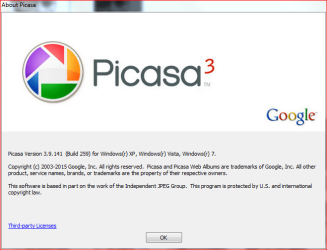
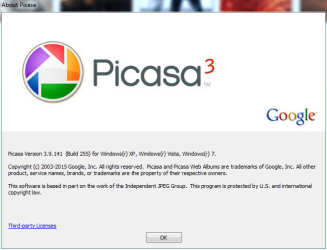
This is from the Troubled PC.
I will get the Clean PC Picasa Specs next.

NOTE:

They are both different "builds".

Might that eliminate Picasa as the culprit?

Mike

- - - Updated - - -

FYI

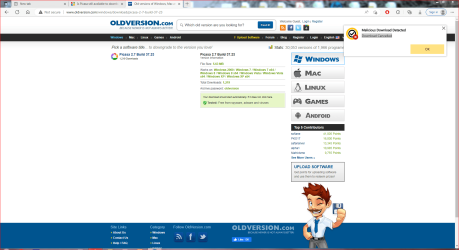
I tried this "recommended site" and here is what stopped me.
NOTE upper right-hand Notice from my ANTI VIRUS.

- - - Updated - - -

I downloaded a Version to a USB Drive anyway.
I'll try it on the "clean" PC and report.


- - - Updated - - -

No change of symptoms with Picasa Version 2.7.
This is a real challenge and I'm growing tired and need a short nap.


Attachments

  • Capture - Troubled PC Picasa Specs..PNG
    Capture - Troubled PC Picasa Specs..PNG
    31.9 KB · Views: 25
  • Capture - from the Clean PC.PNG
    Capture - from the Clean PC.PNG
    33.9 KB · Views: 24
  • Capture = 1.PNG
    Capture = 1.PNG
    105.3 KB · Views: 0

My Computer My Computer

At a glance

Microsoft Windows 7 Professional 64-bit 7601 ...Intel(R) Core(TM) i7-3770 CPU @ 3.40GHz8.00 GBIntel(R) HD Graphics 4000
Computer type
PC/Desktop
Computer Manufacturer/Model Number
Two HP Desktops. One in the Laundry Room / Bed Room.
OS
Microsoft Windows 7 Professional 64-bit 7601 Multiprocessor Free Service Pack 1
CPU
Intel(R) Core(TM) i7-3770 CPU @ 3.40GHz
Motherboard
Hewlett-Packard 3396
Memory
8.00 GB
Graphics Card(s)
Intel(R) HD Graphics 4000
Sound Card
(1) Realtek High Definition Audio (2) Intel(R) Display Aud
Monitor(s) Displays
Hanns-G
Screen Resolution
1440 x 900 x 32 bits (4294967296 colors) @ 59 Hz
Hard Drives
(1) ATA WDC WD40EZRX-00S SCSI Disk Device (2) HP Officejet Pro 86 USB Device (3) WD My Book 1230 USB Device
PSU
Whatever came with the CMT.
Case
HP CMT Black.
Cooling
Whatever came with the CMT.
Keyboard
Logitech K740.
Mouse
Microsoft Optical Mouse 1000.
Internet Speed
Spectrum 25Mbs.
Antivirus
WebRoot, Microsoft Security Essentials.
Browser
EDGE
Other Info
HP Officejet Pro 8600 Plus.
WD MyBook 4TB.
I took the file picasa39-setup.exe that I previously downloaded from Major Geeks a couple weeks ago.
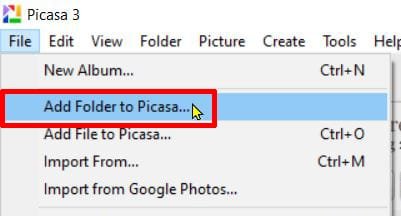
I just installed Picasa on one of my computers with Windows 7 Home. I had no problem importing pictures from a USB flash drive.

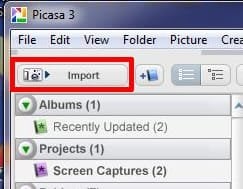
On the toolbar I selected Import

p1.jpg

I browsed to my flash drive Removable Drive (F:\)
After I browsed to it, it says it found 20 pictures

p2.jpg

At the bottom left I select where I want to import the files to
When done I click on Import

p3.jpg

After I closed Picasa I can browse to the Pictures folders and see the picture I imported.

p4.jpg

You have to be careful. Picasa will often pull in pictures without even asking you. If there is a red X next to a picture then that means that the picture has already been imported.
 

My Computers My Computers

  • At a glance

    Windows 7 Professional 64bit / Windows 10 Hom...AMD FX-8350GSKILL Ripjaw-X PC3 12800 12GB (2x4GB, 2x2GB)ASUS ENGTX560 DCII OC/2DI/1GD5 1GB
    Computer type
    PC/Desktop
    Computer Manufacturer/Model Number
    Custom build
    OS
    Windows 7 Professional 64bit / Windows 10 Home 64bit
    CPU
    AMD FX-8350
    Motherboard
    Gigabyte GA-990FXA-UD3 (AM3+) Rev. 4.0
    Memory
    GSKILL Ripjaw-X PC3 12800 12GB (2x4GB, 2x2GB)
    Graphics Card(s)
    ASUS ENGTX560 DCII OC/2DI/1GD5 1GB
    Sound Card
    Integrated
    Monitor(s) Displays
    Asus VE228H (21.5-in)
    Screen Resolution
    1920x1080 60Hz
    Hard Drives
    SAMSUNG 870 EVO 1TB (2.5" SATA SSD)
    SAMSUNG 870 EVO 500GB (2.5" SATA SSD)
    PSU
    Antec TruePower (new) TP-650 (650 watts)
    Case
    Antec Three Hundred
    Cooling
    AMD stock (plan to upgrade to Cooler Master Hyper 212 EVO)
    Keyboard
    Logitech K540 (wireless)
    Mouse
    Logitech M310 (wireless)
    Internet Speed
    Comcast Gigabit X2 Internet (2100Mbps down / 300Mbps up)
    Browser
    Firefox, Edge, Chrome
    Other Info
    Optical drive: ASUS DRW-24B3ST/BLK/G (Black) (24X)
    External hard drives: 2TB & 6TB
    Internet Gateway: Comcast XB8
  • Computer type
    PC/Desktop
I duplicated you last Posts actions with the Picasa 3.9.141 (Build 255) which I already have on the Clean PC.
Where you get to select the Import Device, I do not have that option.
I only have Folder as the option.
To have the identical symptoms on two separate PC's is discouraging.
On the Clean PC, I have Picasa 2 and Picasa 3 installed.
Both act / react the same, only Folder is offered as an import source?
I'll try and download Picasa from the Geeks again today and report back.
Mr. Ed, thank you again for your time and effort.
Mike

- - - Updated - - -

Well, I uninstalled Picasa 3 from my Clean PC and downloaded Picasa 3 from the Geeks.

After installing the download, same results, only Import Source offered is Folder.

My dilemma.

Mike
 

My Computer My Computer

At a glance

Microsoft Windows 7 Professional 64-bit 7601 ...Intel(R) Core(TM) i7-3770 CPU @ 3.40GHz8.00 GBIntel(R) HD Graphics 4000
Computer type
PC/Desktop
Computer Manufacturer/Model Number
Two HP Desktops. One in the Laundry Room / Bed Room.
OS
Microsoft Windows 7 Professional 64-bit 7601 Multiprocessor Free Service Pack 1
CPU
Intel(R) Core(TM) i7-3770 CPU @ 3.40GHz
Motherboard
Hewlett-Packard 3396
Memory
8.00 GB
Graphics Card(s)
Intel(R) HD Graphics 4000
Sound Card
(1) Realtek High Definition Audio (2) Intel(R) Display Aud
Monitor(s) Displays
Hanns-G
Screen Resolution
1440 x 900 x 32 bits (4294967296 colors) @ 59 Hz
Hard Drives
(1) ATA WDC WD40EZRX-00S SCSI Disk Device (2) HP Officejet Pro 86 USB Device (3) WD My Book 1230 USB Device
PSU
Whatever came with the CMT.
Case
HP CMT Black.
Cooling
Whatever came with the CMT.
Keyboard
Logitech K740.
Mouse
Microsoft Optical Mouse 1000.
Internet Speed
Spectrum 25Mbs.
Antivirus
WebRoot, Microsoft Security Essentials.
Browser
EDGE
Other Info
HP Officejet Pro 8600 Plus.
WD MyBook 4TB.
My Computers My Computers

  • At a glance

    Windows 7 Professional 64bit / Windows 10 Hom...AMD FX-8350GSKILL Ripjaw-X PC3 12800 12GB (2x4GB, 2x2GB)ASUS ENGTX560 DCII OC/2DI/1GD5 1GB
    Computer type
    PC/Desktop
    Computer Manufacturer/Model Number
    Custom build
    OS
    Windows 7 Professional 64bit / Windows 10 Home 64bit
    CPU
    AMD FX-8350
    Motherboard
    Gigabyte GA-990FXA-UD3 (AM3+) Rev. 4.0
    Memory
    GSKILL Ripjaw-X PC3 12800 12GB (2x4GB, 2x2GB)
    Graphics Card(s)
    ASUS ENGTX560 DCII OC/2DI/1GD5 1GB
    Sound Card
    Integrated
    Monitor(s) Displays
    Asus VE228H (21.5-in)
    Screen Resolution
    1920x1080 60Hz
    Hard Drives
    SAMSUNG 870 EVO 1TB (2.5" SATA SSD)
    SAMSUNG 870 EVO 500GB (2.5" SATA SSD)
    PSU
    Antec TruePower (new) TP-650 (650 watts)
    Case
    Antec Three Hundred
    Cooling
    AMD stock (plan to upgrade to Cooler Master Hyper 212 EVO)
    Keyboard
    Logitech K540 (wireless)
    Mouse
    Logitech M310 (wireless)
    Internet Speed
    Comcast Gigabit X2 Internet (2100Mbps down / 300Mbps up)
    Browser
    Firefox, Edge, Chrome
    Other Info
    Optical drive: ASUS DRW-24B3ST/BLK/G (Black) (24X)
    External hard drives: 2TB & 6TB
    Internet Gateway: Comcast XB8
  • Computer type
    PC/Desktop
My brain engaged briefly and here is what I learned.

Picasa immediately IMPORTS photos and movies from a Cell Phone.

With ATTACHED devices, non-Cell Phones, it "locates" photos and movies and stores their location for temporary retrieval and viewing.

It "appears" that it does not IMPORT them, just records their location on Disk / Storage.

This means, at least to me, I need to find another piece of Software to find the Photos and Movies and merge them into a Partition on the Drive where Picasa is installed.

My interest in Picasa is its ability to do Facial Recognition saving years of searching through Photos and Movies.

Any feedback on this Post is appreciated.

Mike

- - - Updated - - -

CHECK THIS POST OUT.
IT ADDS A SCARY DETAIL TO THIS ONE.

"Norton discovered this VIRUS when I was importing photos to Picasa."
 
Last edited:

My Computer My Computer

At a glance

Microsoft Windows 7 Professional 64-bit 7601 ...Intel(R) Core(TM) i7-3770 CPU @ 3.40GHz8.00 GBIntel(R) HD Graphics 4000
Computer type
PC/Desktop
Computer Manufacturer/Model Number
Two HP Desktops. One in the Laundry Room / Bed Room.
OS
Microsoft Windows 7 Professional 64-bit 7601 Multiprocessor Free Service Pack 1
CPU
Intel(R) Core(TM) i7-3770 CPU @ 3.40GHz
Motherboard
Hewlett-Packard 3396
Memory
8.00 GB
Graphics Card(s)
Intel(R) HD Graphics 4000
Sound Card
(1) Realtek High Definition Audio (2) Intel(R) Display Aud
Monitor(s) Displays
Hanns-G
Screen Resolution
1440 x 900 x 32 bits (4294967296 colors) @ 59 Hz
Hard Drives
(1) ATA WDC WD40EZRX-00S SCSI Disk Device (2) HP Officejet Pro 86 USB Device (3) WD My Book 1230 USB Device
PSU
Whatever came with the CMT.
Case
HP CMT Black.
Cooling
Whatever came with the CMT.
Keyboard
Logitech K740.
Mouse
Microsoft Optical Mouse 1000.
Internet Speed
Spectrum 25Mbs.
Antivirus
WebRoot, Microsoft Security Essentials.
Browser
EDGE
Other Info
HP Officejet Pro 8600 Plus.
WD MyBook 4TB.
Back
Top