Is SSD align is correct - odd reading in diskpart

richt48

New member
Local time
4:46 AM
Messages
11
Hi,

First post here, hope someone can help. I am a little confused by my the readout on diskpart.

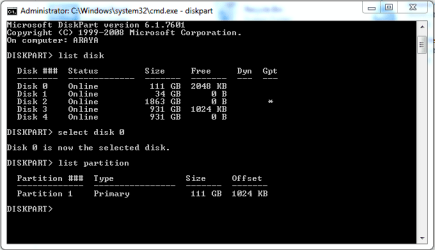
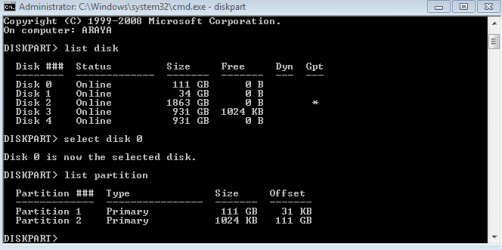
The attachment is the readout from my diskpart. It is a clean install of Windows 7. From what little I know it looks like the offset and size on partition 2 is wrong? Or at least under Size it says 1024KB and under Offset 111GB. Surely these should be the other way around? Anyone know what is happening here? Is the alignment on my SSD really 31KB and thus needs resetting? I thought W7 clean install would set this up for me?

Really hope someone can clear this up for me, I've been at this since the weekend, spent hours and hours reading and just not finding the answers I need!

Yours in hope!

Rich.
-=-
 

Attachments
  • ssd_align_incorrect.PNG
    ssd_align_incorrect.PNG
    6.2 KB · Views: 190

My Computer My Computer

OS
Windows 7 Enterprise 64b
Did win7 clean install do that... strange.
What is partition 2 btw... it's 1024KB large so 1MB... very small.
Partition is misaligned. Put it at the 1MB border.
 

My Computer My Computer

Computer type
Laptop
Computer Manufacturer/Model Number
ACER ASPIRE 5742G
OS
Microsoft Windows 7 Home Premium 64-bits 7601 Multiprocessor Free Service Pack 1
CPU
Intel(R) Core(TM) i3 CPU M 370 @ 2.40GHz
Motherboard
Acer Aspire 5742G
Memory
4,00 GB
Graphics Card(s)
ATI Mobility Radeon HD 5400 Series
Sound Card
(1) AMD High Definition Audio Device (2) Realtek High Defi
Screen Resolution
1366 x 768 x 32 bits (4294967296 colors) @ 60 Hz
Hard Drives
WDC WD5000BEVT-22ZAT0

My Computer My Computer

Computer type
Laptop
Computer Manufacturer/Model Number
ACER ASPIRE 5742G
OS
Microsoft Windows 7 Home Premium 64-bits 7601 Multiprocessor Free Service Pack 1
CPU
Intel(R) Core(TM) i3 CPU M 370 @ 2.40GHz
Motherboard
Acer Aspire 5742G
Memory
4,00 GB
Graphics Card(s)
ATI Mobility Radeon HD 5400 Series
Sound Card
(1) AMD High Definition Audio Device (2) Realtek High Defi
Screen Resolution
1366 x 768 x 32 bits (4294967296 colors) @ 60 Hz
Hard Drives
WDC WD5000BEVT-22ZAT0
Who did create 111GB partition? Done within win7, by win install... or?
 

My Computer My Computer

Computer type
Laptop
Computer Manufacturer/Model Number
ACER ASPIRE 5742G
OS
Microsoft Windows 7 Home Premium 64-bits 7601 Multiprocessor Free Service Pack 1
CPU
Intel(R) Core(TM) i3 CPU M 370 @ 2.40GHz
Motherboard
Acer Aspire 5742G
Memory
4,00 GB
Graphics Card(s)
ATI Mobility Radeon HD 5400 Series
Sound Card
(1) AMD High Definition Audio Device (2) Realtek High Defi
Screen Resolution
1366 x 768 x 32 bits (4294967296 colors) @ 60 Hz
Hard Drives
WDC WD5000BEVT-22ZAT0
Quck replies - many thanks!

Yeah, Windows 7 disk did that alignment. Initially I had a clone of my previous W7 install on it, but the alignment was wrong. So I stuck the W7 disk in, formatted the SSD using the disk and let it do a clean install of W7. This is the result. I also have zero idea why there is a tiny 1MB partition whatsoever!

I will go and read those links right now but before I do, is it worth doing another fresh install of W7 from disk? I have nothing to lose on here right now so don't mind doing it. My idea as of now (before I read those posts) is to put old HDD back in, that has the old version of W7 on it, boot from that, format the SSD again - making sure the alignment is correct via diskpart, then install again. Would that do it? I just assumed that from a fresh install from disk W7 would work out the alignment itself, but it appears it didn't.

I'll be back in a moment when I've taken a look at those links...
 

My Computer My Computer

OS
Windows 7 Enterprise 64b
You formatted a partition on SSD. After that you installed win7 in that partition. But who created the partition? Was it created by a clone operation? If so... many clone programs don't align properly.


Proposal:
  • Download partition wizard and install it. and run it
  • Now align first large partition on SSD
  • apply
After reboot post diskpart output

Code:
diskpart
sel dis 0
sel part 1
det part
sel part 2
det part
exit

Also post output of disk management with all fields visible
 

My Computer My Computer

Computer type
Laptop
Computer Manufacturer/Model Number
ACER ASPIRE 5742G
OS
Microsoft Windows 7 Home Premium 64-bits 7601 Multiprocessor Free Service Pack 1
CPU
Intel(R) Core(TM) i3 CPU M 370 @ 2.40GHz
Motherboard
Acer Aspire 5742G
Memory
4,00 GB
Graphics Card(s)
ATI Mobility Radeon HD 5400 Series
Sound Card
(1) AMD High Definition Audio Device (2) Realtek High Defi
Screen Resolution
1366 x 768 x 32 bits (4294967296 colors) @ 60 Hz
Hard Drives
WDC WD5000BEVT-22ZAT0

My Computer My Computer

Computer type
PC/Desktop
Computer Manufacturer/Model Number
Skylake Special #666
OS
Windows 10 Pro x64
CPU
Intel Core i7 6700K
Motherboard
Asus Sabertooth Z170 Mark 1
Memory
GSkill TridentZ RGB 16GB 3600 16-16-16-36
Graphics Card(s)
EVGA GTX 980 Ti SC x2
Sound Card
Realtek High Definition
Monitor(s) Displays
AOC G2460PG
Screen Resolution
1920 x 1080 144Hz
Hard Drives
Samsung 860 Pro 256GB, Seagate Barracuda 4TB x2
PSU
EVGA 1000 P2, EVGA White Custom Braided Cables
Case
Corsair Vengeance C70 Gunmetal Black
Cooling
Corsair H100i v2, Corsair ML120 x2, Thermal Grizzly Kryonaut
Keyboard
Logitech G910 Orion Spectrum
Mouse
Logitech G700s
Internet Speed
Verizon Fios Quantum Gateway 75/75
Antivirus
Windows Defender, Malwarebytes Free 3.8.3
Browser
Chrome
Other Info
Corsair SP120 x4, LG Blu-ray Drive, Durabrand HT-395 100 Watt Dolby Digital Amp, Corsair H2100 Wireless 7.1 Headset
Hello all.

After following the advice above I think the problem is rectified. I deleted the odd 1MB partition and aligned the remaining partition using that free link to MiniTools Partition Wizard. Was a simple process once I knew what to do. Then again, isn't everything?!

Thanks go to all who replied so quickly.

Rich.
-=-
 

Attachments

  • fixed.PNG
    fixed.PNG
    9.6 KB · Views: 83
Last edited:

My Computer My Computer

OS
Windows 7 Enterprise 64b
Hello all.

After following the advice above I think the problem is rectified. I deleted the odd 1MB partition and aligned the remaining partition using that free link to MiniTools Partition Wizard. Was a simple process once I knew what to do. Then again, isn't everything?!

Thanks go to all who replied so quickly.

Rich.
-=-
Glad you solved it. Just curious.... how long did it take to realign (after pressing apply)?
 

My Computer My Computer

Computer type
Laptop
Computer Manufacturer/Model Number
ACER ASPIRE 5742G
OS
Microsoft Windows 7 Home Premium 64-bits 7601 Multiprocessor Free Service Pack 1
CPU
Intel(R) Core(TM) i3 CPU M 370 @ 2.40GHz
Motherboard
Acer Aspire 5742G
Memory
4,00 GB
Graphics Card(s)
ATI Mobility Radeon HD 5400 Series
Sound Card
(1) AMD High Definition Audio Device (2) Realtek High Defi
Screen Resolution
1366 x 768 x 32 bits (4294967296 colors) @ 60 Hz
Hard Drives
WDC WD5000BEVT-22ZAT0
Was sure I replied to this last night. Obviously there was some technical issue (I forgot to press Post most likely)!

It took about 2 minutes, if that. I got about a page down the book I was reading before I looked up and it was done.
 

My Computer My Computer

OS
Windows 7 Enterprise 64b
Back
Top