

- Local time
- 7:15 PM
- Messages
- 62
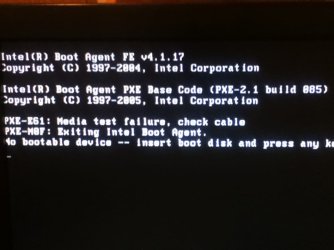
Fixing my friends computer and I ran into the problem of this (picture one)
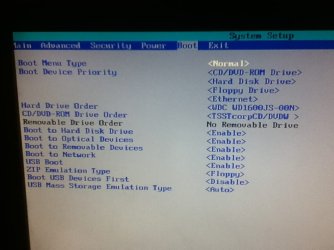
Looked it up, I found out that either the hard drive is bad or the hard drive cables are loose (or something), or that the boot order is wrong in the BIOS. I set the BIOS to the default boot order. Took the computer apart and unpluged and repluged the cables. The problem still persists. So is the hard drive bad? I was able to format the hard drive from the Windows 8 installation and install Windows 8 on it with what it seemed to be no problem. Note: This problem persisted before any adjustments were made to the computer (i.e. before installing Windows 8).
(picture two is BIOS boot order)
Thanks in advance.
Looked it up, I found out that either the hard drive is bad or the hard drive cables are loose (or something), or that the boot order is wrong in the BIOS. I set the BIOS to the default boot order. Took the computer apart and unpluged and repluged the cables. The problem still persists. So is the hard drive bad? I was able to format the hard drive from the Windows 8 installation and install Windows 8 on it with what it seemed to be no problem. Note: This problem persisted before any adjustments were made to the computer (i.e. before installing Windows 8).
(picture two is BIOS boot order)
Thanks in advance.
Attachments
My Computer
At a glance
Windows 7 Home Premium 64-bit SP1AMD FX-6300 Vishera 3.5GHz (4.1GHz Turbo)Corsair 8GB DDR31024MB ATI Radeon HD 4650 (XFX Pine Group)
- Computer type
- PC/Desktop
- Computer Manufacturer/Model Number
- Custom Built
- OS
- Windows 7 Home Premium 64-bit SP1
- CPU
- AMD FX-6300 Vishera 3.5GHz (4.1GHz Turbo)
- Motherboard
- ASRock PRO3 R2.0
- Memory
- Corsair 8GB DDR3
- Graphics Card(s)
- 1024MB ATI Radeon HD 4650 (XFX Pine Group)
- Sound Card
- AMD High Definition Audio Device
- Monitor(s) Displays
- VE247 on ATI Radeon HD 4650
- Screen Resolution
- 1920x1080
- Hard Drives
- 150GB Seagate ST316081,
3TB Seagate Barracuda ST3000DM001
- Mouse
- Razor Deathadder

 is the computer now functioning normally ?


