Is the hard drive bad?

Erratic Fox

Internet Abuser
Member
Local time
9:12 PM
Messages
62
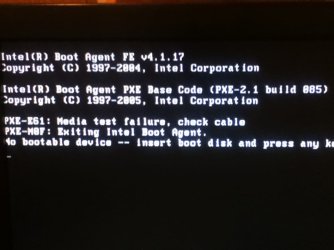
Fixing my friends computer and I ran into the problem of this (picture one)

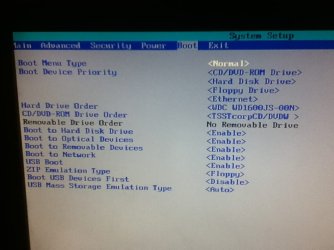
Looked it up, I found out that either the hard drive is bad or the hard drive cables are loose (or something), or that the boot order is wrong in the BIOS. I set the BIOS to the default boot order. Took the computer apart and unpluged and repluged the cables. The problem still persists. So is the hard drive bad? I was able to format the hard drive from the Windows 8 installation and install Windows 8 on it with what it seemed to be no problem. Note: This problem persisted before any adjustments were made to the computer (i.e. before installing Windows 8).

(picture two is BIOS boot order)

Thanks in advance.
 

Attachments
  • photo 1.JPG
    photo 1.JPG
    52.8 KB · Views: 7
  • photo 2.JPG
    photo 2.JPG
    63.3 KB · Views: 10

My Computer My Computer

At a glance

Windows 7 Home Premium 64-bit SP1AMD FX-6300 Vishera 3.5GHz (4.1GHz Turbo)Corsair 8GB DDR31024MB ATI Radeon HD 4650 (XFX Pine Group)
Computer type
PC/Desktop
Computer Manufacturer/Model Number
Custom Built
OS
Windows 7 Home Premium 64-bit SP1
CPU
AMD FX-6300 Vishera 3.5GHz (4.1GHz Turbo)
Motherboard
ASRock PRO3 R2.0
Memory
Corsair 8GB DDR3
Graphics Card(s)
1024MB ATI Radeon HD 4650 (XFX Pine Group)
Sound Card
AMD High Definition Audio Device
Monitor(s) Displays
VE247 on ATI Radeon HD 4650
Screen Resolution
1920x1080
Hard Drives
150GB Seagate ST316081,
3TB Seagate Barracuda ST3000DM001
Mouse
Razor Deathadder
So you installed W8 :sick: is the computer now functioning normally ?
 

My Computer My Computer

At a glance

Windows 10 Pro x64Intel Core i7 6700KGSkill TridentZ RGB 16GB 3600 16-16-16-36EVGA GTX 980 Ti SC x2
Computer type
PC/Desktop
Computer Manufacturer/Model Number
Skylake Special #666
OS
Windows 10 Pro x64
CPU
Intel Core i7 6700K
Motherboard
Asus Sabertooth Z170 Mark 1
Memory
GSkill TridentZ RGB 16GB 3600 16-16-16-36
Graphics Card(s)
EVGA GTX 980 Ti SC x2
Sound Card
Realtek High Definition
Monitor(s) Displays
AOC G2460PG
Screen Resolution
1920 x 1080 144Hz
Hard Drives
Samsung 860 Pro 256GB, Seagate Barracuda 4TB x2
PSU
EVGA 1000 P2, EVGA White Custom Braided Cables
Case
Corsair Vengeance C70 Gunmetal Black
Cooling
Corsair H100i v2, Corsair ML120 x2, Thermal Grizzly Kryonaut
Keyboard
Logitech G910 Orion Spectrum
Mouse
Logitech G700s
Internet Speed
Verizon Fios Quantum Gateway 75/75
Antivirus
Windows Defender, Malwarebytes Free 3.8.3
Browser
Chrome
Other Info
Corsair SP120 x4, LG Blu-ray Drive, Durabrand HT-395 100 Watt Dolby Digital Amp, Corsair H2100 Wireless 7.1 Headset
Wasn't my idea, my friend wanted it. :p
I'm sticking with Windows 7. As said before, this problem persisted before I touched the computer and it still persists after I installed Windows 8. So is it the HDD?
 

My Computer My Computer

At a glance

Windows 7 Home Premium 64-bit SP1AMD FX-6300 Vishera 3.5GHz (4.1GHz Turbo)Corsair 8GB DDR31024MB ATI Radeon HD 4650 (XFX Pine Group)
Computer type
PC/Desktop
Computer Manufacturer/Model Number
Custom Built
OS
Windows 7 Home Premium 64-bit SP1
CPU
AMD FX-6300 Vishera 3.5GHz (4.1GHz Turbo)
Motherboard
ASRock PRO3 R2.0
Memory
Corsair 8GB DDR3
Graphics Card(s)
1024MB ATI Radeon HD 4650 (XFX Pine Group)
Sound Card
AMD High Definition Audio Device
Monitor(s) Displays
VE247 on ATI Radeon HD 4650
Screen Resolution
1920x1080
Hard Drives
150GB Seagate ST316081,
3TB Seagate Barracuda ST3000DM001
Mouse
Razor Deathadder
Mate how did he install 8? OEM or an upgrade? I have just done two of my machines and have no problems.
By the looks of the BIOS screen that is an older machine right? The boot order is the optical first whereas I would have thought you would have set the drive but I suppose you have your reasons. Plus that drive I am thinking is fairly old too by looking at the specs.

Just how old is this machine? some specs would be nice too.
 

My Computer My Computer

At a glance

Desk1 7 Home Prem / Desk2 10 Pro / Main lap A...Desk1 i5 3750K / Laptop i7 GTX 860M / Desk2 i...Desk1 8GB (1866) / Desk2 16GB (1333) / Laptop...Desk 1& 2NVidia GTX 650 & Laptops on board Intel
Computer type
PC/Desktop
Computer Manufacturer/Model Number
Own build (new) Desk1 / Asus ROG Win 7 / Desk2 1st build
OS
Desk1 7 Home Prem / Desk2 10 Pro / Main lap Asus ROG 10 Pro 2 laptop Toshiba 7 Pro Asus P2520 7 & 10
CPU
Desk1 i5 3750K / Laptop i7 GTX 860M / Desk2 i5 2500
Motherboard
Desk1 Asus P877-V / Desk2 Gigabyte H67 UD3H / Laptop ?
Memory
Desk1 8GB (1866) / Desk2 16GB (1333) / Laptop 8Gb DDR3
Graphics Card(s)
Desk 1& 2NVidia GTX 650 & Laptops on board Intel
Sound Card
Desk 1 & 2 -XONAR DG Realtek High Def audio Laptop
Monitor(s) Displays
Desk 1 Benq HD 2450 / Desk2 Philips 24" / Laptop 17.5"
Screen Resolution
1920x1080 D1 & D2 & Laptop 1
Hard Drives
Desk1 Samsung 120GB 830 SSD
Asus ROG 256GB 850 Pro SSD
Desk2 Samsung 840 256 SSD
Toshiba 120GB EVO
PSU
Desk 1 Corsair HX 1050/ Laptop ? / Desk 2 Corsair HX 650
Case
Desk 1 Cooler HAF XM ? Toshiba laptop / Desk2 Coolermaster
Cooling
Fans on all Desk1 -2 Desk2 - all Coolermasters 5 Laptop ?
Keyboard
Desk 1 MS Sidewinder X6 Desk 2 MS Sidewinder X 4
Mouse
Desk 1&2 - Gigabyte MS 900 gamer - laptop - Logitec wireless
Internet Speed
ADSL2+
Other Info
One other Desktop (tester) and spare Toshba laptop both with SSD's
Running Kaspersky 2016 ISS on all machines config'd identically
Logitec audio stereo systems on each machine (x3)
Canon MG5250MFC
Router/modem TP-Link running WPA2SK
Back
Top