
Is "The_World.exe" familiar to anyone?

kmplsv

New member
Local time
3:29 AM
Messages
7
Is anyone familiar with this file? It hasn't been on my system long, I've just noticed it within the past couple of days in my Task Manager but I cannot pinpoint what program it is associated with even after doing a mental rundown of any recently installed software. Could it be associated with a windows update? WSE, Malwarebytes, Jotti, and VirusTotal all show it as non-threatening, but it seems to be leaching quite a bit of RAM for no good reason at all. The file resides in my "C:\Users\username\AppData\Roaming\Microsoft\Windows\Templates" directory and if I delete it, it simply comes back. I've done some googling but that hasn't turned up much useful information, just people with the same questions as I have. It just seems sketchy to me. I've attached a screenshot of the Task Manager window.
 

Attachments
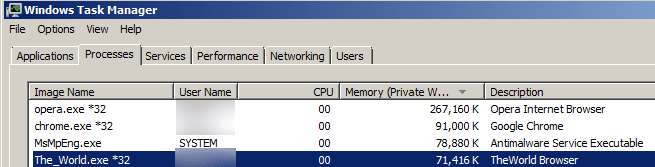
  • theworld.png
    theworld.png
    8.6 KB · Views: 57

My Computer My Computer

At a glance

Windows 7 Professional x64 w/ SP1Intel Core i7 92012GB (6GB OCZ3G1600LV2G + F3-12800CL9T-6GBNQ)Sapphire ATI Radeon 4870x2 (Catalyst 10.10 w/...
Computer type
PC/Desktop
Computer Manufacturer/Model Number
Custom
OS
Windows 7 Professional x64 w/ SP1
CPU
Intel Core i7 920
Motherboard
Asus P6T Deluxe (x58) w/ Latest BIOS
Memory
12GB (6GB OCZ3G1600LV2G + F3-12800CL9T-6GBNQ)
Graphics Card(s)
Sapphire ATI Radeon 4870x2 (Catalyst 10.10 w/ OpenCL)
Sound Card
SoundMAX Integrated Digital HD Audio (SPDIF)
Monitor(s) Displays
BenQ E2400HD
Screen Resolution
1920x1080
Hard Drives
Intel X25-M 80GB SSDSA2M080G2GN
Samsung Spinpoint F1 DT 1TB
PSU
Xclio Greatpower 850w
Case
Antec Twelve Hundred
Cooling
Air - (1) top 200mm, (2) rear 120mm, (3) front 120mm
Google search results.
the world browser - Google Search

It is a browser. It was probably installed with another software you downloaded.

Go into Control Panel then Programs and Features and uninstall it if you want.
Probably listed as "The World Browser" or similar.
 

My Computer My Computer

At a glance

Windows7 Pro 64bit SP-1; Windows XP Pro 32bitIntel Core i7-870 Lynnfield 2.93GHz LGA 1156 ...8GB@1400MHz Crucial Ballistix DDR3-1600 4x2GBASUS ENGTX460 DirectCU/2DI/1GD5 1GB 256-bit G...
Computer Manufacturer/Model Number
Hopalong/ Godzilla
OS
Windows7 Pro 64bit SP-1; Windows XP Pro 32bit
CPU
Intel Core i7-870 Lynnfield 2.93GHz LGA 1156 95W Quad-Core
Motherboard
ASUS P7P55D-E PRO
Memory
8GB@1400MHz Crucial Ballistix DDR3-1600 4x2GB
Graphics Card(s)
ASUS ENGTX460 DirectCU/2DI/1GD5 1GB 256-bit GDDR5
Sound Card
VIA Onboard
Monitor(s) Displays
Asus VS248H-P 24"; Samsung SyncMaster 941BW 19"ws
Screen Resolution
1920x1080; 1440x900
Hard Drives
Samsung 830 120GB SSD
Intel 320 120GB SSD
Western Digital Caviar Black WD7501AALS 750GB 7200 RPM SATA 3.0Gb/s
Western Digital Caviar Black WD6401AALS 640GB 7200 RPM SATA 3.0Gb/s
PSU
COOLER MASTER Silent Pro RS850-AMBAJ3-US 850W Modular
Case
COOLER MASTER HAF 932 RC-932-KKN5-GP Black
Cooling
Scythe "Mugen-2 Rev.B" (2 ScytheKaze-Jyuni PWM fans)
Keyboard
Logitech K-320
Mouse
Kensington
Antivirus
Avast Inernet Suite
Browser
IE 9 ; Chrome
Will be good to remove it with Revo Uninstaller. It will delete all data from the browser in your pc.
 

My Computer My Computer

At a glance

Windows 10 Pro x64Intel Core i5 4440 @Stock4 x 4GB HyperX Fury DDR3Gigabyte GTX 1050Ti O4G
Computer type
PC/Desktop
Computer Manufacturer/Model Number
Custom Build
OS
Windows 10 Pro x64
CPU
Intel Core i5 4440 @Stock
Motherboard
Gigabyte Z97 D3H
Memory
4 x 4GB HyperX Fury DDR3
Graphics Card(s)
Gigabyte GTX 1050Ti O4G
Sound Card
Integrated
Monitor(s) Displays
Dell P2417H
Screen Resolution
1920 x 1080
Hard Drives
Samsung EVO 850 120GB / Toshiba DT01ACA050 1TB 7200prm 32MB
PSU
Riotoro Onyx 750W
Case
NZXT H500 Black-Red
Cooling
Stock CPU + NZXT 120mm + 2x120mm red fans
Keyboard
Modecom Volcano Lanparty
Mouse
Asus ROG Gladius / DeepCool E-Pad Plus
Internet Speed
DOCSIS 50/3 Mbit
Browser
Google Chrome
Other Info
Asus K55VJ(i5 3210M, GT635M / 2GB, 8GB DDR3, 500GB HDD)
It is attached to a piece of malicious software. The software in question is "npkusvc.exe" and yes, I'm certain that the two are linked. This information really should be updated in databases like Jotti and VirusTotal. I finally got rid of the sucker by doing some manual deletion, but only after I got rid of "npkusvc.exe" and manually stopped the service that was associated.
 

My Computer My Computer

At a glance

Windows 7 Professional x64 w/ SP1Intel Core i7 92012GB (6GB OCZ3G1600LV2G + F3-12800CL9T-6GBNQ)Sapphire ATI Radeon 4870x2 (Catalyst 10.10 w/...
Computer type
PC/Desktop
Computer Manufacturer/Model Number
Custom
OS
Windows 7 Professional x64 w/ SP1
CPU
Intel Core i7 920
Motherboard
Asus P6T Deluxe (x58) w/ Latest BIOS
Memory
12GB (6GB OCZ3G1600LV2G + F3-12800CL9T-6GBNQ)
Graphics Card(s)
Sapphire ATI Radeon 4870x2 (Catalyst 10.10 w/ OpenCL)
Sound Card
SoundMAX Integrated Digital HD Audio (SPDIF)
Monitor(s) Displays
BenQ E2400HD
Screen Resolution
1920x1080
Hard Drives
Intel X25-M 80GB SSDSA2M080G2GN
Samsung Spinpoint F1 DT 1TB
PSU
Xclio Greatpower 850w
Case
Antec Twelve Hundred
Cooling
Air - (1) top 200mm, (2) rear 120mm, (3) front 120mm
had the same virus, not really sure what it did, I stopped the service, removed it with hijackthis and manually deleted the files (there were quite a lot of them), thankfully avast didn't do a thing to prevent it ... yehaaaw.
 

My Computer My Computer

At a glance

Windows 7 Ultimate RTMAthlon X2 6000+4GBGF 8800GT
OS
Windows 7 Ultimate RTM
CPU
Athlon X2 6000+
Motherboard
M2N SLI Deluxe
Memory
4GB
Graphics Card(s)
GF 8800GT
Monitor(s) Displays
2x Samsung 2206
Hard Drives
1x Intel SSD 80GB
1x Seagate 1,5TB
1x Samsung 1,5TB
some others
PSU
550W

My Computer My Computer

At a glance

Windows 7 Ultimate x86DualCore AMD Athlon 64 X2, 2600 MHz 5200+Samsung 2GB DDR2Onboard NVIDIA GeForce 6150SE nForce 430
Computer Manufacturer/Model Number
HP m8000n
OS
Windows 7 Ultimate x86
CPU
DualCore AMD Athlon 64 X2, 2600 MHz 5200+
Motherboard
Asus M2N68-LA (Narra)
Memory
Samsung 2GB DDR2
Graphics Card(s)
Onboard NVIDIA GeForce 6150SE nForce 430
Sound Card
Onboard nVIDIA nForce 6100-430 (MCP61P)
Monitor(s) Displays
Westinghouse 19" LED
Screen Resolution
1280x1024
Hard Drives
SATA II Seagate Barracuda 500GB
USB II WD Elements 500GB
USB II WD My Book 1TB
USB II WD My Book 2TB
PSU
Stock (HP)
Case
Stock (HP)
Cooling
Stock
Keyboard
Logitech Classic KB 200
Mouse
Standard HP opticle USB mouse
kmplsv, I have exactly the same thing as you do, but I don't know how to get rid of it. It is using 73,168k when i check the processes tab on Task Manager. It is really annoying e as I don't know what file/installation it came with. I don't have "npkusvc.exe" , at least it doesn't appear on Task Manager..

What steps did you take to delete this piece of dog poo?

Cheers
 

My Computer My Computer

At a glance

Windows 7 Home Premium 64bit
OS
Windows 7 Home Premium 64bit
What a crazy POS this is. Somehow got this running on a brand new XP64 install. Can't help but think it has something to do with inserting the National Geographic Challenge CD into my drive, and not properly cancelling out of the install. This install is work/production, so I don't know where this came from, unless, it somehow got migrated from another visible OS partition.

Regardless, using Iarsn Taskinfo, was able to see that c:<wininstalldirectory>\sysWOW64\kscpsvc.exe started this POS, residing in C:\Documents and Settings\Administrator.<machine name>\Templates\The_World.exe

Killing kscpsvc.exe and deleting the file doesn't do it - something recreates it.

It and/or the_world.exe Brower seems to be started by sdupsvc.exe which is a service. head into your control panel and set it to stop. Then, killing it from my tasklist, killed the_world.exe and kscpsvc.exe. Am deleting those files too, but not sure if that will take care of it for good, and, don't stil know what sdupsvc.exe is - bleepingcomputer.com says I need it. Guess I will see what happens on a reboot.
 

My Computer My Computer

At a glance

xp64
OS
xp64
This the_world.exe cancer has not been stopped. What a pain in the arse. I can usually shut it down with the above method, but every so often it comes to life, in different ways ... need to keep searching. So many viruses, so little time ...

Update: Found it living here - deleted and let's see if it gets recreated. Also, renamed all the registry entries (as opposed to deleting them just to be safer) Path = C:\Documents and Settings\Administrator.<machine name>\Templates\The_World.exe
 
Last edited:

My Computer My Computer

At a glance

xp64
OS
xp64
Back
Top