Is There a Limit to the Size of a My Documents Folder?

baumgrenze

New member
Member
VIP
Local time
10:20 AM
Messages
300
Location
Charlottesville, VA
Confession: I've only recently installed Windows 7/Pro x64.

I tried using Apache Open Office Writer, saving my documents in the Microsoft *.doc format. A few days into the evaluation I tried to save a file and discovered that a branch in my "My Documents" folder had disappeared.

I tried installing and using Office 2000. Other than the hassle of encountering this dropdown each time I open Word or Excel it seems to allow me to create and save documents. When Microsoft drops support for software, they seem to forget that they created it.

User Account Control
Do you want to allow the following program from an unknown publisher to make changes to this computer?
Program name: WINWORD.EXE
Publisher: Unknown
File origin: Hard drive on this computer

At least once since starting to use Word 2000, I've discovered that another branch of My Documents has disappeared.

I just looked at the drive on which I store these document files using TreeSizeFree. My Documents is about 101 Gb. Is there a folder size limit under Windows 7 (or perhaps any MS operating system) for folders saved in the *.doc format?

Here's how I 'established' that the branches have 'disappeared' without a trace:

I searched for a word unique to one of the deleted documents. I used Windows Explorer and I used a global display of both my OS/Programs drive (128 Gb Crucial M550 SSD) and my data drive, 500 Gb WD 610 Gb 7.2K (WDC WD6400AAKS-00E4A0) SATA-2 using ZTreeWin. TreeSizeFree shows <233 Gb on the latter drive.

I've done nothing different in the way I've used Word from the way I used it under XP/Pro SP3.

Should I be considering dividing up My Documents into smaller collections like My Documents Letters, My Documents Finances, etc? I guess I could create a set of Libraries to match and point to the proper file tree on my data drive.

Just now I'm very uncomfortable. The idea of doing hourly backups is distasteful.

thanks

baumgrenze
 

My Computer My Computer

At a glance

Win 7 Pro 64Intel Core 2 Quad Q6600 (2.4 GHz) Quad Core2 x Crucial 4GB Kit (2GBx2) DDR2 CT2KIT25664A...Sapphire Radeon HD 3870 PCIe 512 Mb
Computer type
PC/Desktop
Computer Manufacturer/Model Number
Custom built by GamePC/Solid Electric - Palo Alto - on 03/10/08
OS
Win 7 Pro 64
CPU
Intel Core 2 Quad Q6600 (2.4 GHz) Quad Core
Motherboard
Gigabyte GA-P35-DS3P Intel P35 ATX (rev. 2.1)
Memory
2 x Crucial 4GB Kit (2GBx2) DDR2 CT2KIT25664AA800
Graphics Card(s)
Sapphire Radeon HD 3870 PCIe 512 Mb
Sound Card
RealTek audio on MOBO + EDIROL UA-1EX
Monitor(s) Displays
Samsung S24A450BW 24" LED monitor
Screen Resolution
1600 x 1200 at 75 Hz
Hard Drives
2 Crucial 128 Gb SSD (CT128M550SSD1)
one mounted and running Win7/Pro x64
one disconnected containing only Win10/Pro upgrade - in process
1 1TB WD Caviar Black (WD1003FZEX-00MK2A0) (Data drive)
1 2TB Seagate 2TB (PN/ 9JB1N3-576 - ST2000DM001-1ER
PSU
Seasonic S12-HT 650W 80% Efficiency Power Supply
Case
Lian Li PC-B25B
Cooling
Gigabyte Silent-Pipe
Keyboard
Dell MS Comfort
Mouse
HP x4000 wireless
Internet Speed
Sonic FTTN @ 23 Mbps
Antivirus
Avast
Browser
SeaMonkey
Other Info
BIOS: Award Software International, Inc. F6 06/18/2009

System Specs - Updated on 09//16/19
There are limitations to file sizes and counts in and including folders themselves, but they are practically insane to achieve for NTFS file systems.
Considering that your SSD has only 128GiB of space, I don't understand what the question is. If My Documents is filled with 101GiB of data then surely your SSD is just full.
 

My Computer My Computer

At a glance

Windows 8 Pro x64i7 3820 @ 4.68GHzF3-12800CL9D-8GBXL (32GB)GTX 480 SLI
Computer type
PC/Desktop
OS
Windows 8 Pro x64
CPU
i7 3820 @ 4.68GHz
Motherboard
ASUS Rampage IV Extreme RoG BF3
Memory
F3-12800CL9D-8GBXL (32GB)
Graphics Card(s)
GTX 480 SLI
Sound Card
Auzentech X-Fi HomeTheater HD
Monitor(s) Displays
Sony 32V5500
Screen Resolution
1920 x 1080
Hard Drives
LSI MR9260-4i (RAID10):
Toshiba DT01ACA300 x 4
iaStorA:
OCZ Vertex Enterprise 120GB
ST3500320AS 500GB
Intel 520 Series 120GB
PSU
OCZ ZX 1250W
Case
HAF X
Cooling
H80
Keyboard
Cyborg V.7
Mouse
Razer Lachesis 3.5G 5600dpi
Internet Speed
23296kbps ds / 812kbps us ADSL2+
Browser
Mozilla/5.0 (Windows NT 6.3; Win64; x64; rv:32.0) Gecko/2010
Other Info
AverMedia C127 Game Broadcaster HD
OS/Programs - 128 Gb & Data - 500 Gb

Quite to the contrary here is what TreeSizeFree says about the SSD:

16.3 Gb Windows
13.6 Gb Users
08.0 Gb Pagefile
05.0 Gb System Volume Information
04.4 Gb Program Files (x86)
01.8 Gb Program Files
~50 Gb Total

The data is stored on a 500 Gb WD 610 Gb 7.2K (WDC WD6400AAKS-00E4A0) SATA-2. This drive is ~60% filled, or, 233 Gb of 610 Gb is 40% free.

My concern it that there is a 'not well documented' limit to the size of a parent folder (the My Documents folder) containing classic Word documents in the *.doc format and that the OS responds by pruning some out to make room for new ones.

At this point I can think of no other explanation.
 

My Computer My Computer

At a glance

Win 7 Pro 64Intel Core 2 Quad Q6600 (2.4 GHz) Quad Core2 x Crucial 4GB Kit (2GBx2) DDR2 CT2KIT25664A...Sapphire Radeon HD 3870 PCIe 512 Mb
Computer type
PC/Desktop
Computer Manufacturer/Model Number
Custom built by GamePC/Solid Electric - Palo Alto - on 03/10/08
OS
Win 7 Pro 64
CPU
Intel Core 2 Quad Q6600 (2.4 GHz) Quad Core
Motherboard
Gigabyte GA-P35-DS3P Intel P35 ATX (rev. 2.1)
Memory
2 x Crucial 4GB Kit (2GBx2) DDR2 CT2KIT25664AA800
Graphics Card(s)
Sapphire Radeon HD 3870 PCIe 512 Mb
Sound Card
RealTek audio on MOBO + EDIROL UA-1EX
Monitor(s) Displays
Samsung S24A450BW 24" LED monitor
Screen Resolution
1600 x 1200 at 75 Hz
Hard Drives
2 Crucial 128 Gb SSD (CT128M550SSD1)
one mounted and running Win7/Pro x64
one disconnected containing only Win10/Pro upgrade - in process
1 1TB WD Caviar Black (WD1003FZEX-00MK2A0) (Data drive)
1 2TB Seagate 2TB (PN/ 9JB1N3-576 - ST2000DM001-1ER
PSU
Seasonic S12-HT 650W 80% Efficiency Power Supply
Case
Lian Li PC-B25B
Cooling
Gigabyte Silent-Pipe
Keyboard
Dell MS Comfort
Mouse
HP x4000 wireless
Internet Speed
Sonic FTTN @ 23 Mbps
Antivirus
Avast
Browser
SeaMonkey
Other Info
BIOS: Award Software International, Inc. F6 06/18/2009

System Specs - Updated on 09//16/19
My concern it that there is a 'not well documented' limit to the size of a parent folder (the My Documents folder) containing classic Word documents in the *.doc format and that the OS responds by pruning some out to make room for new ones.

At this point I can think of no other explanation.
As for the size thing, I'd figured, just wanted to be certain. I don't know what your SSD had to do with the grand scheme of things but usually when an end users says SSD and My Documents, they're referring to their profile on their OS drive.

Anywho, that sounds really highly farfetched.
I am assuming you have named this folder My Documents yourself and the OS has not created this folder because of some registry adjustment or something. I hope that is the case.

Have you tried testing this theory? Maybe put a bunch of another filetype in there to see if it happens to the new filetype? Or am I missing something?
 

My Computer My Computer

At a glance

Windows 8 Pro x64i7 3820 @ 4.68GHzF3-12800CL9D-8GBXL (32GB)GTX 480 SLI
Computer type
PC/Desktop
OS
Windows 8 Pro x64
CPU
i7 3820 @ 4.68GHz
Motherboard
ASUS Rampage IV Extreme RoG BF3
Memory
F3-12800CL9D-8GBXL (32GB)
Graphics Card(s)
GTX 480 SLI
Sound Card
Auzentech X-Fi HomeTheater HD
Monitor(s) Displays
Sony 32V5500
Screen Resolution
1920 x 1080
Hard Drives
LSI MR9260-4i (RAID10):
Toshiba DT01ACA300 x 4
iaStorA:
OCZ Vertex Enterprise 120GB
ST3500320AS 500GB
Intel 520 Series 120GB
PSU
OCZ ZX 1250W
Case
HAF X
Cooling
H80
Keyboard
Cyborg V.7
Mouse
Razer Lachesis 3.5G 5600dpi
Internet Speed
23296kbps ds / 812kbps us ADSL2+
Browser
Mozilla/5.0 (Windows NT 6.3; Win64; x64; rv:32.0) Gecko/2010
Other Info
AverMedia C127 Game Broadcaster HD
My concern it that there is a 'not well documented' limit to the size of a parent folder (the My Documents folder) containing classic Word documents in the *.doc format and that the OS responds by pruning some out to make room for new ones.

At this point I can think of no other explanation.

No way.

There is no limit on the size of any individual folder in Windows aside from disk space. If you have the space there is no reason why the My Documents folder could not contain many terabytes of data. At any given time Windows doesn't even know how large any individual folder is. The very concept of determining space consumed by a folder is very problematic and at best is only an estimate.

NTFS does have the capability to impose disk quotas to individual users but this is not enabled by default. But in no case would files ever be deleted to enforce the limit.
 

My Computer My Computer

At a glance

Windows 7 Pro 64 bitXeon W35208 GBNvidia Geforce 210
Computer type
PC/Desktop
Computer Manufacturer/Model Number
HP
OS
Windows 7 Pro 64 bit
CPU
Xeon W3520
Memory
8 GB
Graphics Card(s)
Nvidia Geforce 210
Windows 7 at default does not care how big your Document folder is as long as the drive/partition Document folder it is on has space for it.
 
Last edited:

My Computer My Computer

At a glance

Windows 10 Pro. 64/ version 1709 Windows 7 Pr...Intel i7-6800K @ 4.3Corsair Platinum 16 gig @2400EVGA GTX 1070 OC
Computer type
PC/Desktop
Computer Manufacturer/Model Number
Home made Desktop
OS
Windows 10 Pro. 64/ version 1709 Windows 7 Pro/64
CPU
Intel i7-6800K @ 4.3
Motherboard
ASUS X-99 Deluxe II
Memory
Corsair Platinum 16 gig @2400
Graphics Card(s)
EVGA GTX 1070 OC
Monitor(s) Displays
Asus 27" LED LCD/VE278Q
Screen Resolution
1920-1080 or 1280-720 HDMI
Hard Drives
INTEL SSD 730-240 Gb Sata 3.0/
PSU
EVGA Platium 1200W
Case
Phanteks Luxe Tempered Glass 8 fans/ one radiator
Cooling
XSPC/ Water Cooled CPU
Keyboard
Das 4 Professional
Mouse
Logitech M705/MX Anywhere 2-S
Internet Speed
100 mbits
Antivirus
Microsoft Security Essentials/ Malwarebytes Premium 3.0/ SAS
Browser
I.E. 11 default/Firefox/ ISP Time Warner Cable/Spectrum
Other Info
LG BluRay Burner/
Sound system-KLipsch-THX/
Icy Dock ssd Hot Swap bays.
When you search for the files did you search both drives or just the data drive. I have this issue where due to the default settings things got moved to the %user%\documents folder on the windows drive.
 

My Computer My Computer

At a glance

Windows 7 Pro 64bit
Computer type
PC/Desktop
OS
Windows 7 Pro 64bit
This Mess is Mostly Sorted Out

I apologize for taking so long to send this update, but I've had only an hour here and there to tackle this. I've sorted things out, I think. I am open to correction.

Windows ran an 'urgent' CHKDSK on 5/25/14. I documented this with digital photographs which are shown in sequence in the three attached Word documents. A second 'urgent' CHKDSK ran a few days later.

The result of this process was the creation of a Read Only folder on my Data drive at the root, D:\. named 'found.001.'
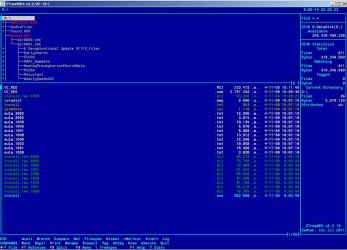
It, in turn, contains dir0000.chk and dir0001.chk. See the attached jpg file.


dir0000.chk is composed of my missing My Documents\Calendars folder which must have been 'modified' by the above CHKDSK process.

dir001.chk is composed of the missing My Documents\Church folder which disappeared when I tried to save a document to it sometime in the last 10 days. I recall a second 'emergency' CHKDSK a day or 2 before the folder opened for a save-as, then failed to open the next time.


I tried opening one of the files that retained its original name and it seemed to be what I'd saved originally. Should it be possible to rebuild the folder tree. I know how to do it using ZTree.


Is there a log of CHKDSK processes? I'd like to document the second date.


thanks,


baumgrenze
 

Attachments

My Computer My Computer

At a glance

Win 7 Pro 64Intel Core 2 Quad Q6600 (2.4 GHz) Quad Core2 x Crucial 4GB Kit (2GBx2) DDR2 CT2KIT25664A...Sapphire Radeon HD 3870 PCIe 512 Mb
Computer type
PC/Desktop
Computer Manufacturer/Model Number
Custom built by GamePC/Solid Electric - Palo Alto - on 03/10/08
OS
Win 7 Pro 64
CPU
Intel Core 2 Quad Q6600 (2.4 GHz) Quad Core
Motherboard
Gigabyte GA-P35-DS3P Intel P35 ATX (rev. 2.1)
Memory
2 x Crucial 4GB Kit (2GBx2) DDR2 CT2KIT25664AA800
Graphics Card(s)
Sapphire Radeon HD 3870 PCIe 512 Mb
Sound Card
RealTek audio on MOBO + EDIROL UA-1EX
Monitor(s) Displays
Samsung S24A450BW 24" LED monitor
Screen Resolution
1600 x 1200 at 75 Hz
Hard Drives
2 Crucial 128 Gb SSD (CT128M550SSD1)
one mounted and running Win7/Pro x64
one disconnected containing only Win10/Pro upgrade - in process
1 1TB WD Caviar Black (WD1003FZEX-00MK2A0) (Data drive)
1 2TB Seagate 2TB (PN/ 9JB1N3-576 - ST2000DM001-1ER
PSU
Seasonic S12-HT 650W 80% Efficiency Power Supply
Case
Lian Li PC-B25B
Cooling
Gigabyte Silent-Pipe
Keyboard
Dell MS Comfort
Mouse
HP x4000 wireless
Internet Speed
Sonic FTTN @ 23 Mbps
Antivirus
Avast
Browser
SeaMonkey
Other Info
BIOS: Award Software International, Inc. F6 06/18/2009

System Specs - Updated on 09//16/19
I didn't dig through this whole thread but 'back in the day' of DOS there was a limit of 512 files in the Root of an HDD using the 8.3 file name scheme. When Windows 95 came out with its LFN/Long File Name scheme that number was less, maybe around half as it stored 2 names for each file. It had to do with how files were indexed and stored. Either method got around the issue by using Directories [in DOS] or Folders [in Win95 and later] which mostly had no limit on the number of files in them. I have one HDD that has a Downloads Folder with over 16,000 files in 1291 Folders [subFolders of Downloads].

The formatting of a drive as FAT32 has a limit of a single file size of 4GB while NTFS does not have that limit.

We've made great strides in storage since my first computer in '92 and its 120MB HDD, $1.00 per MB capacity was a good bargain back then.
 

My Computer My Computer

At a glance

Windows 7 Ultimate 64-bit, Windows 8.1 64-bit...
Computer type
PC/Desktop
Computer Manufacturer/Model Number
Customs, Dell, Gateway, HP, Toshiba, Acer, ASUS
OS
Windows 7 Ultimate 64-bit, Windows 8.1 64-bit, Mac OS X 10.10, Linux Mint 17, Windows 10 Pro TP
Keyboard
Microsoft
Mouse
Microsoft
Chkdsk logs

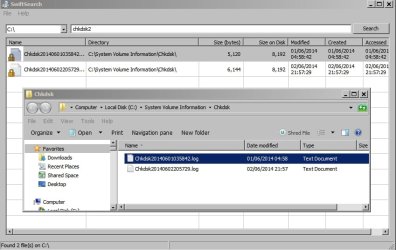
I find chkdsk logs in System Volume Information. The file name shows the date. If you open the log there's no useful info but if you just want the date and time it's possible to search for filenames beginning with chkdsk2014

PowerTool.jpg

PowerTool 2.jpg

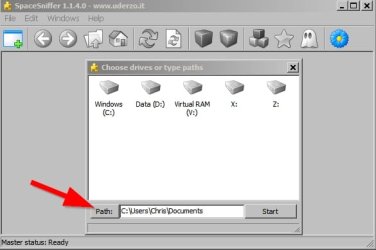
If you want to take a detailed look at "My Documents" or anything else on your HD you might like to check out:

SpaceSniffer Portable


SpaceSniffer.jpg

or WinDirStat
 
Last edited:

My Computer My Computer

At a glance

Microsoft Windows 7 Home Premium 64-bit 7601 ...AMD C-60 APU with Radeon(tm) HD Graphics4.00 GBAMD Radeon HD 6290 Graphics
Computer type
Laptop
Computer Manufacturer/Model Number
ASUS
OS
Microsoft Windows 7 Home Premium 64-bit 7601 Multiprocessor Free Service Pack 1
CPU
AMD C-60 APU with Radeon(tm) HD Graphics
Motherboard
ASUSTeK COMPUTER INC. X501U
Memory
4.00 GB
Graphics Card(s)
AMD Radeon HD 6290 Graphics
Sound Card
(1) AMD High Definition Audio Device (2) Realtek High Defi
Screen Resolution
1366 x 768 x 32 bits (4294967296 colors) @ 60 Hz
Hard Drives
Hitachi HTS545050A7E380 SATA Disk Device
Antivirus
Comodo CIS & FW, SecureAplus App Whitelisting, Threatfire
Browser
Cyberfox 64bit, Opera 64bit, Airfox
Other Info
Spy-The-Spy, HitmanPro.Alert, Norton Connect Safe, MJRegWatcher, BitDefender TrafficLight, Voodoo Shield, Zemana AntiMalware
Thank you, Callender

This is all making more sense with time.

The one disquieting experience was opening a folder to save a file, days after the CHKDSK experience, finding it and deciding to wait until I had a little more information to properly name the file, and then going to save it again and finding it gone. I'm sure there is a logical explanation, but that doesn't make the experience less disquieting.

I did download swiftsearch. It lives up to its name. I tried to open the folder and encountered "Access Denied." Perhaps 'run as administrator' would give different results? That said, I can see the folder 'System Volume Information' in ZTreeWin, 'run as administrator,' but I cannot view any aspects of it. It must be more than just "read only" in status.

That said, I think I will pass for now on the PowerToolx64V1.6 utility. It looks too powerful, too easy to do something dumb.

The SpaceSniffer equivalent I've tried is TreeSizeFree. It is fast and pretty intuitive.

ZTreeWin is a very powerful tool for the $30 that Kim Henkel now charges for access. I think you can try it for free for a month. I use it almost every day.


I will try exploring some of the aspects with the ZTree forum community.

I think we will call this 'solved.'

thanks,

baumgrenze
 

My Computer My Computer

At a glance

Win 7 Pro 64Intel Core 2 Quad Q6600 (2.4 GHz) Quad Core2 x Crucial 4GB Kit (2GBx2) DDR2 CT2KIT25664A...Sapphire Radeon HD 3870 PCIe 512 Mb
Computer type
PC/Desktop
Computer Manufacturer/Model Number
Custom built by GamePC/Solid Electric - Palo Alto - on 03/10/08
OS
Win 7 Pro 64
CPU
Intel Core 2 Quad Q6600 (2.4 GHz) Quad Core
Motherboard
Gigabyte GA-P35-DS3P Intel P35 ATX (rev. 2.1)
Memory
2 x Crucial 4GB Kit (2GBx2) DDR2 CT2KIT25664AA800
Graphics Card(s)
Sapphire Radeon HD 3870 PCIe 512 Mb
Sound Card
RealTek audio on MOBO + EDIROL UA-1EX
Monitor(s) Displays
Samsung S24A450BW 24" LED monitor
Screen Resolution
1600 x 1200 at 75 Hz
Hard Drives
2 Crucial 128 Gb SSD (CT128M550SSD1)
one mounted and running Win7/Pro x64
one disconnected containing only Win10/Pro upgrade - in process
1 1TB WD Caviar Black (WD1003FZEX-00MK2A0) (Data drive)
1 2TB Seagate 2TB (PN/ 9JB1N3-576 - ST2000DM001-1ER
PSU
Seasonic S12-HT 650W 80% Efficiency Power Supply
Case
Lian Li PC-B25B
Cooling
Gigabyte Silent-Pipe
Keyboard
Dell MS Comfort
Mouse
HP x4000 wireless
Internet Speed
Sonic FTTN @ 23 Mbps
Antivirus
Avast
Browser
SeaMonkey
Other Info
BIOS: Award Software International, Inc. F6 06/18/2009

System Specs - Updated on 09//16/19
System Volume Information Folder

You can get access to SVI but it's probably best to leave well alone. If you downloaded Swiftsearch it hopefully shows the filenames so that you can get the dates and times that chkdsk ran.

There's nothing of interest in the files. I've attached an example of a chkdsk log from my machine for you to look at. Your files will contain exactly the same sort of information - in other words it's not useful.

View attachment Chkdsk20140602205729.log

I leave System Volume Information alone and get the same "Access Denied" message but that's the way it's supposed to be. However one function of PowerTool is to force copy locked system files so I used that.

You are wise to avoid PowerTool as if used incorrectly it could brick your machine. I just posted a screenshot to show the location of the log files. I didn't mean for you to download and install it!

All the best.
 
Last edited:

My Computer My Computer

At a glance

Microsoft Windows 7 Home Premium 64-bit 7601 ...AMD C-60 APU with Radeon(tm) HD Graphics4.00 GBAMD Radeon HD 6290 Graphics
Computer type
Laptop
Computer Manufacturer/Model Number
ASUS
OS
Microsoft Windows 7 Home Premium 64-bit 7601 Multiprocessor Free Service Pack 1
CPU
AMD C-60 APU with Radeon(tm) HD Graphics
Motherboard
ASUSTeK COMPUTER INC. X501U
Memory
4.00 GB
Graphics Card(s)
AMD Radeon HD 6290 Graphics
Sound Card
(1) AMD High Definition Audio Device (2) Realtek High Defi
Screen Resolution
1366 x 768 x 32 bits (4294967296 colors) @ 60 Hz
Hard Drives
Hitachi HTS545050A7E380 SATA Disk Device
Antivirus
Comodo CIS & FW, SecureAplus App Whitelisting, Threatfire
Browser
Cyberfox 64bit, Opera 64bit, Airfox
Other Info
Spy-The-Spy, HitmanPro.Alert, Norton Connect Safe, MJRegWatcher, BitDefender TrafficLight, Voodoo Shield, Zemana AntiMalware
Back
Top