
Solved Is there a program or trick to delete a Task (LOCAL) after a virus?

Tactics

New member
Member
VIP
Local time
10:13 AM
Messages
105
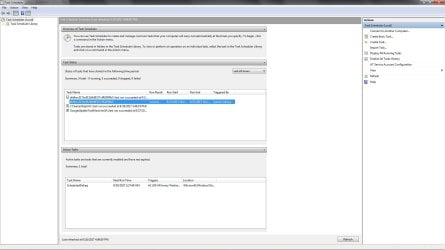
Yesterday caught a virus (and I been a tech for 20 years go me! ) :confused: bug dummy. 1 rootkit and ton of malware. I got rid of all it using Malwarebytes. One of these culprits got in to Task Scheduler. See screen shot of task. Ya can't remove anything in here either.

a6dbec317bc812b9d9317 is the name and last time ran 8/27 hasn't ran since. I've deleted all startup programs in msconfig still can't remove it.

I've found 1 registry key with that name a6dbec317bc812b9d9317 it was in Windows Defender Paths folder I deleted it. This fake task is still there. I have MSE on my PC all updated, all windows updates runs perfect but instead of doing a sys restore I wanted to see if anyone knows of anything I have not tried? I also ran Combofix - found nothing. I'm about to install a program called Autoruns to see if I can manually delete it that way. Also have CCleaner that didn't find anything useful either all clean.

Windows 7 64bit

Thanks!
 

Attachments
  • Untitled.jpg
    Untitled.jpg
    108.7 KB · Views: 4

My Computer My Computer

At a glance

Windows 10 64-bitIntel i7K 8700K16GB Dual Channel DDR4 @2666MHzEVGA GeForce RTX 2080 Ti XC Ultra Gaming 11GB...
Computer type
PC/Desktop
Computer Manufacturer/Model Number
Dell Alienware Aurora R7
OS
Windows 10 64-bit
CPU
Intel i7K 8700K
Motherboard
Alienware 0VDT73
Memory
16GB Dual Channel DDR4 @2666MHz
Graphics Card(s)
EVGA GeForce RTX 2080 Ti XC Ultra Gaming 11GB GDDR6
Sound Card
Realtek on-board w/Logitech z506 5.1 Surround
Monitor(s) Displays
LG - 65" Class - OLED - C9
Screen Resolution
3840 x 2160 4K
Hard Drives
512GB M.2 PCIe SSD
1TB 7200RPM SATA 6Gb/s (Storage)
PSU
850W EPA Bronze PSU Liquid Cooled Chassis
Case
Alienware Aurora
Cooling
Liquid Cooled
Keyboard
Logitech Wireless K800
Mouse
Logitech Performance MX
Internet Speed
100MB
Antivirus
Emsisoft
Browser
Firefox 64-bit
Other Info
Steelseries Artics Pro Wireless gaming headset.

https://steelseries.com/gaming-headsets/arctis-pro-wireless
PS also tried this from a CMD prompt to no avail:


schtasks /delete /tn 'nameoftask'
 

My Computer My Computer

At a glance

Windows 10 64-bitIntel i7K 8700K16GB Dual Channel DDR4 @2666MHzEVGA GeForce RTX 2080 Ti XC Ultra Gaming 11GB...
Computer type
PC/Desktop
Computer Manufacturer/Model Number
Dell Alienware Aurora R7
OS
Windows 10 64-bit
CPU
Intel i7K 8700K
Motherboard
Alienware 0VDT73
Memory
16GB Dual Channel DDR4 @2666MHz
Graphics Card(s)
EVGA GeForce RTX 2080 Ti XC Ultra Gaming 11GB GDDR6
Sound Card
Realtek on-board w/Logitech z506 5.1 Surround
Monitor(s) Displays
LG - 65" Class - OLED - C9
Screen Resolution
3840 x 2160 4K
Hard Drives
512GB M.2 PCIe SSD
1TB 7200RPM SATA 6Gb/s (Storage)
PSU
850W EPA Bronze PSU Liquid Cooled Chassis
Case
Alienware Aurora
Cooling
Liquid Cooled
Keyboard
Logitech Wireless K800
Mouse
Logitech Performance MX
Internet Speed
100MB
Antivirus
Emsisoft
Browser
Firefox 64-bit
Other Info
Steelseries Artics Pro Wireless gaming headset.

https://steelseries.com/gaming-headsets/arctis-pro-wireless
Please download and save FRST 64bit or FRST 32 bit to your Desktop.

http://download.bleepingcomputer.com/farbar/FRST.exe

http://download.bleepingcomputer.com/farbar/FRST64.exe

Right click to run as administrator (XP users click run after receipt of Windows Security Warning - Open File). When the tool opens click Yes to disclaimer.

Make sure that Addition option is checked.
Press Scan button.
It will produce a log called FRST.txt in the same directory the tool is run from.
Please copy and paste log back .
The first time the tool is run it generates another log (Addition.txt - also located in the same directory as FRST.exe/FRST64.exe).
 

My Computer My Computer

At a glance

win 8 32 bit
Computer type
PC/Desktop
OS
win 8 32 bit
I deleted these 2 keys and exported them first to no avail.

HKEY_LOCAL_MACHINE\SOFTWARE\Microsoft\Windows NT\CurrentVersion\Schedule\TaskCache\Tasks

HKEY_LOCAL_MACHINE\SOFTWARE\Microsoft\Windows NT\CurrentVersion\Schedule\TaskCache\Tree

Also deleted contents of Task folder in C:\windows and system32
 

My Computer My Computer

At a glance

Windows 10 64-bitIntel i7K 8700K16GB Dual Channel DDR4 @2666MHzEVGA GeForce RTX 2080 Ti XC Ultra Gaming 11GB...
Computer type
PC/Desktop
Computer Manufacturer/Model Number
Dell Alienware Aurora R7
OS
Windows 10 64-bit
CPU
Intel i7K 8700K
Motherboard
Alienware 0VDT73
Memory
16GB Dual Channel DDR4 @2666MHz
Graphics Card(s)
EVGA GeForce RTX 2080 Ti XC Ultra Gaming 11GB GDDR6
Sound Card
Realtek on-board w/Logitech z506 5.1 Surround
Monitor(s) Displays
LG - 65" Class - OLED - C9
Screen Resolution
3840 x 2160 4K
Hard Drives
512GB M.2 PCIe SSD
1TB 7200RPM SATA 6Gb/s (Storage)
PSU
850W EPA Bronze PSU Liquid Cooled Chassis
Case
Alienware Aurora
Cooling
Liquid Cooled
Keyboard
Logitech Wireless K800
Mouse
Logitech Performance MX
Internet Speed
100MB
Antivirus
Emsisoft
Browser
Firefox 64-bit
Other Info
Steelseries Artics Pro Wireless gaming headset.

https://steelseries.com/gaming-headsets/arctis-pro-wireless
Please download and save FRST 64bit or FRST 32 bit to your Desktop.

http://download.bleepingcomputer.com/farbar/FRST.exe

http://download.bleepingcomputer.com/farbar/FRST64.exe

Right click to run as administrator (XP users click run after receipt of Windows Security Warning - Open File). When the tool opens click Yes to disclaimer.

Make sure that Addition option is checked.
Press Scan button.
It will produce a log called FRST.txt in the same directory the tool is run from.
Please copy and paste log back .
The first time the tool is run it generates another log (Addition.txt - also located in the same directory as FRST.exe/FRST64.exe).

I had to attach it its 76,000 characters only allowed 25,000 from the prompt I just got.
 

Attachments

My Computer My Computer

At a glance

Windows 10 64-bitIntel i7K 8700K16GB Dual Channel DDR4 @2666MHzEVGA GeForce RTX 2080 Ti XC Ultra Gaming 11GB...
Computer type
PC/Desktop
Computer Manufacturer/Model Number
Dell Alienware Aurora R7
OS
Windows 10 64-bit
CPU
Intel i7K 8700K
Motherboard
Alienware 0VDT73
Memory
16GB Dual Channel DDR4 @2666MHz
Graphics Card(s)
EVGA GeForce RTX 2080 Ti XC Ultra Gaming 11GB GDDR6
Sound Card
Realtek on-board w/Logitech z506 5.1 Surround
Monitor(s) Displays
LG - 65" Class - OLED - C9
Screen Resolution
3840 x 2160 4K
Hard Drives
512GB M.2 PCIe SSD
1TB 7200RPM SATA 6Gb/s (Storage)
PSU
850W EPA Bronze PSU Liquid Cooled Chassis
Case
Alienware Aurora
Cooling
Liquid Cooled
Keyboard
Logitech Wireless K800
Mouse
Logitech Performance MX
Internet Speed
100MB
Antivirus
Emsisoft
Browser
Firefox 64-bit
Other Info
Steelseries Artics Pro Wireless gaming headset.

https://steelseries.com/gaming-headsets/arctis-pro-wireless
Can you please pos the second file additions.txt

find
HKLM\...\Policies\Explorer\Run: [al] => C:\Users\Tactics\AppData\Local\Temp\19884252.exe

delete it
 

My Computer My Computer

At a glance

win 8 32 bit
Computer type
PC/Desktop
OS
win 8 32 bit
Can you please pos the second file additions.txt

find
HKLM\...\Policies\Explorer\Run: [al] => C:\Users\Tactics\AppData\Local\Temp\19884252.exe

delete it

That file was not there I might have deleted it at some point or Combofix did i'm sure its delets files out of 3 folders and that is one and I uninstalled Combox fit and I didn't know it totally deletes all restore points. My latest back up is from last month if all else fails.
 

Attachments

My Computer My Computer

At a glance

Windows 10 64-bitIntel i7K 8700K16GB Dual Channel DDR4 @2666MHzEVGA GeForce RTX 2080 Ti XC Ultra Gaming 11GB...
Computer type
PC/Desktop
Computer Manufacturer/Model Number
Dell Alienware Aurora R7
OS
Windows 10 64-bit
CPU
Intel i7K 8700K
Motherboard
Alienware 0VDT73
Memory
16GB Dual Channel DDR4 @2666MHz
Graphics Card(s)
EVGA GeForce RTX 2080 Ti XC Ultra Gaming 11GB GDDR6
Sound Card
Realtek on-board w/Logitech z506 5.1 Surround
Monitor(s) Displays
LG - 65" Class - OLED - C9
Screen Resolution
3840 x 2160 4K
Hard Drives
512GB M.2 PCIe SSD
1TB 7200RPM SATA 6Gb/s (Storage)
PSU
850W EPA Bronze PSU Liquid Cooled Chassis
Case
Alienware Aurora
Cooling
Liquid Cooled
Keyboard
Logitech Wireless K800
Mouse
Logitech Performance MX
Internet Speed
100MB
Antivirus
Emsisoft
Browser
Firefox 64-bit
Other Info
Steelseries Artics Pro Wireless gaming headset.

https://steelseries.com/gaming-headsets/arctis-pro-wireless
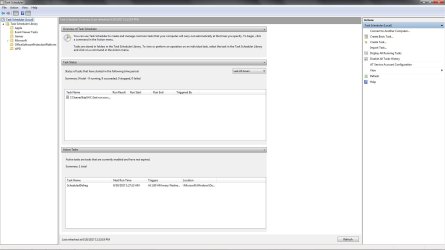
Low and behold its gone. Not sure how maybe deleting Combofix - no idea. I'm gonna reboot and see if it comes back.
 

Attachments

  • Untitled.jpg
    Untitled.jpg
    101.5 KB · Views: 5

My Computer My Computer

At a glance

Windows 10 64-bitIntel i7K 8700K16GB Dual Channel DDR4 @2666MHzEVGA GeForce RTX 2080 Ti XC Ultra Gaming 11GB...
Computer type
PC/Desktop
Computer Manufacturer/Model Number
Dell Alienware Aurora R7
OS
Windows 10 64-bit
CPU
Intel i7K 8700K
Motherboard
Alienware 0VDT73
Memory
16GB Dual Channel DDR4 @2666MHz
Graphics Card(s)
EVGA GeForce RTX 2080 Ti XC Ultra Gaming 11GB GDDR6
Sound Card
Realtek on-board w/Logitech z506 5.1 Surround
Monitor(s) Displays
LG - 65" Class - OLED - C9
Screen Resolution
3840 x 2160 4K
Hard Drives
512GB M.2 PCIe SSD
1TB 7200RPM SATA 6Gb/s (Storage)
PSU
850W EPA Bronze PSU Liquid Cooled Chassis
Case
Alienware Aurora
Cooling
Liquid Cooled
Keyboard
Logitech Wireless K800
Mouse
Logitech Performance MX
Internet Speed
100MB
Antivirus
Emsisoft
Browser
Firefox 64-bit
Other Info
Steelseries Artics Pro Wireless gaming headset.

https://steelseries.com/gaming-headsets/arctis-pro-wireless
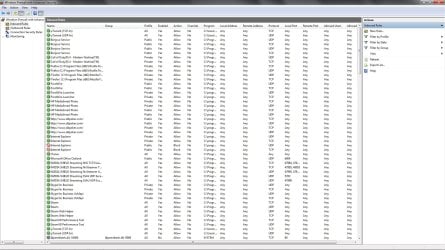
That file running from temp may have been the problem holding onto the task but if you look at report task scheduler is having problems. You have 8,000 firewall rules that will slow the network down I would remove them all
 

My Computer My Computer

At a glance

win 8 32 bit
Computer type
PC/Desktop
OS
win 8 32 bit
That file running from temp may have been the problem holding onto the task but if you look at report task scheduler is having problems. You have 8,000 firewall rules that will slow the network down I would remove them all

Thats weird I have no idea how the rules were created. Where do I delete these 8000 entries? I went here and only see inbound/outbound. See screenshot.

Thanks!

Also I assume Task Scheduler will rebuild some of those tasks I had running before. I didn't have many all I care about is SR and defrag.
 

Attachments

  • Untitled.jpg
    Untitled.jpg
    231.8 KB · Views: 3

My Computer My Computer

At a glance

Windows 10 64-bitIntel i7K 8700K16GB Dual Channel DDR4 @2666MHzEVGA GeForce RTX 2080 Ti XC Ultra Gaming 11GB...
Computer type
PC/Desktop
Computer Manufacturer/Model Number
Dell Alienware Aurora R7
OS
Windows 10 64-bit
CPU
Intel i7K 8700K
Motherboard
Alienware 0VDT73
Memory
16GB Dual Channel DDR4 @2666MHz
Graphics Card(s)
EVGA GeForce RTX 2080 Ti XC Ultra Gaming 11GB GDDR6
Sound Card
Realtek on-board w/Logitech z506 5.1 Surround
Monitor(s) Displays
LG - 65" Class - OLED - C9
Screen Resolution
3840 x 2160 4K
Hard Drives
512GB M.2 PCIe SSD
1TB 7200RPM SATA 6Gb/s (Storage)
PSU
850W EPA Bronze PSU Liquid Cooled Chassis
Case
Alienware Aurora
Cooling
Liquid Cooled
Keyboard
Logitech Wireless K800
Mouse
Logitech Performance MX
Internet Speed
100MB
Antivirus
Emsisoft
Browser
Firefox 64-bit
Other Info
Steelseries Artics Pro Wireless gaming headset.

https://steelseries.com/gaming-headsets/arctis-pro-wireless
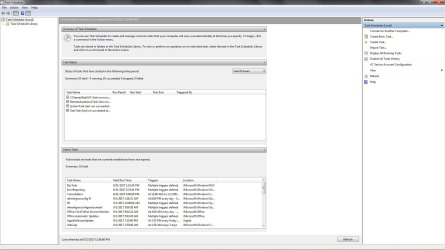
Ever since the entry/virus task was there it messed up my Task Scheduler I was just about to go back to a backup image but I found a program called Repair Tasks this morning it found 73 issues and repaired them all. Awesome program I read nothing negative about it on the web.

Recovered task: Apple\AppleSoftwareUpdate
Recovered task: Microsoft\Office\Office Automatic Updates
Recovered task: Microsoft\Office\Office ClickToRun Service Monitor
Recovered task: Microsoft\Office\OfficeTelemetryAgentFallBack
Recovered task: Microsoft\Office\OfficeTelemetryAgentLogOn
Recovered task: Microsoft\Windows\AfterRecovery
Recovered task: Microsoft\Windows\MemDiag
Recovered task: Microsoft\Windows\Active Directory Rights Management Services Client\AD RMS Rights Policy Template Management (Automated)
Recovered task: Microsoft\Windows\Active Directory Rights Management Services Client\AD RMS Rights Policy Template Management (Manual)
Recovered task: Microsoft\Windows\AppID\PolicyConverter
Recovered task: Microsoft\Windows\AppID\VerifiedPublisherCertStoreCheck
Recovered task: Microsoft\Windows\Autochk\Proxy
Recovered task: Microsoft\Windows\Bluetooth\UninstallDeviceTask
Recovered task: Microsoft\Windows\CertificateServicesClient\SystemTask
Recovered task: Microsoft\Windows\CertificateServicesClient\UserTask
Recovered task: Microsoft\Windows\CertificateServicesClient\UserTask-Roam
Recovered task: Microsoft\Windows\Customer Experience Improvement Program\Consolidator
Recovered task: Microsoft\Windows\Customer Experience Improvement Program\KernelCeipTask
Recovered task: Microsoft\Windows\Customer Experience Improvement Program\UsbCeip
Recovered task: Microsoft\Windows\Diagnosis\Scheduled
Recovered task: Microsoft\Windows\DiskDiagnostic\Microsoft-Windows-DiskDiagnosticDataCollector
Recovered task: Microsoft\Windows\DiskDiagnostic\Microsoft-Windows-DiskDiagnosticResolver
Recovered task: Microsoft\Windows\Location\Notifications
Recovered task: Microsoft\Windows\Maintenance\WinSAT
Recovered task: Microsoft\Windows\Media Center\ActivateWindowsSearch
Recovered task: Microsoft\Windows\Media Center\ConfigureInternetTimeService
Recovered task: Microsoft\Windows\Media Center\DispatchRecoveryTasks
Recovered task: Microsoft\Windows\Media Center\ehDRMInit
Recovered task: Microsoft\Windows\Media Center\InstallPlayReady
Recovered task: Microsoft\Windows\Media Center\mcupdate
Recovered task: Microsoft\Windows\Media Center\MediaCenterRecoveryTask
Recovered task: Microsoft\Windows\Media Center\ObjectStoreRecoveryTask
Recovered task: Microsoft\Windows\Media Center\OCURActivate
Recovered task: Microsoft\Windows\Media Center\OCURDiscovery
Recovered task: Microsoft\Windows\Media Center\PBDADiscovery
Recovered task: Microsoft\Windows\Media Center\PBDADiscoveryW1
Recovered task: Microsoft\Windows\Media Center\PBDADiscoveryW2
Recovered task: Microsoft\Windows\Media Center\PeriodicScanRetry
Recovered task: Microsoft\Windows\Media Center\PvrRecoveryTask
Recovered task: Microsoft\Windows\Media Center\PvrScheduleTask
Recovered task: Microsoft\Windows\Media Center\RecordingRestart
Recovered task: Microsoft\Windows\Media Center\RegisterSearch
Recovered task: Microsoft\Windows\Media Center\ReindexSearchRoot
Recovered task: Microsoft\Windows\Media Center\SqlLiteRecoveryTask
Recovered task: Microsoft\Windows\Media Center\StartRecording
Recovered task: Microsoft\Windows\Media Center\UpdateRecordPath
Recovered task: Microsoft\Windows\MemoryDiagnostic\CorruptionDetector
Recovered task: Microsoft\Windows\MemoryDiagnostic\DecompressionFailureDetector
Recovered task: Microsoft\Windows\MobilePC\HotStart
Recovered task: Microsoft\Windows\MUI\LPRemove
Recovered task: Microsoft\Windows\Multimedia\SystemSoundsService
Recovered task: Microsoft\Windows\NetTrace\GatherNetworkInfo
Recovered task: Microsoft\Windows\PerfTrack\BackgroundConfigSurveyor
Recovered task: Microsoft\Windows\Power Efficiency Diagnostics\AnalyzeSystem
Recovered task: Microsoft\Windows\RAC\RacTask
Recovered task: Microsoft\Windows\Ras\MobilityManager
Recovered task: Microsoft\Windows\Registry\RegIdleBackup
Recovered task: Microsoft\Windows\RemoteAssistance\RemoteAssistanceTask
Recovered task: Microsoft\Windows\Setup\gwx\launchtrayprocess
Recovered task: Microsoft\Windows\Setup\gwx\refreshgwxconfig
Recovered task: Microsoft\Windows\Setup\gwx\refreshgwxconfigandcontent
Recovered task: Microsoft\Windows\Setup\gwx\refreshgwxcontent
Recovered task: Microsoft\Windows\Setup\GWXTriggers\refreshgwxconfig-B
Recovered task: Microsoft\Windows\Shell\WindowsParentalControls
Recovered task: Microsoft\Windows\Shell\WindowsParentalControlsMigration
Recovered task: Microsoft\Windows\SideShow\AutoWake
Recovered task: Microsoft\Windows\SideShow\GadgetManager
Recovered task: Microsoft\Windows\SideShow\SessionAgent
Recovered task: Microsoft\Windows\SideShow\SystemDataProviders
Recovered task: Microsoft\Windows\Windows Error Reporting\ErrorReporting
Recovered task: Microsoft\Windows\WindowsBackup\AutomaticBackup
Recovered task: Microsoft\Windows\WindowsBackup\Windows Backup Monitor
Recovered task: Microsoft\Windows\Wininet\CacheTask
Repair completed: 73 repairs succeeded; 0 repairs failed


Followed this video huge thumbs up. Hopefully i'm back to normal.

Easy FIX (Task Scheduler): The task image is corrupt or has been tampered with. - YouTube
 

Attachments

  • TS.jpg
    TS.jpg
    131.4 KB · Views: 4

My Computer My Computer

At a glance

Windows 10 64-bitIntel i7K 8700K16GB Dual Channel DDR4 @2666MHzEVGA GeForce RTX 2080 Ti XC Ultra Gaming 11GB...
Computer type
PC/Desktop
Computer Manufacturer/Model Number
Dell Alienware Aurora R7
OS
Windows 10 64-bit
CPU
Intel i7K 8700K
Motherboard
Alienware 0VDT73
Memory
16GB Dual Channel DDR4 @2666MHz
Graphics Card(s)
EVGA GeForce RTX 2080 Ti XC Ultra Gaming 11GB GDDR6
Sound Card
Realtek on-board w/Logitech z506 5.1 Surround
Monitor(s) Displays
LG - 65" Class - OLED - C9
Screen Resolution
3840 x 2160 4K
Hard Drives
512GB M.2 PCIe SSD
1TB 7200RPM SATA 6Gb/s (Storage)
PSU
850W EPA Bronze PSU Liquid Cooled Chassis
Case
Alienware Aurora
Cooling
Liquid Cooled
Keyboard
Logitech Wireless K800
Mouse
Logitech Performance MX
Internet Speed
100MB
Antivirus
Emsisoft
Browser
Firefox 64-bit
Other Info
Steelseries Artics Pro Wireless gaming headset.

https://steelseries.com/gaming-headsets/arctis-pro-wireless
Back
Top