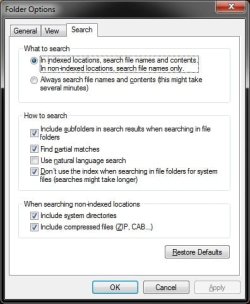
I know the search option in Windows 7 is on a totally new level compared to the old one in Windows XP, but still I would like to customize it to my needs as I use it all the time.
One problem that I've noticed is that sometimes, if you know that a certain files is inside a certain folder, and you just don't want to manually sort through every file in that folder to find the one you are looking for, you can't find it by typing the name of the file from the search box near the start button but to search from within the containing folder.
Any help will be greatly appreciated.
One problem that I've noticed is that sometimes, if you know that a certain files is inside a certain folder, and you just don't want to manually sort through every file in that folder to find the one you are looking for, you can't find it by typing the name of the file from the search box near the start button but to search from within the containing folder.
Any help will be greatly appreciated.
My Computer
At a glance
Windows 7 Home Premium 64 bitIntel core i5 2400 quad 6mb 3.1 GHzKVR Kingston 4GB DDR3 1333MHZATI Radeon R7 200
- Computer type
- PC/Desktop
- OS
- Windows 7 Home Premium 64 bit
- CPU
- Intel core i5 2400 quad 6mb 3.1 GHz
- Motherboard
- Gigabyte H67M-D2-B3
- Memory
- KVR Kingston 4GB DDR3 1333MHZ
- Graphics Card(s)
- ATI Radeon R7 200
- Sound Card
- 5.1 on-board
- Monitor(s) Displays
- Dell U2410
- Screen Resolution
- 1900 x 1200
- Hard Drives
- Internal HD Western Digital 1 terabyte 7200 SATA3
Samsung SSD 850 EVO 250 GB
- PSU
- INWIN power man 450W A.PFC
- Internet Speed
- 100 mb