Is there a way to file share with XP?

i had this problem , i could see the xp pc but could not access it from my windows 7 laptop ,and i fixed it somehow and now everything is working great , so here are some of the things that i did ( along with the other suggestions from the posts on this thread ) :

1- in windows 7 make sure you leave "homegroup" , you can do this from the network and sharing center( i don't remember how but it's easy).

2-also in windows 7 in Network and sharing center go to "Change advanced sharing settings" and turn everything on except the "password protected sharing" turn that off. and now for the most important part , in the "HomeGroup connections" section set it to "Use user accounts and passwords to connect to other computers".

of course those two steps are not the only thing you should do , you also have to make sure that all the basic stuff are in place , like having the same workgroup name for the two systems and enabling file and printer sharing in xp , and other stuff mentioned in this thread.
 

My Computer My Computer

At a glance

windows 7 , xp
OS
windows 7 , xp
Can't get it to work....

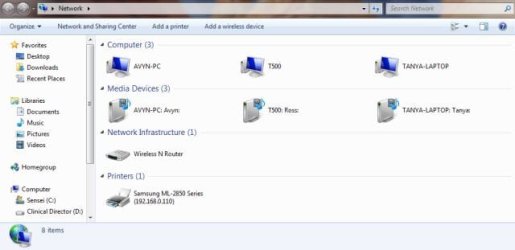
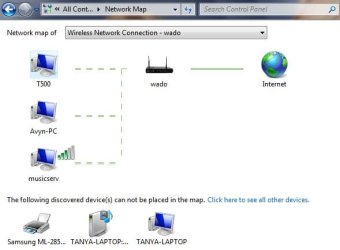
I have XP SP2, Vista, and one 7 system in a local home network. Our family music server is an XP SP2 machine with share for MP3's and a share for other media content. The other XP machines can see and access MUSICSERV, the Vista machines can see and use MUSICSERV, however my Windows 7 system cannot "see" let alone use the shares. However, I can successfully ping the IP of that machine and it does show up in the Network Map. My 7 machine can only see Vista machines in the network, and none of the XP machines.

I have tried most of the suggestions that I have found:
  • ensured the basics that I am familiar with; workgroup name is the same across all computers, share is avialable and accessable by all the other computers as it has been for years, etc.
  • made sure that advanced sharing settings are as suggested (network discovery, file & printer sharing, sharing so anyone..., all on, password protection off, and use user accounts and passwords)
  • Left any Homegroup
  • Tried installing IPv6 on the XP SP2 machine
  • Tried disabling IPv6 on the Windows 7 machine
  • Tried "Enable NetBIOS over TCP/IP" in WINS confguration for IPv4 on both the XP and 7 machines
  • Sacrificed a chicken under the new moon and spread the entrails around the Windows 7 machine in an effigy of Bill Gates.....
Doesn't seem to be working. Any better ideas ? I have been working with computer networks since the early ages, so I am no noobie at this, but can't seem to problem solve this one. Any assistance is much appreciated.
 

Attachments

  • Network.jpg
    Network.jpg
    20 KB · Views: 42
  • Network Map.jpg
    Network Map.jpg
    22.8 KB · Views: 38

My Computer My Computer

At a glance

Windows 7
OS
Windows 7
For Santoku:

I am in the -exact- same issue with you and everyone else, I am by no means new at this - Hell, I started building computers from the ground up using toggle DIP switches to set IRQ's - Windows sharing has always been SOOO Simple - as easy as right clicking in (Windows XP and above) a folder, clicking to share it - and boom, the network is shared and you can see that folder - no issues or passwords needed, no one flying down to the root file structure without passwords.

What in the shit was M$oft thinking with this crap? Windows worked -perfect- in the networking world, and as far as I can tell - they are 'forcing' every single machine to either upgrade to windows 7, or to be forced to have a broken network.

I'm trying to share movies over my network via one single folder titled 'Movies' and for the life of me, I cant get -anything- to share, sure - my PS3 can pick it up - but my Popcorn player upstairs cant, anything windows xp cant, vista cant - nothing works.

And yes, I've tried everything I can think of.. I just now enabled the ICS under services, and thats the last ditch I'll try.


I moved to Windows 7 originally because everything is moving to it, I'm a big gamer as well and Vista had issues that Windows 7 didnt - so that was a huge plus - but now this Network stuff is so retarded... how can Microsoft not fix this?
 

My Computer My Computer

At a glance

Windows 7 Premium (OEM)AMD Phenom x4 955 BE @ 3.2GHz8gigs (4x2gb) Mushkin DDR3EVGA GeForce 260 GTX 216 core 896mb
OS
Windows 7 Premium (OEM)
CPU
AMD Phenom x4 955 BE @ 3.2GHz
Motherboard
ASUS Crosshair III
Memory
8gigs (4x2gb) Mushkin DDR3
Graphics Card(s)
EVGA GeForce 260 GTX 216 core 896mb
Sound Card
SoundBlaster X-Fi Fatal1ty Pro
Monitor(s) Displays
26.5" Samsung ToC, 22" Samsung 226BW
Screen Resolution
1920x1200 & 1680x1050
Hard Drives
2x WD Caviar Black AAKS 500gigs (RAID 0)
2x WD Caviar Black AAKS 1TB
PSU
Thermaltake ToughPower 750w
Case
CoolerMaster Scout CMStorm Black Edition
Cooling
2x140mm Intake/Exhaust, 1x120mm Exhaust, 2x120mm Side Intake
Keyboard
Razer Tarantula
Mouse
Razer Imperator w/ Razer Goliathus Precision Mat
Internet Speed
5mb DSL (768k Download, 83k Upload)
For Santoku:

I am in the -exact- same issue with you and everyone else, I am by no means new at this - Hell, I started building computers from the ground up using toggle DIP switches to set IRQ's - Windows sharing has always been SOOO Simple - as easy as right clicking in (Windows XP and above) a folder, clicking to share it - and boom, the network is shared and you can see that folder - no issues or passwords needed, no one flying down to the root file structure without passwords.

What in the shit was M$oft thinking with this crap? Windows worked -perfect- in the networking world, and as far as I can tell - they are 'forcing' every single machine to either upgrade to windows 7, or to be forced to have a broken network.

I'm trying to share movies over my network via one single folder titled 'Movies' and for the life of me, I cant get -anything- to share, sure - my PS3 can pick it up - but my Popcorn player upstairs cant, anything windows xp cant, vista cant - nothing works.

And yes, I've tried everything I can think of.. I just now enabled the ICS under services, and thats the last ditch I'll try.


I moved to Windows 7 originally because everything is moving to it, I'm a big gamer as well and Vista had issues that Windows 7 didnt - so that was a huge plus - but now this Network stuff is so retarded... how can Microsoft not fix this?
Have you installed this on your xp machine?
Network Map in Windows Vista does not display computers that are running Windows XP
 

My Computer My Computer

At a glance

windows 7 RTM x64Phenom II 965 Quad Core 3.4GhzMushkin Blackline 8GB (4x2gb)XFX Radeon 5970 Black Edition
Computer Manufacturer/Model Number
Black_Box (homebuilt)
OS
windows 7 RTM x64
CPU
Phenom II 965 Quad Core 3.4Ghz
Motherboard
Asus M4A79T Deluxe
Memory
Mushkin Blackline 8GB (4x2gb)
Graphics Card(s)
XFX Radeon 5970 Black Edition
Sound Card
onboard
Monitor(s) Displays
Dell 2408WPF-main Dell E248WFP-secondary
Screen Resolution
1920x1200-main 1920x1200-secondary
Hard Drives
OCZ Vertex Limited Edition 100GB (OS)
x1 WD Black Edition 500GB drive (Storage)
PSU
XFX 850w Black Edition (Modular)
Case
Mountian Mods H2go
Cooling
CoolITSystems ECO A.L.C.
Keyboard
Logitech MX 5500 wireless keyboard
Mouse
Razor Copperhead
Internet Speed
16Mb down/2Mb up Wowway Cable Internet
I can also ping the xp box by either name or IP address


Yuasa
 

My Computer My Computer

At a glance

windows xp
OS
windows xp
For myself I just 'mapped network drives' on my 7 computer to my xp computers.

Quick way to do this is to open your windows explorer(windows key+E), go to my computer and hit Map Network Drive. This allows me to access all my shared folders on my XP systems without having to type //computername

mapped%20network%20drive.png


This works for me because all the files I want to use are in the shared folder, one of these fellas can probably find you a way to access the whole hard drive but alas I can't.
This is just a quick way to automatically and quickly access the shared folders on your XP machine.
 

My Computer My Computer

At a glance

Home Premium x64Intel e7400 2.8GHz Dual Core, OC @ 3.36GHz4GB DDR2 1066Nvidia GeForce 9800 GT
OS
Home Premium x64
CPU
Intel e7400 2.8GHz Dual Core, OC @ 3.36GHz
Motherboard
Gigabyte GA-EP43-DS3L/S3L
Memory
4GB DDR2 1066
Graphics Card(s)
Nvidia GeForce 9800 GT
Sound Card
Realtek Surround Onboard.
Monitor(s) Displays
ASUS VW224, 22 Inch and Samsung SyncMaster 713v
Screen Resolution
Main Screen @1680x1050, Secondary @ 1280x1024
Hard Drives
Western Digital WD3200AAKS 320GB 7200 RPM SATA 3.0Gb/s
PSU
Thermaltake Purepower W0100RU 500W
Case
Rosewill R5601-BK Screw-less
Cooling
Two 120mm fans and Stock CPU fans
Keyboard
Old Dell Keyboard my neighbor gave me.
Mouse
Logitech MX518
Internet Speed
6Kbps
Other Info
Logitech X-540 70 watts 5.1 Speakers
For you guys who can't even see the XP machines from your Win 7 machine these steps, they work everytime. :)

Go through this tutorial about sharing with XP, click on the XP tab, it should help.
Sharing files and printers with different versions of Windows - Help & How-to - Microsoft Windows

This one is more general but has good info.
Networking home computers running different versions of Windows

It can also help to get around password problems if you use the same username and password on all machines in the LAN.

After going through all of that if you are still having file access problems try doing this registry adjustment on the Win 7 machine with the problem.

Solution is really easy just modify one key in registry:
HKEY_LOCAL_MACHINE\SOFTWARE\Microsoft\Windows\CurrentVersion\Policies\System
create or modify 32-bit DWORD: LocalAccountTokenFilterPolicy
set the value to: 1

One of the original posts here.
http://www.sevenforums.com/network-sharing/62116-networking-7-xp-issue.html
 

My Computer My Computer

At a glance

Windows 7 Ult, Windows 8.1 Pro,Q9650-4.275GHz, E8600 4.5GHz, E6750-3.8GHzG.Skill PC2 9600 1200Mhz 5 5 5 15 2TGTX480
Computer type
PC/Desktop
Computer Manufacturer/Model Number
Home built
OS
Windows 7 Ult, Windows 8.1 Pro,
CPU
Q9650-4.275GHz, E8600 4.5GHz, E6750-3.8GHz
Motherboard
Evga 780i FTW
Memory
G.Skill PC2 9600 1200Mhz 5 5 5 15 2T
Graphics Card(s)
GTX480
Sound Card
Asus Xonar D2
Monitor(s) Displays
HannsG
Screen Resolution
1680X1050
Hard Drives
GSkill Phoenix Pro 120GB SSD
PSU
ThermalTake Toughpower 1000Watt modular
Case
ThermalTake XaserV
Cooling
Xigmatek S1283
Keyboard
Logitech G15
Mouse
Logitech G9
Internet Speed
T1
The entire thing is though - it shouldnt be this hard to get a simple network working, honestly.

Microsoft needs to pull there hands out of there pants and stop messing with something that already worked perfectly, Something as simple as sharing folders always worked perfectly in every version of windows - now they buggered it up and arent doing any valid steps to make it 'easier' for the general public. I shouldnt have to go through services and registry to set up ICS and whatever else on a store bought version of Windows 7 just to share some folders
 

My Computer My Computer

At a glance

Windows 7 Premium (OEM)AMD Phenom x4 955 BE @ 3.2GHz8gigs (4x2gb) Mushkin DDR3EVGA GeForce 260 GTX 216 core 896mb
OS
Windows 7 Premium (OEM)
CPU
AMD Phenom x4 955 BE @ 3.2GHz
Motherboard
ASUS Crosshair III
Memory
8gigs (4x2gb) Mushkin DDR3
Graphics Card(s)
EVGA GeForce 260 GTX 216 core 896mb
Sound Card
SoundBlaster X-Fi Fatal1ty Pro
Monitor(s) Displays
26.5" Samsung ToC, 22" Samsung 226BW
Screen Resolution
1920x1200 & 1680x1050
Hard Drives
2x WD Caviar Black AAKS 500gigs (RAID 0)
2x WD Caviar Black AAKS 1TB
PSU
Thermaltake ToughPower 750w
Case
CoolerMaster Scout CMStorm Black Edition
Cooling
2x140mm Intake/Exhaust, 1x120mm Exhaust, 2x120mm Side Intake
Keyboard
Razer Tarantula
Mouse
Razer Imperator w/ Razer Goliathus Precision Mat
Internet Speed
5mb DSL (768k Download, 83k Upload)
I use a programme called Network Magic from Cisco. Around £20 for the basic programme and about £40 for the pro version. I use it with W7, XP and Vista machines and share a printer between all PC's. Easy to set up and so easy to use
 

My Computer My Computer

At a glance

W7Intel Quad 96004GBATI Radeon HD2600
OS
W7
CPU
Intel Quad 9600
Motherboard
Asus
Memory
4GB
Graphics Card(s)
ATI Radeon HD2600
Monitor(s) Displays
NEC 18 inch LCD
Hard Drives
Samsung
The entire thing is though - it shouldnt be this hard to get a simple network working, honestly.

Microsoft needs to pull there hands out of there pants and stop messing with something that already worked perfectly, Something as simple as sharing folders always worked perfectly in every version of windows - now they buggered it up and arent doing any valid steps to make it 'easier' for the general public. I shouldnt have to go through services and registry to set up ICS and whatever else on a store bought version of Windows 7 just to share some folders

Is this supposed to be my reward for posting relevant information?
 

My Computer My Computer

At a glance

Windows 7 Ult, Windows 8.1 Pro,Q9650-4.275GHz, E8600 4.5GHz, E6750-3.8GHzG.Skill PC2 9600 1200Mhz 5 5 5 15 2TGTX480
Computer type
PC/Desktop
Computer Manufacturer/Model Number
Home built
OS
Windows 7 Ult, Windows 8.1 Pro,
CPU
Q9650-4.275GHz, E8600 4.5GHz, E6750-3.8GHz
Motherboard
Evga 780i FTW
Memory
G.Skill PC2 9600 1200Mhz 5 5 5 15 2T
Graphics Card(s)
GTX480
Sound Card
Asus Xonar D2
Monitor(s) Displays
HannsG
Screen Resolution
1680X1050
Hard Drives
GSkill Phoenix Pro 120GB SSD
PSU
ThermalTake Toughpower 1000Watt modular
Case
ThermalTake XaserV
Cooling
Xigmatek S1283
Keyboard
Logitech G15
Mouse
Logitech G9
Internet Speed
T1
For myself I just 'mapped network drives' on my 7 computer to my xp computers.

Quick way to do this is to open your windows explorer(windows key+E), go to my computer and hit Map Network Drive. This allows me to access all my shared folders on my XP systems without having to type //computername

mapped%20network%20drive.png


This works for me because all the files I want to use are in the shared folder, one of these fellas can probably find you a way to access the whole hard drive but alas I can't.
This is just a quick way to automatically and quickly access the shared folders on your XP machine.


Thanks. This is the only workable solution for me. I have the same problem. Win XP can access Win 7 files through network. But win 7 can only see XP. Cannot access file inside. I have a post on another title but find this title is more useful.

Actually, this method still didn't work at the beginning. Amazingly, I change the workgroup name from "MSHOME" (for both computers) to "WORKGROUP'. And rename the computer with ALL CAPITAL letters. It was a combination of Large and small letter. After this change, still cannot access winXP files but luckily can map a network drive to one of the shared folders from XP. Not really fix but at least better than before.

I used Win7 Home premium (Notebook) and WinXP sp3 (Desktop). Connect through a wireless router TP-Link. I am quite sure it is a bug of Window. At first, I thought it was by firewall.

After the network drive being mapped, I can see the mapped folder in the folder tree. Click the folder, can see the subfolder and files. But click the computer icon, an error windows pop up and said cannot connect to that computer. It is stupid! The mapped folder is already there. Why not connected?

Sometimes,,,, right sometimes not all time, I got an error and asked me to check the computer name spelling. Error code 0x80070043. Stupid again! The computer name is auto generated in folder tree. I just click the icon. How to fix the spelling!

Maybe putting some pictures here will better describe but I don't know how.
 

My Computer My Computer

At a glance

win 7 & win xp
OS
win 7 & win xp
The entire thing is though - it shouldnt be this hard to get a simple network working, honestly.

Microsoft needs to pull there hands out of there pants and stop messing with something that already worked perfectly, Something as simple as sharing folders always worked perfectly in every version of windows - now they buggered it up and arent doing any valid steps to make it 'easier' for the general public. I shouldnt have to go through services and registry to set up ICS and whatever else on a store bought version of Windows 7 just to share some folders

Is this supposed to be my reward for posting relevant information?

Oh gosh no, sorry! Thanks - completely forgot to say it in terms with my venting! Sorry!


Just frustrated is all - Ease of use has always been the way of windows (for the most part) and theres a few blundering bugs that are just halfway aggravating =)
 

My Computer My Computer

At a glance

Windows 7 Premium (OEM)AMD Phenom x4 955 BE @ 3.2GHz8gigs (4x2gb) Mushkin DDR3EVGA GeForce 260 GTX 216 core 896mb
OS
Windows 7 Premium (OEM)
CPU
AMD Phenom x4 955 BE @ 3.2GHz
Motherboard
ASUS Crosshair III
Memory
8gigs (4x2gb) Mushkin DDR3
Graphics Card(s)
EVGA GeForce 260 GTX 216 core 896mb
Sound Card
SoundBlaster X-Fi Fatal1ty Pro
Monitor(s) Displays
26.5" Samsung ToC, 22" Samsung 226BW
Screen Resolution
1920x1200 & 1680x1050
Hard Drives
2x WD Caviar Black AAKS 500gigs (RAID 0)
2x WD Caviar Black AAKS 1TB
PSU
Thermaltake ToughPower 750w
Case
CoolerMaster Scout CMStorm Black Edition
Cooling
2x140mm Intake/Exhaust, 1x120mm Exhaust, 2x120mm Side Intake
Keyboard
Razer Tarantula
Mouse
Razer Imperator w/ Razer Goliathus Precision Mat
Internet Speed
5mb DSL (768k Download, 83k Upload)
Hi,

first thanks everyone for posting all these, and second I am apologizing for mistakes in grammar.
I am posting here because I have similar problem like CCC above. My brother just bought laptop with Windows 7 home premium, and I am writing this on XP Pro desktop.
When he opened it first, everything went smoothly, after installing on hard drive, it connected to thomson st780 router (wireless), and W7 and XP together surfed the web. What a happy time. I thought second day would go the same way, with networking stuff but didn't.
I tried different tutorials and results were that I could connect XP to share on W7, but when I tried to open a share on XP, W7 cannot connect to this resource. Answer was : "\\name isn't accessible. Maybe you don't have permissions". Or something like that.

I can ping both computers and router, I think this mean that network is fine.
Tomorrow I will try rest of the stuff mentioned here.

Fingers cross.

Bye
 

My Computer My Computer

At a glance

XP
OS
XP
Hello,

I successfully connected W7 and XP. These are things what you have to do.
Both computers have to be in the same workgroup as noted before, and both computers must ping each other (I am not sure about that but I think that workgroup name must be WORKGROUP, upper case all). After that, on XP and W7 folders which you want to share must be configured for sharing. The best way is enabling simple file sharing on XP machine ( Tools -> Folder option -> View -> checkbox). And of course folders have to be checked on for sharing (right click folder -> share this folder).

Now, when I go to network I don't see other computer icon. Why is that, I don't know, but I clicked right beside W7 computer icon and choose new network place and then type \\myXPname\share and what I saw is my new network place which is share of my XP. On XP procedure is the same, but I can go in my computer adress bar and type \\W7 and I am connected with shares.

I shared my printer connected to XP machine with W7, but you can find details about this on other page.

I hope that this will help someone.
 

My Computer My Computer

At a glance

XP
OS
XP
Back
Top