is there a way to increase the number of processors?

ferdienandp

New member
Local time
3:08 PM
Messages
1
If i want to make the VM in 2 x processors, how would i be able to do that?
 

My Computer My Computer

At a glance

Win7Pro 64biti7 970 / 3.19Ghz / 12cores12GBATi Radeon HD 4300
Computer type
PC/Desktop
Computer Manufacturer/Model Number
Homebrew
OS
Win7Pro 64bit
CPU
i7 970 / 3.19Ghz / 12cores
Motherboard
Intel based
Memory
12GB
Graphics Card(s)
ATi Radeon HD 4300
Hard Drives
1 x 500GB SATA
Antivirus
MS Security Essentials
Browser
Chrome, Firefox and IE
Please explain in more detail.
 

My Computer My Computer

At a glance

Windows 7 Ultimate 64-bitIntel G3420 3.2GHZ Dual CoreKingson 8GB 1600mhzMSI R7970 TF 3GD5/OC BE
Computer type
PC/Desktop
Computer Manufacturer/Model Number
Custom Build
OS
Windows 7 Ultimate 64-bit
CPU
Intel G3420 3.2GHZ Dual Core
Motherboard
Gigabyte H87-HD3
Memory
Kingson 8GB 1600mhz
Graphics Card(s)
MSI R7970 TF 3GD5/OC BE
Monitor(s) Displays
21" LG & "19 Vertical Samsung
Hard Drives
120GB SSD - Boot
1TB WD
350GB External
2TB External (Wireless)
PSU
Corsair CX 500 modular
Case
Zalman Z11 Plus (modified)
Cooling
Corsair H55, 2x 120mm SP Corsair, 1x 140 Coolermaster
Keyboard
Corsair K50
Mouse
CSL Gaming
Internet Speed
164Mbps
Antivirus
Avast, Malwarebytes
Browser
Google Chrome, IE, Firefox
Yes there is. It is in the settings for whatever method you are using for virtualizing. Tell us what you are using..Virtual Box, VMWare etc and we can help you.
 

My Computer My Computer

At a glance

Windows 10 Pro X64Intel(R) Core(TM) i5-3570K CPU OC@ 4.5GHZ Turbo8.00 GB DDR3 1600MhzMSI Gaming X GTX 1070
Computer type
PC/Desktop
Computer Manufacturer/Model Number
Dude Build
OS
Windows 10 Pro X64
CPU
Intel(R) Core(TM) i5-3570K CPU OC@ 4.5GHZ Turbo
Motherboard
MSI Z77A-G45 Gaming
Memory
8.00 GB DDR3 1600Mhz
Graphics Card(s)
MSI Gaming X GTX 1070
Sound Card
Realtek High Definition
Monitor(s) Displays
Dell S23O9W, HP L1710
Screen Resolution
DELL-1920 x 1080 HP-1280 x1024
Hard Drives
Crucial m4 256 SSD, WD 7200RPM 500GB WD 1TB
PSU
Seasonic X650 GOLD
Case
Zalman Z12
Cooling
Antec Kuhler 920
Keyboard
Logitech
Mouse
MSI DS100 Interceptor
Internet Speed
50 down and 5 up
Antivirus
MSE
Browser
Chrome, IE 11
Other Info
Logitech X-620 Speakers
Hi there
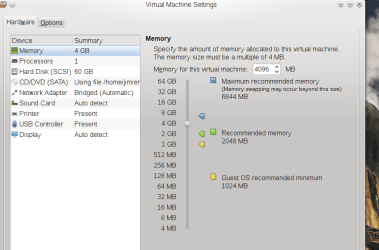
When setting up the VM use the Configuration -- here's an example from VMWARE -- processors can be set from 1 - 4 I think.

In general though there isn't much advantage in setting a VM to use more than one processor - at least if it's a "Home user" type VM.

Depends on what you want the VM to do -- setting the number of processors to > 1 merely reduces the available resources the HOST has for very little gain.

Running specialized VM's which have a load of concurrent users is a different issue - I'm assuming here that you are running a VM on a laptop / desktop machine and not setting up an Enterprise type "VDI -- Virtual Desktop Infrastructure).

The BEST performance you can get for a VM will be if the VM is on an SSD - this will really speed up response time even on older systems.

Cheers
jimbo
 

Attachments

  • snapshot7.png
    snapshot7.png
    43.9 KB · Views: 0

My Computer My Computer

At a glance

Linux CENTOS 7 / various Windows OS'es and se...Intel i7 Intel i58GB, 16GBOn Motherboard
Computer type
PC/Desktop
Computer Manufacturer/Model Number
Custom built, several laptops HP/ASUS
OS
Linux CENTOS 7 / various Windows OS'es and servers
CPU
Intel i7 Intel i5
Memory
8GB, 16GB
Graphics Card(s)
On Motherboard
Sound Card
Realtek HD audio
Monitor(s) Displays
Apple Cinema display, Samsung LCD
Screen Resolution
1920 X 1080
Hard Drives
4 X 1TB SATA
Mouse
Toshiba wireless laser
Internet Speed
> 20MB up
Back
Top