Is there a way to load and run Win7 from D:

Always keep no drive letter on System Reserved from all OS's Disk Mgmt, for many important reasons: Drive Letter - Add, Change, or Remove in Windows 7 - Windows 7 Forums

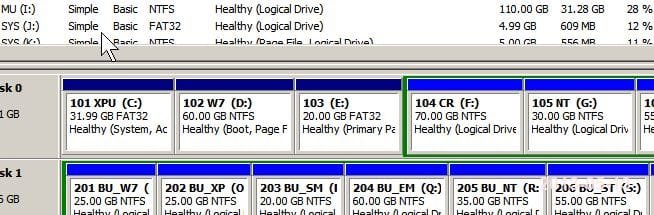
We will be able to know much better what you've got if we can see a screenshot of
Disk Management - Post a Screen Capture Image - Windows 7 Help Forums

OK, I will show you my "miracle set up" (lol) but just to respond... that's just it, when XP booted up (note: to avoid confusion, we are talking about the system where I have re-installed Win7 on C: and shifted XP to D: ...)

But when I boot into D: it does assign itself as C: and when I saw it had assigned the system reserved as D: I was not happy, I don't really like the system doing it's own thing like that... anyhow, I couldn't change it once it booted because it's a system partition... and it did keep my E aligned so I just accepted it... and called it a day...

It will always be C. Always. You could create a Z drive, move it to the Z drive and it will still have the exact same thing as you're seeing now: System Reserved on D and that E drive. This is because Windows XP is doing its thing independently of Windows 7, and Windows 7 is doing its thing independently of Windows XP. Windows XP did not (and does not) know that you moved it to the D: drive while you were in Windows 7.

Right I hear what your saying, and I believe that you think that is the only possibility, I get that... and yes, I know that XP just saw a partition and named it... was just saying it worked out... Anyhow you're still not getting what I'm saying. It doesn't always HAVE TO BE C: It may be as Greg says a best practice, and I think that could stand technically, that doesn't mean there aren't exceptions. That's why I am here. Try and think of this as an opportunity to see something a little different today. An anomaly if you will.

Put on your curiosity hat, this is just another interesting "thing" like when learning new stuff was fun (remember those glorious days... cause I don't! lol) Anyhow, that is just a Win7 centric view... and maybe will come true, if and when all the XP OSs die out... that might become reality, but until that day, that is just part of a bigger picture, as my other original dual boot "XP system" will attest to...

this is getting funny though in the sense it's like trying to convince others of seeing a UFO or a floating man or something... LOL ... come on guys lighten up this isn't religion or supernatural phenomena, despite what Bill Gates and Co tells you... I'd like to keep this to a technical discussion, although like I said, understanding MS's history and origin goes a long way to giving context and understanding to how they operate...

I think Greg has the best sense of what I am talking about too, because he has been there from the beginning giving me advice and feedback since I introduced my "heretical" setup... (hats off to you) But I am really surprised. Is there no one on this site that has, or has seen a XP/Win7 dual boot? (with no moving letter assignments) that's news to me...)
 

My Computer My Computer

At a glance

win7 32bitPentium4 3GHz3GBGeForce 6200
Computer type
PC/Desktop
Computer Manufacturer/Model Number
ibm
OS
win7 32bit
CPU
Pentium4 3GHz
Memory
3GB
Graphics Card(s)
GeForce 6200
The comments about Bill Gates are completely unfounded as anyone can find from a Google search. The bizarre allegations lead to Alex Jones website which only the most unhinged conspiracy theorists follow - most recently that Boston attack was government staged. I would not dignify them with a response but they need to be rebutted.

Gates is a decent philanthropist who has tried to contribute back to the world which made him successful, preventing AIDS, Malaria and wiring classrooms around the globe.

Unsubscribed, as I will not wallow in that any longer. You have the answer to your question, just confirmed by our resident professor.
 
Is there no one on this site that has, or has seen a XP/Windows 7 dual boot? (with no moving letter assignments) that's news to me...)

Yes, I do it all the time.

I don't use xp - I use vista/7/8 ( and Linux. )

Read the post just before yours.
 

My Computers My Computers

  • At a glance

    7 X64i5 84002x8gb 3200mhz
    Computer type
    PC/Desktop
    OS
    7 X64
    CPU
    i5 8400
    Motherboard
    gigabyte b365m ds3h
    Memory
    2x8gb 3200mhz
    Hard Drives
    various
    PSU
    pure power 11 400w cm
    Case
    Coolermaster
    Cooling
    cryorig m9i
  • At a glance

    7x64g54008gb ddr4 2400
    Computer type
    PC/Desktop
    OS
    7x64
    CPU
    g5400
    Motherboard
    ga b365m ds3h
    Memory
    8gb ddr4 2400
    PSU
    xfx pro 450w
I have been doing it for years.

1) Either run the installer from your existing installation - then it will assign itself the next available letter .

2) Or - if you are geeky, you can fix the osletter immediately after applying the image - that involves fiddling with the registry, so best use option 1.

I have often used X as the os letter.


I usually reserve W,X,Y,Z for external SATA/USB drives...

Right on SIW2, that was something what I was looking for weeks ago, but it's just as well, I probably wouldn't have been up to speed enough to understand that a few weeks ago, when I started monkeying with my hardware upgrades... but now I can wholeheartedly agree, so thanks for the confirmation as well... That makes a whole lot of sense.

You also got my attention about the registry approach. hmm, that might be a good thing to know... because thing is (or was) I couldn't get into the system when I was trying to get it to run on D: on the new drive, cause it would find the partition boot, load the OS, log in, and then realizing it was a C drive... immediately log me out again!

Would be interested to know if there is a way to access the registry of another OS if the OS is not running?... and I wonder how many entries I would need to change to get it running? (just musing)
 

My Computer My Computer

At a glance

win7 32bitPentium4 3GHz3GBGeForce 6200
Computer type
PC/Desktop
Computer Manufacturer/Model Number
ibm
OS
win7 32bit
CPU
Pentium4 3GHz
Memory
3GB
Graphics Card(s)
GeForce 6200
The comments about Bill Gates are completely unfounded as anyone can find from a Google search. The bizarre allegations lead to Alex Jones website which only the most unhinged conspiracy theorists follow. I would not dignify them with a response but they need to be rebutted.

Gates is a decent philanthropist who has tried to contribute back to the world which made him successful, preventing AIDS, Malaria and wiring classrooms around the globe.

Unsubscribed, as I will not wallow in that any longer. You have the answer to your question, just confirmed by our resident professor.

Q-DOS was short for Quick and Dirty Operating System a stripped down version of a UNIX OS minus the networking capability (how ironic) which Bill bought for 30 or 70 thousand dollars... then using (legal finesse managed to lease to IBM... that's how it all started... ever wonder what happened to the guy he fleeced for it? Neither does anyone else...

You sound like you know him personally... 5 minutes of research on the internet... ohhkaayyy... I am talking about reading this in the media when it WAS GOING DOWn.. and the books that were published at the time... Remember DR-DOS, that guy committed suicide because Bill put code in Windows that would cause the system to crash if it was running on DR-DOS... he did a more sophisticated thing with the AMD 350 chip, I remember when I was installing it, during the huge controversy which chip was better AMD or Intel (it was clearly AMD) but if you followed the propaganda instead of testing the hardware yourself you would have thought it was Intel...

re the 350 chip you had to go to the MS site and download a tiny piece of code that was labelled "something erratum" which was basically MS ADMITTING that it fixed an MS ERROR in (in "Latin") when running on the AMD 350 chipped (they were legally forced to post it) (it would have taken 2 seconds to include in the download or SP) But if you didn't know about it you would think your AMD chip was running flunky... same pattern over and over... they didn't kill Apple because they were in danger of Monopoly charges... so they swallowed them whole .... alive.... and their attack on Netscape (again the superior competitor was the last straw that started the DOJ anti-trust laws, government doesn't go after a company on anti-trust grounds for being a good boys scout, you have to push pretty far to get that honour...

Gates became a "philanthropist" after the anti-trust law deals... and the reason hardly anyone can remember , was because they made a deal, which included a huge media black out on any more negative PR that was killing MS, (they met their match for the first time in 25 years in the Govt, and no, I am no fan of the Govt, this is just a bigger fish eating a smaller fish)anyhow the media vacuum was so MS could save face, in exchange the world got Vista... 5, maybe 10% bells and whistles over XP but a 20,000% increase in code?????

What's up with that?... their "official response" ... security... really? security for who? I think in a postwar 9/11 world we can all guess whose "security" it was for... and what that extra 20,000% increase in code was for... this is just the tip of the iceberg man... the tip of the iceberg...

Like I said if you can't beat them, join them, but you don't have to 'love' them... (that would be too much like Stockholm syndrome for me) I bring up these examples because they are perfect examples of what I said earlier, in that they would actually explain technical issues sometimes better when you know what is going on... tip of the iceberg? or isolated incident?
 
Last edited:

My Computer My Computer

At a glance

win7 32bitPentium4 3GHz3GBGeForce 6200
Computer type
PC/Desktop
Computer Manufacturer/Model Number
ibm
OS
win7 32bit
CPU
Pentium4 3GHz
Memory
3GB
Graphics Card(s)
GeForce 6200
Aside from the bickering, what difference does it make if the booted drive is called C or P. D, Q or Tiffany?
 

My Computer My Computer

At a glance

Windows 7 Ultimate X64 SP1Intel i5-2550K, Differing ~4.4-4.8GHz No buil...16GB G.Skill Sniper 1866MHz @ 2133MHz 2x8GBASUS GTX650TIB-DC2OC-2GD5, (650TI Boost)
Computer type
PC/Desktop
Computer Manufacturer/Model Number
Home Built Desktop By DataTech
OS
Windows 7 Ultimate X64 SP1
CPU
Intel i5-2550K, Differing ~4.4-4.8GHz No built in GPU
Motherboard
ASUS P8Z68-V PRO/GEN3
Memory
16GB G.Skill Sniper 1866MHz @ 2133MHz 2x8GB
Graphics Card(s)
ASUS GTX650TIB-DC2OC-2GD5, (650TI Boost)
Sound Card
Onboard Realtek 5-1
Monitor(s) Displays
Samsung P2570HD
Screen Resolution
1920x1080
Hard Drives
Samsung 840 Pro 256GB SSD for OS, 500GB Seagate Constellation (Enterprise drive) for Data
PSU
Corsair HX650W
Case
Inwin Dragon Rider
Cooling
Hyper 212 EVO w/two Noctua fans, push-pull, @1300 RPM
Keyboard
E-Z Eyes, bright yellow keys with large characters
Mouse
steelseries SENSEI Laser Pro Gaming
Internet Speed
48-51Mbs Mbs down, 11 Mbs up Xfinity Cable
Antivirus
Norton Internet Security 2013
Browser
IE 10, Opera, Pale Moon if needed
Other Info
4 case fans, LG BluRay-RE, ASUS DVD-RW, Mr. Fusion power supply, 1.21 gigawatts.
I haven't tried Tiffany yet.

If you have a lot of os it is useful to have drive letter consistency, so you know where you are.

It may also be needed after restoring an image.
 

My Computers My Computers

  • At a glance

    7 X64i5 84002x8gb 3200mhz
    Computer type
    PC/Desktop
    OS
    7 X64
    CPU
    i5 8400
    Motherboard
    gigabyte b365m ds3h
    Memory
    2x8gb 3200mhz
    Hard Drives
    various
    PSU
    pure power 11 400w cm
    Case
    Coolermaster
    Cooling
    cryorig m9i
  • At a glance

    7x64g54008gb ddr4 2400
    Computer type
    PC/Desktop
    OS
    7x64
    CPU
    g5400
    Motherboard
    ga b365m ds3h
    Memory
    8gb ddr4 2400
    PSU
    xfx pro 450w
Aside from the bickering, what difference does it make if the booted drive is called C or P. D, Q or Tiffany?

My whole foray into this Britton was I had an XP/Win7 system and wanted to upgrade to a larger HDD... That is when I found this weird behaviour that no matter how I tried to set up the Clone job it would not "take" on the new drive...

I figured this was a Win7 peculiarity and that is when I started doing research on Boot loading in general, found Easy BCD and (eventually this Win7 forum) EasyBCD of course that didn't work, because although it will point it to D, no one told me that Win7 always wants to be C once it starts loading. (we are now discussing apparently that it is news that this doesn't NECESSARILY have to be the case...)

Anyhow, that was several weeks agow... I have done various tests and experiments and started getting all these weird results, that is when I started to really take a close look at 7. I was way behind the curve because I saw Vista coming before it knocked everyone broadside... I never touched it, worked with it, nor would recommend it to others BEFORE the consumer uproar... and I was right on the money, (because I was following the politics, and doing internet research that gave me a big heads up... as a result I was way behind the curve on Win7. I knew Win7 was coming (had to come) but I was so put off by Vista, I never really got around to it until recently.

I did a test install on my XP to try it out... liked it and left it at that... then I tried to do the upgrade and that was when I "fell in love all over again with Windows.... lol)

hope that makes sense...

brb... have an important conference call (just so you don't think I'm ducking and running...)
 

My Computer My Computer

At a glance

win7 32bitPentium4 3GHz3GBGeForce 6200
Computer type
PC/Desktop
Computer Manufacturer/Model Number
ibm
OS
win7 32bit
CPU
Pentium4 3GHz
Memory
3GB
Graphics Card(s)
GeForce 6200
You are getting two things confused here.

BCD is different. The drive letters are an alias to make it easier for the user.

The entries are made up of the disk and partition id.

That is why you are having the issue. You would either need to generalise the bcd store before cloning, or correct the entries after cloning. Easiest way to correct is to run startup repair from win 7 dvd/repair cd.

To generalize the bcd- at an elevated command prompt:

bcdedit /set {current} osdevice boot
bcdedit /set {current} device boot
bcdedit /set {bootmgr} device boot
bcdedit /set {memdiag} device boot
 

My Computers My Computers

  • At a glance

    7 X64i5 84002x8gb 3200mhz
    Computer type
    PC/Desktop
    OS
    7 X64
    CPU
    i5 8400
    Motherboard
    gigabyte b365m ds3h
    Memory
    2x8gb 3200mhz
    Hard Drives
    various
    PSU
    pure power 11 400w cm
    Case
    Coolermaster
    Cooling
    cryorig m9i
  • At a glance

    7x64g54008gb ddr4 2400
    Computer type
    PC/Desktop
    OS
    7x64
    CPU
    g5400
    Motherboard
    ga b365m ds3h
    Memory
    8gb ddr4 2400
    PSU
    xfx pro 450w
I haven't tried Tiffany yet.

If you have a lot of os it is useful to have drive letter consistency, so you know where you are.

It may also be needed after restoring an image.

finally, someone who thinks like me... yes... sometimes the OS can be set up to look for other partitions, etc...
 

My Computer My Computer

At a glance

win7 32bitPentium4 3GHz3GBGeForce 6200
Computer type
PC/Desktop
Computer Manufacturer/Model Number
ibm
OS
win7 32bit
CPU
Pentium4 3GHz
Memory
3GB
Graphics Card(s)
GeForce 6200
I gotcha now Simon and Sigma. I just set up a dual boot of XP and Vista (which I found out isn't horrible) because I had no w7 disk. Whichever OS I boot too the partition is called C, so not just a w7 thing.

It will work for me becuase two OSes are enough unless I go the VM route to experiment.

As a further experiment I imaged the whole drive with both OSes, wiped the drive, then restored it successfully. I used free Macrium and its WinPE disk to restore the image.
 

My Computer My Computer

At a glance

Windows 7 Ultimate X64 SP1Intel i5-2550K, Differing ~4.4-4.8GHz No buil...16GB G.Skill Sniper 1866MHz @ 2133MHz 2x8GBASUS GTX650TIB-DC2OC-2GD5, (650TI Boost)
Computer type
PC/Desktop
Computer Manufacturer/Model Number
Home Built Desktop By DataTech
OS
Windows 7 Ultimate X64 SP1
CPU
Intel i5-2550K, Differing ~4.4-4.8GHz No built in GPU
Motherboard
ASUS P8Z68-V PRO/GEN3
Memory
16GB G.Skill Sniper 1866MHz @ 2133MHz 2x8GB
Graphics Card(s)
ASUS GTX650TIB-DC2OC-2GD5, (650TI Boost)
Sound Card
Onboard Realtek 5-1
Monitor(s) Displays
Samsung P2570HD
Screen Resolution
1920x1080
Hard Drives
Samsung 840 Pro 256GB SSD for OS, 500GB Seagate Constellation (Enterprise drive) for Data
PSU
Corsair HX650W
Case
Inwin Dragon Rider
Cooling
Hyper 212 EVO w/two Noctua fans, push-pull, @1300 RPM
Keyboard
E-Z Eyes, bright yellow keys with large characters
Mouse
steelseries SENSEI Laser Pro Gaming
Internet Speed
48-51Mbs Mbs down, 11 Mbs up Xfinity Cable
Antivirus
Norton Internet Security 2013
Browser
IE 10, Opera, Pale Moon if needed
Other Info
4 case fans, LG BluRay-RE, ASUS DVD-RW, Mr. Fusion power supply, 1.21 gigawatts.
You are getting two things confused here.

BCD is different. The drive letters are an alias to make it easier for the user.

The entries are made up of the disk and partition id.

That is why you are having the issue. You would either need to generalise the bcd store before cloning, or correct the entries after cloning. Easiest way to correct is to run startup repair from win 7 dvd/repair cd.

To generalize the bcd- at an elevated command prompt:

bcdedit /set {current} osdevice boot
bcdedit /set {current} device boot
bcdedit /set {bootmgr} device boot
bcdedit /set {memdiag} device boot

Thanks SIW2. I realized that the bcd setting was just pointing to the partition to initiate the install... but not assigning the drive letter I learned that the hard way... lol (the OS pointed to, just automatically starts on C, which of course I can now see and appreciate the utility and practicality of that, etc...) But that is what I have been harping on for the last few weeks..

Are you saying there is a way to get BCD to assign the drive letter into the Boot process? is that what those commands are ?
 

My Computer My Computer

At a glance

win7 32bitPentium4 3GHz3GBGeForce 6200
Computer type
PC/Desktop
Computer Manufacturer/Model Number
ibm
OS
win7 32bit
CPU
Pentium4 3GHz
Memory
3GB
Graphics Card(s)
GeForce 6200
I gotcha now Simon and Sigma. I just set up a dual boot of XP and Vista (which I found out isn't horrible) because I had no w7 disk. Whichever OS I boot too the partition is called C, so not just a w7 thing.

It will work for me becuase two OSes are enough unless I go the VM route to experiment.

As a further experiment I imaged the whole drive with both OSes, wiped the drive, then restored it successfully. I used free Macrium and its WinPE disk to restore the image.

Right... what I am saying and has now been confirmed by Greg and Simon is that if you do the Win7 install after the XP AND from within XP it will install Win7 on the second partition and it will also boot up as the D drive... This is a subtle but good to know factoid imo ... because it exposes a lot of the behaviour and nature of the MS boot process... and the biggest takeaway I got is this idea of creating these identifier codes and assigning them to each partition as part of it's process, that and when adding an entry (in BCD) it is only "pointing" not "assigning"

I am still learning all the ins and outs of how to control the letter assignment process... I have to admit this whole boot technology really boggles and attracts me at the same time... it's definitely a worthy 'pet project' to study and learn...
 

My Computer My Computer

At a glance

win7 32bitPentium4 3GHz3GBGeForce 6200
Computer type
PC/Desktop
Computer Manufacturer/Model Number
ibm
OS
win7 32bit
CPU
Pentium4 3GHz
Memory
3GB
Graphics Card(s)
GeForce 6200
Bootmgr looks for winload.exe based on the unique number in the bcd.

That number is generated form the Disk id ( actually the disk signature in the mbr ) and the partition offset .

If that is right, bootmgr should find winload.exe and start it up, Then you will get as far as the welcome screen. At that point as the os is loading, drive letters come into play.

There is a second potential issue at that point - if the drive letters have changed - which can happen when restoring an image/cloning.

The best programs (e.g. Paragon ) will check that during the process.
 

My Computers My Computers

  • At a glance

    7 X64i5 84002x8gb 3200mhz
    Computer type
    PC/Desktop
    OS
    7 X64
    CPU
    i5 8400
    Motherboard
    gigabyte b365m ds3h
    Memory
    2x8gb 3200mhz
    Hard Drives
    various
    PSU
    pure power 11 400w cm
    Case
    Coolermaster
    Cooling
    cryorig m9i
  • At a glance

    7x64g54008gb ddr4 2400
    Computer type
    PC/Desktop
    OS
    7x64
    CPU
    g5400
    Motherboard
    ga b365m ds3h
    Memory
    8gb ddr4 2400
    PSU
    xfx pro 450w
It is very different for XP - which isn't phased by changes in disk sig.
 

My Computers My Computers

  • At a glance

    7 X64i5 84002x8gb 3200mhz
    Computer type
    PC/Desktop
    OS
    7 X64
    CPU
    i5 8400
    Motherboard
    gigabyte b365m ds3h
    Memory
    2x8gb 3200mhz
    Hard Drives
    various
    PSU
    pure power 11 400w cm
    Case
    Coolermaster
    Cooling
    cryorig m9i
  • At a glance

    7x64g54008gb ddr4 2400
    Computer type
    PC/Desktop
    OS
    7x64
    CPU
    g5400
    Motherboard
    ga b365m ds3h
    Memory
    8gb ddr4 2400
    PSU
    xfx pro 450w
Bootmgr looks for winload.exe based on the unique number in the bcd.

That number is generated form the Disk id ( actually the disk signature in the mbr ) and the partition offset .

If that is right, bootmgr should find winload.exe and start it up, Then you will get as far as the welcome screen. At that point as the os is loading, drive letters come into play.

There is a second potential issue at that point - if the drive letters have changed - which can happen when restoring an image/cloning.

The best programs (e.g. Paragon ) will check that during the process.

Righteous SI... haha I would like correspond more with you on this (if you don't mind) this is the info I have been looking for... finally... I knew it had to do with those signature numbers

... and yes there has to be something that controls also for the letter assignment as well, because Win7 will do it if installed from inside a previous existing XP for example...
 

My Computer My Computer

At a glance

win7 32bitPentium4 3GHz3GBGeForce 6200
Computer type
PC/Desktop
Computer Manufacturer/Model Number
ibm
OS
win7 32bit
CPU
Pentium4 3GHz
Memory
3GB
Graphics Card(s)
GeForce 6200
I still have my doubts. May I see the screenshots that I requested before please?

  1. Screenshot from within XP of My Computer
  2. Screenshot from within 7 of My Computer
Or is it currently not set up the way you want? I mean, would you prefer that while you're in Windows 7, your OS drive for Windows 7 says D:?
 

My Computer My Computer

Computer type
PC/Desktop
i still have my doubts. May i see the screenshots that i requested before please?

  1. screenshot from within xp of my computer
  2. screenshot from within 7 of my computer
or is it currently not set up the way you want? I mean, would you prefer that while you're in windows 7, your os drive for windows 7 says d:?

Win7 on D.jpg
 

My Computer My Computer

At a glance

win7 32bitPentium4 3GHz3GBGeForce 6200
Computer type
PC/Desktop
Computer Manufacturer/Model Number
ibm
OS
win7 32bit
CPU
Pentium4 3GHz
Memory
3GB
Graphics Card(s)
GeForce 6200

My Computer My Computer

At a glance

win7 32bitPentium4 3GHz3GBGeForce 6200
Computer type
PC/Desktop
Computer Manufacturer/Model Number
ibm
OS
win7 32bit
CPU
Pentium4 3GHz
Memory
3GB
Graphics Card(s)
GeForce 6200
i still have my doubts. May i see the screenshots that i requested before please?

  1. screenshot from within xp of my computer
  2. screenshot from within 7 of my computer
or is it currently not set up the way you want? I mean, would you prefer that while you're in windows 7, your os drive for windows 7 says d:?

View attachment 267969

No, I'm asking for 2 screenshots of My Computer. One from within XP, and another from within 7. I don't want Disk Management.

I apologize for pushing, but I really need to see this because I genuinely want to have a full understanding. I want to see this in the practical sense, and that's why I'm asking for 2 screenshots of My Computer: one from XP, and another from 7. So I'm saying boot to XP, take the screenshot, boot to 7, take the screenshot, and then post them.
 

My Computer My Computer

Computer type
PC/Desktop
Back
Top