
Is there a way to monitor all device's internet connection ?

TDoGChad

New member
Local time
5:01 PM
Messages
21
Is there a way to monitor all device's internet connection into a log ? (computer, laptop, tablets and phone ... all in one)

Deeper explanation :

because I do not like AT&T DSL 5M internet provider, but that is the only company in this area that has it.
(no Hughes dish etc ... no)

anyway, I am getting sick of disconnecting and reconnecting ... not sure if that DSL is fluctuating ... or along the DSL lines thru houses/business re-wiring DSL ... or etc etc etc ...

how can I know whether is it guaranteed disconnected/Reconnected by computer or DSL or etc ?

I was playing a 8 ball tournament online and lost one match dues disconnecting (no, hack/cheat involved because I played on mobile)

only thing I noticed is that AT&T cellular data still connected forever without getting disconnected ... but I can not use data plan because of the limited bandwidth/data usage.

so, I tried nearly everything I can think of and researched hard ... and tested it ... I still can not find an issue, even DSL guy came here to check it out ... nothing's wrong here ... BS ... there is something, somewhere that is causing disconnecting and reconnecting ...

already did flush dns, clear cache, etc etc ...

I just need networking monitor log because I am can not watch all 6 devices and test it when disconnecting occurs ... I thought that is a great idea to pinpoint even further down, for example : laptop #2, tablet #1 and this computer gets disconnecting reconnecting when occurs ... while other 3 does not ... then why this 3 can not do what other 3 can do ? ...that is the idea ... could be hardware, but not likely though.

I hope you get the idea what I am trying to say and asking for ... I am really tired of this "disconnecting/reconnecting" ... and it seems it only happens so often at business hours ... and fewer at night ... since it's fewer at night ... then it can not be the devices, but rather outside my home ... like hub, lines, create new buildings causing it ...

Is there anything that can helps me to see closer and pinpoint what causing DSL to disconnecting/reconnecting and networking monitoring ?
 
Last edited:

My Computer My Computer

At a glance

Win 7 Pro 32-bit
Computer type
PC/Desktop
OS
Win 7 Pro 32-bit
All I can think of at the moment is open a command prompt and run:
Code:
ping -t 8.8.8.8
This will keep pinging Google DNS server. And check the machines (you can run the command on) when you face a disconnect/issue.
 

My Computer My Computer

At a glance

Windows 7 Ultimate x64 SP1AMD Phenom 2 1090T2x8GB Kingston HyperX Fury Black 1600Mhz Unga...MSI GTX 970 Gaming 4G
Computer type
PC/Desktop
Computer Manufacturer/Model Number
Custom Build
OS
Windows 7 Ultimate x64 SP1
CPU
AMD Phenom 2 1090T
Motherboard
Gigabyte GA-890FXA-UD5
Memory
2x8GB Kingston HyperX Fury Black 1600Mhz Unganged
Graphics Card(s)
MSI GTX 970 Gaming 4G
Sound Card
Realtek On-Board HD 7.1 Audio / Logitech G35
Monitor(s) Displays
3xAcer GD245HQ
Screen Resolution
1920x1080
Hard Drives
Samsung 850 Pro 512GB SSD - OS /
WD Caviar Black SATA 3 - 1 TBx2 - Dynamic RAID 0 /
WD Caviar Green SATA 2 - 640GBx2 - Dynamic RAID 0 /
WD Caviar Green SATA 2 - 640GB - Internal Backup /
Seagate Barracude SATA 3 - 3TB - External Backup/ Sync
PSU
HighPower 1000W
Case
Cooler Master HAF 932
Cooling
Noctua NH-D14
Keyboard
Logitech G19
Mouse
Logitech G500
Internet Speed
100/4 Mbit Cable (100GB quota)
Antivirus
ZoneAlarm Extreme Security / MBAM Pro / MBAE Free / SAS Free
Browser
IE 11 - Firefox - Chrome
Other Info
Logitech F710/ G27/ G940/ Z5500 // TrackIR 5 // Nvidia 3D Surround Vision
In addition to GokAy's excellent advice, you can run a constant ping to your router/modem too. That will let you know if something has barfed inside you network while the constant ping to 8.8.8.8 will let you know if it is outside of your network.
 

My Computer My Computer

At a glance

W7 Pro SP1 64biti78GBIntel HD Graphics
Computer type
Laptop
Computer Manufacturer/Model Number
Employer provided Dell Latitude
OS
W7 Pro SP1 64bit
CPU
i7
Memory
8GB
Graphics Card(s)
Intel HD Graphics
Hard Drives
crappy SSD
Antivirus
Employer mandated Symantec Endpoint Protection
Browser
Pale Moon 64bit, IE11 64bit & Chrome 64bit
Ok thanks ... and doing it now and see ... umm ... what exactly is "Request timed out." means ? I got that like every 1 min 3 times ... ok, now longer than 5 minutes ... no "request timed out" yet. is there a timestamp in this dos/ command ping ? ... ahhh now about 6th minutes ... I got another "request timed out."

this is a good way to monitoring ... simpler question ... this ping -t is not a form of dos attack (abuse) against google, right ?

ahhh ... I just ping -t my default gateway ... also gets request timed out, too like every 3 or 4 minutes

Is there a way that I can ping -t miniclip.com (mobile (android/iOS), not web (PC, Mac, Linux)) 8 ball game server to see I am NOT the one getting disconnecting from the game ? And also ping the forum at Official 8 Ball Pool Forum

ahh ... I just saw both google and my default gateway "requested timed out" at the same time.

I am reading this ... JMU - pingtrace

It said that request timed out is normal ...

and how would I know if my AT&T DSL is disconnecting ... will it say request timed out longer ?

I just got 2 request timed out twice in a row on google
 
Last edited:

My Computer My Computer

At a glance

Win 7 Pro 32-bit
Computer type
PC/Desktop
OS
Win 7 Pro 32-bit
Ping is a network diagnostic tool. It is given low priority on most networks. If other traffic needs to get thru, the ping traffic might just drop. Pinging Google's server will not hurt the server. If it does not have the time to answer your ping, it won't.

The default ping command on a Windows computer is set to wait 4 seconds for a reply. If nothing comes back within 4 seconds, you should see: "Request timed out."

If you want to change the time that ping waits, use:
Code:
ping -4 8.8.8.8 -t -w 1000
The various switches can go before or after the address to be pinged.
The "-4" tells ping to use the IPv4 protocol. (Nothing for you to care about.)
The -t tells ping to repeat until you stop it.
The -w specifies the time to wait (in milliseconds).
Setting that time to less then 1000 will most likely be ignored.


> and how would I know if my AT&T DSL is disconnecting
It is somewhat subjective. 5 or 10 timeouts in a row to that google ping would be a disconnect in my opinion. That would be 40 seconds if you stick with the default ping values. That said, you might want to ping several servers on the Internet. It would be unlikely that they would all decide to not reply to you at the exact same time.

You linked to info about tracert. You can use that to gather some IP addresses to ping. Not all servers will reply to pings. Some ignore all ping requests.

You might also check the service agreement. Some ISP providers do not guarantee 100% connectivity.

If you are causing heavy traffic (perhaps by streaming a video), then the pings might time out due to the other traffic. When streaming, leave Task Manager open and watch the tab named Networking.

Click on View in the menu bar.
Select Network Adapter History.
Put a check by red.
Repeat the steps above and put a check by yellow.
Repeat the steps above and uncheck green.

Click on View in the menu bar.
Select Update Speed > High

Click on Options in the menu bar.
Put a check by everything except Always on top and Reset.

Leave Task Manager running. If the stream starts buffering or halts, then bring up Task Manager and look at the graph of the network traffic history. You won't really know if the source of the stream has an issue or if your service is the problem, but at least you can "see" the traffic change.
 
Last edited:

My Computer My Computer

At a glance

W7 Pro SP1 64biti78GBIntel HD Graphics
Computer type
Laptop
Computer Manufacturer/Model Number
Employer provided Dell Latitude
OS
W7 Pro SP1 64bit
CPU
i7
Memory
8GB
Graphics Card(s)
Intel HD Graphics
Hard Drives
crappy SSD
Antivirus
Employer mandated Symantec Endpoint Protection
Browser
Pale Moon 64bit, IE11 64bit & Chrome 64bit
I know about this part "Some ISP providers do not guarantee 100% connectivity." but every like 10 minutes or more like 2-8 times an hour during rush hours like around 9am-11pm or 3pm til 5pm ... that is NOT normal ... that seems like someone unplug and replug (kinda like like re-route or switch to different jack) the connection at the hub where people builings business or redesign homes along the way to AT&T home.

I was kinda exciting to read and learn until this part

You won't really know if the source of the stream has an issue or if your service is the problem, but at least you can "see" the traffic change.

that is NOT fair !!! ... ARGH !!! ... (*chuckling*)

that is EXACTLY what I am looking for ... is it "me", "Miniclip 8 ball" server or "AT&T" ? ... I even look at https://downdetector.com/status/att ...that is the only 3 I wanted to know ... anything else I don't care

the main point is that I love to play 8 ball and playing at like the highest tier (very expensive 2,500,000 pool coins) ... and if I get disconnected ... (*beep*beeeeeeeep*) ... it is really hard to keep the pool coins balance at least 10,000,000 ... then until if I ever reach to 1,000,000,000 pool coins ... maybe I won't care disconnecting much anymore, because 20M is the highest tier called "ALL IN" but capped at 20M entry fee and having 1B pool coins then it takes alot to lose to go broke to start all over again :) ... so that is why I wanted to fix this disconnecting issues ... and I am trying to figure it out ... is it ME, MINICLIP, or AT&T ? My average is about 10M ... my highest earning is 16M pool coins and did went down 890,000 pool coins then back up to 2.2M ... GEEZ ... 3 highest tier I played got disconnected ... I can see my network turned the yellow sign the back to normal, but not fast enough to get back in the game before losing the game.
cheaters/hackers can not hurt mobile (very rarely) ... but web version (like PC) ... there is ALOT of lag, disconnected etc etc ... that is why I stick with my mobile :)

Thanks for your help and if you have more ... please keep teaching :)

p.s. I look at Resource Monitor's Network and may have to research to understand deeper about it.
 

My Computer My Computer

At a glance

Win 7 Pro 32-bit
Computer type
PC/Desktop
OS
Win 7 Pro 32-bit
Do others in your area have the same issues?

If no, then keep talking with AT&T until they find the issue.

If yes, then encourage them all to call and complain.

There are areas near me where AT&T has some very old equipment. It cannot deliver the bandwidth needed for all of the connections being made. Unfortunately, not enough people will complain.


You might also call AT&T and ask a customer service rep to remotely control your computer. Ask them to then connect to your router/modem and show you how/where to read various log files*. The point of this remote control session is not so much for you to learn about those log files - the point is for them to get disconnected during their attempts to help you. I've done this more than once - but it was years ago for a friend that I was helping. Maybe the service reps are not allowed to remotely control a customer's computer anymore. But it sure makes a point about how bad the service is if they cannot stay connected to you. I've done this with other ISPs too. It drives the point home.

*depending on the modem model, there might not be any log files - but there should be connection status info that includes line quality data. It does not matter, just ask about log files and see what they say.
 

My Computer My Computer

At a glance

W7 Pro SP1 64biti78GBIntel HD Graphics
Computer type
Laptop
Computer Manufacturer/Model Number
Employer provided Dell Latitude
OS
W7 Pro SP1 64bit
CPU
i7
Memory
8GB
Graphics Card(s)
Intel HD Graphics
Hard Drives
crappy SSD
Antivirus
Employer mandated Symantec Endpoint Protection
Browser
Pale Moon 64bit, IE11 64bit & Chrome 64bit
Having a timeout once in a while is normal when you are pinging the Internet, but timeout to your router is in my belief is not normal. Even during heavy download/upload I only notice a much higher latency (upto 500ms rarely whereas 1ms for idle) and not timeouts.

There are apps for IOS/Android for pinging. I am sure there are free ones as well.
 

My Computer My Computer

At a glance

Windows 7 Ultimate x64 SP1AMD Phenom 2 1090T2x8GB Kingston HyperX Fury Black 1600Mhz Unga...MSI GTX 970 Gaming 4G
Computer type
PC/Desktop
Computer Manufacturer/Model Number
Custom Build
OS
Windows 7 Ultimate x64 SP1
CPU
AMD Phenom 2 1090T
Motherboard
Gigabyte GA-890FXA-UD5
Memory
2x8GB Kingston HyperX Fury Black 1600Mhz Unganged
Graphics Card(s)
MSI GTX 970 Gaming 4G
Sound Card
Realtek On-Board HD 7.1 Audio / Logitech G35
Monitor(s) Displays
3xAcer GD245HQ
Screen Resolution
1920x1080
Hard Drives
Samsung 850 Pro 512GB SSD - OS /
WD Caviar Black SATA 3 - 1 TBx2 - Dynamic RAID 0 /
WD Caviar Green SATA 2 - 640GBx2 - Dynamic RAID 0 /
WD Caviar Green SATA 2 - 640GB - Internal Backup /
Seagate Barracude SATA 3 - 3TB - External Backup/ Sync
PSU
HighPower 1000W
Case
Cooler Master HAF 932
Cooling
Noctua NH-D14
Keyboard
Logitech G19
Mouse
Logitech G500
Internet Speed
100/4 Mbit Cable (100GB quota)
Antivirus
ZoneAlarm Extreme Security / MBAM Pro / MBAE Free / SAS Free
Browser
IE 11 - Firefox - Chrome
Other Info
Logitech F710/ G27/ G940/ Z5500 // TrackIR 5 // Nvidia 3D Surround Vision
this ping actually helps alot ... it IS the AT&T disconnecting right now ... 3 times so far ... then reconnected in about a minute later ... during rush hours like I said earlier.

no issues last night (late night close to midnight)

it can not be traffic jamming which is almost nearly impossible
 
Last edited:

My Computer My Computer

At a glance

Win 7 Pro 32-bit
Computer type
PC/Desktop
OS
Win 7 Pro 32-bit
I think, I finally pinpoint but can not get closer than that ... it is NOT my network/router/wifi ... it IS the AT&T DSL disconnecting then reconnecting in about a minute or 2.

is there a PING software where I can recording as LOG with time stamp and all the bells and whistles, so I can show AT&T the proof, do not lie and "DFWM" (ok, alittle too harsh ... lol)
 

My Computer My Computer

At a glance

Win 7 Pro 32-bit
Computer type
PC/Desktop
OS
Win 7 Pro 32-bit
Try Ping for Life - that will just sit there and ping continuously till you tell it otherwise with timestamps. It won't write to a log but you can copy the results to a text file easily enough. Depending on how long you want the ping to run for then you may have to adjust the "Max. log rows to show" number (under Settings) to get the full result.
 

My Computer My Computer

At a glance

Windows 7 64bitIntel(R) Core(TM) i7-4770K CPU @ 3.50GHzCorsair XMS3 16GB kit (2x8GB) DDR3 1333MHz Un...(1) Intel(R) HD Graphics 4600 (2) NVIDIA GeFo...
Computer type
PC/Desktop
Computer Manufacturer/Model Number
Custom Build
OS
Windows 7 64bit
CPU
Intel(R) Core(TM) i7-4770K CPU @ 3.50GHz
Motherboard
Gigabyte Technology Co., Ltd. Z87-DS3H
Memory
Corsair XMS3 16GB kit (2x8GB) DDR3 1333MHz Unbuffered CL9 DI
Graphics Card(s)
(1) Intel(R) HD Graphics 4600 (2) NVIDIA GeForce GT 640
Hard Drives
(1) Samsung SSD 840 EVO 250G SCSI Disk Device (2) Samsung SSD 850 EVO 250G SCSI Disk Device (3) WDC WD10EZEX-00KUWA0 SCSI Disk Device
Antivirus
MSE
Browser
Pale Moon
Yes - there are apps like that - however, AT&T should be looking at the modem's logs. There should be some indication of the disconnect, even if the disconnect is happening outside of you home.

I hesitate to suggest an app that I've not tested. It has been years since I looked for/found/used a ping logging app. I tend to write my own tools when I need stuff.
 

My Computer My Computer

At a glance

W7 Pro SP1 64biti78GBIntel HD Graphics
Computer type
Laptop
Computer Manufacturer/Model Number
Employer provided Dell Latitude
OS
W7 Pro SP1 64bit
CPU
i7
Memory
8GB
Graphics Card(s)
Intel HD Graphics
Hard Drives
crappy SSD
Antivirus
Employer mandated Symantec Endpoint Protection
Browser
Pale Moon 64bit, IE11 64bit & Chrome 64bit
I'm too lazy to write a tool that does what I want it to do perfectly well personally. ;)

Working on Networks as I do it is a lot easier to get a company doing WAN provision to investigate something when you are armed with information that is accurate. When you can tell them that you have seen x amount of dropped packets over a period of time and you have logs to back those up (if they ask for them) always helps. Personally I would be pinging both the internal and external gateway on the router and something like Google's server at the same time - you can get a better idea of where the disconnection is then.
 

My Computer My Computer

At a glance

Windows 7 64bitIntel(R) Core(TM) i7-4770K CPU @ 3.50GHzCorsair XMS3 16GB kit (2x8GB) DDR3 1333MHz Un...(1) Intel(R) HD Graphics 4600 (2) NVIDIA GeFo...
Computer type
PC/Desktop
Computer Manufacturer/Model Number
Custom Build
OS
Windows 7 64bit
CPU
Intel(R) Core(TM) i7-4770K CPU @ 3.50GHz
Motherboard
Gigabyte Technology Co., Ltd. Z87-DS3H
Memory
Corsair XMS3 16GB kit (2x8GB) DDR3 1333MHz Unbuffered CL9 DI
Graphics Card(s)
(1) Intel(R) HD Graphics 4600 (2) NVIDIA GeForce GT 640
Hard Drives
(1) Samsung SSD 840 EVO 250G SCSI Disk Device (2) Samsung SSD 850 EVO 250G SCSI Disk Device (3) WDC WD10EZEX-00KUWA0 SCSI Disk Device
Antivirus
MSE
Browser
Pale Moon
I was going to post "Hmm, perhaps open few command windows and ping -t individually to your router internal, router ISP side, ISP gateway and Google (8.8.8.8). Keep them all visible and take a screenshot once the connection drops.". Then I saw the 2nd page :) Apparently I think alike Tranquil and have done such troubleshooting in the past.
 

My Computer My Computer

At a glance

Windows 7 Ultimate x64 SP1AMD Phenom 2 1090T2x8GB Kingston HyperX Fury Black 1600Mhz Unga...MSI GTX 970 Gaming 4G
Computer type
PC/Desktop
Computer Manufacturer/Model Number
Custom Build
OS
Windows 7 Ultimate x64 SP1
CPU
AMD Phenom 2 1090T
Motherboard
Gigabyte GA-890FXA-UD5
Memory
2x8GB Kingston HyperX Fury Black 1600Mhz Unganged
Graphics Card(s)
MSI GTX 970 Gaming 4G
Sound Card
Realtek On-Board HD 7.1 Audio / Logitech G35
Monitor(s) Displays
3xAcer GD245HQ
Screen Resolution
1920x1080
Hard Drives
Samsung 850 Pro 512GB SSD - OS /
WD Caviar Black SATA 3 - 1 TBx2 - Dynamic RAID 0 /
WD Caviar Green SATA 2 - 640GBx2 - Dynamic RAID 0 /
WD Caviar Green SATA 2 - 640GB - Internal Backup /
Seagate Barracude SATA 3 - 3TB - External Backup/ Sync
PSU
HighPower 1000W
Case
Cooler Master HAF 932
Cooling
Noctua NH-D14
Keyboard
Logitech G19
Mouse
Logitech G500
Internet Speed
100/4 Mbit Cable (100GB quota)
Antivirus
ZoneAlarm Extreme Security / MBAM Pro / MBAE Free / SAS Free
Browser
IE 11 - Firefox - Chrome
Other Info
Logitech F710/ G27/ G940/ Z5500 // TrackIR 5 // Nvidia 3D Surround Vision
I was going to post "Hmm, perhaps open few command windows and ping -t individually to your router internal, router ISP side, ISP gateway and Google (8.8.8.8). Keep them all visible and take a screenshot once the connection drops.". Then I saw the 2nd page Apparently I think alike Tranquil and have done such troubleshooting in the past.

that is what I did last night :)

Before I came back to read this discussion ... I am gonna try this Ping Monitor - Free Network Ping Monitoring Tool
 

My Computer My Computer

At a glance

Win 7 Pro 32-bit
Computer type
PC/Desktop
OS
Win 7 Pro 32-bit
I was going to post "Hmm, perhaps open few command windows and ping -t individually to your router internal, router ISP side, ISP gateway and Google (8.8.8.8). Keep them all visible and take a screenshot once the connection drops.". Then I saw the 2nd page Apparently I think alike Tranquil and have done such troubleshooting in the past.
that is what I did last night :)

Before I came back to read this discussion ... I am gonna try this Ping Monitor - Free Network Ping Monitoring Tool
yep - give it a try. That is the first one that I downloaded to test - but it said that I had to install .NET4 or higher. I did not have the time to install that into the Virtual Machine that I was playing in.
 

My Computer My Computer

At a glance

W7 Pro SP1 64biti78GBIntel HD Graphics
Computer type
Laptop
Computer Manufacturer/Model Number
Employer provided Dell Latitude
OS
W7 Pro SP1 64bit
CPU
i7
Memory
8GB
Graphics Card(s)
Intel HD Graphics
Hard Drives
crappy SSD
Antivirus
Employer mandated Symantec Endpoint Protection
Browser
Pale Moon 64bit, IE11 64bit & Chrome 64bit
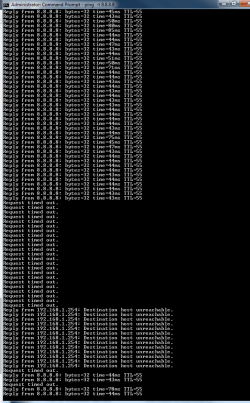
I got a new one ...
 

Attachments

  • Got_a_new_one.png
    Got_a_new_one.png
    12.5 KB · Views: 0

My Computer My Computer

At a glance

Win 7 Pro 32-bit
Computer type
PC/Desktop
OS
Win 7 Pro 32-bit
It doesn't show much alone. Run 3 separate cmd windows, run one ping in each:
Ping -t yourownIP (run in cmd: ipconfig to find out)
Ping -t 192.168.1.254
Ping -t 8.8.8.8
 

My Computer My Computer

At a glance

Windows 7 Ultimate x64 SP1AMD Phenom 2 1090T2x8GB Kingston HyperX Fury Black 1600Mhz Unga...MSI GTX 970 Gaming 4G
Computer type
PC/Desktop
Computer Manufacturer/Model Number
Custom Build
OS
Windows 7 Ultimate x64 SP1
CPU
AMD Phenom 2 1090T
Motherboard
Gigabyte GA-890FXA-UD5
Memory
2x8GB Kingston HyperX Fury Black 1600Mhz Unganged
Graphics Card(s)
MSI GTX 970 Gaming 4G
Sound Card
Realtek On-Board HD 7.1 Audio / Logitech G35
Monitor(s) Displays
3xAcer GD245HQ
Screen Resolution
1920x1080
Hard Drives
Samsung 850 Pro 512GB SSD - OS /
WD Caviar Black SATA 3 - 1 TBx2 - Dynamic RAID 0 /
WD Caviar Green SATA 2 - 640GBx2 - Dynamic RAID 0 /
WD Caviar Green SATA 2 - 640GB - Internal Backup /
Seagate Barracude SATA 3 - 3TB - External Backup/ Sync
PSU
HighPower 1000W
Case
Cooler Master HAF 932
Cooling
Noctua NH-D14
Keyboard
Logitech G19
Mouse
Logitech G500
Internet Speed
100/4 Mbit Cable (100GB quota)
Antivirus
ZoneAlarm Extreme Security / MBAM Pro / MBAE Free / SAS Free
Browser
IE 11 - Firefox - Chrome
Other Info
Logitech F710/ G27/ G940/ Z5500 // TrackIR 5 // Nvidia 3D Surround Vision
As with most things of this nature, I suggest that you take a look at the tools available from Microsoft itself, or more directly the Sysinternals suite by Mark Russinovich

In this case have a look at what is possible with PsTools
 

My Computers My Computers

  • At a glance

    Windows 11 Pro x64 [Latest Release and Releas...Ryzen 9 5950X, 3.8 - 5.2 MHz64GB [2 x 32GB] DDR4 3200MHz4GB NVIDIA GEFORCE GTX 1650 Ti
    Computer type
    PC/Desktop
    Computer Manufacturer/Model Number
    ChillBlast - Custom to my design
    OS
    Windows 11 Pro x64 [Latest Release and Release Preview]
    CPU
    Ryzen 9 5950X, 3.8 - 5.2 MHz
    Motherboard
    Asus Prime X570-Pro
    Memory
    64GB [2 x 32GB] DDR4 3200MHz
    Graphics Card(s)
    4GB NVIDIA GEFORCE GTX 1650 Ti
    Sound Card
    On-board SPDIF to 5.1 System + HDMI [5.1 system]
    Monitor(s) Displays
    32" UHD 32 Bit HDR Monitor + 43" UHD 4K 32Bit HDR TV
    Screen Resolution
    2 x 3840 x 2160 @60Hz
    Hard Drives
    1TB M2 SSD OS, 500GB Fast Access SSD, 2 x 8TB Data + Various Externals from 1TB to 4TB, 10TB NAS
    PSU
    NZXT C750 80 PLUS Gold 750W Modular PSU
    Case
    Workstation Case [Matt Black]
    Cooling
    NZXT Kraken X63 280mm CPU Cooler +2x Quiet Case fans
    Keyboard
    Logitech Wireless MX Keys & K400 + others
    Mouse
    Logitech Wireless MX Master 3S
    Internet Speed
    920 MB Down 50 MB Up
    Antivirus
    BitDefender Total Security Pro
    Browser
    Chrome (always run latest Non-Beta)
    Other Info
    Also run ...
    Laptop - Quad 8GB - Windows 10 Pro x64
    Nexus 7 Android tablet x2
    Samsung 10.2" tablet
    Blackview TAB 8 4G Android Tablet c/w Keyboard
    Wacom Intuos Pro Medium Pen Pad
    Wacom Intuos Pro Small Pen Pad
    Wacom Expresskeys Remote
    Loopdeck+ Graphics Controller
    Shuttle Pro v2 Control
  • At a glance

    Windows 11 Pro x64 Latest RPIntel I7 10750H 5.0GHz32GB [2x16GB] DDR4 2933 MHznVidia GTX1650Ti 4 GB GDDR6
    Computer type
    Laptop
    System Manufacturer/Model Number
    Dell XPS 17 10750H
    OS
    Windows 11 Pro x64 Latest RP
    CPU
    Intel I7 10750H 5.0GHz
    Motherboard
    Dell XPS
    Memory
    32GB [2x16GB] DDR4 2933 MHz
    Graphics Card(s)
    nVidia GTX1650Ti 4 GB GDDR6
    Sound Card
    Stock [Realtek] 4 Speaker
    Monitor(s) Displays
    17" IPS UHD+ Infinity Edge Touchscreen
    Screen Resolution
    3840 x 2400
    Hard Drives
    2TB M2 NVMe, 4TB External + various 500GB & 1TB External NVMe (also have access to spinner HDD from
    PSU
    Stock
    Case
    Stock XPS Aluminium & Carbon Fibre
    Cooling
    Stock - Active Fan Control
    Keyboard
    Backlit + Various Logitech
    Mouse
    Stock Track Pad + Logitech MX Trackball
    Internet Speed
    72 MB Down 18MB Up
    Browser
    Chrome
    Other Info
    Also run ...
    Laptop - Quad 8GB - Windows 10 Pro x64
    Nexus 7 Android tablet x2
    10.2" tablet
    Sony Z3 Android Smartphone
    Wacom Intuos Pro Medium Pen Pad
    Wacom Intuos Pro Small Pen Pad
    Wacom Expresskeys Remote
    Loopdeck+ Graphics Controller
    Shuttle Pro v2 Control Pad
    10TB NAS
Back
Top