Is there a workaround to use all 4GB of RAM?

of course not, because what it suggests is impossible for the memory subsystem of a 32bit host operating system.

There are 32 bit server versions of Windows that can handle significantly more than 4GB of RAM through PAE:

Physical Address Extension - Wikipedia, the free encyclopedia

The amount of RAM addressable by individual 32 bit applications would still be limited to 2-3 GB, but it would permit multiple applications to be run simultaneously in a larger real system memory.

I have read claims of hacks that permit enabling PAE on some desktop versions of Windows, but I've never tried one.

Seems mostly pointless, given the current availability of 64 bit Win7 and drivers for it.
 

My Computer My Computer

At a glance

Windows 7 Pro X64 SP1Intel Core I7-3930k16 GB Gskill DDR3-2133eVGA GTX680
Computer Manufacturer/Model Number
homegrown
OS
Windows 7 Pro X64 SP1
CPU
Intel Core I7-3930k
Motherboard
Asus P9X79 Pro
Memory
16 GB Gskill DDR3-2133
Graphics Card(s)
eVGA GTX680
Sound Card
Creative X-Fi Titanium
Monitor(s) Displays
As PA246Q
Screen Resolution
1920 X 1200
Hard Drives
Corsair Force GT, 120 GB
WDC 1.5TB Caviar Black
PSU
PCP&C Silencer 750 Crossfire
Case
Silverstone FT02
Cooling
Noctua NH-D14
Keyboard
cheap Logitech USB
Mouse
Microsoft Intellimouse Explorer (old optical) USB
Internet Speed
6Mb cable
Other Info
Pioneer BDR-205
Samsung SH-203B
Monsoon 5.1 speakers
There are NO "Tweaks" that allow an x86 (32 bit) system to use more than 4gb of ram and the most I have heard of in actual use is 3.75gb used, never 4.0gb used. This limit was designed/built into the core of the OS many years ago and cannot be changed.

The only "Tweak" is to upgrade to x64 (64 bit). The lack of drivers used to be an issue but I haven't heard about any real issues lately and 32 bit programs will run on the 64 bit OS as a result of WOW.

Take the plunge and upgrade, You can always go back if you don't like it.
 

My Computer My Computer

At a glance

Windows 7 Ultimate x64Q6600 @2.4ghz (G0 stepping)8 gb OCZ vista essential sli PC-6400Dual 9800gt in SLI mode
Computer Manufacturer/Model Number
Systemax N2000 Gaming PC
OS
Windows 7 Ultimate x64
CPU
Q6600 @2.4ghz (G0 stepping)
Motherboard
XFX nforce 680i LT
Memory
8 gb OCZ vista essential sli PC-6400
Graphics Card(s)
Dual 9800gt in SLI mode
Sound Card
Integrated 8.1 High Definition Audio
Monitor(s) Displays
Dual Sceptre x246w 24 inch monitors
Screen Resolution
1920 x 1200 each monitor
Hard Drives
500 GB SATA II / 7500 rpm
PSU
Cooler Master Real Power Pro 1250W
Case
N2000 server tower
Cooling
Thermaltake Bigwater 760 is
Keyboard
MS Intelitype 6000 v2.0
Mouse
MS Intelipoint 6000
Internet Speed
Wi-power 1.5GB up / 512k down
Other Info
Windows 7 Ultimate x64, Windows 7 Pro x64, Windows Home Premium X86, Windows XP pro, Windows Home Server x86, Ubuntu 10.4 x86 and x64, Ubuntu server 10.4, SQL Server 2005, MySQL 5.0
There are NO "Tweaks" that allow an x86 (32 bit) system to use more than 4gb of ram and the most I have heard of in actual use is 3.75gb used, never 4.0gb used. This limit was designed/built into the core of the OS many years ago and cannot be changed.

There has been a PAE kernel available since Windows 2000. Microsoft has just chosen to limit it in all desktop editions.

Their 32bit server editions support everything from 4GB up to 128GB.
 

My Computer My Computer

At a glance

Windows
OS
Windows
I just finished a very interesting article on this very subject. Credit for this great read goes to mpcrsc562.

What is the truth, then? When someone says some such thing as that 32-bit Windows Vista is technically, physically, logicallly, architecturally, fundamentally or otherwise incapable of using all your 4GB or more of RAM, what can they mean?

A surprising number of people who claim some sort of attention as expert commentators would have you believe that using more than 4GB of memory is mathematically impossible for any 32-bit operating system because 2 to the power of 32 is 4G and a 32-bit register can’t form an address above 4GB. If nothing else, these experts don’t know enough history: 2 to the 16 is only 64K and yet the wealth of Microsoft is founded on a 16-bit operating system that from its very first version was designed to use 640KB of RAM plus other memory in a physical address space of 1MB. Some remember this history and add seemingly plausible qualifications that exceeding 4GB is possible only at the price of nasty hacks that require everyone—well, all programmers—to jump through hoops. Fortunately, Intel’s processors are a lot more advanced than the 8086 from all those years ago.
Geoff Chappell, Software Analyst - Viewer
 

My Computer My Computer

At a glance

7 Ultimate x64i5-2500k8GB G.Skill Ripjaws X F3-12800CL7D-8GBXH 1866...EVGA GTX 570 SC
OS
7 Ultimate x64
CPU
i5-2500k
Motherboard
Asus P8P67 Pro
Memory
8GB G.Skill Ripjaws X F3-12800CL7D-8GBXH 1866MHz 8-9-8-24
Graphics Card(s)
EVGA GTX 570 SC
Sound Card
X-Fi Titanium Fatality
Monitor(s) Displays
Samsung S27A550H 27" LED
Screen Resolution
1920x1080
Hard Drives
OCZ Vertex 3 120GB.
1TB Samsung F3.
2TB Samsung F4.
PSU
PC Power & Cooling Silencer 760
Case
Lian Li Lancool K62
Cooling
Thermalright Venomous X Black/Scythe S-Flex/Shin-Etsu X23
Keyboard
MS Natural Elite 4000 Ergonomic
Mouse
Logitech G500
Internet Speed
6MB/768
Other Info
Logitech Z-5500 505 watts.
D-Link DGL-4500.
Tripp-Lite Smart Pro 1500.
Very interesting read. Someone needs to write a patch that does this for mere mortals like me. Or is at simple as changing boot.ini to select the alternative kernal?

Oh and as the OP I wasn't dreaming - I was sure I'd come across this before.
 
Last edited:

My Computer My Computer

At a glance

Win 7 Home Premium 64 bitPhenom II X4 955 BE8GB Kingston DDR2 800Sapphire HD5670 1GB.
Computer Manufacturer/Model Number
Mixture
OS
Win 7 Home Premium 64 bit
CPU
Phenom II X4 955 BE
Motherboard
GA-MA785GM-US2H
Memory
8GB Kingston DDR2 800
Graphics Card(s)
Sapphire HD5670 1GB.
Sound Card
Asus Xonar Essence ST
Monitor(s) Displays
Samsung P2350
Screen Resolution
1920x1080
Hard Drives
Seagate 1TB
Hitachi 1TB

WD 500GB external
PSU
Corsair VX550W
Case
Cooler Master Silio 500
Cooling
Noctua NH-U9B SE2
Keyboard
Logitech
Mouse
Evoluent Vertimouse 3 (wireless)
Internet Speed
ADSL2+
Oh and as the OP I wasn't dreaming - I was sure I'd come across this before.
You are still dreaming, because PAE was never intended for desktops, and it would lead to massive instability, thanks to drivers that wouldn't be capable.

Here's what I don't understand. The solution for you costs the exact same amount as a downloadable patch. You already have a legit Windows 7 license, so just get the x64 media, and be done with it. Problem solved...properly.
 

My Computer My Computer

At a glance

Windows 7 Ultimate x64 SP1Intel Core i7-260012 GB Patriot Extreme DDR3-1333Nvidia GTX 470
OS
Windows 7 Ultimate x64 SP1
CPU
Intel Core i7-2600
Motherboard
Gigabyte GA-P67A-UD3P-B3
Memory
12 GB Patriot Extreme DDR3-1333
Graphics Card(s)
Nvidia GTX 470
Monitor(s) Displays
Dell UltraSharp 2209WA
Hard Drives
OCZ Agility3 240 GB, WD5001AALS, WD7501AALS
PSU
OCZ ModStream 700W
Case
CoolerMaster HAF 912 Advanced
Cooling
CoolerMaster Hyper 212 Plus

My Computer My Computer

At a glance

Windows 10 Pro x64 EN-GB1.6 GHz Intel Core i7-720QM Processor6 GBATI Mobility Radeon HD 5850 Graphics
Computer type
Laptop
Computer Manufacturer/Model Number
HP ENVY 17-1150eg
OS
Windows 10 Pro x64 EN-GB
CPU
1.6 GHz Intel Core i7-720QM Processor
Memory
6 GB
Graphics Card(s)
ATI Mobility Radeon HD 5850 Graphics
Sound Card
Beats sound system with integrated subwoofer
Monitor(s) Displays
17" laptop display, 22" LED and 32" Full HD TV through HDMI
Screen Resolution
1600*900 (1), 1920*1080 (2&3)
Hard Drives
Internal: 2 x 500 GB SATA Hard Disk Drive 7200 rpm
External: 2TB for backups, 3TB USB3 network drive for media
Cooling
As Envy runs a bit warm, I have it on a Cooler Master pad
Keyboard
Logitech diNovo Media Desktop Laser (bluetooth)
Mouse
Logitech Performance Mouse MX
Internet Speed
50/10 Mbps VDSL
Antivirus
Windows Defender 4.3.9431.0
Browser
Maxthon 3.5.2., IE11
Listen OP, you have 4 GBs all these tweaks are for going above 4 GB. What you are not going to solve is that the hardware is going to use a portion of your RAM regardless! There is no stopping that, that is how the x86 platform functions. You will never get all your RAM on an x86 platform. It doesn't matter what settings you use or want advice you follow you will never see the full use of your RAM, ever.
 

My Computer My Computer

At a glance

Windows 10 Pro (x64)Intel Core i7-3930K (3.2GHz - 4.5GHz)4x Samsung 4GB PC3-12800 DDR3 (16GB 1600MHz)Nvidia Geforce GTX 690
Computer type
PC/Desktop
Computer Manufacturer/Model Number
Alienware Aurora ALX R4
OS
Windows 10 Pro (x64)
CPU
Intel Core i7-3930K (3.2GHz - 4.5GHz)
Motherboard
Alienware Aurora-R4 x79
Memory
4x Samsung 4GB PC3-12800 DDR3 (16GB 1600MHz)
Graphics Card(s)
Nvidia Geforce GTX 690
Sound Card
SteelSeries Siberia Elite
Monitor(s) Displays
Dell UltraSharp U3011
Screen Resolution
2560x1600
Hard Drives
Samsung 850 Pro 256 GB, Seagate 1TB Desktop Hybrid HDD, 2x Western Digital 4TB Green HDD
PSU
875W Some Dell PSU <.<
Case
Alienware Aurora ALX
Cooling
Custom Liquid Cooling (EK CPU & GPU blocks) dual EK 480RAD
Keyboard
Logitech G710+ Mechanical
Mouse
Logitech G700s
Internet Speed
Verizon Fios (50 mbps average)
Other Info
Server: Intel NUC D54250WYK: i5-4250U, 16GB, 256 GB mSATA, Windows Server 2012 R2
There are NO "Tweaks" that allow an x86 (32 bit) system to use more than 4gb of ram and the most I have heard of in actual use is 3.75gb used, never 4.0gb used. This limit was designed/built into the core of the OS many years ago and cannot be changed.

There has been a PAE kernel available since Windows 2000. Microsoft has just chosen to limit it in all desktop editions.

Their 32bit server editions support everything from 4GB up to 128GB.

You still cannot access more than 4gb at one time and software must be written to use the expanded memory which very little software is even now. PAE also suffers from a performance hit as a result of the addressing conversion so not really your best choice. Further, as you stated, Microsoft chooses to NOT allow the use on desktops so it is a mute point.

If you want to use more than 4gb then upgrade to x64. Anything else is wishful thinking and not in the realm of normal PC users.
 

My Computer My Computer

At a glance

Windows 7 Ultimate x64Q6600 @2.4ghz (G0 stepping)8 gb OCZ vista essential sli PC-6400Dual 9800gt in SLI mode
Computer Manufacturer/Model Number
Systemax N2000 Gaming PC
OS
Windows 7 Ultimate x64
CPU
Q6600 @2.4ghz (G0 stepping)
Motherboard
XFX nforce 680i LT
Memory
8 gb OCZ vista essential sli PC-6400
Graphics Card(s)
Dual 9800gt in SLI mode
Sound Card
Integrated 8.1 High Definition Audio
Monitor(s) Displays
Dual Sceptre x246w 24 inch monitors
Screen Resolution
1920 x 1200 each monitor
Hard Drives
500 GB SATA II / 7500 rpm
PSU
Cooler Master Real Power Pro 1250W
Case
N2000 server tower
Cooling
Thermaltake Bigwater 760 is
Keyboard
MS Intelitype 6000 v2.0
Mouse
MS Intelipoint 6000
Internet Speed
Wi-power 1.5GB up / 512k down
Other Info
Windows 7 Ultimate x64, Windows 7 Pro x64, Windows Home Premium X86, Windows XP pro, Windows Home Server x86, Ubuntu 10.4 x86 and x64, Ubuntu server 10.4, SQL Server 2005, MySQL 5.0
Listen OP, you have 4 GBs all these tweaks are for going above 4 GB. What you are not going to solve is that the hardware is going to use a portion of your RAM regardless! There is no stopping that, that is how the x86 platform functions. You will never get all your RAM on an x86 platform. It doesn't matter what settings you use or want advice you follow you will never see the full use of your RAM, ever.

There is no difference between a 32 and a 64bit OS when the talk is about addressing physical memory. The remapped memory is to be found above 4G regardless of what OS you are running.
 

My Computer My Computer

At a glance

Windows
OS
Windows
You still cannot access more than 4gb at one time and software must be written to use the expanded memory which very little software is even now. PAE also suffers from a performance hit as a result of the addressing conversion so not really your best choice. Further, as you stated, Microsoft chooses to NOT allow the use on desktops so it is a mute point.

If you want to use more than 4gb then upgrade to x64. Anything else is wishful thinking and not in the realm of normal PC users.

No, software is not to be written to take advantage of it. The deal is that multitasking eats away of your memory. PAE is able to give all your multitasking applications more memory.

Performance hit? PAE is enabled by default in all editions. The small hit you get, you also get by running in 64bit mode.
 

My Computer My Computer

At a glance

Windows
OS
Windows
????


PAE is in no way comprable to a real 64bit platform. Not in the least.

To actually make FULL use of 4GB of RAM or more, you need a 64bit OS.

Theres simply no way around the physical limitation of 32bit architecture when we're talking 4GB +
 

My Computer My Computer

At a glance

Windows 7 Home Premium 64bitIntel Core i7 2700k8GB Mushkin Redline Ridgebacks @1866EVGA GTX570 SC
Computer Manufacturer/Model Number
Custom (Self Build)
OS
Windows 7 Home Premium 64bit
CPU
Intel Core i7 2700k
Motherboard
eVGA P67 SLI
Memory
8GB Mushkin Redline Ridgebacks @1866
Graphics Card(s)
EVGA GTX570 SC
Sound Card
XiFi Titanium HD
Monitor(s) Displays
LG W2453V
Screen Resolution
1920x1080
Hard Drives
Intel 320 80GB -- Intel X25-V 40GB --WD Black 1TB x2 -- WD Blue 640GB
PSU
Seasonic x750
Case
Corsair 600T SE White
Cooling
eVGA Superclocked CPU Cooler
Keyboard
Saitek Cyborg
Antivirus
Kaspersky
Browser
IE
Other Info
LG BD/DVD
I don't think anybody here is comparing PAE to a 64bit OS. The talk is about 32bit OSes.
 

My Computer My Computer

At a glance

Windows
OS
Windows
PAE is in no way comprable to a real 64bit platform. Not in the least.
You're right, but my buddy pallesenw doesn't like to let these threads go with the proper answer...without throughing out tons of information on PAE. While not incorrect, all it does is confuse the OPs and make them briefly think there's a way to address all their memory on a desktop system with an x86 OS installed. The correct answer is, and always is...to just use an x64 OS.
 

My Computer My Computer

At a glance

Windows 7 Ultimate x64 SP1Intel Core i7-260012 GB Patriot Extreme DDR3-1333Nvidia GTX 470
OS
Windows 7 Ultimate x64 SP1
CPU
Intel Core i7-2600
Motherboard
Gigabyte GA-P67A-UD3P-B3
Memory
12 GB Patriot Extreme DDR3-1333
Graphics Card(s)
Nvidia GTX 470
Monitor(s) Displays
Dell UltraSharp 2209WA
Hard Drives
OCZ Agility3 240 GB, WD5001AALS, WD7501AALS
PSU
OCZ ModStream 700W
Case
CoolerMaster HAF 912 Advanced
Cooling
CoolerMaster Hyper 212 Plus
I think this whole discussion may be interesting from an academic point of view - but it has little practical use. Whether Win7 has 3.2GBs or 4.0GBs at its disposal is pretty irrelevant for most users whilst the application of the PAE constitutes many risks that the average user cannot fathom. So why bother.
 

My Computer My Computer

At a glance

Vista, Windows7, Mint Mate, Zorin, Windows 8from 1.6GHz Duo to i7
Computer Manufacturer/Model Number
HP, Dell, Gateway, Toshiba - 4 laptops and 2 desktops
OS
Vista, Windows7, Mint Mate, Zorin, Windows 8
CPU
from 1.6GHz Duo to i7
Monitor(s) Displays
2x HP w2207
Hard Drives
5x HDD, 7x SSD, 12x Externals
Keyboard
with trackball - no mices
Mouse
Trackball mice
Internet Speed
DSL 6000
You're right, but my buddy pallesenw doesn't like to let these threads go with the proper answer...without throughing out tons of information on PAE.
You don't understand what this thread is about.
 

My Computer My Computer

At a glance

Windows
OS
Windows
You're right, but my buddy pallesenw doesn't like to let these threads go with the proper answer...without throughing out tons of information on PAE.
You don't understand what this thread is about.

The original question was if there was a tweak to allow a 32bit OS to allocate 4GB of RAM or more.


The short answer is: No there is not, move to a 64bit OS. Its the only method that truly works as intended.
Theres no way around the physical limitation of 4GB total addressing space in a 32bit OS.
 

My Computer My Computer

At a glance

Windows 7 Home Premium 64bitIntel Core i7 2700k8GB Mushkin Redline Ridgebacks @1866EVGA GTX570 SC
Computer Manufacturer/Model Number
Custom (Self Build)
OS
Windows 7 Home Premium 64bit
CPU
Intel Core i7 2700k
Motherboard
eVGA P67 SLI
Memory
8GB Mushkin Redline Ridgebacks @1866
Graphics Card(s)
EVGA GTX570 SC
Sound Card
XiFi Titanium HD
Monitor(s) Displays
LG W2453V
Screen Resolution
1920x1080
Hard Drives
Intel 320 80GB -- Intel X25-V 40GB --WD Black 1TB x2 -- WD Blue 640GB
PSU
Seasonic x750
Case
Corsair 600T SE White
Cooling
eVGA Superclocked CPU Cooler
Keyboard
Saitek Cyborg
Antivirus
Kaspersky
Browser
IE
Other Info
LG BD/DVD
You don't understand what this thread is about.
I could actually say the same thing back at you. The OP isn't going to care or use PAE. That's not what this thread was about. You're answering and discussing topics at a 10, and this thread calls for an answer around a 3. As mentioned by others, PAE would be a great discussion topic for academics, but let's just answer the OPs question.

I understand you do this in ever similar thread on [H]ardforums, and that's why they usually end up in a flamefest. I'm not trying to say you are wrong, nor am I trying to flame you. The point is, let's follow the K.I.S.S. idea and just answer the OPs question that no, there's no patch or quick fix to use more memory than his system is set up. Discussing PAE for this topic is like discussing triple-bypass surgery when the person was looking for a band-aid.
 

My Computer My Computer

At a glance

Windows 7 Ultimate x64 SP1Intel Core i7-260012 GB Patriot Extreme DDR3-1333Nvidia GTX 470
OS
Windows 7 Ultimate x64 SP1
CPU
Intel Core i7-2600
Motherboard
Gigabyte GA-P67A-UD3P-B3
Memory
12 GB Patriot Extreme DDR3-1333
Graphics Card(s)
Nvidia GTX 470
Monitor(s) Displays
Dell UltraSharp 2209WA
Hard Drives
OCZ Agility3 240 GB, WD5001AALS, WD7501AALS
PSU
OCZ ModStream 700W
Case
CoolerMaster HAF 912 Advanced
Cooling
CoolerMaster Hyper 212 Plus
You're right, but my buddy pallesenw doesn't like to let these threads go with the proper answer...without throughing out tons of information on PAE.
You don't understand what this thread is about.

The original question was if there was a tweak to allow a 32bit OS to allocate 4GB of RAM or more.


The short answer is: No there is not, move to a 64bit OS. Its the only method that truly works as intended.
Theres no way around the physical limitation of 4GB total addressing space in a 32bit OS.
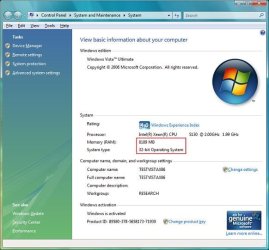
Read the article I mentioned in my post earlier in this thread.

system8189.jpg
 

My Computer My Computer

At a glance

Windows 10 Pro x64 EN-GB1.6 GHz Intel Core i7-720QM Processor6 GBATI Mobility Radeon HD 5850 Graphics
Computer type
Laptop
Computer Manufacturer/Model Number
HP ENVY 17-1150eg
OS
Windows 10 Pro x64 EN-GB
CPU
1.6 GHz Intel Core i7-720QM Processor
Memory
6 GB
Graphics Card(s)
ATI Mobility Radeon HD 5850 Graphics
Sound Card
Beats sound system with integrated subwoofer
Monitor(s) Displays
17" laptop display, 22" LED and 32" Full HD TV through HDMI
Screen Resolution
1600*900 (1), 1920*1080 (2&3)
Hard Drives
Internal: 2 x 500 GB SATA Hard Disk Drive 7200 rpm
External: 2TB for backups, 3TB USB3 network drive for media
Cooling
As Envy runs a bit warm, I have it on a Cooler Master pad
Keyboard
Logitech diNovo Media Desktop Laser (bluetooth)
Mouse
Logitech Performance Mouse MX
Internet Speed
50/10 Mbps VDSL
Antivirus
Windows Defender 4.3.9431.0
Browser
Maxthon 3.5.2., IE11
That's mearly showing you how much physical memory is installed...not what Vista is actually addressing. Microsoft had too many complaints about systems only showing 3.25 GB, even though more was installed, so it was patched.
 

My Computer My Computer

At a glance

Windows 7 Ultimate x64 SP1Intel Core i7-260012 GB Patriot Extreme DDR3-1333Nvidia GTX 470
OS
Windows 7 Ultimate x64 SP1
CPU
Intel Core i7-2600
Motherboard
Gigabyte GA-P67A-UD3P-B3
Memory
12 GB Patriot Extreme DDR3-1333
Graphics Card(s)
Nvidia GTX 470
Monitor(s) Displays
Dell UltraSharp 2209WA
Hard Drives
OCZ Agility3 240 GB, WD5001AALS, WD7501AALS
PSU
OCZ ModStream 700W
Case
CoolerMaster HAF 912 Advanced
Cooling
CoolerMaster Hyper 212 Plus
Back
Top