Is there anything I can do?

Dreakon

New member
Local time
3:04 PM
Messages
21
I've posted things like this in the past, but I don't think I iterated my concerns very well, so I'm going to try again lol...

Let me start by saying I'm pretty OCD when it comes to my desktop and computer in general. I like it clean and with as few icons on the desktop itself as humanly possible, preferably none.

I have Windows 7, I like the taskbar but I have a tendency to overfill it with random things that I use from time to time and enjoy the convenience of having a mere click away (CCleaner, Google Earth, the various programs in the Microsoft Office suite, audio editors, video editors, music and movie players, web browsers, games, programming software(s), etc). I want it to have a lot of things in it, having to navigate the start menu, Explorer, or work to the desktop to open a single program is an unnecessary inconvenience in this day and age. Some might say I don't need to have all of those things a click away, and I don't, but it'd be nice!

However, when it gets overfilled, it gets kind of ugly and eventually moves to a new row, incredibly inconvenient and terrible for my OCD lol. This, coupled with the fact some programs can take up multiple icon spots on the taskbar (for example, multiplayer games where I need to pin the updater to the taskbar, but the game itself takes up another spot) and new programs are regularly opening and closing, taking up even more spots! Drives me crazy! I'm almost ready to go back to Vista solely because I have ways to keeping my desktop nice and organized that were conveniently removed in 7. Right now I'm being handcuffed by this new taskbar lol, it desperately needs a way to allow me to group items together as I wish so I can put updaters and games in the same spot so they don't take up unnecessary space... and so on.

Help! Is there anything I can do to alleviate these annoyances? ;)
 

My Computer My Computer

At a glance

Windows Vista
OS
Windows Vista

My Computer My Computer

At a glance

W 7 64-bit UltimateIntel Q9550 Yorkfield8GB Dominator 8500C5DATI : XFX 5870
Computer Manufacturer/Model Number
* BFK Customs *
OS
W 7 64-bit Ultimate
CPU
Intel Q9550 Yorkfield
Motherboard
ASUS P5Q Pro
Memory
8GB Dominator 8500C5D
Graphics Card(s)
ATI : XFX 5870
Sound Card
Realtek HD Audio 7-1
Monitor(s) Displays
1x 47" LCD HDMI & 3x 26" LCD HDMI
Screen Resolution
1920x1080P & 1920x1200
Hard Drives
1x 80GB Intel X25-M G2 SSD : 1x 500GB & 1x 640GB WD Caviar Black(s)
PSU
Corsair 620HX
Case
Cooler Master RC-690
Cooling
Tuniq Tower 120, 2x 140mm and 3x 120mm case fans
Keyboard
Microsoft 500
Mouse
Razer Diamondback 3G
Internet Speed
14 Mb/s
Other Info
1x Koutech 3Gb/s SATA HDD Hot Swap Rack
Hello Dreakon.


I don't know if this will help you or not because I've never looked at it but have a look to see for yourself, I hope that it will, at the link below.

http://www.sevenforums.com/tutorials/496-taskbar-button-grouping-enable-disable.html?ltr=T
But that would take up even more taskbar space lol. :( And besides, I want things to group together.

When I say grouping, I mean combining two seperate programs into 1 spot on the taskbar. Not combining multiple instances of the same program. Like the example of the game with a updater. The game needs the updater to run first, so I have to pin the updater to the taskbar while when the game itself finally runs, it takes up yet another valuable taskbar slot...

But regardless, I know that isn't possible unfortunately. I'm just wondering if there are any other options that might help my situation.

And I know of programs like 7stacks, but that just aesthetically solves my problem, in the end the programs still take up the taskbar spots when opened. :P
 

My Computer My Computer

At a glance

Windows Vista
OS
Windows Vista
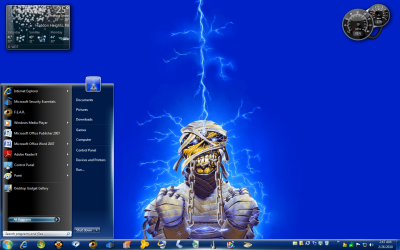
Are you using the start menu to its fullest potential ? I have 14 there and you can add more.
Are you combining on the taskbar ?

I do not like any icons on my desktop either.
 

Attachments

  • Desktop #6.png
    Desktop #6.png
    286.8 KB · Views: 14
  • Desktop #13.jpg
    Desktop #13.jpg
    153.6 KB · Views: 12

My Computer My Computer

At a glance

Windows 7 Ultimate 64BitC2D E82008GB PNY PC2-6400BFG 9600GT x 2
Computer Manufacturer/Model Number
Myself
OS
Windows 7 Ultimate 64Bit
CPU
C2D E8200
Motherboard
XFX 750i
Memory
8GB PNY PC2-6400
Graphics Card(s)
BFG 9600GT x 2
Sound Card
Stock XFX Optical
Monitor(s) Displays
Gateway 22" HD Display
Hard Drives
C: 1 TB G: 500 GB H: 500 GB
PSU
Ultra LSP 550 Pro Lifetime Series
Case
Xion2
Cooling
ThermalTake
Are you referring to the removal of alternate task bars?

There are a couple of nice third party task bar apps that you can probably use to group icons in other locations. Then just use the w7 task bar as it was used in previous windows, as a place for displaying running programs only?
 

My Computer My Computer

At a glance

Windows 7 x64 Ultimatei7 96012 Gig Corsair DominatorNvidia 480
Computer Manufacturer/Model Number
Scratch built
OS
Windows 7 x64 Ultimate
CPU
i7 960
Motherboard
Asus P6X58D
Memory
12 Gig Corsair Dominator
Graphics Card(s)
Nvidia 480
Sound Card
Maudio Delta 44 + breakout box
Monitor(s) Displays
Dell UltraSharp U2410 24in and Samsung 21 dual monitors
Screen Resolution
1920x1200 and 1280x1024
Hard Drives
Primary: Intel X-25M G2 160G SSD
Secondary: Segate baracuda 1.0 TB
HDs in AHCI mode.
PSU
Corasair TX850
Case
Cooler Master HAF
Cooling
Corsair H50
Keyboard
Logitech G15 + N52 game pad
Mouse
Logitech MX518
Internet Speed
15kbs down 4.5kbps up
Other Info
WEI 7.6
CPU & RAM 7.6
Graphics 7.9
Hard disk 7.7

My Computer My Computer

At a glance

Windows 7 Ultimate x64AMD Phenom II X4 940 Black Edition @ 3.4GHz (...Corsair CM2X4096-8500C5 (4 X 2GB)XFX Radeon HD 5770 / Diamond Radeon HD 5770 C...
Computer Manufacturer/Model Number
Rig 1
OS
Windows 7 Ultimate x64
CPU
AMD Phenom II X4 940 Black Edition @ 3.4GHz (AM2+)
Motherboard
Gigabyte GA-MA790X-UD4P (AM2+)
Memory
Corsair CM2X4096-8500C5 (4 X 2GB)
Graphics Card(s)
XFX Radeon HD 5770 / Diamond Radeon HD 5770 CrossFireX
Sound Card
Asus Xonar DS (PCI)
Monitor(s) Displays
Samsung SyncMaster 932bw+ (3)
Screen Resolution
4320x900
Hard Drives
OCZ Vertex 2 80 GB - Windows 7 System --
WD Caviar Black 1TB - Music, Movies, Vids, Pics --
WD Caviar Black 640GB - User Profiles & Games --
WD My Book 320GB external
PSU
Corsair CMPSU-750TX
Case
Cooler Master HAF 932
Cooling
Corsair Hydro Series H50
Keyboard
Logitech Desktop Wave
Mouse
Logitech LX8 Laser
Internet Speed
20 down / 2 up
Other Info
LG GGC-H20L Blu-Ray / HDDVD combo --
Hauppauge HVR-1250 --
Silverstone MFP-51 --
Logitech Webcam C600
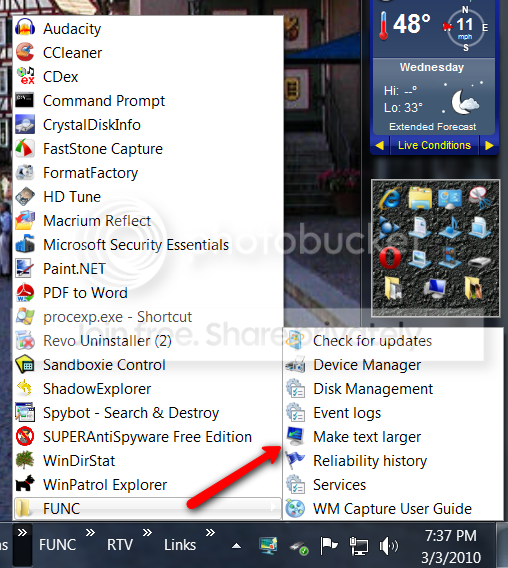
I suggest you group the shortcuts of all those programs into a folder that you can park anywhere (desktop, documents, etc). Then you make a toolbar of that folder (right click on taskbar > toolbars > new toolbar). You can even have subfolders that will fly out when you click on them. See the example of one of my toolbars. Note: I have "Func" both as subfolder and as toolbar - just for fun. I also have the AppLauncher in my tweaked sidebar (just above the Func entries). This is another good repository for quick launch shortcuts.

2010-03-03_1938.png
 

My Computer My Computer

At a glance

Vista, Windows7, Mint Mate, Zorin, Windows 8from 1.6GHz Duo to i7
Computer Manufacturer/Model Number
HP, Dell, Gateway, Toshiba - 4 laptops and 2 desktops
OS
Vista, Windows7, Mint Mate, Zorin, Windows 8
CPU
from 1.6GHz Duo to i7
Monitor(s) Displays
2x HP w2207
Hard Drives
5x HDD, 7x SSD, 12x Externals
Keyboard
with trackball - no mices
Mouse
Trackball mice
Internet Speed
DSL 6000
Are you using the start menu to its fullest potential ? I have 14 there and you can add more.
Are you combining on the taskbar ?

I do not like any icons on my desktop either.
Hey where did u get that great weather app on ur desktop and what is it called please.:)
 

My Computer My Computer

At a glance

Win 7 Home Premium-64bit2.34 gig
Computer Manufacturer/Model Number
Gateway
OS
Win 7 Home Premium-64bit
CPU
2.3
Memory
4 gig
Shortcut keys....might cut down the clutter....
 

My Computer My Computer

At a glance

Windows 7 x64i7-2600K8 GGTX 480
Computer Manufacturer/Model Number
Homebuilt
OS
Windows 7 x64
CPU
i7-2600K
Motherboard
Asus P8Z77-v Pro
Memory
8 G
Graphics Card(s)
GTX 480
Sound Card
Onboard
Monitor(s) Displays
LG W2753V
Screen Resolution
1920x1080
Hard Drives
Crucial M4 128 G SSD
deleted - was a mistake
 

My Computer My Computer

At a glance

Vista, Windows7, Mint Mate, Zorin, Windows 8from 1.6GHz Duo to i7
Computer Manufacturer/Model Number
HP, Dell, Gateway, Toshiba - 4 laptops and 2 desktops
OS
Vista, Windows7, Mint Mate, Zorin, Windows 8
CPU
from 1.6GHz Duo to i7
Monitor(s) Displays
2x HP w2207
Hard Drives
5x HDD, 7x SSD, 12x Externals
Keyboard
with trackball - no mices
Mouse
Trackball mice
Internet Speed
DSL 6000
Are you using the start menu to its fullest potential ? I have 14 there and you can add more.
Are you combining on the taskbar ?

I do not like any icons on my desktop either.
Hey where did u get that great weather app on ur desktop and what is it called please.:)


Are you kidding ? It`s a sidebar gadget !!
 

My Computer My Computer

At a glance

Windows 7 Ultimate 64BitC2D E82008GB PNY PC2-6400BFG 9600GT x 2
Computer Manufacturer/Model Number
Myself
OS
Windows 7 Ultimate 64Bit
CPU
C2D E8200
Motherboard
XFX 750i
Memory
8GB PNY PC2-6400
Graphics Card(s)
BFG 9600GT x 2
Sound Card
Stock XFX Optical
Monitor(s) Displays
Gateway 22" HD Display
Hard Drives
C: 1 TB G: 500 GB H: 500 GB
PSU
Ultra LSP 550 Pro Lifetime Series
Case
Xion2
Cooling
ThermalTake
You could add ObjectDock to the desktop.
 

My Computer My Computer

At a glance

Windows 7 Ultimate 64BitC2D E82008GB PNY PC2-6400BFG 9600GT x 2
Computer Manufacturer/Model Number
Myself
OS
Windows 7 Ultimate 64Bit
CPU
C2D E8200
Motherboard
XFX 750i
Memory
8GB PNY PC2-6400
Graphics Card(s)
BFG 9600GT x 2
Sound Card
Stock XFX Optical
Monitor(s) Displays
Gateway 22" HD Display
Hard Drives
C: 1 TB G: 500 GB H: 500 GB
PSU
Ultra LSP 550 Pro Lifetime Series
Case
Xion2
Cooling
ThermalTake
Are you using the start menu to its fullest potential ? I have 14 there and you can add more.
Are you combining on the taskbar ?

I do not like any icons on my desktop either.
If I had a choice, I wouldn't even have the start menu in Windows 7... all I use it for is to shut down (would much rather have a pinned application in the taskbar that does the same thing) and as another method to bring up My Computer (Explorer already has a spot on my taskbar). Different ways of launching programs still bugs me, because while it's more organized, the programs being launched from the jumplist or using 7stacks are still unpinned and mess with my otherwise pleasant taskbar setup.

Which is why I want the whole Microsoft Office suite to live in only 1 spot on my taskbar, instead of needing a spot for Word and Excel and Access and Powerpoint. And if I need 2 or 3 of those open at the same time? That's a big chunk of the taskbar being used by them. With the way the taskbar is set up, you'd think Microsoft could've come up with some way to group similar Suite programs like that together and live in 1 spot of the taskbar, even if they're all open at the same time.

I think my problem is that I love the new taskbar too much lol. I don't want to leave any program I have unpinned. Doesn't it annoy you when unpinned applications pop up and mess with your filled-up taskbar, or perhaps even send the taskbar to a new row?
 

My Computer My Computer

At a glance

Windows Vista
OS
Windows Vista
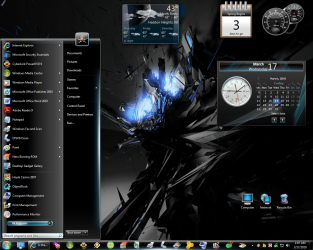
My question is ......And I`m not being rude but Come On! how often do you use a program ??? I work for 5 different companys plus my own. You really need to sit down at your pc and prioratize. How often do you use Word , how often do you use Excel, and so on. I bet you can do it. This pic doesn`t even show the object dock.
 

Attachments

  • Newest pic.png
    Newest pic.png
    366.5 KB · Views: 5

My Computer My Computer

At a glance

Windows 7 Ultimate 64BitC2D E82008GB PNY PC2-6400BFG 9600GT x 2
Computer Manufacturer/Model Number
Myself
OS
Windows 7 Ultimate 64Bit
CPU
C2D E8200
Motherboard
XFX 750i
Memory
8GB PNY PC2-6400
Graphics Card(s)
BFG 9600GT x 2
Sound Card
Stock XFX Optical
Monitor(s) Displays
Gateway 22" HD Display
Hard Drives
C: 1 TB G: 500 GB H: 500 GB
PSU
Ultra LSP 550 Pro Lifetime Series
Case
Xion2
Cooling
ThermalTake

My Computer My Computer

At a glance

W 7 64-bit UltimateIntel Q9550 Yorkfield8GB Dominator 8500C5DATI : XFX 5870
Computer Manufacturer/Model Number
* BFK Customs *
OS
W 7 64-bit Ultimate
CPU
Intel Q9550 Yorkfield
Motherboard
ASUS P5Q Pro
Memory
8GB Dominator 8500C5D
Graphics Card(s)
ATI : XFX 5870
Sound Card
Realtek HD Audio 7-1
Monitor(s) Displays
1x 47" LCD HDMI & 3x 26" LCD HDMI
Screen Resolution
1920x1080P & 1920x1200
Hard Drives
1x 80GB Intel X25-M G2 SSD : 1x 500GB & 1x 640GB WD Caviar Black(s)
PSU
Corsair 620HX
Case
Cooler Master RC-690
Cooling
Tuniq Tower 120, 2x 140mm and 3x 120mm case fans
Keyboard
Microsoft 500
Mouse
Razer Diamondback 3G
Internet Speed
14 Mb/s
Other Info
1x Koutech 3Gb/s SATA HDD Hot Swap Rack
Back
Top