Is this a right choice for the Windows 7 hardware?

jovesharma,
The military class statement means that the components on the board are of a higher military class grade and should hold up to heat better. Take this marketing statements with a grain of salt.....but I too am a MSI fan and have two desk tops built around them and I can attest to their quality.

Then please download this excellent MSI program "Live Update5 and review the updates it suggests and if there is a GPU update add and run it. If it suggests a bios update please don't update till you have read, backed up data and understand the process. I will tell you that with this program it make the process a breeze but with the bios there is always a chance that you can "brick" the system and it's so new and unless you have other issues Leave the Bios Alone for now!
http://www.msi.com/product/mb/A75MA-P35.html#/?div=Utility&os=Win7 64

If the on board graphics aren't high enough for you then I would save up for a graphics card that can run in hybrid mode as mentioned then you will get a combined effect of both gpu's to a degree and I'm thinking it shouldn't break the bank......unless your living in Greece. lol....sorry!
 

My Computer My Computer

At a glance

Windows 7 Ultimate 64i7 3770k OC'd 4.6 @ 1.17v, also FX 8120 & i5 ...32 gb G.Skill Sniper DDR3 10-12-12-31 @ 2133XFX Radeon 7870 2GB DDR5
Computer type
PC/Desktop
Computer Manufacturer/Model Number
A blend of brains, brawn and dumb luck.
OS
Windows 7 Ultimate 64
CPU
i7 3770k OC'd 4.6 @ 1.17v, also FX 8120 & i5 miniITX
Motherboard
MSI P67A-GD80 b3
Memory
32 gb G.Skill Sniper DDR3 10-12-12-31 @ 2133
Graphics Card(s)
XFX Radeon 7870 2GB DDR5
Sound Card
Sound Blaster Z Series Card
Monitor(s) Displays
(2) LG LED 23" 1920 x 1080 2ms Monitors via mini d-port
Screen Resolution
1680 X 1050 p
Hard Drives
Samsung 256 gb 830 SSD sata III
(1) 1 tb WD Black
(2) 1 tb Hitachi deskmates/sata II
(2) 1 tb WD green/sata II
(2) 3 tb Seagate Barracuda
(1) 120 gb OCZ Vertex SS
(1) Drobo 5N w/5 Seagate 3tb
PSU
EVGA modular 1000G2 80% gold rating & APC 1200 RS
Case
CoolerMaster Storm Styker
Cooling
7 case fans 140mm & 120mm, NZXT Kraken X60
Keyboard
(2) Logitech Illuminated Keyboards (1) usb (1) wireless
Mouse
Logitech G700 & T-BC21 - nano nx for the laptop
Internet Speed
Basic 120mbps down
Antivirus
Trend Micro Titanium Max Security & Malwarebytes Premium
Browser
Chrome and IE 10
Other Info
5 Noctua case fans + 3 Noctua in p/p on NZXT cooler
Integrated hot swap drive bays for 2.5" Drives
(2) Lite-on dvd/cd/Blu Ray optical 22X
Integrated fan controller and led on/off
HP Officejet Pro 8630 all-n-one
Hot-swappable 3.5" hard drive bay
Netgear Nighthawk router
Asus USB 3 & sata 6 PCIe card
Vantec IDE to sata adptr./Ultra sata adptr
Lenovo L420 i5 lappy with m sata
Drobo 5N advanced NAS
You can't pigeon-hole users into one brand or another by their usage. The high end gaming systems are all powered by Intel. AMD is only competing right now in the budget arena, and even there, it's got some major competition. Since the OP isn't looking for high end, there are options, but there's no reason to shy away from an Intel i3-2100. For the cost, it's a pretty fast chip.

I prefer Intel, only because I prefer Intel motherboard chipsets compared to anything AMD's side has available to them.
 

My Computer My Computer

At a glance

Windows 7 Ultimate x64 SP1Intel Core i7-260012 GB Patriot Extreme DDR3-1333Nvidia GTX 470
OS
Windows 7 Ultimate x64 SP1
CPU
Intel Core i7-2600
Motherboard
Gigabyte GA-P67A-UD3P-B3
Memory
12 GB Patriot Extreme DDR3-1333
Graphics Card(s)
Nvidia GTX 470
Monitor(s) Displays
Dell UltraSharp 2209WA
Hard Drives
OCZ Agility3 240 GB, WD5001AALS, WD7501AALS
PSU
OCZ ModStream 700W
Case
CoolerMaster HAF 912 Advanced
Cooling
CoolerMaster Hyper 212 Plus
DF,
I take away that the OP has already purchased a AMD APU mobo and chip. I also understand that these APU's are excellent running video and games without the need for a separate GPU but upgrade-able to hybrid at a later date making the system fast, compact, cool and energy efficient to say the least.
 

My Computer My Computer

At a glance

Windows 7 Ultimate 64i7 3770k OC'd 4.6 @ 1.17v, also FX 8120 & i5 ...32 gb G.Skill Sniper DDR3 10-12-12-31 @ 2133XFX Radeon 7870 2GB DDR5
Computer type
PC/Desktop
Computer Manufacturer/Model Number
A blend of brains, brawn and dumb luck.
OS
Windows 7 Ultimate 64
CPU
i7 3770k OC'd 4.6 @ 1.17v, also FX 8120 & i5 miniITX
Motherboard
MSI P67A-GD80 b3
Memory
32 gb G.Skill Sniper DDR3 10-12-12-31 @ 2133
Graphics Card(s)
XFX Radeon 7870 2GB DDR5
Sound Card
Sound Blaster Z Series Card
Monitor(s) Displays
(2) LG LED 23" 1920 x 1080 2ms Monitors via mini d-port
Screen Resolution
1680 X 1050 p
Hard Drives
Samsung 256 gb 830 SSD sata III
(1) 1 tb WD Black
(2) 1 tb Hitachi deskmates/sata II
(2) 1 tb WD green/sata II
(2) 3 tb Seagate Barracuda
(1) 120 gb OCZ Vertex SS
(1) Drobo 5N w/5 Seagate 3tb
PSU
EVGA modular 1000G2 80% gold rating & APC 1200 RS
Case
CoolerMaster Storm Styker
Cooling
7 case fans 140mm & 120mm, NZXT Kraken X60
Keyboard
(2) Logitech Illuminated Keyboards (1) usb (1) wireless
Mouse
Logitech G700 & T-BC21 - nano nx for the laptop
Internet Speed
Basic 120mbps down
Antivirus
Trend Micro Titanium Max Security & Malwarebytes Premium
Browser
Chrome and IE 10
Other Info
5 Noctua case fans + 3 Noctua in p/p on NZXT cooler
Integrated hot swap drive bays for 2.5" Drives
(2) Lite-on dvd/cd/Blu Ray optical 22X
Integrated fan controller and led on/off
HP Officejet Pro 8630 all-n-one
Hot-swappable 3.5" hard drive bay
Netgear Nighthawk router
Asus USB 3 & sata 6 PCIe card
Vantec IDE to sata adptr./Ultra sata adptr
Lenovo L420 i5 lappy with m sata
Drobo 5N advanced NAS
They aren't bad in the budget category, but either is Intel...so a person shouldn't shy away from one or the other. Only when we get to high end systems, does Intel really pully away. 6 months from now...who knows.
 

My Computer My Computer

At a glance

Windows 7 Ultimate x64 SP1Intel Core i7-260012 GB Patriot Extreme DDR3-1333Nvidia GTX 470
OS
Windows 7 Ultimate x64 SP1
CPU
Intel Core i7-2600
Motherboard
Gigabyte GA-P67A-UD3P-B3
Memory
12 GB Patriot Extreme DDR3-1333
Graphics Card(s)
Nvidia GTX 470
Monitor(s) Displays
Dell UltraSharp 2209WA
Hard Drives
OCZ Agility3 240 GB, WD5001AALS, WD7501AALS
PSU
OCZ ModStream 700W
Case
CoolerMaster HAF 912 Advanced
Cooling
CoolerMaster Hyper 212 Plus
Oh and I agree with you, but in this instance.....but I could be wrong the OP has already made a purchase and now is asking how to improve their video performance which as I understand these APU can slay almost any game or video task out there at least at a medium to high setting if not max'd with the hybrid card later and all of this for a very reasonable price.
 

My Computer My Computer

At a glance

Windows 7 Ultimate 64i7 3770k OC'd 4.6 @ 1.17v, also FX 8120 & i5 ...32 gb G.Skill Sniper DDR3 10-12-12-31 @ 2133XFX Radeon 7870 2GB DDR5
Computer type
PC/Desktop
Computer Manufacturer/Model Number
A blend of brains, brawn and dumb luck.
OS
Windows 7 Ultimate 64
CPU
i7 3770k OC'd 4.6 @ 1.17v, also FX 8120 & i5 miniITX
Motherboard
MSI P67A-GD80 b3
Memory
32 gb G.Skill Sniper DDR3 10-12-12-31 @ 2133
Graphics Card(s)
XFX Radeon 7870 2GB DDR5
Sound Card
Sound Blaster Z Series Card
Monitor(s) Displays
(2) LG LED 23" 1920 x 1080 2ms Monitors via mini d-port
Screen Resolution
1680 X 1050 p
Hard Drives
Samsung 256 gb 830 SSD sata III
(1) 1 tb WD Black
(2) 1 tb Hitachi deskmates/sata II
(2) 1 tb WD green/sata II
(2) 3 tb Seagate Barracuda
(1) 120 gb OCZ Vertex SS
(1) Drobo 5N w/5 Seagate 3tb
PSU
EVGA modular 1000G2 80% gold rating & APC 1200 RS
Case
CoolerMaster Storm Styker
Cooling
7 case fans 140mm & 120mm, NZXT Kraken X60
Keyboard
(2) Logitech Illuminated Keyboards (1) usb (1) wireless
Mouse
Logitech G700 & T-BC21 - nano nx for the laptop
Internet Speed
Basic 120mbps down
Antivirus
Trend Micro Titanium Max Security & Malwarebytes Premium
Browser
Chrome and IE 10
Other Info
5 Noctua case fans + 3 Noctua in p/p on NZXT cooler
Integrated hot swap drive bays for 2.5" Drives
(2) Lite-on dvd/cd/Blu Ray optical 22X
Integrated fan controller and led on/off
HP Officejet Pro 8630 all-n-one
Hot-swappable 3.5" hard drive bay
Netgear Nighthawk router
Asus USB 3 & sata 6 PCIe card
Vantec IDE to sata adptr./Ultra sata adptr
Lenovo L420 i5 lappy with m sata
Drobo 5N advanced NAS
Hi All,
I just want to know do I need to install any software for improving graphics performance?
If yes, then please tell me which one.

I'm not playing very high quality videos, but the normal videos, like 360p on youtube, but after one frame, it seems that another frame is lagging.

Also, When I move any window using mouse, it leaves footprints, which shows no grpahics driver is installed.

Is there any option needs to be enabled from the BIOS ?

Thanks.
 

My Computer My Computer

At a glance

Windows XP X86 Service Pack 3AMD A8-3850 APU with Inbuilt Radeon HD Graphics8 GB Kingston
OS
Windows XP X86 Service Pack 3
CPU
AMD A8-3850 APU with Inbuilt Radeon HD Graphics
Motherboard
mSi A75MA-G55
Memory
8 GB Kingston
Sound Card
Realtek HD Audio
Monitor(s) Displays
Samsung SyncMaster P2250 LCD Monitor (22 Inches)
Screen Resolution
1024x768
Hard Drives
2 TB Seagate
Keyboard
Microsoft Wireless
Mouse
Microsoft Wireless
Internet Speed
512 kbps, Downloading ~ 60kbps on MTNL, Delhi
Other Info
This is a Dual Booting machine with Windows 7 X64 Service Pack 1 Installed on another Drive.
Jovesharma, sorry the late response.

You need to install the AMD APU Drivers, since the Motherboard don't have a video chip integrated, you won't find anything in there.

I'm not sure if you already installed Windows 7 64-bit... but i'm leaving you all the combinations.

Win 7 (32-bit): ATI Radeon
Win 7 (64-bit): ATI Radeon
Win XP (32-bit): ATI Radeon
Win XP (64-bit): ATI Radeon

Download the ones you need, inside that page you should download the Catalyst Software Suite, or you could go to "Individual Downloads" and only download the Display Driver and OpenCL Driver (if you don't wan't to install the Catalyst Control Center) it's up to you :)

Cheers.
 

My Computer My Computer

At a glance

Windows
Computer type
PC/Desktop
OS
Windows
Hi Punkster Sir,
I have installed the full Catalyst Control Center on XP's 32-Bit version. But still, I can't see any improve ment in video playing.
Again when I am moving any explorer window around, it's leaving footmarks.
Sir, I would request if you have a little time, you can take my PC control on saturday or sunday, via TeamViewer or something, and then you can easily determine, what is the exact problem, which needs to be resolved in this combination of MSI 75 motherboard and AMD 3850 (Inbuilt Radeon HD Graphics APU Processor).

Thanks sir.
 

My Computer My Computer

At a glance

Windows XP X86 Service Pack 3AMD A8-3850 APU with Inbuilt Radeon HD Graphics8 GB Kingston
OS
Windows XP X86 Service Pack 3
CPU
AMD A8-3850 APU with Inbuilt Radeon HD Graphics
Motherboard
mSi A75MA-G55
Memory
8 GB Kingston
Sound Card
Realtek HD Audio
Monitor(s) Displays
Samsung SyncMaster P2250 LCD Monitor (22 Inches)
Screen Resolution
1024x768
Hard Drives
2 TB Seagate
Keyboard
Microsoft Wireless
Mouse
Microsoft Wireless
Internet Speed
512 kbps, Downloading ~ 60kbps on MTNL, Delhi
Other Info
This is a Dual Booting machine with Windows 7 X64 Service Pack 1 Installed on another Drive.
I am sorry Punkster sir, if I said something wrong.
Sir, I just meant to say that you'd be able to see all problems which I am getting now.

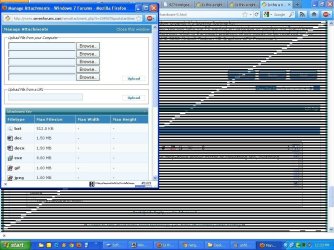
1. Low quality video becomes like more low.
2. This linings problem, most often, when I am selecting the drop-down menus faster or something like, switching from one explorer window to other (using ALT + Tab)

Here is the example screenshot :
I also got this error, when I clicked on file upload button in this sevenforums quick reply page, In total, I get this error most often in this new PC.

error black strips-1.JPG
 
Last edited:

My Computer My Computer

At a glance

Windows XP X86 Service Pack 3AMD A8-3850 APU with Inbuilt Radeon HD Graphics8 GB Kingston
OS
Windows XP X86 Service Pack 3
CPU
AMD A8-3850 APU with Inbuilt Radeon HD Graphics
Motherboard
mSi A75MA-G55
Memory
8 GB Kingston
Sound Card
Realtek HD Audio
Monitor(s) Displays
Samsung SyncMaster P2250 LCD Monitor (22 Inches)
Screen Resolution
1024x768
Hard Drives
2 TB Seagate
Keyboard
Microsoft Wireless
Mouse
Microsoft Wireless
Internet Speed
512 kbps, Downloading ~ 60kbps on MTNL, Delhi
Other Info
This is a Dual Booting machine with Windows 7 X64 Service Pack 1 Installed on another Drive.
Hello jovesharma! i'm sorry for not answering your lastest post, i just logged in..

That seems weird.. really weird, is it possible that you may have got a defective APU??

Usually that black lines are related to hardware instead of drivers..

Of course, i'd like to see a 2nd opinion! Have you tried it in Windows 7 and it's the same?
 

My Computer My Computer

At a glance

Windows
Computer type
PC/Desktop
OS
Windows
Till yet Windows 7 don't show such linings.
Can you please take my PC remote connection now?
I am working on WIndows 7 - X64 right now.
 

My Computer My Computer

At a glance

Windows XP X86 Service Pack 3AMD A8-3850 APU with Inbuilt Radeon HD Graphics8 GB Kingston
OS
Windows XP X86 Service Pack 3
CPU
AMD A8-3850 APU with Inbuilt Radeon HD Graphics
Motherboard
mSi A75MA-G55
Memory
8 GB Kingston
Sound Card
Realtek HD Audio
Monitor(s) Displays
Samsung SyncMaster P2250 LCD Monitor (22 Inches)
Screen Resolution
1024x768
Hard Drives
2 TB Seagate
Keyboard
Microsoft Wireless
Mouse
Microsoft Wireless
Internet Speed
512 kbps, Downloading ~ 60kbps on MTNL, Delhi
Other Info
This is a Dual Booting machine with Windows 7 X64 Service Pack 1 Installed on another Drive.
tomorrow I am thinking to go back to the vendor to relace the defective things, so if APU is also defective, then I will replace that as well.
 

My Computer My Computer

At a glance

Windows XP X86 Service Pack 3AMD A8-3850 APU with Inbuilt Radeon HD Graphics8 GB Kingston
OS
Windows XP X86 Service Pack 3
CPU
AMD A8-3850 APU with Inbuilt Radeon HD Graphics
Motherboard
mSi A75MA-G55
Memory
8 GB Kingston
Sound Card
Realtek HD Audio
Monitor(s) Displays
Samsung SyncMaster P2250 LCD Monitor (22 Inches)
Screen Resolution
1024x768
Hard Drives
2 TB Seagate
Keyboard
Microsoft Wireless
Mouse
Microsoft Wireless
Internet Speed
512 kbps, Downloading ~ 60kbps on MTNL, Delhi
Other Info
This is a Dual Booting machine with Windows 7 X64 Service Pack 1 Installed on another Drive.
At present on Windows 7, what I am seeing is, the video issue only, that low quality video becomes worst.
Do I need to replace this APU or need to buy a graphics card?
 

My Computer My Computer

At a glance

Windows XP X86 Service Pack 3AMD A8-3850 APU with Inbuilt Radeon HD Graphics8 GB Kingston
OS
Windows XP X86 Service Pack 3
CPU
AMD A8-3850 APU with Inbuilt Radeon HD Graphics
Motherboard
mSi A75MA-G55
Memory
8 GB Kingston
Sound Card
Realtek HD Audio
Monitor(s) Displays
Samsung SyncMaster P2250 LCD Monitor (22 Inches)
Screen Resolution
1024x768
Hard Drives
2 TB Seagate
Keyboard
Microsoft Wireless
Mouse
Microsoft Wireless
Internet Speed
512 kbps, Downloading ~ 60kbps on MTNL, Delhi
Other Info
This is a Dual Booting machine with Windows 7 X64 Service Pack 1 Installed on another Drive.
From what I've read you shouldn't need to purchase a card to run games and video's at high levels. Only when you want to max out or close would the card running in hybrid mode be needed. Sorry you're having all the issues and hope you get them worked out with replacement or tuning.
 

My Computer My Computer

At a glance

Windows 7 Ultimate 64i7 3770k OC'd 4.6 @ 1.17v, also FX 8120 & i5 ...32 gb G.Skill Sniper DDR3 10-12-12-31 @ 2133XFX Radeon 7870 2GB DDR5
Computer type
PC/Desktop
Computer Manufacturer/Model Number
A blend of brains, brawn and dumb luck.
OS
Windows 7 Ultimate 64
CPU
i7 3770k OC'd 4.6 @ 1.17v, also FX 8120 & i5 miniITX
Motherboard
MSI P67A-GD80 b3
Memory
32 gb G.Skill Sniper DDR3 10-12-12-31 @ 2133
Graphics Card(s)
XFX Radeon 7870 2GB DDR5
Sound Card
Sound Blaster Z Series Card
Monitor(s) Displays
(2) LG LED 23" 1920 x 1080 2ms Monitors via mini d-port
Screen Resolution
1680 X 1050 p
Hard Drives
Samsung 256 gb 830 SSD sata III
(1) 1 tb WD Black
(2) 1 tb Hitachi deskmates/sata II
(2) 1 tb WD green/sata II
(2) 3 tb Seagate Barracuda
(1) 120 gb OCZ Vertex SS
(1) Drobo 5N w/5 Seagate 3tb
PSU
EVGA modular 1000G2 80% gold rating & APC 1200 RS
Case
CoolerMaster Storm Styker
Cooling
7 case fans 140mm & 120mm, NZXT Kraken X60
Keyboard
(2) Logitech Illuminated Keyboards (1) usb (1) wireless
Mouse
Logitech G700 & T-BC21 - nano nx for the laptop
Internet Speed
Basic 120mbps down
Antivirus
Trend Micro Titanium Max Security & Malwarebytes Premium
Browser
Chrome and IE 10
Other Info
5 Noctua case fans + 3 Noctua in p/p on NZXT cooler
Integrated hot swap drive bays for 2.5" Drives
(2) Lite-on dvd/cd/Blu Ray optical 22X
Integrated fan controller and led on/off
HP Officejet Pro 8630 all-n-one
Hot-swappable 3.5" hard drive bay
Netgear Nighthawk router
Asus USB 3 & sata 6 PCIe card
Vantec IDE to sata adptr./Ultra sata adptr
Lenovo L420 i5 lappy with m sata
Drobo 5N advanced NAS
But sir, what should I say them to replace APU or motherboard?
In My Computer Properties, everything is showing as fine.

my_comp.png
 

My Computer My Computer

At a glance

Windows XP X86 Service Pack 3AMD A8-3850 APU with Inbuilt Radeon HD Graphics8 GB Kingston
OS
Windows XP X86 Service Pack 3
CPU
AMD A8-3850 APU with Inbuilt Radeon HD Graphics
Motherboard
mSi A75MA-G55
Memory
8 GB Kingston
Sound Card
Realtek HD Audio
Monitor(s) Displays
Samsung SyncMaster P2250 LCD Monitor (22 Inches)
Screen Resolution
1024x768
Hard Drives
2 TB Seagate
Keyboard
Microsoft Wireless
Mouse
Microsoft Wireless
Internet Speed
512 kbps, Downloading ~ 60kbps on MTNL, Delhi
Other Info
This is a Dual Booting machine with Windows 7 X64 Service Pack 1 Installed on another Drive.
I believe the issue is related to the software, windows 7 seems OK..

Let's try one more thing...

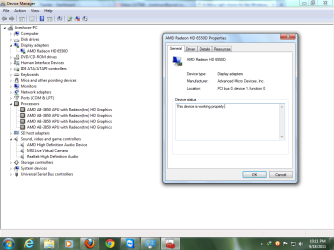
Send a screenshot of the device manager and open up the video (or graphics) adapter, please.
 

My Computer My Computer

At a glance

Windows
Computer type
PC/Desktop
OS
Windows
Sir, I have Teamviewer installed, shall I start it? so that you can easily see the settings..?
display-adaptor.png
 

My Computer My Computer

At a glance

Windows XP X86 Service Pack 3AMD A8-3850 APU with Inbuilt Radeon HD Graphics8 GB Kingston
OS
Windows XP X86 Service Pack 3
CPU
AMD A8-3850 APU with Inbuilt Radeon HD Graphics
Motherboard
mSi A75MA-G55
Memory
8 GB Kingston
Sound Card
Realtek HD Audio
Monitor(s) Displays
Samsung SyncMaster P2250 LCD Monitor (22 Inches)
Screen Resolution
1024x768
Hard Drives
2 TB Seagate
Keyboard
Microsoft Wireless
Mouse
Microsoft Wireless
Internet Speed
512 kbps, Downloading ~ 60kbps on MTNL, Delhi
Other Info
This is a Dual Booting machine with Windows 7 X64 Service Pack 1 Installed on another Drive.
Jovesharma, i'm not on my PC right now, and i really don't know how to use teamviewer, so let's stick to the thread to see if we can find the root of your issue
 

My Computer My Computer

At a glance

Windows
Computer type
PC/Desktop
OS
Windows
Sir, this is the screenshot of device manager and graphics
 

Attachments

  • 175937d1316364136-right-choice-windows-7-hardware-display-adaptor.png
    175937d1316364136-right-choice-windows-7-hardware-display-adaptor.png
    53.7 KB · Views: 2

My Computer My Computer

At a glance

Windows XP X86 Service Pack 3AMD A8-3850 APU with Inbuilt Radeon HD Graphics8 GB Kingston
OS
Windows XP X86 Service Pack 3
CPU
AMD A8-3850 APU with Inbuilt Radeon HD Graphics
Motherboard
mSi A75MA-G55
Memory
8 GB Kingston
Sound Card
Realtek HD Audio
Monitor(s) Displays
Samsung SyncMaster P2250 LCD Monitor (22 Inches)
Screen Resolution
1024x768
Hard Drives
2 TB Seagate
Keyboard
Microsoft Wireless
Mouse
Microsoft Wireless
Internet Speed
512 kbps, Downloading ~ 60kbps on MTNL, Delhi
Other Info
This is a Dual Booting machine with Windows 7 X64 Service Pack 1 Installed on another Drive.
Apparently the driver is installed correctly.

I'd suggest you to take the PC to the place where you got it to see if there's something they can do... because everything seems correct, aside the windows XP picture that looks really weird.. Usually APUs don't need a separate video card, i've seen the same APU as yours running Dirt 3 at 1080p without problems! so i'm guessing... wait!

Download the portable speccy from here Speccy - Builds and post a screenshot of the main window, maximized please. I just want to check the Temps on your PC, that could be harming it.
 

My Computer My Computer

At a glance

Windows
Computer type
PC/Desktop
OS
Windows
Back
Top