Is this config. dangerous

geniulmalefic

Push the limits!
Member
VIP
Local time
12:25 PM
Messages
186
Location
Look behind you...
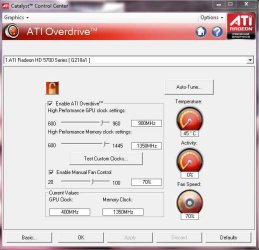
Hi,I'm new in Overclocking PC,and I want to know if this config. is dangerous.
I've red somewhere that "overclocking reduce life of your PC" is that true?
I posted a pic. down \here ,please tell me is this config dangerous?
 

Attachments

  • config.png
    config.png
    464.7 KB · Views: 100

My Computer

Computer Manufacturer/Model Number
AMD Athlon 64x2 dual core 4400+
OS
Windows 7 Enterprise x64
CPU
2,3GHz
Motherboard
ASUS
Memory
2GB DDR2
Graphics Card(s)
ATI Radeon HD 2400
Sound Card
Realtek
Monitor(s) Displays
Benq G900W
Screen Resolution
1440x900
Hard Drives
160 GB
Hi,I'm new in Overclocking PC,and I want to know if this config. is dangerous.
I've red somewhere that "overclocking reduce life of your PC" is that true?
I posted a pic. down \here ,please tell me is this config dangerous?


Hello,


There is no 'safe' clock, its down to trial and error.

Because i don't know the stock speed of the card in question, i would say only do maybe 10mhz bump just to make sure you don't fry the card.

And yes overclocking does reduce pc life-span as you are pushing hardware past its rated factory set speed. meaning its going to get hotter and do more things than it is meant to.

Go ahead and OC, do it like i said, 5 - 10 mhz bumps and

MAKE SURE TO STRESS TEST THE CARD EACH BOOT UNTILL YOU ARE CERTAIN IT IS STABLE.

Sorry to use caps, but that is one thing to always remember.

If its starts crashing, lower the clock.

If you need anymore help, there are tutorials on this forum and all over the web to help.

Post back with you findings

Lucky

 

My Computer

Computer Manufacturer/Model Number
The HAFmeister (Custom)
OS
Windows 7 Ultimate x64 RTM + SP1
CPU
Intel Core i7 950 3.06GHZ (OC'd to 3.99Ghz)
Motherboard
Asus Rampage III Extreme x58 SATA 6GB & USB 3.0
Memory
6GB OCZ Reaper HPC Edition PC3-16000 (set 1606Mhz 8-8-8-26)
Graphics Card(s)
EVGA Nvidia Geforce GTX 570
Sound Card
Creative SB X-Fi Titanium Fatal1ty Professional Series
Monitor(s) Displays
Samsung SM2433BW 24" Widescreen Monitor
Screen Resolution
1920x1200
Hard Drives
Western Digital Caviar Black 500GB 32Mb Buffer SATA II
Western Digital Caviar Black 750GB 32Mb Buffer SATA II
Western Digital Caviar Blue 500GB 16Mb Buffer SATA II
Western Digital My Book Essential Edition 750GB USB
Samsung Spinpoint 2TB SATA II
PSU
Thermaltake Toughpower 1200w (Modular)
Case
CoolerMaster HAF-932
Cooling
Zalman Reserator XT and ZM-WB5 Plus - GPU uses Stock coolers
Keyboard
Logitech G510
Mouse
Logitech G9 Gaming Mouse
Internet Speed
3MB Profile - 350-400kbs (Real-Speed)
Other Info
IcyBox Hot-Swap Bay,
Logitech G27 Steering Wheel,
Xbox 360 Wirless Elite Controller with Microsoft Reciever and
Play & Charge Kit,
Belkin USB Wireless Adaptor,
GAME Generic Controller (Playstation Looky-Likey),
Epson SX125 All-in-One.
Hi,I'm new in Overclocking PC,and I want to know if this config. is dangerous.
I've red somewhere that "overclocking reduce life of your PC" is that true?
I posted a pic. down \here ,please tell me is this config dangerous?


Hello,


There is no 'safe' clock, its down to trial and error.

Because i don't know the stock speed of the card in question, i would say only do maybe 10mhz bump just to make sure you don't fry the card.

And yes overclocking does reduce pc life-span as you are pushing hardware past its rated factory set speed. meaning its going to get hotter and do more things than it is meant to.

Go ahead and OC, do it like i said, 5 - 10 mhz bumps and

MAKE SURE TO STRESS TEST THE CARD EACH BOOT UNTILL YOU ARE CERTAIN IT IS STABLE.

Sorry to use caps, but that is one thing to always remember.

If its starts crashing, lower the clock.

If you need anymore help, there are tutorials on this forum and all over the web to help.

Post back with you findings

Lucky
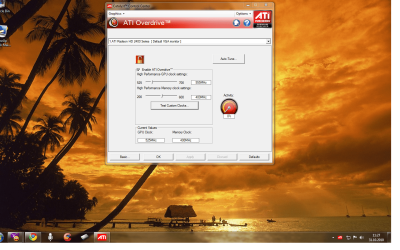
I've selected Auto-tune and put my OC clock to 620 MHz.
So if I let it this way,it could possible to damage?
Thanks mate!
 

My Computer

Computer Manufacturer/Model Number
AMD Athlon 64x2 dual core 4400+
OS
Windows 7 Enterprise x64
CPU
2,3GHz
Motherboard
ASUS
Memory
2GB DDR2
Graphics Card(s)
ATI Radeon HD 2400
Sound Card
Realtek
Monitor(s) Displays
Benq G900W
Screen Resolution
1440x900
Hard Drives
160 GB
Personally i would'nt use anything 'auto' for overclocking, just incase it OC's to a particular clock that it eventually can't handle and will then cause damage.

Like i said, baby steps.

Also, you have made sure all your drivers are up to date and everything is backed up.

Oh, may i ask what your purpose is to overclock your card as well?

The reason i ask, is because you are OC'ing a lower end card and i was just wondering what you might be expecting to get out of this oc in the end?


Lucky
 

My Computer

Computer Manufacturer/Model Number
The HAFmeister (Custom)
OS
Windows 7 Ultimate x64 RTM + SP1
CPU
Intel Core i7 950 3.06GHZ (OC'd to 3.99Ghz)
Motherboard
Asus Rampage III Extreme x58 SATA 6GB & USB 3.0
Memory
6GB OCZ Reaper HPC Edition PC3-16000 (set 1606Mhz 8-8-8-26)
Graphics Card(s)
EVGA Nvidia Geforce GTX 570
Sound Card
Creative SB X-Fi Titanium Fatal1ty Professional Series
Monitor(s) Displays
Samsung SM2433BW 24" Widescreen Monitor
Screen Resolution
1920x1200
Hard Drives
Western Digital Caviar Black 500GB 32Mb Buffer SATA II
Western Digital Caviar Black 750GB 32Mb Buffer SATA II
Western Digital Caviar Blue 500GB 16Mb Buffer SATA II
Western Digital My Book Essential Edition 750GB USB
Samsung Spinpoint 2TB SATA II
PSU
Thermaltake Toughpower 1200w (Modular)
Case
CoolerMaster HAF-932
Cooling
Zalman Reserator XT and ZM-WB5 Plus - GPU uses Stock coolers
Keyboard
Logitech G510
Mouse
Logitech G9 Gaming Mouse
Internet Speed
3MB Profile - 350-400kbs (Real-Speed)
Other Info
IcyBox Hot-Swap Bay,
Logitech G27 Steering Wheel,
Xbox 360 Wirless Elite Controller with Microsoft Reciever and
Play & Charge Kit,
Belkin USB Wireless Adaptor,
GAME Generic Controller (Playstation Looky-Likey),
Epson SX125 All-in-One.
Personally i would'nt use anything 'auto' for overclocking, just incase it OC's to a particular clock that it eventually can't handle and will then cause damage.

Like i said, baby steps.

Also, you have made sure all your drivers are up to date and everything is backed up.

Oh, may i ask what your purpose is to overclock your card as well?

The reason i ask, is because you are OC'ing a lower end card and i was just wondering what you might be expecting to get out of this oc in the end?


Lucky
Well... my PC is a low-tech so...I experience lag in some games even on low settings.
 

My Computer

Computer Manufacturer/Model Number
AMD Athlon 64x2 dual core 4400+
OS
Windows 7 Enterprise x64
CPU
2,3GHz
Motherboard
ASUS
Memory
2GB DDR2
Graphics Card(s)
ATI Radeon HD 2400
Sound Card
Realtek
Monitor(s) Displays
Benq G900W
Screen Resolution
1440x900
Hard Drives
160 GB
What card do U have? what's the default speeds/clock?
try to upgrade Ur catalyst it will show also a fan speed control.

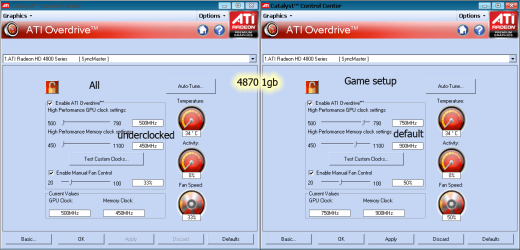
This is the default for 4870 but I downclocked it because lower the temp and power consumption by half.
Only when play games rise to 750/900.
But first must find defaults for Ur card then rise step by step.
 

Attachments

  • ATi.png
    ATi.png
    31.4 KB · Views: 13

My Computer

Computer type
PC/Desktop
Computer Manufacturer/Model Number
696
OS
7 Ultimate x64 sp1
CPU
Intel i5-4690K
Motherboard
GA Z97X Gaming 5
Memory
16Gb HyperX fury
Graphics Card(s)
R9-270x 2Gb
Sound Card
On Board
Monitor(s) Displays
2443NW
Screen Resolution
1920x1200
Hard Drives
WD5000 -
WD5001 -
WD1002
PSU
Cft-650-14cs
Case
Very Big Case
Cooling
stock
Keyboard
G11
Mouse
Logitech
Internet Speed
Adsl
Browser
FF
Other Info
RWD
What card do U have? what's the default speeds/clock?
try to upgrade Ur catalyst it will show also a fan speed control.

This is the default for 4870 but I downclocked it because lower the temp and power consumption by half.
Only when play games rise to 750/900.
But first must find defaults for Ur card then rise step by step.

I have the latest drivers for my videos card,but it doesn't show a fan control or something like that.
My video card is ATI Radeon HD 2400 PRO PCI-E
 

My Computer

Computer Manufacturer/Model Number
AMD Athlon 64x2 dual core 4400+
OS
Windows 7 Enterprise x64
CPU
2,3GHz
Motherboard
ASUS
Memory
2GB DDR2
Graphics Card(s)
ATI Radeon HD 2400
Sound Card
Realtek
Monitor(s) Displays
Benq G900W
Screen Resolution
1440x900
Hard Drives
160 GB
Im pretty sure you could clock it more with the proper cooling and settings

seriously that looks like a regular clock mine is much higher but i also run a hd5770

pretty much you have to know the boundries of you're system any mistakes made can make or break you and cost you time and money unless you have cash to purchase another card which i would recommend anyway if it is lagging and not doing the job

I can post a pic of my gpu but i doubt it would be any real help to you cause we have tottally different set ups that will also apply to performance

if you feel the gpu is doing the job look at other options like cpu or adding more ram a simple oc of a card really won't do much but put more strain on something that is already pushed hard
 

Attachments

  • gpu temp.jpg
    gpu temp.jpg
    39.6 KB · Views: 9

My Computer

Computer type
PC/Desktop
Computer Manufacturer/Model Number
CoreI7-6700K MrFingerIII Special Builds
OS
Windows 10 Home Premium 64bit sp1
CPU
Intel I7-6700K @ 4.6 Ghz 1.344 volts everyday OC
Motherboard
Asrock Fatality K6 Z170 Socket 1151
Memory
32GB G-Skill TridentZ 3200mhz 16-18-18-38 DDR4
Graphics Card(s)
Sli Gigabyte Windforce GTX 980 G1
Sound Card
AC97 Creative Rage Tactic 3D Headphones Bluetooth
Monitor(s) Displays
27" Asus ROG Swift PG278Q G-Sync 48" Vizio Smart HD TV
Screen Resolution
2560x1440p 27"- 48" Currently Gaming at 2560x1440p Res 2K
Hard Drives
250GB Samsung Evo840SSD Seagate baracuda 500 GB WD Mybook 500Gb 1TB Seagate Barracuda
PSU
HX1050w Corsair Silver 80plus certified crosfire/sli
Case
Enthod Pro Full Tower
Cooling
Corsair H110i GT 280 mm High Performance WaterBlock
Keyboard
Logitech wireless keyboard
Mouse
Logitech wireless mouse
Internet Speed
Cox Cable 100+ mb
Antivirus
WebRoot Spysweeper with Antivirus
Browser
IE-10, Chrome, Opera
Other Info
My Other Rig is a AMD FX8320E @4.6Ghz 16GB Ballistic Sport Ram
Mobo Asrock Fatality 990FX 120GB OCZ SSD 1TB Seagate Barracuda Corsair H75 Cooling PSU Corsair CX750
GPU GTX Gigabyte 970G1
Im pretty sure you could clock it more with the proper cooling and settings

seriously that looks like a regular clock mine is much higher but i also run a hd5770

pretty much you have to know the boundries of you're system any mistakes made can make or break you and cost you time and money unless you have cash to purchase another card which i would recommend anyway if it is lagging and not doing the job

I can post a pic of my gpu but i doubt it would be any real help to you cause we have tottally different set ups that will also apply to performance

if you feel the gpu is doing the job look at other options like cpu or adding more ram a simple oc of a card really won't do much but put more strain on something that is already pushed hard

Dude,in Romania money ain't enough anytime,here everything is expensive than in other countryes.
 

My Computer

Computer Manufacturer/Model Number
AMD Athlon 64x2 dual core 4400+
OS
Windows 7 Enterprise x64
CPU
2,3GHz
Motherboard
ASUS
Memory
2GB DDR2
Graphics Card(s)
ATI Radeon HD 2400
Sound Card
Realtek
Monitor(s) Displays
Benq G900W
Screen Resolution
1440x900
Hard Drives
160 GB
Im pretty sure you could clock it more with the proper cooling and settings

seriously that looks like a regular clock mine is much higher but i also run a hd5770

pretty much you have to know the boundries of you're system any mistakes made can make or break you and cost you time and money unless you have cash to purchase another card which i would recommend anyway if it is lagging and not doing the job

I can post a pic of my gpu but i doubt it would be any real help to you cause we have tottally different set ups that will also apply to performance

if you feel the gpu is doing the job look at other options like cpu or adding more ram a simple oc of a card really won't do much but put more strain on something that is already pushed hard

Dude,in Romania money ain't enough anytime,here everything is expensive than in other countryes.
well there are good options like saving for it maybe I save up for something i need to get if i don't have immediate funds most of all countries right now are having money woe's don't get me wrong not just anyone can just purchase when they want to but me being the sole provider for my familly sometimes you have to sacrafice to get what you want :cool:
 

My Computer

Computer type
PC/Desktop
Computer Manufacturer/Model Number
CoreI7-6700K MrFingerIII Special Builds
OS
Windows 10 Home Premium 64bit sp1
CPU
Intel I7-6700K @ 4.6 Ghz 1.344 volts everyday OC
Motherboard
Asrock Fatality K6 Z170 Socket 1151
Memory
32GB G-Skill TridentZ 3200mhz 16-18-18-38 DDR4
Graphics Card(s)
Sli Gigabyte Windforce GTX 980 G1
Sound Card
AC97 Creative Rage Tactic 3D Headphones Bluetooth
Monitor(s) Displays
27" Asus ROG Swift PG278Q G-Sync 48" Vizio Smart HD TV
Screen Resolution
2560x1440p 27"- 48" Currently Gaming at 2560x1440p Res 2K
Hard Drives
250GB Samsung Evo840SSD Seagate baracuda 500 GB WD Mybook 500Gb 1TB Seagate Barracuda
PSU
HX1050w Corsair Silver 80plus certified crosfire/sli
Case
Enthod Pro Full Tower
Cooling
Corsair H110i GT 280 mm High Performance WaterBlock
Keyboard
Logitech wireless keyboard
Mouse
Logitech wireless mouse
Internet Speed
Cox Cable 100+ mb
Antivirus
WebRoot Spysweeper with Antivirus
Browser
IE-10, Chrome, Opera
Other Info
My Other Rig is a AMD FX8320E @4.6Ghz 16GB Ballistic Sport Ram
Mobo Asrock Fatality 990FX 120GB OCZ SSD 1TB Seagate Barracuda Corsair H75 Cooling PSU Corsair CX750
GPU GTX Gigabyte 970G1
Im pretty sure you could clock it more with the proper cooling and settings

seriously that looks like a regular clock mine is much higher but i also run a hd5770

pretty much you have to know the boundries of you're system any mistakes made can make or break you and cost you time and money unless you have cash to purchase another card which i would recommend anyway if it is lagging and not doing the job

I can post a pic of my gpu but i doubt it would be any real help to you cause we have tottally different set ups that will also apply to performance

if you feel the gpu is doing the job look at other options like cpu or adding more ram a simple oc of a card really won't do much but put more strain on something that is already pushed hard

Dude,in Romania money ain't enough anytime,here everything is expensive than in other countryes.
well there are good options like saving for it maybe I save up for something i need to get if i don't have immediate funds most of all countries right now are having money woe's don't get me wrong not just anyone can just purchase when they want to but me being the sole provider for my familly sometimes you have to sacrafice to get what you want :cool:

I understand,but trust me dude,here is economic crises before it realy start.
 

My Computer

Computer Manufacturer/Model Number
AMD Athlon 64x2 dual core 4400+
OS
Windows 7 Enterprise x64
CPU
2,3GHz
Motherboard
ASUS
Memory
2GB DDR2
Graphics Card(s)
ATI Radeon HD 2400
Sound Card
Realtek
Monitor(s) Displays
Benq G900W
Screen Resolution
1440x900
Hard Drives
160 GB
Dont worry on the other thread we have taken care of you and you will be happy to know we care about your wallet too :cool:
 

My Computer

Computer type
PC/Desktop
Computer Manufacturer/Model Number
CoreI7-6700K MrFingerIII Special Builds
OS
Windows 10 Home Premium 64bit sp1
CPU
Intel I7-6700K @ 4.6 Ghz 1.344 volts everyday OC
Motherboard
Asrock Fatality K6 Z170 Socket 1151
Memory
32GB G-Skill TridentZ 3200mhz 16-18-18-38 DDR4
Graphics Card(s)
Sli Gigabyte Windforce GTX 980 G1
Sound Card
AC97 Creative Rage Tactic 3D Headphones Bluetooth
Monitor(s) Displays
27" Asus ROG Swift PG278Q G-Sync 48" Vizio Smart HD TV
Screen Resolution
2560x1440p 27"- 48" Currently Gaming at 2560x1440p Res 2K
Hard Drives
250GB Samsung Evo840SSD Seagate baracuda 500 GB WD Mybook 500Gb 1TB Seagate Barracuda
PSU
HX1050w Corsair Silver 80plus certified crosfire/sli
Case
Enthod Pro Full Tower
Cooling
Corsair H110i GT 280 mm High Performance WaterBlock
Keyboard
Logitech wireless keyboard
Mouse
Logitech wireless mouse
Internet Speed
Cox Cable 100+ mb
Antivirus
WebRoot Spysweeper with Antivirus
Browser
IE-10, Chrome, Opera
Other Info
My Other Rig is a AMD FX8320E @4.6Ghz 16GB Ballistic Sport Ram
Mobo Asrock Fatality 990FX 120GB OCZ SSD 1TB Seagate Barracuda Corsair H75 Cooling PSU Corsair CX750
GPU GTX Gigabyte 970G1

My Computer

Computer Manufacturer/Model Number
AMD Athlon 64x2 dual core 4400+
OS
Windows 7 Enterprise x64
CPU
2,3GHz
Motherboard
ASUS
Memory
2GB DDR2
Graphics Card(s)
ATI Radeon HD 2400
Sound Card
Realtek
Monitor(s) Displays
Benq G900W
Screen Resolution
1440x900
Hard Drives
160 GB

My Computer

Computer Manufacturer/Model Number
Hera
OS
Windows 7 Ultimate x64, Mint 9
CPU
Intel i5-2500k
Motherboard
ASUS P8P67 Pro
Memory
2x 4Gb Corsair VENGEANCE DDR3-1600
Graphics Card(s)
NVidia GeForce N260GTX Twin Frozr
Sound Card
Realtek HD OnBoard Audio
Monitor(s) Displays
ASUS 24" Monitor
Screen Resolution
1920x1080
Hard Drives
G.SKILL Phoenix Series 60GB SATA II MLC Internal Solid State Drive (SSD)
SAMSUNG Spinpoint F3R 1TB 7200 RPM 32MB Cache SATA II
PSU
Cooler Master Real Power Pro 750W
Case
Cooler Master Haf 932
Cooling
Fans
Keyboard
Razer Tarantula
Mouse
Razer Lachesis
Internet Speed
not fast enough
Back
Top