ISO burning programs wont recognize my dvd drive

hwally

New member
Local time
10:37 PM
Messages
25
I have PowerISO and ImgBurn installed on my computer. When I try to use them to burn a dvd they only recognize my cd drive not the dvd drive. The dvd drive is listed in bios and also when I go to computer in the start menu. The dvd drive does function as it should.
 

My Computer My Computer

OS
windows 7 ultimate 64-bit
You have 2 drives that (shouldbe ) capable of writing CDs/DVDs ?
Reading works fine?
 

My Computer My Computer

Computer type
Laptop
Computer Manufacturer/Model Number
ACER ASPIRE 5742G
OS
Microsoft Windows 7 Home Premium 64-bits 7601 Multiprocessor Free Service Pack 1
CPU
Intel(R) Core(TM) i3 CPU M 370 @ 2.40GHz
Motherboard
Acer Aspire 5742G
Memory
4,00 GB
Graphics Card(s)
ATI Mobility Radeon HD 5400 Series
Sound Card
(1) AMD High Definition Audio Device (2) Realtek High Defi
Screen Resolution
1366 x 768 x 32 bits (4294967296 colors) @ 60 Hz
Hard Drives
WDC WD5000BEVT-22ZAT0

My Computer My Computer

Computer type
Laptop
Computer Manufacturer/Model Number
ACER ASPIRE 5742G
OS
Microsoft Windows 7 Home Premium 64-bits 7601 Multiprocessor Free Service Pack 1
CPU
Intel(R) Core(TM) i3 CPU M 370 @ 2.40GHz
Motherboard
Acer Aspire 5742G
Memory
4,00 GB
Graphics Card(s)
ATI Mobility Radeon HD 5400 Series
Sound Card
(1) AMD High Definition Audio Device (2) Realtek High Defi
Screen Resolution
1366 x 768 x 32 bits (4294967296 colors) @ 60 Hz
Hard Drives
WDC WD5000BEVT-22ZAT0
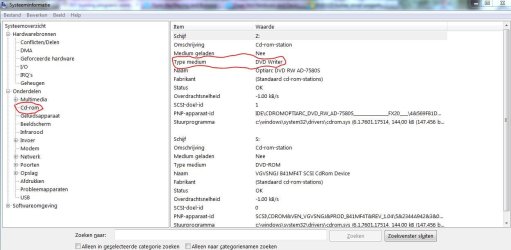
Run msinfo32 and post a screenshot of CDROM.
 

Attachments

  • Knipsel.JPG
    Knipsel.JPG
    84.9 KB · Views: 11

My Computer My Computer

Computer type
Laptop
Computer Manufacturer/Model Number
ACER ASPIRE 5742G
OS
Microsoft Windows 7 Home Premium 64-bits 7601 Multiprocessor Free Service Pack 1
CPU
Intel(R) Core(TM) i3 CPU M 370 @ 2.40GHz
Motherboard
Acer Aspire 5742G
Memory
4,00 GB
Graphics Card(s)
ATI Mobility Radeon HD 5400 Series
Sound Card
(1) AMD High Definition Audio Device (2) Realtek High Defi
Screen Resolution
1366 x 768 x 32 bits (4294967296 colors) @ 60 Hz
Hard Drives
WDC WD5000BEVT-22ZAT0
Ummm. Just a thought. In Imgburn, you have a dropdown arrow where it chooses the optical it thinks you want. Just for the heck of it, see if your dvd is listed below.
 

My Computer My Computer

Computer Manufacturer/Model Number
8 home-builds from the 80's into 2004
OS
W7 Home Premium 32bit
Hello, Problem solved! I ran the playing and burning CDs and DVDs troubleshooter and found out the DVD drive wasn't capable of writing DVDs. I installed another and it now works. Thank you very much for your time and expertise. :party:
 

My Computer My Computer

OS
windows 7 ultimate 64-bit
You could have booted from linux ubuntu live CD and try to burn How to burn a DVD on Ubuntu | Ubuntu

If it fails as well: Hardware error

Maybe it isn't a dvd writer at all, but a dvd player? Maybe write laserlight got damaged? Throw it away
 

My Computer My Computer

Computer type
Laptop
Computer Manufacturer/Model Number
ACER ASPIRE 5742G
OS
Microsoft Windows 7 Home Premium 64-bits 7601 Multiprocessor Free Service Pack 1
CPU
Intel(R) Core(TM) i3 CPU M 370 @ 2.40GHz
Motherboard
Acer Aspire 5742G
Memory
4,00 GB
Graphics Card(s)
ATI Mobility Radeon HD 5400 Series
Sound Card
(1) AMD High Definition Audio Device (2) Realtek High Defi
Screen Resolution
1366 x 768 x 32 bits (4294967296 colors) @ 60 Hz
Hard Drives
WDC WD5000BEVT-22ZAT0
And so it was only a DVD Reader and not a writer.:)

Download and install a small utility, VSO Inspector VSO Inspector: free CD, DVD and Blu-ray scanning reporting tool for testing your medias and burners

VSO Inspector can scan your CD and DVD drives and show devices information, such as vendor, model, firmware, buffer size, region code and control, user changes and vendor resets left, read and write features.

Additionally, VSO Inspector can provide details concerning the inserted media, including media type and ID, speeds, capacity and sectors, volume label and sessions.

BTW, curious to know which brand/model optical drive you bought.
 

My Computer My Computer

OS
Windows 7 Home Premium 32 bit
Back
Top