ISP or Networking Issue? 30 days old and counting problem..

caelaiden

New member
Local time
10:43 AM
Messages
31
So let me explain this:

about 30 days ago my internet started cutting in and out. What I mean by that is sometimes the lights on my modem go out sometimes they don't but either way it interrupts my connection and sometimes it will stay offline anywhere from 30seconds-30minutes. The only solution I myself have found is to power cycle the modem when this happens but that only fixes the issue for a short amount of time before it occurs again. ALSO sometimes the internet won't even go offline but the download speed will be less than 1mbps (I'm suppose to get 15mbps)

So...
I called my ISP to figure out the issue and I have had 10 "technician's" out here in the last 30 days. They have replaced all the cords going to my home and inside my home, replaced the modem and router 3 times, and I'm still having the problem.

Today...
They came out here again and replaced the modem/router with a Motorola modem, and a netgear router. All worked fine for about 2 hours and then they called me and told me they were seeing some problems and said since they have done everything that it must be a device on the network. They told me to do this:

"Unplug the router from the network and just leave the modem connected to your hardwire PC for 8 hours, then unplug your hardwire connection and just use the wifi with the separate devices and we will see what happens. I honestly think this is an application you are running that is taking up so much bandwidth which is either causing you to lose connection or get really slow download speed."

Now...
I'm about 7 hours in and I started seeing the same problems and the only thing that was running at the time of the problem were these following applications

League of Legends
Teamspeak 3
Google Chrome

The odd thing is I have had all 3 of these applications running before with no problems...

Ultimate Question..
Is my ISP screwing up or do you think there is something wrong with my desktop that is causing these "crashes"? I appreciate any help you can give me because I am an MLG player and web designer so my work consistently involves being on the internet.

Thank You,
Cael
 

My Computer My Computer

OS
Windows 7 Professional (64 Bit)
The thing they need to check if they can access your modem while you don't have connection on your pc. If they can then its something to do with your PC.

Do you have any other PC that connect to it?

Have you tried visiting the manufactures website for NIC drivers?

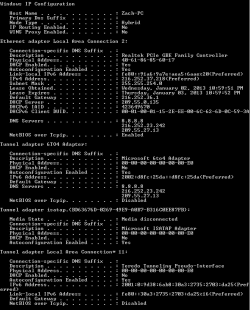
Can you post an ipconfig /all output from the command prompt
Click start
In search box type cmd press enter
In command prompt type ipconfig /all
 

My Computer My Computer

OS
Windows 7 Ultimate x64
well the thing is its both....sometimes they say the modem is offline and sometimes they say it isnt so maybe its both? Here is the ipconfig all!

EDIT: apparently the main thing the network analyst guy I was talking to was talking about is that my network goes through a high amount of packet loss?

Thanks again
 

Attachments

  • ipconfig all.PNG
    ipconfig all.PNG
    9.2 KB · Views: 15
Last edited:

My Computer My Computer

OS
Windows 7 Professional (64 Bit)
You can tell which programs are using the network resources by going into task manager and look in the network processes.

I must say that the extra IP's listed in your DNS are rather strange and suspected as a potential problem.

It looks like somebody entered a few incorrect DNS addresses into the IPv4 properties.

Are you certain that the modem is plugged into the WAN port on the router?

And your DHCP server is a different IP than your default gateway also with an unconventional LAN address. I'm not sure why anyone would want to set up a router in this fashion. It looks like something isn't connected or configured correctly.

This certainly isn't a class of router that I'm familiar with and it's no surprise that you are having problems. Hopefully parman can figured this one out. :confused:
 

My Computer My Computer

Computer type
PC/Desktop
Computer Manufacturer/Model Number
Home built
OS
Windows 7 Ult, Windows 8.1 Pro,
CPU
Q9650-4.275GHz, E8600 4.5GHz, E6750-3.8GHz
Motherboard
Evga 780i FTW
Memory
G.Skill PC2 9600 1200Mhz 5 5 5 15 2T
Graphics Card(s)
GTX480
Sound Card
Asus Xonar D2
Monitor(s) Displays
HannsG
Screen Resolution
1680X1050
Hard Drives
GSkill Phoenix Pro 120GB SSD
PSU
ThermalTake Toughpower 1000Watt modular
Case
ThermalTake XaserV
Cooling
Xigmatek S1283
Keyboard
Logitech G15
Mouse
Logitech G9
Internet Speed
T1
Is there anyway I can just reset everything?
 

My Computer My Computer

OS
Windows 7 Professional (64 Bit)
Is this with the PC directly plugged into the modem or the router?

I you said that the ISP replaced your modem/router with a modem. Did they also supply you with a new router or are you still trying to use the modem/router as your router.

Let me know these then we will dig deeper.
 

My Computer My Computer

OS
Windows 7 Ultimate x64
yes this pc is hardwired straight to the modem currently....I have a router that they gave me but it is currently not connected to the network

EDIT: the router is normally connected to the network whenever I have the issue though and I can try to reconnect it to see if it will help it at all
 

My Computer My Computer

OS
Windows 7 Professional (64 Bit)
That explains some of the address.

Lets check some things.
Click start. type network connections in search box press enter.
after dialog box opens right click on your adapter, and select properties.
Scroll down the list and find Internet Protocol Version 4 (TCP/IPv4) and select it.
Choose properties and verify that both IP address and DNS are obtained automatically.
 

My Computer My Computer

OS
Windows 7 Ultimate x64
yes they are both selected to obtain automatically.

Here is a screen capture of what is going on with the network from the task manager is this normal?
 

Attachments

  • connection.PNG
    connection.PNG
    3.6 KB · Views: 4

My Computer My Computer

OS
Windows 7 Professional (64 Bit)
Next let check network usage.

Go to start menu.
Type resource monitor press enter.
On the top you will see tabs. overview, cpu, memory, disk, network. Select Network.
Let it run for a minutes then post a screen shot of Processes with network activity and TCP connections
 

My Computer My Computer

OS
Windows 7 Ultimate x64
ok here it is
 

Attachments

  • network connection.PNG
    network connection.PNG
    10.2 KB · Views: 12

My Computer My Computer

OS
Windows 7 Professional (64 Bit)
I updated my last past. try to get those screen shots.
 

My Computer My Computer

OS
Windows 7 Ultimate x64
alright I hope this works lol
 

Attachments

  • resource monitor.PNG
    resource monitor.PNG
    18 KB · Views: 10

My Computer My Computer

OS
Windows 7 Professional (64 Bit)

My Computer My Computer

Computer type
Laptop
Computer Manufacturer/Model Number
ASUS G60-RBBX05
OS
Win7 Home Premium 64x
CPU
Intel Core 2 Duo P7450 / 2.13 GHz (2.29 with Extreme Turbo)
Memory
4 GB PC-6400 Hyundai (2X2) at 800Mhz
Graphics Card(s)
NVIDIA GeForce GTX 260M 1GB DDR3 VRAM
Monitor(s) Displays
16" LED Backlit
Screen Resolution
1366 x 768 on laptop 1600x1050 max res on 22" external mon
Hard Drives
OCZ Agility 3 60GB SSD / 320 GB - Serial ATA-150 - 7200 rpm
PSU
6-cell Lithium ion { lasts 1.5 hours }
Case
ASUS G60 Laptop
Keyboard
Chicklet type back-lit (white light) keyboard
Mouse
Logitech G9 Laser Mouse 3200dpi and 1000 reports per minute
Internet Speed
Comcast 8.60mb/s up - 3.11mb/s down
Antivirus
MSE
Browser
Firefox
Other Info
General mid-budget gaming Comp. Low batterylife - High FrameRates - currently overheating problems :(

2nd Rig: Case: Rosewill BLACKHAWK Gaming ATX Mid Tower Computer Case

Mobo: GIGABYTE GA-990FXA-UD3
CPU: AMD FX-6200 Zambezi 3.8GHz (4.1GHz Turbo)
Heatsink: COOLER MASTER V8 CPU Cooler
RAM: Patriot Viper 3 8GB (2 x 4GB) 240-Pin DDR3 SDRAM 1866 (PC3 15000)
GPU: SAPPHIRE Radeon HD 6850 1GB 2
so if I uninstall it and reinstall the pando it should work?

EDIT: I just reinstalled
 

My Computer My Computer

OS
Windows 7 Professional (64 Bit)
Thorsen is correct. I would say if its not something that you use then just leave it uninstalled or try to find a replacement.

I'm guessing league of legends is a game you play? I'm not sure if its needed to play the game.
 

My Computer My Computer

OS
Windows 7 Ultimate x64
it is something I use, ALOT lol so I should just keep an eye out on it if it keeps occuring?
 

My Computer My Computer

OS
Windows 7 Professional (64 Bit)
from the link provided by Thorsen

PMB.exe - League of Legends Community

Pando is not necessary. I can download patches at 1 mb/s without it. Uninstall it.

Pando is quite ridiculously bad. A thread was made such a long time ago about deleting it.

Normally for players the reinstall the game it's the first thing they do.

I suggest removing it for now and see if your problem stops.
 

My Computer My Computer

OS
Windows 7 Ultimate x64
You don't need to uninstall/reinstall League of Legends, go to programs and features and look for Pando Media Booster and uninstall it.

When you install LoL, it will silently install PMB. So if you ever reinstall in the future, check for it in your programs and uninstall PMB.

The two links I posted have tons of information.

Note: Really, Pando Media Booster just sounds like malware. installs without you knowing and steals your bandwidth and makes your computer download, maintain and send files without your knowledge.

That's pretty shady...

from your screenshot, PMB has 10x more bandwidth usage at 35Mb/s than your next highest program Chrome at 3Mb/s.....
 

My Computer My Computer

Computer type
Laptop
Computer Manufacturer/Model Number
ASUS G60-RBBX05
OS
Win7 Home Premium 64x
CPU
Intel Core 2 Duo P7450 / 2.13 GHz (2.29 with Extreme Turbo)
Memory
4 GB PC-6400 Hyundai (2X2) at 800Mhz
Graphics Card(s)
NVIDIA GeForce GTX 260M 1GB DDR3 VRAM
Monitor(s) Displays
16" LED Backlit
Screen Resolution
1366 x 768 on laptop 1600x1050 max res on 22" external mon
Hard Drives
OCZ Agility 3 60GB SSD / 320 GB - Serial ATA-150 - 7200 rpm
PSU
6-cell Lithium ion { lasts 1.5 hours }
Case
ASUS G60 Laptop
Keyboard
Chicklet type back-lit (white light) keyboard
Mouse
Logitech G9 Laser Mouse 3200dpi and 1000 reports per minute
Internet Speed
Comcast 8.60mb/s up - 3.11mb/s down
Antivirus
MSE
Browser
Firefox
Other Info
General mid-budget gaming Comp. Low batterylife - High FrameRates - currently overheating problems :(

2nd Rig: Case: Rosewill BLACKHAWK Gaming ATX Mid Tower Computer Case

Mobo: GIGABYTE GA-990FXA-UD3
CPU: AMD FX-6200 Zambezi 3.8GHz (4.1GHz Turbo)
Heatsink: COOLER MASTER V8 CPU Cooler
RAM: Patriot Viper 3 8GB (2 x 4GB) 240-Pin DDR3 SDRAM 1866 (PC3 15000)
GPU: SAPPHIRE Radeon HD 6850 1GB 2
Back
Top