Issue: Windows could not automatically detect this network's proxy

BloodyBunny

New member
Local time
3:23 AM
Messages
5
Hey all, Ive tried everything possible to attempt to fix this issue and i couldn't

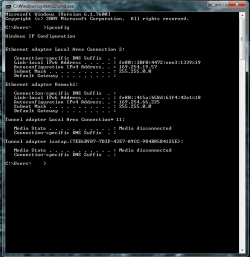
I recently removed a virus from my computer via MSE and since i've had to reboot from that I've been unable to access the internet in any form. I've tried all the netsh command and disable/enable, I've even tried to system restore but that didn't work. I will bump in a few minutes with my ipconfig. Any help would be greatly appriciated.
 

My Computer

OS
Windows 7 Ultimate x32
bump
 

Attachments

  • cmd.png
    cmd.png
    27.4 KB · Views: 140

My Computer

OS
Windows 7 Ultimate x32
You have an 169.x.x.x IP address which means Windows was not able to find a DHCP server to issue a IP address.
Are you using a router?
A little more info about your system, OS, nic, network setup will help us help you.
 

My Computer

Computer Manufacturer/Model Number
Home build
OS
Windows 7 Pro x64
CPU
AMD FX 4100 4 Core 3.6GHz AM3+
Motherboard
ASROCK 970 Extreme3
Memory
16GB G.Skill RipjawsX
Graphics Card(s)
Radeon 6850
Sound Card
ASUS Xonar D1
Monitor(s) Displays
ASUS 23" LCD
Hard Drives
SSD 120GB
WD 750GB Black series
WD 640GB Black series
PSU
700W
Case
Antec 100
Cooling
Hyper 212 Plus
Internet Speed
50MB
I am running though a netgear router, but the router isnt the problem because everyone else in my house can connect to the internet just fine.

Tell me exactly what to look up on my computer to find out what you need to know,
 

My Computer

OS
Windows 7 Ultimate x32
Your router is working fine but your pc is unable to detect the network and this is why Windows gave you a 169.x.x.x IP address. The first thing you need to do is make sure your NIC is enabled and setup correctly. Then you need to check your network settings in Windows, make sure that DHCP is enabled if you are using the router in DHCP.

Open a command prompt and type in ipconfig /all and hit enter, post the pic of that output.
 

My Computer

Computer Manufacturer/Model Number
Home build
OS
Windows 7 Pro x64
CPU
AMD FX 4100 4 Core 3.6GHz AM3+
Motherboard
ASROCK 970 Extreme3
Memory
16GB G.Skill RipjawsX
Graphics Card(s)
Radeon 6850
Sound Card
ASUS Xonar D1
Monitor(s) Displays
ASUS 23" LCD
Hard Drives
SSD 120GB
WD 750GB Black series
WD 640GB Black series
PSU
700W
Case
Antec 100
Cooling
Hyper 212 Plus
Internet Speed
50MB
Bump
 

Attachments

  • CMDall.png
    CMDall.png
    34.4 KB · Views: 134

My Computer

OS
Windows 7 Ultimate x32
Have you tried installing the nic drivers again.
 

My Computer

Computer Manufacturer/Model Number
Home build
OS
Windows 7 Pro x64
CPU
AMD FX 4100 4 Core 3.6GHz AM3+
Motherboard
ASROCK 970 Extreme3
Memory
16GB G.Skill RipjawsX
Graphics Card(s)
Radeon 6850
Sound Card
ASUS Xonar D1
Monitor(s) Displays
ASUS 23" LCD
Hard Drives
SSD 120GB
WD 750GB Black series
WD 640GB Black series
PSU
700W
Case
Antec 100
Cooling
Hyper 212 Plus
Internet Speed
50MB
Thats the network card right? I just uninstalled those and they reinstalled themselves with i restarted and the connection still failed.
 

My Computer

OS
Windows 7 Ultimate x32
I never like to say it and I don't say it very often but I have ran across this type of problem and it can get real nasty with Windows 7 and even if one is able to get the internet connection restored things just don't seem to be the same with the overall system, so I would suggest backing up any data that you need and doing a clean install and I would also recommand deleting the partition and creating a new one. Once you have installed Windows install all updates, SP and install Microsoft Security Essentials (anti-virus) before doing anything else. I would also recommand that once you have the clean install and all updates done and before installing any of your programs to do a full back up and make a recovery disk so the next time you can be back and and going in a jiffy.
 

My Computer

Computer Manufacturer/Model Number
Home build
OS
Windows 7 Pro x64
CPU
AMD FX 4100 4 Core 3.6GHz AM3+
Motherboard
ASROCK 970 Extreme3
Memory
16GB G.Skill RipjawsX
Graphics Card(s)
Radeon 6850
Sound Card
ASUS Xonar D1
Monitor(s) Displays
ASUS 23" LCD
Hard Drives
SSD 120GB
WD 750GB Black series
WD 640GB Black series
PSU
700W
Case
Antec 100
Cooling
Hyper 212 Plus
Internet Speed
50MB
Back
Top